Telegram Privacy Settings: Complete Business Guide for 2024
Master Telegram privacy settings with our complete guide. Learn to protect your business account, manage contacts, and secure communications effectively.

Your Telegram account holds sensitive business conversations, client contacts, and confidential project details. One wrong privacy setting could expose everything to competitors, spam bots, or unwanted contacts. Try our Telegram scheduling.
See It in Action
This is what scheduling a Telegram post looks like in Schedulala
This guide walks you through every Telegram privacy setting that matters for business users. You'll learn how to lock down your account while staying accessible to legitimate clients and team members. Our content calendar can help.
Try Schedulala for free
Schedule posts to Bluesky, Twitter, and 8 other platforms from one dashboard.
Get started for free→Why Telegram privacy matters for business
Telegram's default settings favor openness over privacy. Your phone number might be visible to strangers, your profile photo accessible to anyone, and your online status broadcasting when you're active. For personal use, this might be fine. For business? It's a security nightmare. See our telegram content ideas what guide.
Consider these scenarios: A competitor joins the same Telegram group and now has access to your phone number. Spam bots find your account through public groups and flood your DMs. Clients can see exactly when you're online, creating pressure to respond immediately even during off-hours. See our our guide on telegram marketing: complete guide.
The solution isn't to abandon Telegram. With over 700 million active users, it's too valuable for business networking and communication. Instead, you need to configure your privacy settings strategically to protect your information while maintaining professional accessibility. See our telegram font generator guide.
Proper privacy configuration also builds trust with clients. When they see you've taken steps to protect communications, they're more likely to share sensitive project details or confidential business information through the platform. Learn more about telegram line break generator.
Essential privacy settings every business should configure
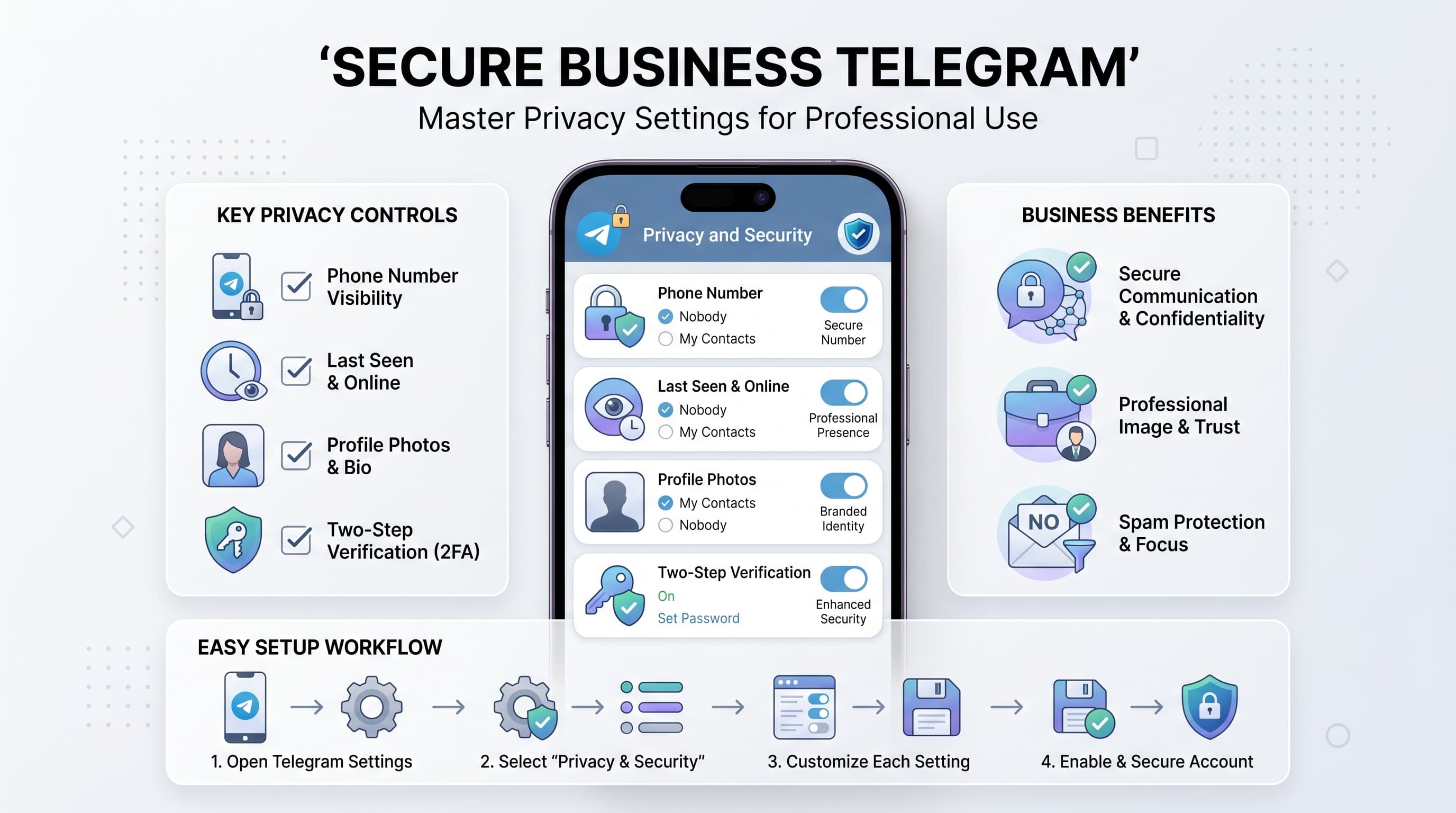
1. Phone number visibility
Your phone number is the gateway to your Telegram account. By default, it's visible to anyone who has it in their contacts or shares a group with you. For business users, this creates multiple problems.
Navigate to Settings > Privacy and Security > Phone Number. You'll see three options: Everyone, My Contacts, and Nobody. Choose My Contacts for most business scenarios. This allows legitimate business connections to reach you while blocking random group members from accessing your number.
The Nobody option seems appealing, but it creates friction. People who have your business card or received your number from a mutual contact won't be able to find you on Telegram. You'll need to share your username instead, which isn't always practical for business networking.
Pro tip: Use the Exceptions feature to fine-tune this setting. Add specific contacts to the exception list if you need granular control over who can see your number.
2. Last seen and online status
This setting controls who can see when you were last active on Telegram. It's crucial for maintaining work-life balance and managing client expectations about response times.
Go to Settings > Privacy and Security > Last Seen & Online. Set this to My Contacts to prevent strangers from tracking your activity patterns. This stops people from knowing you're online at 11 PM or 6 AM, which could create unrealistic expectations about availability.
Remember: If you restrict who can see your last seen status, you won't be able to see theirs either. This is Telegram's reciprocity rule. For most business users, this trade-off is worth the privacy benefit.
Consider using Nobody if you're in a client-facing role where response time expectations are particularly sensitive. You can always communicate your availability through other means, like email signatures or profile bios.
3. Profile photo access
Your profile photo often contains more information than you realize. It might show your office location, family members, or other identifying details you don't want to share with everyone on Telegram.
Access this setting through Settings > Privacy and Security > Profile Photos. Set it to My Contacts to ensure only people you know can see your full-resolution profile photos.
When set to My Contacts, strangers will still see a low-resolution version of your current profile photo, which is perfect for business. They can identify you in conversations, but they can't access your full photo gallery or see high-resolution details.
Avoid the Everyone setting entirely. This allows anyone to download your profile photos, including all previous versions you've used. This creates potential security risks and unwanted attention.
Advanced privacy configurations for business users
4. Voice message restrictions
Voice messages can be problematic for business users. They're harder to search, difficult to reference later, and can be played accidentally in professional settings. Telegram lets you control who can send you voice messages.
Navigate to Settings > Privacy and Security > Voice Messages. Set this to My Contacts to prevent strangers from sending voice messages. This forces unknown contacts to communicate through text, which is more professional and easier to manage.
This setting is particularly valuable if you participate in large Telegram groups or channels where spam voice messages are common. It maintains the personal touch of voice messages with trusted contacts while blocking unwanted audio from strangers.
5. Forwarding and linking controls
When someone forwards your messages, Telegram can show your name as the original sender. For business communications, this creates attribution issues and potential privacy concerns.
Go to Settings > Privacy and Security > Forwarded Messages. Enable Nobody to prevent your name from appearing when others forward your messages. This is especially important for sensitive business discussions or confidential project communications.
Similarly, configure Adding to Groups and Channels under the same privacy section. Set this to My Contacts to prevent strangers from adding you to random groups without permission. This stops spam group invitations and unwanted notifications.
The forwarding setting doesn't prevent people from forwarding your messages – it just removes the attribution link back to your account. People can still copy and paste your content, but they can't create a direct link to your profile through forwarded messages.
6. Calls and peer-to-peer connections
Telegram's calling feature can reveal your IP address to other users during calls. For most business users, this presents an unnecessary security risk that should be mitigated.
Access Settings > Privacy and Security > Calls and review two key settings. First, set Who can call me to My Contacts to prevent unwanted calls from strangers or spam accounts.
Second, configure Peer-to-Peer connection settings. Choose Nobody to force all calls through Telegram's servers instead of direct peer-to-peer connections. This prevents other users from seeing your IP address, though it may slightly reduce call quality.
The IP address concern isn't just theoretical. Sophisticated attackers can use IP addresses to determine your approximate location, internet service provider, and potentially launch targeted attacks against your network.
Username and discoverability settings
Your Telegram username affects how people find and contact you. Unlike phone numbers, usernames are public by design, but you can control whether to have one at all.
Setting up a business-appropriate username
Navigate to Settings > Edit Profile to configure your username. Choose something professional that reflects your business or industry. Avoid personal nicknames or inside jokes that might confuse professional contacts.
Good business username formats include: your company name plus your role (@acmecorp_marketing), your industry plus location (@webdev_seattle), or your professional brand (@johnsmith_consultant). Keep it under 15 characters when possible for easy sharing.
Remember that usernames are case-insensitive and must be unique across all Telegram users. If your preferred username is taken, try variations with underscores, numbers, or industry abbreviations.
Managing username discoverability
Having a username makes you discoverable through Telegram's search function and allows people to contact you without knowing your phone number. This can be beneficial or problematic depending on your business needs.
If you prefer maximum privacy, you can remove your username entirely. Go to Settings > Edit Profile and delete the username field. This prevents anyone from finding you through search, but it also means you can only be contacted by people who have your phone number.
For most business users, having a professional username strikes the right balance. It allows networking contacts to find you easily while maintaining separation between your phone number and your Telegram presence.
Consider creating separate business and personal Telegram accounts if you need different privacy levels. Use the business account with a professional username for work contacts, and keep the personal account private with no username.
Two-factor authentication and security
Privacy settings protect your information from other users, but two-factor authentication (2FA) protects your entire account from unauthorized access. This is non-negotiable for business accounts.
Enabling two-step verification
Go to Settings > Privacy and Security > Two-Step Verification. Tap Set Password to begin the setup process. Choose a strong password that's different from your other business accounts.
Telegram will ask for a recovery email address. Use a business email account that you actively monitor. This email becomes crucial if you forget your 2FA password, so don't use a personal account that you might discontinue.
Add a password hint, but make it obscure enough that others can't guess your password from the hint alone. Instead of "dog's name," use something like "childhood pet + graduation year" that only you would understand.
Once enabled, Telegram will periodically ask for your 2FA password when you log in from new devices. This prevents unauthorized access even if someone obtains your phone number and SMS verification codes.
Active session management
Telegram allows multiple active sessions across different devices. This is convenient for business users who switch between phones, tablets, and computers, but it also creates security risks if not managed properly.
Review your active sessions by going to Settings > Privacy and Security > Active Sessions. You'll see every device and browser where you're currently logged into Telegram, including login dates and locations.
Terminate any sessions you don't recognize or devices you no longer use. This includes old phones, shared computers, or browsers where you might have logged in temporarily. Each active session is a potential security vulnerability.
Make it a habit to review active sessions monthly. Set a calendar reminder to check this list and remove outdated sessions. This simple practice prevents many account compromise scenarios.
Group and channel privacy considerations
Your privacy settings interact differently with groups and channels. Understanding these nuances helps you participate in business communities without compromising your privacy.
Privacy in business groups
When you join a Telegram group, other members can see your profile photo and name regardless of your privacy settings. However, whether they can access your phone number or username depends on your configurations and group settings.
In groups with fewer than 200 members, your phone number becomes visible to other group members if they have your number in their contacts. This is unavoidable due to Telegram's contact matching system.
For larger groups (supergroups), your phone number stays hidden even from people who have it in their contacts. This makes large business groups safer for networking without revealing personal contact information.
Before joining any business group, research the group size and membership. Industry groups with thousands of members offer better privacy protection than small, intimate business circles.
Channel subscription privacy
Telegram channels offer better privacy than groups. When you subscribe to a channel, other subscribers cannot see your information or even that you're subscribed. Channel admins also cannot access subscriber lists in most cases.
However, if you comment on channel posts or participate in channel discussions, your profile information becomes visible to other participants. Consider this before engaging publicly in business channels.
Use channels for consuming industry news and insights without privacy concerns. Reserve active participation for channels where you're comfortable with your professional visibility.
Common privacy mistakes to avoid
Even with good intentions, many business users make privacy configuration mistakes that expose sensitive information or create security vulnerabilities.
- Using personal photos as profile pictures - Your family vacation photos might reveal location information or personal details you don't want business contacts to see
- Ignoring username implications - A silly personal username can undermine professional credibility in business communications
- Forgetting about message forwarding - Sensitive business discussions can be forwarded with attribution back to your account unless you configure forwarding settings
- Assuming group conversations are private - Other group members can screenshot, forward, or save your messages regardless of privacy settings
- Not reviewing bot permissions - Some Telegram bots request access to your messages or profile information that isn't necessary for their function
- Using the same password everywhere - Your Telegram 2FA password should be unique, especially for business accounts with sensitive communications
Privacy settings for different business scenarios
Your optimal privacy configuration depends on how you use Telegram for business. Different roles and industries require different approaches to balancing privacy with accessibility.
| Business Type | Phone Number | Last Seen | Profile Photos | Username |
|---|---|---|---|---|
| Freelancer/Consultant | My Contacts | My Contacts | My Contacts | Professional |
| Sales Professional | My Contacts | Nobody | My Contacts | Professional |
| Remote Team Member | My Contacts | My Contacts | My Contacts | Optional |
| Business Owner | Nobody | Nobody | My Contacts | Professional |
| Customer Support | Nobody | Nobody | Everyone | Professional |
Scenario 1: Freelancers and consultants
Freelancers need to balance accessibility with privacy protection. You want potential clients to reach you, but you don't want to broadcast availability 24/7 or expose personal information.
Set phone number visibility to My Contacts and create a professional username for discoverability. Hide your last seen status to manage client expectations about response times. Keep profile photos visible to contacts only, using professional headshots rather than personal photos.
Scenario 2: Sales professionals
Sales teams often use Telegram for prospect communication and client relationship management. Your priority is professional accessibility while protecting personal time and information.
Use the Nobody setting for last seen status to prevent prospects from tracking your activity patterns. This protects your personal time and prevents pressure to respond immediately during off-hours. Keep other settings at My Contacts level for professional accessibility.
Scenario 3: Remote team members
Remote workers often use Telegram for team communication and project coordination. Your focus should be on seamless communication with colleagues while maintaining boundaries with external contacts.
Consider using exception lists to allow team members to see your online status while hiding it from others. This helps with team coordination without broadcasting your availability to all contacts.
Monitoring and maintaining your privacy settings
Setting up privacy controls is just the beginning. Telegram regularly updates its features, and your business needs evolve over time. Regular maintenance ensures your privacy settings remain effective.
Monthly privacy checkup routine
Set a monthly reminder to review your active sessions and remove any outdated devices or browsers. This simple step prevents many account security issues before they become problems.
Check your blocked users list and remove blocks that are no longer necessary. Keeping this list current ensures you don't miss important business communications from previously blocked contacts.
Review any bots or third-party services connected to your account. Remove access for tools you no longer use, and verify that active bots still need the permissions they have.
Quarterly settings review
Every three months, revisit all your privacy settings from scratch. Telegram adds new features regularly, and your business role might have changed, requiring different privacy approaches.
Update your recovery email address if you've changed business email providers. Test that you can still access this email account and that it forwards properly to your current inbox.
Review your username and profile information for continued professional relevance. What worked when you were a junior developer might need updating now that you're a team lead or consultant.
Try Schedulala for free
Schedule posts to Bluesky, Twitter, and 8 other platforms from one dashboard.
Get started for free→