Social Media Content Calendar: How to Plan Your Posts
Learn how to create a social media content calendar. Plan posts, stay consistent, and save time. Includes free template and step-by-step instructions.

Quick answer
Create a social media content calendar by mapping out post themes, formats, and publishing dates for each platform on a weekly or monthly basis.
- •A content calendar ensures consistent posting and balanced content mix across platforms
- •Plan 1-4 weeks ahead with themed days (e.g., Tip Tuesday, Behind-the-Scenes Friday)
- •Use tools like Google Sheets, Notion, or Schedulala's built-in calendar view
- •Schedulala's calendar lets you visualize and manage posts across 12 platforms for $9/month
Waking up every day wondering "What should I post?" is exhausting. It leads to inconsistency, stress, and mediocre content.
A content calendar fixes this. Instead of scrambling daily, you plan ahead — knowing exactly what you're posting, when, and where. If you're new to the concept, our intro to social media scheduling covers the basics.
This guide covers everything you need to create a social media content calendar that actually works: the what, why, how, and a template to get started.
Try Schedulala for free
Schedule posts to Bluesky, Twitter, and 8 other platforms from one dashboard.
Get started for free→What Is a Content Calendar?
A content calendar (also called an editorial calendar) is a planning document that maps out what content you'll post and when.
- Post dates and times
- Platforms for each post
- Content type (text, image, video)
- Post copy or description
- Media/assets needed
- Status (draft, scheduled, published)
The format can be a spreadsheet, visual calendar, project management board, or a scheduling tool's built-in calendar. The format matters less than having one.
Why You Need a Content Calendar
1. Consistency Without Stress
A calendar ensures you post regularly without daily scrambling. Consistency is the #1 factor in social media growth.
2. Better Content Quality
Planning ahead gives you time to create thoughtful content instead of rushed posts. Quality improves when you're not under pressure.
3. Strategic Thinking
A calendar forces you to think strategically: Am I covering the right topics? Is my content mix balanced? Am I aligning with business goals?
4. Time Savings
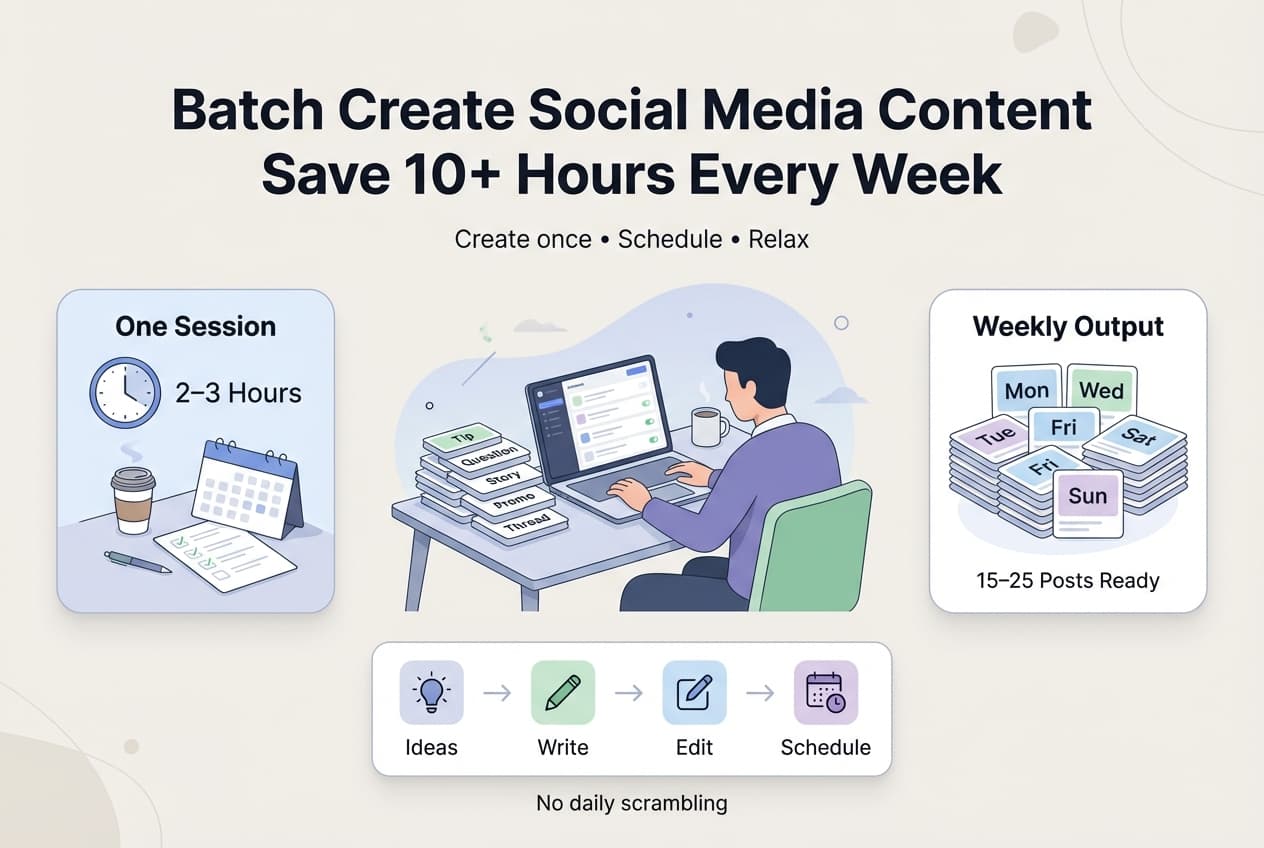
Batch creating content with a calendar is faster than daily posting. Think 2-3 hours once per week vs. 30+ minutes daily scrambling.
5. Team Coordination
If multiple people manage your social media, a calendar keeps everyone aligned on who's creating what and what's been published vs. pending.
6. Never Miss Key Dates
A calendar helps you plan for holidays, product launches, industry events, and seasonal trends. No more "It's Valentine's Day and we forgot to post!"
How to Create Your Content Calendar
Step 1: Choose Your Format
Pick a format that works for you:
- Spreadsheet (Google Sheets, Excel) — Flexible, free, shareable
- Visual Calendar (Google Calendar, Notion) — Easy to visualize, drag-and-drop
- Project Management (Trello, Asana) — Workflow tracking, team features
- Scheduling Tool (Schedulala, Buffer) — Direct connection to publishing
Step 2: Determine Your Posting Frequency
How often will you post on each platform? Here are suggested minimums:
| Platform | Minimum Frequency |
|---|---|
| Twitter/X | 1x daily |
| Bluesky | 1x daily |
| 3-5x weekly | |
| 3-5x weekly | |
| TikTok | 3-5x weekly |
| 3-5x weekly | |
| 5-10x weekly | |
| YouTube | 1-2x weekly |
Start achievable. You can always increase later. For Bluesky specifically, check out our Bluesky scheduler guide to get set up.
Step 3: Define Your Content Pillars
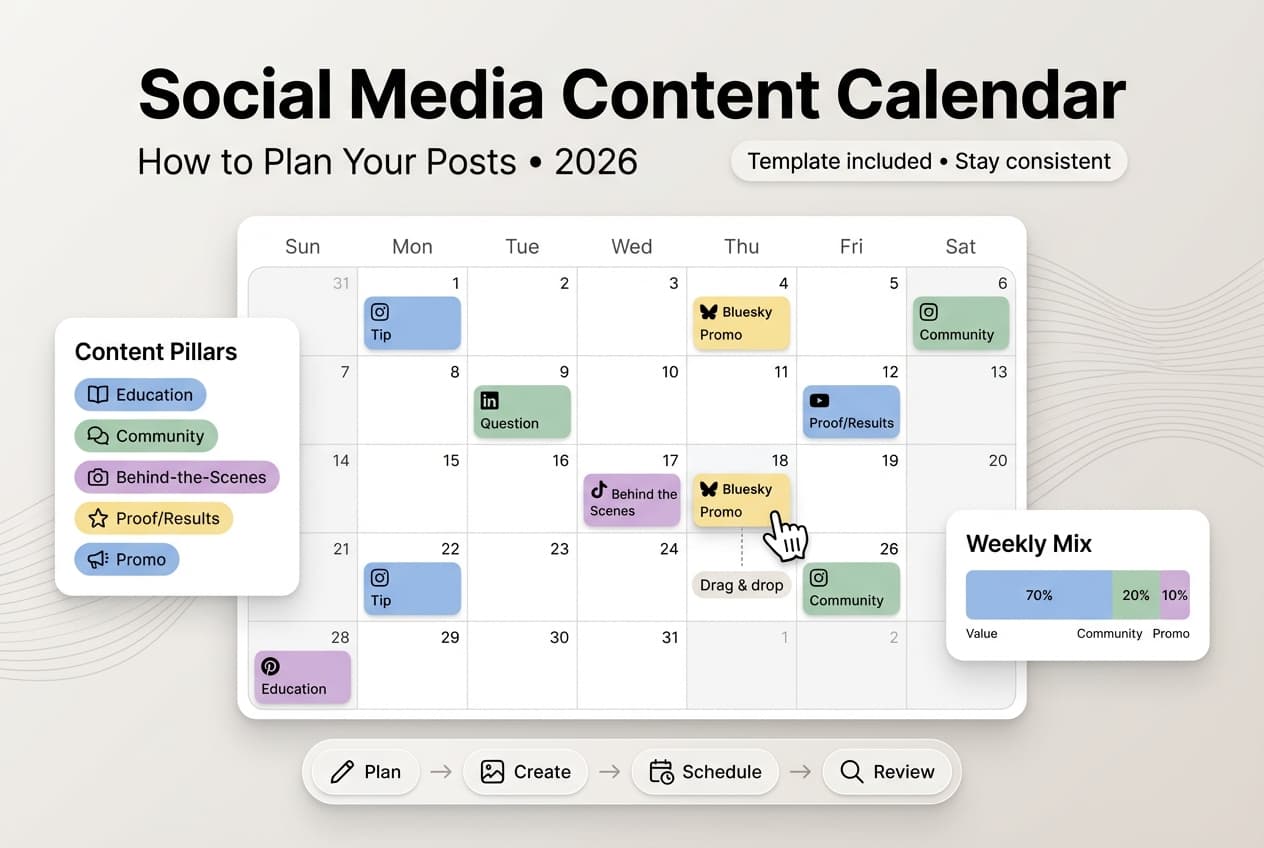
Content pillars are the 3-5 main themes you'll post about. They ensure variety while staying focused.
Example for a marketing agency: Marketing tips, case studies, industry news, behind-the-scenes, client spotlights.
Example for a fitness coach: Workout tips, nutrition advice, motivation, client transformations, personal journey.
Define your pillars before filling your calendar. Need inspiration? Check out our content ideas guide.
Step 4: Map Out Key Dates
Add important dates to your calendar first:
- Holidays (New Year, Valentine's, etc.)
- Industry events and conferences
- Product launches
- Company milestones
- Awareness days relevant to your niche
These anchor dates shape your content planning.
Step 5: Plan Your Content Mix
A balanced content calendar includes variety. Try one of these frameworks:
The 4-1-1 Rule: 4 valuable/educational posts, 1 soft promotional post, 1 entertainment/personal post.
The 70-20-10 Rule: 70% value (educational), 20% shared/curated content, 10% promotional.
Step 6: Fill In the Posts
Now populate your calendar:
- Start with pillar content across the month
- Add key date content
- Fill gaps with evergreen content
- Leave some flexibility for timely content
For each post, note the date/time, platform(s), content pillar, topic, draft copy, media needed, and status.
Step 7: Create and Schedule
With your calendar planned, batch create the content, prepare all media, write final copy, then schedule posts to multiple platforms at once.
Content Calendar Template
Here's a simple spreadsheet structure to get you started:
| Date | Platform | Time | Pillar | Topic | Status |
|---|---|---|---|---|---|
| 1/20 | Bluesky | 9am | Tips | Scheduling tip | Scheduled |
| 1/20 | 10am | Case Study | Client win | Draft | |
| 1/21 | All | 9am | Holiday | MLK Day | Scheduled |
| 1/22 | 12pm | Behind-scenes | Office tour | Idea |
Additional columns to consider: campaign/theme, hashtags, link URL, engagement notes, performance metrics (after posting).
Content Calendar Best Practices
Plan 2-4 Weeks Ahead
Far enough to reduce daily stress, close enough to stay relevant. Avoid planning detailed posts months ahead — things change.
Leave Room for Flexibility
Don't schedule 100% of your content. Leave room for trending topics, breaking news, and spontaneous ideas. Aim for 70-80% planned, 20-30% flexible.
Batch by Task
When creating content, batch similar tasks: write all copy in one session, create all images in another, schedule everything at once. This is more efficient than constant task-switching.
Review and Iterate
Monthly, review your calendar: What performed well? What fell flat? What should you do more of? Improve based on data.
Align with Business Goals
Your content calendar should serve business objectives. Launching a product? More awareness content beforehand. Building authority? More educational content. Don't just post for the sake of posting.
Content Calendar Tools
Free Options
- Google Sheets/Excel — Best for individuals, simple planning
- Google Calendar — Best for visual time-based planning
- Notion (Free tier) — Best for individuals wanting database features
- Trello (Free tier) — Best for Kanban-style workflow
Paid Options
- Schedulala ($9/mo) — Planning + scheduling in one, supports 12 platforms
- Notion (Paid) — Teams needing collaboration and database features
- Asana/Monday.com — Larger teams with complex workflows
For solopreneurs: Google Sheets + a scheduling tool
For small teams: Notion or Trello + a scheduling tool
For efficiency: A scheduling tool with built-in calendar combines planning and publishing. See our guide on social media automation to learn more.
Common Content Calendar Mistakes
Mistake 1: Over-Planning
Planning every post for the next 3 months leads to irrelevant content and burnout.
Mistake 2: No Content Pillars
Random topic selection leads to unfocused content that doesn't build authority.
Mistake 3: All Promotion, No Value
A calendar full of "buy our stuff" posts annoys followers.
Mistake 4: Ignoring Performance Data
Planning without reviewing what works means repeating mistakes.
Mistake 5: Making It Too Complicated
Elaborate systems with too many fields become a burden.
Frequently Asked Questions
How far in advance should I plan content?
2-4 weeks is ideal for most businesses. Far enough to batch-create, close enough to stay relevant.
How long does it take to manage a content calendar?
Initial setup: 2-3 hours. Weekly maintenance: 1-2 hours. It saves more time than it takes.
Should I plan content for all platforms in one calendar?
Yes. A unified calendar helps you see your entire social presence and avoid over-posting or gaps.
What if I run out of content ideas?
Use your content pillars to generate ideas. Check out our content ideas guide for inspiration. Repurpose high-performing past content.
Do I need a fancy tool?
No. A simple spreadsheet works fine. Fancy tools help but aren't required to start.
How do I handle last-minute content?
Leave 20-30% of your posting capacity for spontaneous content. Your calendar is a guide, not a prison.
Start Your Content Calendar Today
A content calendar transforms social media from a daily scramble to a manageable system. Here's your action plan:
- Choose a format (spreadsheet is fine to start)
- Define your posting frequency per platform
- Identify your content pillars (3-5 themes)
- Map key dates for the next month
- Fill in posts following a balanced content mix
- Batch create and schedule
The first calendar is the hardest. Once you have a system, maintaining it becomes routine.
Try Schedulala for free
Schedule posts to Bluesky, Twitter, and 8 other platforms from one dashboard.
Get started for free→