Ultimate Social Media Management Tools Guide: 25+ Best Platforms for 2026
Complete guide to 25+ top social media management tools. Compare features, pricing, and find the perfect platform for your business needs in 2026.

Quick answer
The top social media management tools in 2026 include Schedulala, Hootsuite, Buffer, Sprout Social, and Later, each serving different team sizes and budgets.
- •Schedulala: $9/month for one account on each platform across 12 platforms with unlimited posts
- •Buffer: $6/channel/month; Hootsuite: $99/month; Sprout Social: $199/month per seat
- •Later: $25/month for 1 user; Metricool: free tier with limited features
- •Key factors: platform support, post limits, analytics depth, team collaboration, and pricing
Managing multiple social media accounts manually feels like juggling flaming torches while riding a unicycle. One missed post, one forgotten response, and your carefully crafted brand presence starts to crumble. See our Instagram scheduling guide.
See It in Action
This is what scheduling an Instagram post looks like in Schedulala
The average business manages 7.5 social media accounts across different platforms. Without the right tools, that's hours of daily work switching between tabs, copying content, and trying to remember what you posted where. Learn more about scheduling across platforms.
But what if there was a better way to streamline your entire social media workflow? Try our scheduling across platforms.
Try Schedulala for free
Schedule posts to Bluesky, Twitter, and 8 other platforms from one dashboard.
Get started for free→What are social media management tools?
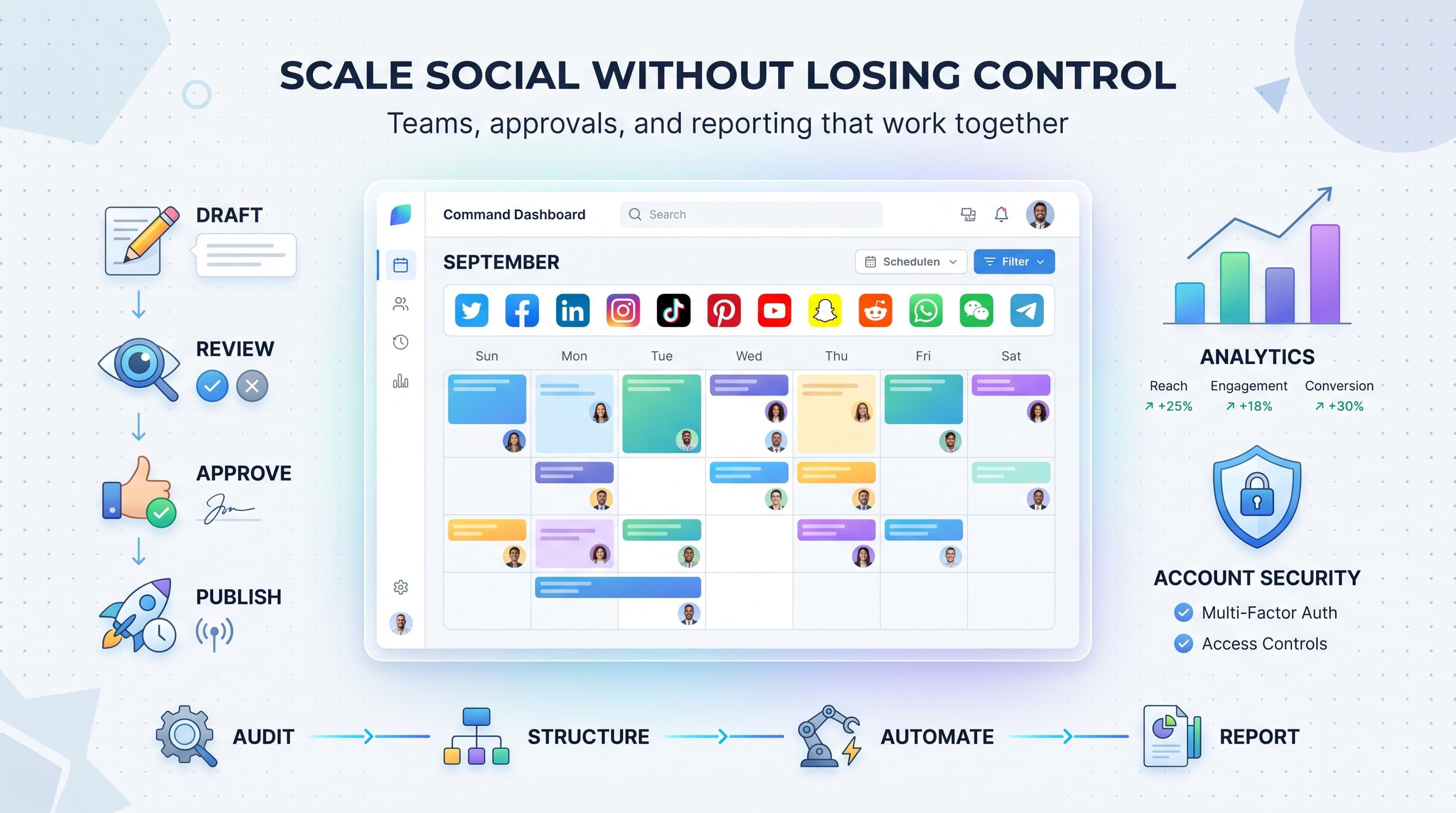
Social media management tools are platforms that help you publish, monitor, and analyze your social media presence from a single dashboard. Think of them as your command center for all things social media. See our social media scheduling tools guide.
These tools evolved from simple scheduling platforms into comprehensive business solutions. Today's top platforms integrate with dozens of social networks, offer AI-powered content suggestions, and provide detailed analytics that would make a data scientist jealous. Our best time to post on instagram can help.
Core features of modern management tools
- Multi-platform posting and scheduling
- Content calendar visualization
- Team collaboration and approval workflows
- Social listening and monitoring
- Performance analytics and reporting
- Customer service and engagement tools
- Content creation and editing features
- Audience management and segmentation
The market has exploded in recent years. We've gone from a handful of basic schedulers to hundreds of specialized platforms. Some focus on small businesses, others target enterprise clients. Some emphasize content creation, while others prioritize analytics. See our instagram engagement calculator guide.
Why your business needs a social media management tool
Let me paint you a picture of social media management without proper tools. Sarah runs a boutique clothing store. Every morning, she spends 90 minutes posting to Instagram, Facebook, TikTok, and Pinterest. She writes captions from scratch, uploads images individually, and tries to remember which hashtags work best for each platform.
By afternoon, she's responding to comments and messages across four platforms. She screenshots engagement numbers into a spreadsheet to track performance. When a customer asks about a product on Instagram, she has to remember to update inventory across all channels.
Sound familiar? This scattered approach costs businesses an average of 3.2 hours daily. That's 16 hours per week, or roughly $25,000 in lost productivity annually for a small business owner.
The hidden costs of manual management
Time isn't the only cost. Manual management leads to inconsistent posting, missed opportunities, and content gaps that hurt your brand. When you're rushing to post something, anything, the quality suffers.
Missed responses damage customer relationships. A study by Sprout Social found that 89% of consumers expect brands to respond within 24 hours, but manually managed accounts average 48-72 hours response time.
Analytics suffer too. Without proper tracking, you're flying blind. You might think your funny memes perform well, but data could show educational content drives 4x more conversions.
Quantifiable benefits of management tools
Companies using social media management tools report impressive improvements across key metrics. Let's break down the real numbers:
| Metric | Manual Management | With Tools | Improvement |
|---|---|---|---|
| Daily time spent | 3.2 hours | 45 minutes | 75% reduction |
| Posting consistency | 4.2 posts/week | 12.8 posts/week | 3x increase |
| Response time | 48 hours | 6 hours | 87% faster |
| Engagement rate | 2.1% | 4.7% | 124% increase |
| Content quality score | 6.2/10 | 8.4/10 | 35% improvement |
These aren't marginal improvements. We're talking about transforming how your business shows up on social media. The consistency alone is worth the investment. Algorithms favor accounts that post regularly, and management tools make consistency effortless.
ROI calculation example
Let's say you value your time at $50/hour. Manual management takes 3.2 hours daily, costing $160/day or $3,200/month. A good management tool costs $200/month and reduces your time to 45 minutes daily.
Your new time cost: 45 minutes × $50/hour × 20 working days = $750/month. Add the tool cost ($200) for a total of $950/month. You're saving $2,250 monthly, or $27,000 annually.
That's not counting the revenue increase from better engagement and more consistent posting.
Essential features to look for in 2026
The social media management tool landscape changes rapidly. Features that were premium in 2023 are now table stakes. Meanwhile, AI integration and cross-platform compatibility have become essential.
Here's what separates leading tools from the pack in 2026:
Multi-platform publishing
Beyond basic scheduling
Every tool claims multi-platform publishing, but the implementation varies wildly. Basic tools let you post the same content everywhere. Advanced platforms optimize content for each platform's unique requirements.
For example, your Instagram post might be a square image with story-focused captions. The same content on LinkedIn becomes a horizontal image with professional language and industry hashtags. On TikTok, it's a vertical video with trending sounds.
Look for tools that support platform-specific features: Instagram Stories and Reels, LinkedIn polls, Twitter Spaces, TikTok effects, Pinterest Rich Pins, and Facebook Events.
Platform coverage matters too. Basic tools support the big four: Facebook, Instagram, Twitter, and LinkedIn. Comprehensive platforms add TikTok, Pinterest, YouTube, Google My Business, Snapchat, and emerging platforms like BeReal or Clubhouse.
AI-powered content optimization
Artificial intelligence has revolutionized social media management. AI features range from basic automation to sophisticated content generation and performance prediction.
Smart scheduling analyzes your audience's online behavior to determine optimal posting times. This goes beyond generic "best time to post" advice. It looks at when YOUR specific audience engages most with YOUR content.
AI content features to prioritize
- Hashtag suggestions based on content analysis
- Caption generation from image recognition
- Content performance prediction
- Automatic image resizing and optimization
- Trend identification and recommendations
- Sentiment analysis for audience feedback
- Competitor content analysis
The best AI features feel invisible. They work behind the scenes to improve your results without adding complexity to your workflow. Avoid tools that make AI the main selling point but fail at basic functionality.
Advanced analytics and reporting
Analytics separate professional tools from amateur hour. Basic metrics like likes and shares don't tell the full story. You need deeper insights into audience behavior, content performance, and business impact.
Look for tools that track engagement quality, not just quantity. A post with 100 thoughtful comments beats one with 1,000 emoji reactions. Advanced analytics identify which content drives meaningful interactions versus vanity metrics.
| Analytics Level | Basic Tools | Advanced Tools |
|---|---|---|
| Engagement tracking | Likes, shares, comments | Engagement rate, quality score, sentiment |
| Audience insights | Demographics | Behavior patterns, interests, purchase intent |
| Content analysis | Top posts | Content themes, optimal formats, trending topics |
| ROI measurement | Follower growth | Lead generation, sales attribution, lifetime value |
| Reporting | Monthly summaries | Custom dashboards, automated reports, data exports |
Custom reporting capabilities matter for agencies and larger businesses. You need to create branded reports for clients or stakeholders. Look for tools that let you white-label reports and customize metrics based on business objectives.
Team collaboration features
Social media management is rarely a one-person job. Even small businesses often have multiple people creating content, responding to customers, and analyzing performance.
Collaboration essentials
Role-based permissions let you control who can publish, edit, or view content. Your intern can draft posts but can't publish without approval. Your CEO can view analytics but can't accidentally delete your content calendar.
Approval workflows prevent embarrassing mistakes. Content goes through review stages before publication. Comments and feedback stay organized within the platform instead of scattered across email chains.
Asset management keeps your brand consistent. Centralized logo storage, brand color palettes, and approved image libraries ensure everyone uses current assets.
Communication features reduce context switching. Team members can discuss content, leave feedback, and make decisions without leaving the platform. This is especially valuable for remote teams managing content across time zones.
Integration capabilities
Your social media management tool shouldn't exist in isolation. It needs to connect with your existing business systems: CRM, email marketing, e-commerce platform, and analytics tools.
Popular integrations include Shopify for product posts, Mailchimp for audience syncing, Google Analytics for traffic attribution, and Slack for team notifications. Zapier integration opens up thousands of additional connections.
API access lets developers create custom integrations. If you have specific workflow requirements, a robust API ensures you won't hit limitations as your business grows.
Top 25+ social media management tools for 2026
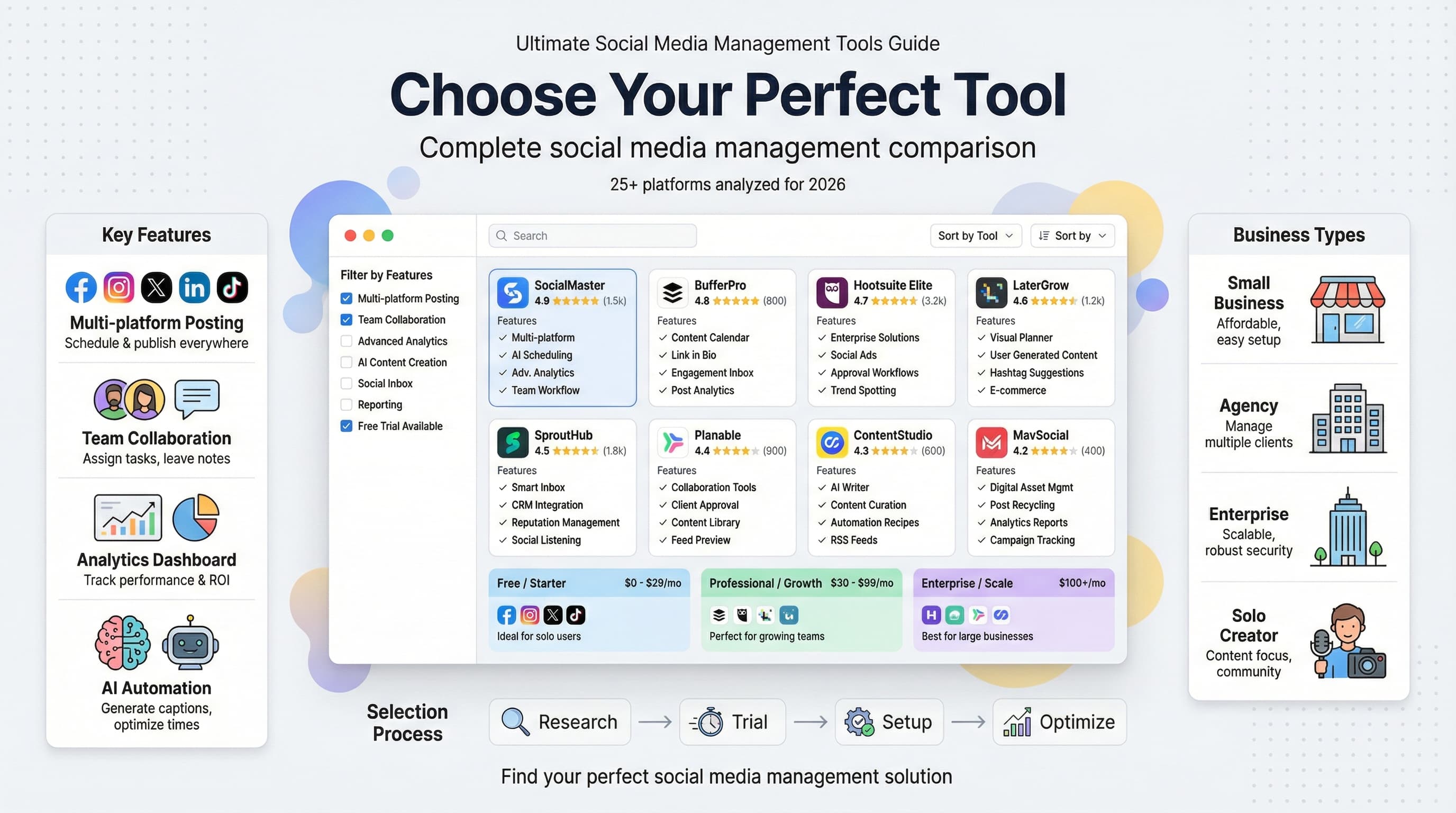
After testing dozens of platforms and analyzing user reviews from thousands of businesses, here are the tools that rise above the competition. Each serves different needs and budgets, so I've organized them by category.
Best overall platforms
1. Schedulala - The complete solution
Schedulala combines powerful scheduling, advanced analytics, and intuitive design in one platform. What sets it apart is the focus on actual business results rather than vanity metrics.
Key strengths: AI-optimized posting times, content performance prediction, seamless team collaboration, and detailed ROI tracking. The visual content calendar makes planning effortless, while bulk upload features save hours for content-heavy businesses.
Best for: Small to medium businesses wanting comprehensive features without complexity. The pricing scales reasonably, making it accessible for startups but powerful enough for growing companies.
Pricing starts at $29/month for up to 10 social accounts.
2. Hootsuite - The enterprise standard
Hootsuite pioneered social media management and remains the go-to choice for large organizations. Its strength lies in comprehensive platform coverage and enterprise-grade security features.
The platform supports over 35 social networks, making it ideal for businesses with diverse social media presence. Advanced listening tools help monitor brand mentions across the entire web.
Best for: Large companies, agencies, and organizations requiring extensive compliance and security features.
Pricing starts at $99/month for professional plans, with enterprise options available.
3. Sprout Social - The analytics powerhouse
Sprout Social excels at turning social media data into actionable business insights. Their reporting capabilities are unmatched, offering deep dives into audience behavior and content performance.
The Smart Inbox unifies messages from all platforms, making customer service management seamless. CRM integration helps track customer journeys from social interaction to sale.
Best for: Data-driven businesses and customer service-focused companies.
Pricing starts at $249/month, positioning it firmly in the premium category.
Best for small businesses
4. Buffer - Simple and effective
Buffer built its reputation on simplicity. The interface is clean, the learning curve is minimal, and the core features work reliably. It's social media management without the overwhelm.
Recent updates added basic analytics and team features, but Buffer remains focused on making publishing easy. The browser extension lets you share content from anywhere on the web.
Best for: Solo entrepreneurs and small teams prioritizing ease of use over advanced features.
Free plan available; paid plans start at $5/month per channel.
5. Later - Visual content focus
Later started as an Instagram scheduler and maintains strong visual content features. The drag-and-drop calendar makes content planning intuitive, especially for image-heavy businesses.
Visual content calendar shows how your feed will look before posting. Hashtag suggestions and user-generated content tools help maximize reach.
Best for: Businesses with strong visual brands: restaurants, fashion, travel, and retail.
Free plan includes 30 posts/month; paid plans start at $18/month.
6. SocialBee - Content recycling master
SocialBee's unique strength is content categorization and recycling. You can set up evergreen content to automatically repost at set intervals, maximizing the value of your best content.
Category-based scheduling ensures content variety. Set percentages for educational, promotional, and entertaining content to maintain optimal mix.
Best for: Businesses with substantial evergreen content libraries.
Plans start at $19/month with 14-day free trial.
Best for agencies
7. Agorapulse - Client management champion
Agorapulse designed their platform with agencies in mind. Client management features include separate workspaces, white-label reporting, and granular permission controls.
The Social Inbox consolidates all client interactions in one place. Competitor analysis tools help agencies provide strategic value beyond content creation.
Best for: Social media agencies and consultants managing multiple client accounts.
Plans start at $79/month with agency-specific features.
8. Sendible - White-label ready
Sendible offers extensive white-labeling options, allowing agencies to present the platform as their own branded solution. Custom domains, logos, and color schemes maintain brand consistency.
Client collaboration features let customers review and approve content before publication. Automated reporting saves time on client communications.
Best for: Agencies wanting to white-label their management platform.
Plans start at $29/month with white-label options at higher tiers.
Best for content creation
9. Canva Pro + scheduling
Canva expanded beyond design to include social media scheduling. The integration is seamless: create designs in Canva, then schedule them directly to your social accounts.
Template library includes thousands of social media designs. Brand kit ensures consistency across all visual content.
Best for: Businesses prioritizing visual content creation with basic scheduling needs.
Canva Pro starts at $12.99/month with scheduling included.
10. Loomly - Content inspiration engine
Loomly provides content inspiration alongside scheduling features. Daily post ideas based on trending topics, holidays, and industry events help overcome creator's block.
Built-in editing tools let you enhance images and videos without leaving the platform. Preview feature shows exactly how posts will appear on each network.
Best for: Teams struggling with consistent content creation.
Plans start at $25/month with 10 social accounts included.
Best for analytics
11. Socialbakers (now Emplifi)
Emplifi focuses on AI-powered social media intelligence. Their analytics go beyond standard metrics to predict content performance and identify optimization opportunities.
Competitor benchmarking shows how your performance compares to industry standards. Influencer discovery tools help identify collaboration opportunities.
Best for: Brands requiring sophisticated analytics and competitive intelligence.
Enterprise pricing starts around $300/month.
12. Brandwatch
Brandwatch specializes in social listening and conversation analysis. Track brand mentions, sentiment, and trending topics across social networks and news sites.
Crisis detection alerts notify you of potential PR issues before they escalate. Audience analysis reveals demographic and psychographic insights.
Best for: Large brands requiring comprehensive social monitoring.
Custom enterprise pricing based on data volume and features.
Platform-specific specialists
13. Tailwind - Pinterest and Instagram expert
Tailwind built specialized tools for Pinterest and Instagram, understanding the unique requirements of visual platforms.
Pinterest features include board optimization, trending pin identification, and seasonal content planning. Instagram tools focus on hashtag optimization and Stories scheduling.
Best for: Businesses heavily invested in Pinterest marketing or Instagram growth.
Plans start at $14.99/month with platform-specific features.
14. Meet Edgar - Twitter growth specialist
Meet Edgar (now Edgar) focuses on content recycling and Twitter optimization. The platform automatically reshares your best content at optimal times.
Category-based scheduling ensures content variety while maximizing evergreen content value. Built-in link shortening tracks click-through rates.
Best for: Content-heavy businesses wanting to maximize post longevity.
Plans start at $29/month with unlimited recycling features.
Emerging and specialized tools
15. Kontentino - Visual approval workflow
Kontentino emphasizes visual content approval workflows. Clients and team members can review posts in a visual format before approval.
Comment system keeps feedback organized. Revision history tracks changes throughout the approval process.
Best for: Agencies with complex approval requirements.
Plans start at $9/month per user.
16. CoSchedule - Integrated marketing calendar
CoSchedule treats social media as part of broader marketing campaigns. The unified calendar includes blog posts, emails, social media, and other marketing activities.
Campaign organization helps coordinate multi-channel marketing efforts. Team workflow features ensure nothing falls through the cracks.
Best for: Marketing teams coordinating complex, multi-channel campaigns.
Social calendar starts at $29/month with marketing suite options.
17. MavSocial - Stock photo integration
MavSocial includes a built-in stock photo library, eliminating the need for separate image subscriptions. Advanced search helps find relevant images quickly.
Image editing tools let you customize photos without leaving the platform. Video scheduling supports multiple formats and platforms.
Best for: Businesses requiring frequent stock photography for social content.
Plans start at $19/month including stock photos.
18. eClincher - Unified inbox champion
eClincher's unified inbox aggregates messages from all social platforms and review sites. Customer service teams can respond from one interface.
Auto-posting with RSS feeds keeps content flowing automatically. Smart queues optimize posting times based on audience activity.
Best for: Businesses prioritizing customer service through social channels.
Plans start at $65/month with comprehensive inbox features.
19. Crowdfire - Audience growth focus
Crowdfire emphasizes growing your social media following through content curation and audience analysis. Discover trending content in your industry to share with followers.
Follower analysis identifies inactive accounts and suggests unfollowing strategies. Content recommendations help maintain posting consistency.
Best for: Businesses focused on growing their social media following.
Free plan available; paid plans start at $7.48/month.
20. Zoho Social - Business suite integration
Zoho Social integrates seamlessly with other Zoho business applications. CRM integration tracks social leads through the sales pipeline.
Collaboration tools work across the Zoho ecosystem. Custom reports can be shared with other business applications.
Best for: Businesses already using Zoho's business suite.
Plans start at $10/month with Zoho ecosystem benefits.
Budget-friendly options
21. SocialPilot - Maximum value
SocialPilot offers enterprise features at small business prices. Team collaboration, client management, and detailed analytics come standard.
Bulk scheduling handles hundreds of posts efficiently. White-label options rival more expensive competitors.
Best for: Budget-conscious agencies and small businesses wanting premium features.
Plans start at $25.50/month with 25 social accounts.
22. Publer - Feature-rich free tier
Publer provides generous free plan limits with advanced features typically reserved for paid tiers. AI assistance helps optimize content performance.
Link-in-bio tool creates mobile-optimized landing pages. Recycling features maximize evergreen content value.
Best for: Startups and solo entrepreneurs with minimal budgets.
Free plan includes 5 accounts; paid plans start at $12/month.
23. Postcron - Latin American focus
Postcron caters specifically to Latin American markets with localized features and Spanish-language support. Timezone optimization accounts for regional audience patterns.
Watermark-free image editing and bulk upload features rival premium competitors. Team collaboration includes client approval workflows.
Best for: Businesses targeting Latin American audiences.
Plans start at $8/month with regional optimization.
Enterprise solutions
24. Sprinklr - Fortune 500 standard
Sprinklr handles social media management for the world's largest brands. Advanced AI, comprehensive compliance features, and enterprise security are standard.
Global campaign management coordinates efforts across regions and time zones. Advanced analytics include predictive modeling and ROI attribution.
Best for: Large enterprises with complex global social media operations.
Custom enterprise pricing based on scale and requirements.
25. Khoros - Community management
Khoros combines social media management with community platform features. Build branded communities while managing external social presence.
Advanced moderation tools handle high-volume customer interactions. Integration with customer service platforms creates unified experiences.
Best for: Enterprises wanting to build branded community experiences.
Enterprise pricing starts around $600/month.
How to choose the right tool for your business
With dozens of options available, choosing the right social media management tool can feel overwhelming. The key is matching tool capabilities to your specific business needs rather than chasing the most features or lowest price.
Step 1: Audit your current social media workflow
Before evaluating tools, understand your current process. Track how much time you spend on different social media tasks for one week:
Time tracking exercise
- Content creation and editing
- Writing captions and descriptions
- Posting to individual platforms
- Responding to comments and messages
- Analyzing performance data
- Planning future content
- Coordinating with team members
Document pain points: tasks that take too long, steps you frequently forget, or processes that feel inefficient.
This audit reveals your biggest optimization opportunities. If you spend 90 minutes daily responding to customer inquiries across platforms, prioritize tools with unified inbox features. If content creation consumes most of your time, look for platforms with strong creative tools.
Step 2: Define your must-have features
Create three feature lists based on your audit results:
| Priority Level | Description | Examples |
|---|---|---|
| Must-have | Deal-breakers that eliminate tools from consideration | Instagram support, team collaboration, mobile app |
| Should-have | Important features that significantly impact workflow | Analytics dashboards, bulk uploading, approval workflows |
| Nice-to-have | Bonus features that add value but aren't essential | Stock photo library, AI recommendations, white-labeling |
Be ruthless with your must-have list. Every additional requirement narrows your options and potentially increases costs. Focus on features that solve your biggest pain points first.
Common feature prioritization mistakes
Many businesses over-prioritize advanced analytics when they struggle with basic posting consistency. Others focus on supporting dozens of platforms when they actively use only 3-4.
Start with your current needs, not hypothetical future requirements. You can always upgrade later as your social media strategy evolves.
Step 3: Consider your team structure
Team size and structure significantly impact tool requirements:
Solo users need intuitive interfaces and time-saving automation. Collaboration features are unnecessary, but mobile access and easy scheduling matter.
Small teams (2-5 people) require basic collaboration: content approval, shared calendars, and role-based permissions. Communication features prevent duplicated effort.
Agencies need client separation, white-label reporting, and granular permission controls. Billing integration and client collaboration features become essential.
Enterprise teams require advanced security, compliance features, and integration with existing business systems. Custom reporting and API access are often non-negotiable.
Step 4: Platform coverage analysis
List every social platform where you maintain active presence. Include current platforms and any you plan to add within six months.
Verify that potential tools support not just basic posting, but platform-specific features you use:
- Instagram Stories, Reels, and Shopping tags
- LinkedIn native video and polls
- Twitter threads and Twitter Spaces
- Facebook Events and Shop integration
- TikTok effects and trending sounds
- Pinterest Rich Pins and Idea Pins
- YouTube Community posts and Shorts
Generic posting support isn't enough if you rely on platform-specific features for engagement and reach.
Step 5: Budget planning beyond subscription costs
Tool costs extend beyond monthly subscriptions. Factor in:
Total cost considerations
Setup time: Account configuration, content migration, and team training. Budget 10-20 hours for comprehensive platform setup.
Learning curve: Reduced productivity during the adjustment period. Complex tools may require 2-4 weeks for team proficiency.
Integration costs: API connections, custom workflows, and third-party add-ons may require developer time.
Content creation tools: Some platforms require separate subscriptions for stock photos, design tools, or video editing.
Calculate the total monthly cost including subscriptions, integrations, and additional tools. A $50/month platform that requires $200 in add-ons may cost more than a $200/month all-in-one solution.
Step 6: Trial strategy
Never commit to a tool without thorough testing. Most platforms offer free trials, but use them strategically:
Week 1: Basic functionality testing. Set up accounts, import content, and test core features. Focus on daily workflow tasks rather than advanced features.
Week 2: Team collaboration. If applicable, invite team members and test approval workflows. Simulate your actual team structure and responsibilities.
Week 3: Advanced features and integrations. Test analytics, reporting, and any required integrations. This is when limitations typically surface.
Trial evaluation checklist
- How long does it take to schedule a week's worth of content?
- Is the mobile app fully functional for on-the-go management?
- Do analytics provide actionable insights or just vanity metrics?
- How responsive is customer support during your trial?
- Are there any hidden limitations not mentioned in marketing materials?
- Does the tool actually save time compared to manual management?
Test with real content and actual team members. Demo environments often hide performance issues and workflow friction that appear with real-world usage.
Common mistakes when choosing management tools
After analyzing hundreds of social media management tool implementations, certain mistakes appear repeatedly. These errors cost businesses time, money, and often force expensive platform migrations.
Mistake 1: Choosing based on price alone
Price-focused decisions often backfire. A $15/month tool that saves 30 minutes daily provides less value than a $100/month platform saving 3 hours daily, assuming your time is worth more than $50/hour.
True cost calculation example
Company A chooses a $20/month tool that handles basic scheduling but lacks analytics. They spend an additional 10 hours monthly manually tracking performance across platforms.
Company B pays $150/month for comprehensive analytics and automation. Their time investment drops to 2 hours monthly for the same insights.
At $75/hour value, Company A's "cheap" solution costs $770/month ($20 + 10 hours × $75), while Company B's "expensive" tool costs $300/month ($150 + 2 hours × $75).
Budget constraints are real, but focus on value rather than absolute price. Sometimes the mid-tier option provides the best cost-to-benefit ratio.
Mistake 2: Feature overwhelm
Complex platforms with hundreds of features seem like better value, but feature quantity doesn't equal utility. Teams often use 20-30% of available features, paying for capabilities they'll never need.
Feature-heavy tools also have steeper learning curves. Your team spends more time navigating menus than creating content. Simple, focused tools often deliver better results.
Mistake 3: Ignoring team adoption challenges
Decision makers often evaluate tools in isolation, forgetting that success depends on team adoption. A platform that makes sense to you might confuse team members with different technical skills.
Include actual users in the evaluation process. Let content creators test scheduling workflows. Have customer service staff test unified inbox features. Their feedback reveals usability issues that demonstrations miss.
Adoption success factors
- Intuitive interface that matches team's technical comfort level
- Mobile app functionality for team members who work remotely
- Training resources and responsive customer support
- Gradual rollout plan rather than immediate full implementation
- Clear documentation of new workflows and responsibilities
Mistake 4: Insufficient integration planning
Social media management doesn't exist in isolation. Your tool needs to work with existing business systems: CRM, email marketing, e-commerce, and analytics platforms.
Research integration capabilities before committing. API limitations, data sync delays, and missing connections often surface after implementation, requiring expensive workarounds.
Common integration points include:
- Customer data syncing with CRM systems
- E-commerce product catalogs for social commerce
- Email marketing platforms for audience segmentation
- Analytics tools for unified reporting
- Design software for content creation workflows
Mistake 5: Neglecting scalability requirements
Teams often choose tools based on current needs without considering growth plans. A platform perfect for managing 3 social accounts may crumble under the weight of 15 accounts across multiple team members.
Scalability isn't just about account limits. Consider:
| Scalability Factor | Current State | 12-Month Projection | Impact |
|---|---|---|---|
| Social accounts | 5 accounts | 12 accounts | Pricing tier changes |
| Team members | 2 users | 6 users | Collaboration features needed |
| Content volume | 20 posts/week | 60 posts/week | Bulk management required |
| Client accounts | 0 clients | 8 clients | Client separation features |
Migration costs between platforms are significant. Choose tools that can grow with your business even if you're paying for unused capacity initially.
Mistake 6: Overlooking data ownership and export
Your social media data has value: content libraries, audience insights, performance history, and customer interactions. Some platforms make data export difficult or impossible.
Before committing, verify:
- Can you export your content library in usable formats?
- Do you retain access to historical analytics data?
- Are customer conversations exportable for CRM integration?
- What happens to scheduled content if you cancel?
Implementation best practices
Selecting the right tool is only half the battle. Successful implementation determines whether your investment pays off or becomes another unused software subscription.
Phase 1: Setup and configuration
Resist the urge to dive in immediately. Proper setup prevents future headaches and ensures you extract maximum value from day one.
Week 1: Foundation setup
Day 1-2: Account configuration. Connect all social media accounts, configure basic settings, and establish posting permissions. Test each connection to ensure proper functionality.
Day 3-4: Team setup. Create user accounts, assign roles, and configure collaboration workflows. Test approval processes with sample content.
Day 5-7: Content migration. Import existing content libraries, establish folder structures, and organize assets. Create templates for recurring content types.
Don't rush this phase. Proper organization at the beginning saves hours of cleanup later. Many teams skip systematic setup and struggle with chaotic content libraries months later.
Phase 2: Workflow integration
Integration success depends on gradually shifting existing workflows rather than forcing immediate changes.
Week 2-3: Parallel processing
Run your old workflow alongside the new tool for 1-2 weeks. This parallel approach lets you identify gaps without risking content consistency.
Schedule identical content through both systems initially. Compare posting reliability, engagement tracking, and team satisfaction between methods.
Document workflow differences and create standard operating procedures for the new system.
Team resistance often peaks during this phase. Address concerns proactively by highlighting specific time savings and improvement areas.
Phase 3: Feature optimization
Once basic workflows stabilize, explore advanced features that can provide additional value.
Priority order for feature adoption:
- Content scheduling and basic analytics
- Team collaboration and approval workflows
- Advanced analytics and reporting
- Automation and AI-powered features
- Integration with other business tools
Add one new feature category every 2-3 weeks. This gradual approach prevents overwhelm while building team competency.
Training and team development
Effective training goes beyond basic feature demonstrations. Focus on workflow efficiency and results improvement.
Training approach
Role-specific training: Content creators need different skills than community managers or analysts. Customize training to job responsibilities.
Hands-on practice: Use real content and actual workflows during training. Generic examples don't build muscle memory for daily tasks.
Ongoing education: Schedule monthly feature reviews to explore underutilized capabilities. Tool capabilities expand regularly through updates.
Create internal documentation that supplements vendor training materials. Include your specific workflows, naming conventions, and approval processes.
Performance measurement
Track implementation success through quantifiable metrics rather than subjective feedback alone.
| Metric | Baseline (Pre-tool) | Month 1 | Month 3 | Target |
|---|---|---|---|---|
| Daily time spent | 3.2 hours | 2.1 hours | 1.2 hours | <1 hour |
| Posting consistency | 4.2 posts/week | 7.8 posts/week | 12.1 posts/week | 10+ posts/week |
| Response time | 18 hours | 8 hours | 3 hours | <4 hours |
| Content quality score | 6.2/10 | 7.1/10 | 8.3/10 | 8.0+/10 |
Set realistic expectations for improvement timelines. Most benefits appear gradually over 2-3 months as workflows optimize and team skills develop.
Troubleshooting common implementation issues
Every implementation faces challenges. Anticipating common problems accelerates resolution.
Content posting failures
Symptoms: Posts fail to publish, appear incorrectly formatted, or post at wrong times.
Causes: Platform API changes, account permission issues, or timezone configuration errors.
Solutions: Verify account connections weekly, maintain backup posting methods, and monitor published content for accuracy.
Team adoption resistance
Symptoms: Team members continue using old methods, complain about complexity, or avoid advanced features.
Causes: Insufficient training, workflow disruption, or fear of technology changes.
Solutions: Provide role-specific training, highlight individual time savings, and implement gradual feature rollout.
Document solutions to recurring problems. This knowledge base helps train new team members and reduces support ticket volume.
Future trends in social media management
Social media management tools continue evolving rapidly. Understanding upcoming trends helps make future-proof tool selections and anticipate workflow changes.
AI integration beyond basic automation
Current AI features focus on scheduling optimization and basic content suggestions. The next generation will provide sophisticated content creation, audience analysis, and strategic recommendations.
Emerging AI capabilities
Content generation: AI will create platform-optimized posts from brief prompts, including images, captions, and hashtag strategies.
Predictive analytics: Tools will forecast content performance before publication, suggesting modifications to improve results.
Audience insights: Advanced analysis will identify micro-audience segments and recommend content strategies for each group.
Crisis detection: AI monitoring will identify potential PR issues hours or days before they escalate.
However, AI augments human creativity rather than replacing it. The most successful implementations will combine AI efficiency with human strategic thinking and brand understanding.
Cross-platform content optimization
Current tools adapt content for different platforms through resizing and reformatting. Future platforms will optimize content strategy based on platform-specific audience behavior and algorithm preferences.
This goes beyond technical formatting to include messaging tone, content types, and posting strategies. A single piece of source content might become a LinkedIn article, Instagram carousel, TikTok video, and Twitter thread, each optimized for platform-specific engagement patterns.
Enhanced measurement and attribution
Current analytics focus on engagement metrics with limited business impact measurement. Future tools will provide comprehensive ROI tracking, customer journey analysis, and revenue attribution.
Integration with business intelligence platforms will connect social media activities to sales outcomes, customer lifetime value, and market share changes. This data helps justify social media investments and optimize budget allocation.
Privacy and data regulations impact
Increasing privacy regulations affect how social media management tools collect, store, and use customer data. GDPR, CCPA, and similar regulations require new approaches to audience tracking and personalization.
Tools are developing privacy-first features: cookieless audience tracking, consent management integration, and anonymized analytics. Businesses must verify that management platforms comply with applicable regulations in their markets.
Video content prioritization
Video content dominates social media engagement across platforms. Management tools are expanding video creation, editing, and optimization capabilities.
Video management features
- Automated video editing and thumbnail generation
- Platform-specific video optimization (vertical vs horizontal formats)
- Subtitle generation and accessibility features
- Video performance analytics beyond basic view counts
- Live streaming integration and multi-platform broadcasting
Businesses relying heavily on video content should prioritize tools with strong video management capabilities, even if other features are slightly weaker.
Social commerce integration
Social platforms increasingly emphasize shopping features. Management tools must integrate with e-commerce platforms to support social selling workflows.
Future features will include inventory syncing, product catalog management, and purchase attribution tracking. Social media managers will need tools that understand commerce metrics alongside engagement data.
Final verdict: Making your decision
After evaluating 25+ social media management tools and analyzing hundreds of implementations, the choice ultimately depends on your specific situation. However, some clear patterns emerge for different business types.
For most small businesses: Schedulala
Schedulala strikes the optimal balance between functionality and simplicity. The platform provides enterprise-grade features without overwhelming small teams. AI-optimized scheduling, comprehensive analytics, and intuitive design deliver results without requiring extensive training.
The pricing scales reasonably from startup to growth stage, avoiding forced migrations as your business expands. Customer support responsiveness and regular feature updates demonstrate long-term viability.
For agencies: Agorapulse or Sendible
Client management features, white-label capabilities, and granular permission controls make these platforms ideal for agencies. Choose Agorapulse for superior social listening features or Sendible for extensive white-labeling options.
For enterprises: Hootsuite or Sprinklr
Large organizations need robust security, compliance features, and integration capabilities. Hootsuite provides broad platform coverage with reasonable pricing. Sprinklr offers the most advanced features for Fortune 500 requirements.
Budget-conscious businesses should consider SocialPilot or Publer for maximum feature value. Visual content-focused brands will appreciate Later's Instagram specialization or Tailwind's Pinterest expertise.
Implementation timeline recommendations
Plan for a 4-6 week implementation timeline regardless of tool choice:
- Week 1: Setup and configuration
- Week 2-3: Parallel workflow testing
- Week 4: Full transition and team training
- Week 5-6: Optimization and advanced feature adoption
Rushed implementations consistently underperform. Invest time upfront to maximize long-term value.
Start with a thorough trial of your top 2-3 choices. Test with real content, actual team members, and genuine workflows. The right choice will become obvious through hands-on experience rather than feature comparisons.
Remember that tool selection is just the beginning. Success depends on thoughtful implementation, team training, and ongoing optimization. The most basic tool used expertly outperforms advanced platforms managed poorly.
Try Schedulala for free
Schedule posts to Bluesky, Twitter, and 8 other platforms from one dashboard.
Get started for free→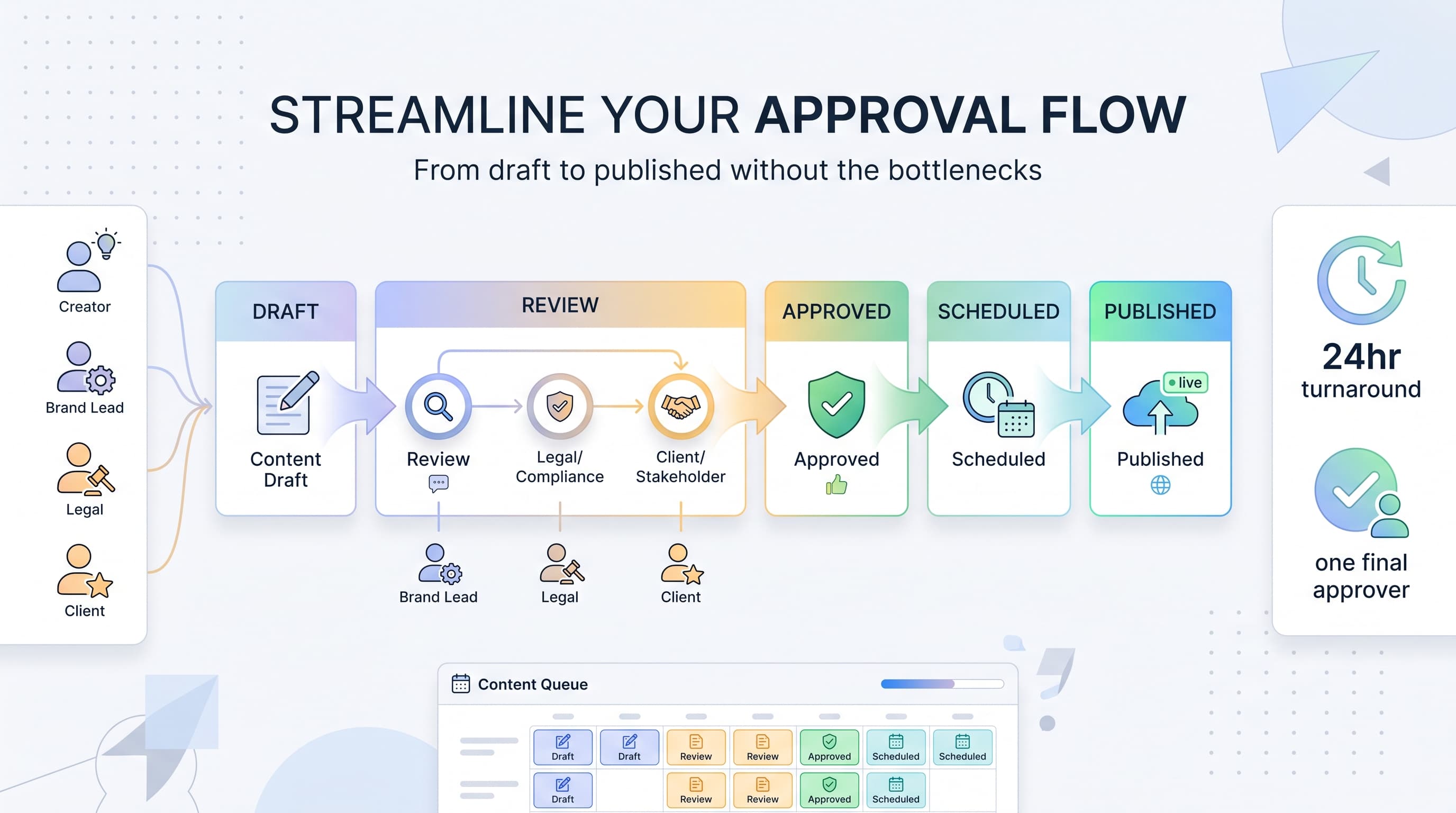
![Social Media Proposal Template [Free Download] - Win More Clients](/_next/image?url=%2Fblog%2Fsocial-media-proposal-template%2Fheader.jpeg&w=3840&q=75&dpl=dpl_6RiKV7dz1EjMEbYgqheh1pc2YPwv)