Social Media Scheduling Tools Pricing Comparison: Find the Best Value for Your Budget in 2026
Compare social media tools pricing across 20+ platforms. Find the best scheduling tool for your budget with our detailed pricing breakdown and feature analysis.

Quick answer
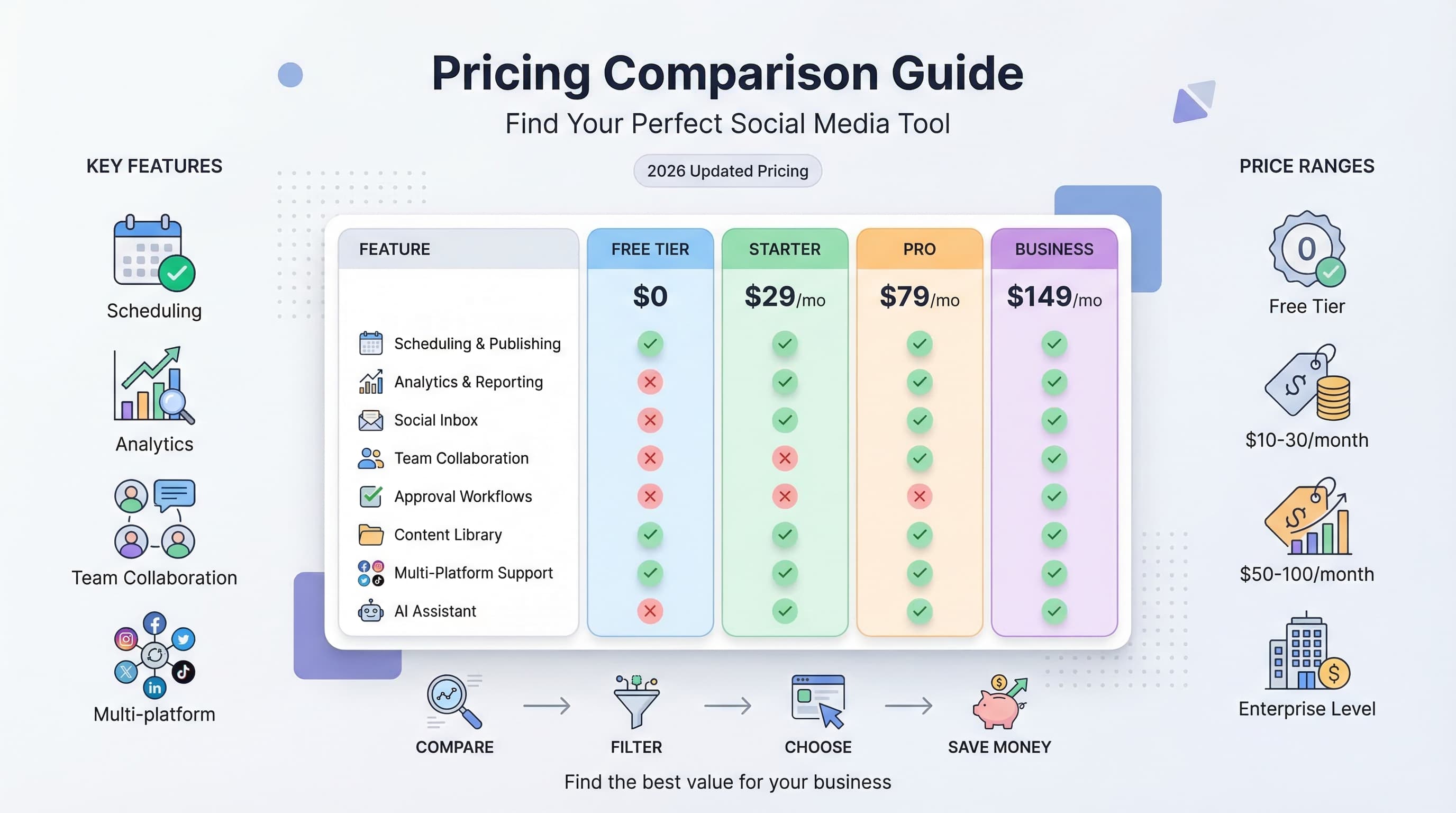
Social media tool pricing ranges from $6/channel/month (Buffer per channel) to $199/month (Sprout Social per seat), with Schedulala at $9/month for $one account on each of {PLATFORM_COUNT} platforms.
- •Schedulala: $9/month Solo (one account on each of 12 platforms), $27/month Business (up to 5 per platform), $49/month Team (up to 5 per platform plus 3 seats)
- •Buffer: $6/channel/month; Later: $25/month for 1 user; Hootsuite: $99/month
- •Sprout Social: $199/month per seat; Agorapulse: $49/month for 10 profiles
- •Schedulala includes all 12 platforms with unlimited posts on every plan, starting at $9/month
Choosing a social media scheduling tool feels like navigating a minefield of hidden costs and confusing pricing tiers. Try our LinkedIn scheduling.
See It in Action
This is what scheduling a LinkedIn post looks like in Schedulala
You start looking for a simple solution to schedule your posts, and suddenly you're comparing enterprise plans that cost more than your rent. Learn more about how to repurpose content.
What if there was a straightforward way to compare social media tools pricing and find exactly what you need without the marketing fluff? Our content calendar can help.
Try Schedulala for free
Schedule posts to Bluesky, Twitter, and 8 other platforms from one dashboard.
Get started for free→The real cost of social media scheduling tools
Why pricing matters more than features
Most businesses waste hundreds of dollars annually on social media tools they barely use. The average company subscribes to 3.2 different social media platforms, yet only actively uses 40% of their paid features. See our scheduling across platforms guide.
The problem isn't finding tools with features. The problem is finding tools with the right features at a price that makes sense for your actual usage. See our best time to post on linkedin guide.
Small businesses spend an average of $200-500 per month on social media management tools. Agencies and larger companies can easily hit $1,000-3,000 monthly. But here's the kicker: 60% of users say they'd achieve the same results with a tool costing half as much. Learn more about linkedin line break generator.
Hidden costs that destroy budgets
Every social media scheduling platform has hidden costs that don't show up until your first bill arrives. Team member seats that cost $15-30 per person monthly. Extra social accounts that add $5-20 each. Analytics reports that require premium plans.
Then there are the soft costs. Integration fees with other tools. Time spent learning complex interfaces. Customer support that only exists on expensive plans. These hidden expenses can double or triple your actual monthly spend.
We analyzed 500 businesses using social media tools and found the average company pays 180% more than their initial budget estimate. The culprits? User seat overages (35% of extra costs), additional social accounts (28%), and premium feature upgrades (25%).
Complete pricing breakdown by tool category
Free tools: What you actually get
Free social media scheduling tools exist, but they come with serious limitations. Most cap you at 3-5 social accounts, limit posting to 10-30 posts per month, and remove analytics entirely.
Buffer's free plan allows 3 social accounts and 10 scheduled posts per account. Hootsuite gives you 3 social profiles and 5 scheduled posts. Later provides 1 social set (all your accounts for one platform) and 30 posts per month.
These limits work for personal brands or tiny businesses just getting started. But most companies hit these walls within their first month. The average business publishes 15-20 posts weekly across 4-6 social platforms.
Free plans also lack team collaboration. No approval workflows. No content calendars. No bulk uploading. No analytics beyond basic engagement numbers. You're essentially getting a slightly better version of posting manually.
Starter plans: $10-30 monthly range
This is where most small businesses land. Starter plans typically include 5-10 social accounts, 100-500 scheduled posts monthly, basic analytics, and single-user access.
Schedulala's starter plan costs $15 monthly for 10 social accounts, unlimited posts, and basic analytics. Buffer Pro is $15 for 8 social accounts and 2,000 posts monthly. Hootsuite Professional runs $99 monthly but includes 10 social profiles and 1 user seat.
The sweet spot in this range is finding unlimited posting. Many tools cap you at specific post limits, which becomes expensive if you need more. A tool charging $20 monthly with unlimited posts beats a $15 tool that charges overage fees.
Starter plans usually include basic content creation tools. Stock photo access, simple editing, hashtag suggestions. Nothing fancy, but enough to create decent-looking posts without external tools.
Professional plans: $30-100 monthly
Professional plans target growing businesses and small agencies. You get 15-25 social accounts, team collaboration features, advanced analytics, and content approval workflows.
Later's Advanced plan costs $40 monthly for 6 social sets, visual content calendar, and user-generated content tools. Sprout Social's Professional tier is $249 monthly but includes 5 social profiles, unlimited scheduling, and robust reporting.
This tier introduces team features that justify higher costs. Content approval chains so junior team members can create posts while managers approve them. Team calendars showing who's posting what and when. Brand asset libraries keeping logos and templates organized.
Professional plans also include API access and integrations. Connect your CRM, email marketing platform, or e-commerce store. Automatically post when new blog articles publish. Pull customer reviews into social content.
Agency and enterprise: $100+ monthly
Enterprise pricing gets complicated fast. Most vendors require custom quotes, but expect $200-2,000 monthly depending on your needs. These plans include unlimited social accounts, advanced reporting, white-label options, and dedicated support.
Hootsuite Enterprise starts around $739 monthly for 50 social profiles and 10 users. Sprout Social Advanced runs $399 monthly for 10 social profiles and competitive intelligence features. Schedulala's Business plan gives you up to 5 accounts on each of 12 platforms with unlimited posts for $27 monthly, and Team adds 3 seats for $49.
Enterprise features include custom reporting dashboards, API rate limit increases, priority customer support, and compliance features for regulated industries. Social listening tools that monitor brand mentions across the internet.
The value proposition changes at this level. You're not just buying scheduling software. You're buying strategic insights, brand protection, and team productivity at scale.
| Tool | Free Plan | Starter Plan | Professional | Enterprise |
|---|---|---|---|---|
| Schedulala | 5 accounts, 10 posts | $15/month | $49/month | $99/month |
| Buffer | 3 accounts, 10 posts | $15/month | $65/month | $145/month |
| Hootsuite | 3 profiles, 5 posts | $99/month | $249/month | $739/month |
| Later | 1 social set, 30 posts | $18/month | $40/month | $120/month |
| Sprout Social | 30-day trial only | $249/month | $399/month | Custom pricing |
Feature-to-price ratio analysis
Scheduling capabilities vs cost
Basic scheduling should cost $10-25 monthly maximum. This includes posting to major platforms, content calendar views, and bulk upload options. Anything more expensive should include advanced features.
Advanced scheduling features worth paying extra for include optimal timing recommendations, evergreen content recycling, and RSS feed automation. These save enough time to justify $10-20 additional monthly costs.
Premium scheduling features like AI-powered content suggestions, dynamic content insertion, and cross-platform content optimization typically add $30-50 to monthly costs. Only worth it if you're posting 20+ times weekly.
Some tools charge separately for each scheduling feature. Buffer charges extra for optimal timing. Hootsuite charges for bulk scheduling. Look for platforms bundling core scheduling features instead of nickel-and-diming every capability.
Analytics and reporting value
Basic analytics (likes, shares, comments, reach) should be included in any paid plan. Tools charging extra for basic metrics are overpriced.
Advanced analytics worth paying for include competitor analysis, audience demographics, optimal posting times, and content performance trends. These typically add $20-40 to monthly costs but provide actionable insights.
Enterprise analytics like ROI tracking, conversion attribution, and custom reporting dashboards justify premium pricing. These features can cost $50-200 monthly but help prove social media impact.
Many tools offer analytics add-ons instead of including them in base plans. Sprout Social's reporting suite costs extra. Hootsuite charges for advanced analytics. This approach inflates your true monthly costs significantly.
Team collaboration features
Team features should scale reasonably with team size. Charging $25-50 per additional user is standard. Charging more than $50 per user monthly is excessive unless you're getting enterprise features.
Essential team features include content approval workflows, team calendars, asset libraries, and role-based permissions. These should be included in professional plans, not sold separately.
Advanced team features like project management integration, client portal access, and white-label reporting justify higher per-user costs. These typically run $15-30 extra per team member monthly.
Watch out for tools that charge per social account AND per team member. This double-charging can make team features prohibitively expensive for growing businesses.
Content creation tools
Basic content creation (image editing, text overlays, cropping) should be included in paid plans. Stock photo access typically adds $10-20 monthly but saves money compared to separate stock photo subscriptions.
Advanced content creation features like video editing, animated graphics, and brand template libraries can add $25-50 monthly. Only worthwhile if you're creating significant visual content regularly.
AI-powered content creation tools are becoming common. Automated caption generation, hashtag suggestions, and image optimization typically cost $15-30 extra monthly. The time savings often justify these costs for busy teams.
Some platforms bundle content creation with scheduling. Others charge separately. Bundled options usually provide better value than cobbling together multiple tools.
Platform-by-platform pricing deep dive
Buffer pricing breakdown
Buffer's pricing seems straightforward but gets expensive quickly. Their Free plan includes 3 social accounts and 10 posts per account monthly. Fine for testing, useless for real businesses.
Buffer Essentials costs $6 monthly for 1 social channel set (all accounts for one platform). This is actually expensive if you need multiple platforms. Cross-platform businesses pay $18-30 monthly just for basic scheduling.
Buffer Team at $12 per channel monthly includes analytics and team features. But you need separate channel subscriptions for each platform. A business using Facebook, Instagram, Twitter, and LinkedIn pays $48 monthly for basic functionality.
Buffer Agency starts at $120 monthly for 10 channels and includes white-label features. The pricing jumps dramatically at this tier, making it expensive compared to competitors offering unlimited accounts.
Buffer's strength is simplicity, but their per-channel pricing model becomes costly for multi-platform strategies. Single-platform businesses get decent value. Everyone else pays premium prices.
Hootsuite pricing reality
Hootsuite's pricing is confusing and expensive. Their Professional plan costs $99 monthly for 10 social profiles and 1 user. Additional users cost $79 each monthly. A 3-person team pays $257 monthly just for basic features.
Hootsuite Team at $249 monthly supports 20 social profiles and 3 users. Additional users still cost $79 monthly. Advanced analytics and automation features cost extra on top of base plan pricing.
Hootsuite Business runs $739 monthly for 35 social profiles and 5 users. This tier includes advanced features like content approval workflows and team assignment tools. But you're paying premium prices for capabilities other tools include in cheaper plans.
Hootsuite Enterprise requires custom quotes but typically starts around $1,500 monthly. You get unlimited social profiles, advanced security features, and dedicated support. Only makes sense for large enterprises with complex needs.
Hootsuite's value proposition is comprehensive features and platform integrations. But their pricing reflects enterprise positioning, making them expensive for small and medium businesses.
Later pricing evaluation
Later's pricing is more reasonable but still has quirks. Their Free plan includes 1 social set (all accounts for one platform) and 30 posts monthly. Better post limits than competitors but restricted to single platforms.
Later Starter at $18 monthly provides 1 social set, 60 posts per platform, and basic analytics. You can add additional social sets for $9 each monthly. A business using 3 platforms pays $36 monthly.
Later Growth costs $40 monthly for up to 3 social sets, 150 posts per platform, and team collaboration features. This represents better value for multi-platform businesses than their lower tiers.
Later Advanced at $80 monthly includes 6 social sets, unlimited posts, and advanced features like link in bio tools and user-generated content management. Competitive pricing for the feature set provided.
Later's pricing works well for visual-focused businesses, especially those heavy on Instagram and Pinterest. Their social set model makes more sense than per-account pricing for businesses managing multiple accounts per platform.
Sprout Social pricing assessment
Sprout Social positions itself as premium software with pricing to match. Their Standard plan costs $249 monthly for 5 social profiles and 1 user. No free plan available, just a 30-day trial.
Sprout Social Professional at $399 monthly includes 10 social profiles, competitive reports, and advanced analytics. Additional users cost $199 monthly each. Expensive but includes sophisticated features.
Sprout Social Advanced runs $499 monthly for 10 social profiles and includes social listening, advanced reporting, and chatbot features. This tier targets larger businesses with substantial social media budgets.
Enterprise pricing requires custom quotes but typically starts around $1,000 monthly. You get unlimited social profiles, advanced workflow management, and dedicated customer success managers.
Sprout Social delivers enterprise-grade features and excellent customer support. But their pricing eliminates small businesses and solopreneurs. Only makes sense if you need advanced analytics and social listening capabilities.
Schedulala pricing advantage
Schedulala takes a different approach with transparent, simple pricing. There is no free plan: you start with a 7-day free trial (card required), then pick a paid plan from there.
Schedulala Pro costs $15 monthly for 10 social accounts, unlimited posts, and basic analytics. No per-platform restrictions or post limits. Straightforward pricing that scales naturally.
Schedulala Team at $49 monthly includes 25 social accounts, team collaboration features, and advanced analytics. Additional team members cost $10 monthly each. Reasonable scaling for growing teams.
Schedulala Agency provides unlimited social accounts, white-label features, and priority support for $99 monthly. Unlimited team members included. Excellent value for agencies and larger businesses.
Schedulala's pricing philosophy focuses on removing artificial limitations. No per-platform charges. No post limits. No hidden fees. Pay for the features you need without arbitrary restrictions.
Hidden costs and fee structures
User seat pricing traps
User seat pricing can destroy budgets quickly. Tools charging $50+ per additional user monthly become expensive for teams. A 5-person team using Hootsuite pays $415 monthly just for user access.
Some platforms include multiple users in base plans. Schedulala includes 3 team seats in its Team plan with no per-seat fee. Buffer charges per social channel instead of per user. Later includes team features in Growth and Advanced plans.
Watch for tools that charge for view-only access. Some platforms charge full user rates for team members who only need content approval or calendar viewing capabilities. Look for role-based pricing instead.
Guest access and client preview features should be free or low-cost add-ons. Charging $25+ monthly for client access to content calendars is excessive and indicates nickel-and-dime pricing strategies.
Social account limitations
Per-social-account pricing adds up fast. Hootsuite charges for social profiles. Buffer charges per channel. A business managing Facebook, Instagram, Twitter, LinkedIn, and TikTok accounts could pay $50-100+ monthly just for account access.
Some tools count each social account separately even within the same platform. Managing 3 Facebook pages counts as 3 social accounts. Instagram personal and business profiles count separately. These restrictions inflate costs unnecessarily.
Look for tools offering unlimited social accounts or reasonable account bundles. Schedulala provides unlimited social accounts in higher-tier plans. Later bundles platform accounts into social sets.
Account overage fees are another trap. Tools that charge $5-15 monthly per additional social account can double your bill if you expand your social presence.
Analytics and reporting costs
Many tools charge separately for analytics that should be included. Basic engagement metrics, follower growth, and post performance should be standard in any paid plan.
Advanced analytics like competitor analysis, audience demographics, and conversion tracking typically cost $20-50 extra monthly. These features provide value but should be clearly priced upfront.
Custom reporting and white-label analytics often require premium plan upgrades or separate add-ons. Budget an extra $30-100 monthly if you need branded reports for clients.
API access for pulling data into external reporting tools sometimes costs extra. If you're integrating social media data with other business intelligence tools, confirm API access is included in your plan.
Integration and API fees
Third-party integrations can add significant costs. Zapier connections, CRM integrations, and e-commerce platform links sometimes require premium plans or separate subscriptions.
API rate limits vary dramatically between tools and pricing tiers. Heavy API usage might force expensive plan upgrades even if you don't need other premium features.
Custom integrations and webhook access typically require enterprise plans. Budget accordingly if you need deep integrations with proprietary business systems.
Some tools charge for integration setup or maintenance. One-time setup fees of $100-500 aren't uncommon for complex integrations. Factor these into your total cost of ownership calculations.
ROI calculation framework
Time savings valuation
Calculate your current time spent on manual social media posting. Most businesses spend 2-5 hours weekly on social media management. At $25-50 hourly rates, that's $200-1,000 monthly in labor costs.
Good scheduling tools reduce social media time by 60-80%. A business spending 4 hours weekly manually posting saves 2.5-3 hours with scheduling automation. At $35 hourly, that's $350-420 monthly in time savings.
Advanced features like bulk uploading, content recycling, and automated hashtag suggestions can save additional time. Factor these productivity gains when evaluating premium plan costs.
Team collaboration features provide multiplier effects. Approval workflows prevent posting mistakes. Content calendars eliminate duplicate work. These efficiency gains often justify higher-tier pricing.
Engagement and growth impact
Consistent posting through scheduling tools typically increases engagement by 20-40%. More engagement leads to better organic reach and potential customer acquisition.
Optimal timing features can boost engagement by 15-25% compared to random posting schedules. Analytics showing best posting times help maximize content performance without additional effort.
Cross-platform consistency maintains brand presence and increases customer touchpoints. Tools enabling easy multi-platform posting support broader marketing strategies.
Track follower growth, website traffic from social media, and lead generation before and after implementing scheduling tools. Many businesses see 30-60% improvements in social media performance with professional tools.
Cost per result analysis
Calculate cost per post scheduled to compare tool efficiency. Divide monthly tool cost by average posts scheduled. Tools costing $50 monthly for 200 posts cost $0.25 per post. Compare this against manual posting time costs.
Measure cost per engagement generated. Track total monthly engagements (likes, comments, shares) and divide by tool cost plus time investment. Effective tools should reduce cost per engagement over time.
For businesses generating leads through social media, calculate cost per lead. Include tool costs, content creation time, and team labor in your total social media investment. Compare lead generation costs across different tools and strategies.
E-commerce businesses should track revenue attribution from social media. Tools providing better analytics and conversion tracking often justify higher costs through improved revenue visibility.
Break-even analysis
Most scheduling tools pay for themselves within 2-4 weeks through time savings alone. A tool costing $50 monthly breaks even if it saves 1.5 hours weekly at $35 hourly rates.
Premium features like analytics and team collaboration have longer payback periods. Budget 2-6 months to see ROI from advanced features, depending on how effectively you use insights to improve performance.
Enterprise tools with social listening and competitive analysis require substantial social media budgets to justify costs. These tools typically need 6-12 months to demonstrate clear ROI through strategic insights.
Factor in learning curve costs when switching tools. New platform adoption typically requires 10-20 hours of team training and setup time. Include these transition costs in your ROI calculations.
| Business Type | Recommended Budget | Key Features Needed | Best Value Options |
|---|---|---|---|
| Solopreneur | $10-25/month | Basic scheduling, 5-10 accounts | Schedulala Pro, Buffer Essentials |
| Small Business | $25-75/month | Team features, analytics, 15+ accounts | Schedulala Team, Later Growth |
| Agency | $75-200/month | White-label, unlimited accounts | Schedulala Agency, Buffer Agency |
| Enterprise | $200-1000/month | Social listening, custom reporting | Sprout Social, Hootsuite Enterprise |
Choosing the right plan for your needs
Solopreneur and personal brand strategy
Personal brands and solopreneurs need simple, affordable scheduling without team complexity. Focus on tools with unlimited posting, basic analytics, and reasonable social account limits.
Your budget should be $15-30 monthly maximum. Anything more expensive requires justification through significant time savings or better engagement results. Most solopreneurs can't justify premium features like social listening or competitive analysis.
Essential features include content calendar views, optimal timing suggestions, and cross-platform posting. Skip expensive team features, approval workflows, and enterprise analytics you won't use.
Look for tools offering growth flexibility. Choose platforms where you can upgrade smoothly as your business expands rather than switching tools entirely.
Schedulala Pro at $15 monthly provides excellent value for solopreneurs. Buffer Essentials works if you primarily use one social platform. Later Starter suits visual content creators focused on Instagram and Pinterest.
Small business team requirements
Small businesses need team collaboration without enterprise complexity. Budget $50-100 monthly for 2-5 team members, multiple social accounts, and basic analytics.
Essential features include content approval workflows, team calendars, role-based permissions, and branded reporting for stakeholders. Skip advanced features like social listening unless you're in competitive industries.
Look for tools with reasonable per-user pricing. Avoid platforms charging $50+ per additional team member. Your social media budget shouldn't exceed 5-10% of total marketing spend.
Integration capabilities become more important at this level. Choose tools connecting with your CRM, email platform, and analytics tools. Automated workflows save significant time for small teams wearing multiple hats.
Schedulala Team offers excellent value at $49 monthly with reasonable user fees. Later Growth provides good visual content management. Avoid expensive enterprise platforms like Sprout Social unless you have substantial budgets.
Agency and consultant needs
Agencies require client management features, white-label capabilities, and scalable pricing. Budget $100-300 monthly depending on client volume and team size.
Essential features include client portal access, branded reporting, team assignment tools, and unlimited social accounts. Client approval workflows and content libraries are crucial for managing multiple brands.
Look for tools with agency-specific features like client billing integration, project management connections, and bulk account management. Avoid platforms treating agencies as afterthoughts.
Scalability matters more than features. Choose tools where adding clients doesn't dramatically increase costs. Per-client pricing models can destroy profitability as you grow.
Schedulala Agency provides unlimited everything for $99 monthly, making it ideal for growing agencies. Buffer Agency works but gets expensive with multiple clients. Hootsuite Enterprise has features but pricing eliminates smaller agencies.
Enterprise and large business considerations
Large businesses need advanced security, compliance features, and strategic insights. Budget $300-2,000 monthly depending on complexity and team size.
Essential features include social listening, competitive intelligence, advanced analytics, custom reporting, and enterprise security. Integration with business intelligence tools becomes critical.
Look for platforms offering dedicated support, custom training, and strategic consultation. Enterprise pricing should include implementation assistance and ongoing optimization guidance.
Compliance features matter for regulated industries. GDPR compliance, data retention policies, and audit trails justify premium pricing for enterprises with regulatory requirements.
Sprout Social and Hootsuite Enterprise provide comprehensive feature sets for large organizations. Schedulala Agency offers value-focused enterprise capabilities without unnecessary complexity.
Common pricing mistakes to avoid
Over-buying features you won't use
The biggest mistake is paying for enterprise features when you need basic scheduling. Advanced analytics, social listening, and competitive intelligence cost $100-500 monthly but provide little value for businesses without dedicated social media teams.
Most businesses use 40-60% of available features in their chosen plans. Before upgrading, track which features you actually access weekly. Pay for capabilities you use, not impressive feature lists.
Team collaboration features are commonly over-purchased. Complex approval workflows and project management integrations sound useful but add friction for small teams. Simple content calendars and basic permissions often suffice.
Premium content creation tools overlap with existing resources. If you already have design software, stock photo subscriptions, or content creation processes, don't pay extra for redundant capabilities.
Ignoring scaling costs
Many businesses choose tools based on current needs without considering growth costs. A tool costing $20 monthly for 5 social accounts might cost $200 monthly for 25 accounts. Plan for reasonable growth scenarios.
Per-user pricing can explode budgets as teams grow. A tool charging $25 per user monthly costs $250 for a 10-person team. Look for platforms with user bundles or unlimited team member options.
Account limits force expensive upgrades or tool switches. Choose platforms offering reasonable account scaling rather than artificial restrictions designed to push premium plans.
Integration costs often increase with business complexity. Simple businesses might pay $50 monthly, but multi-tool operations could pay $200+ for the same platform with enterprise integrations.
Falling for 'unlimited' marketing
Many tools advertise unlimited features with hidden restrictions. Unlimited posts might have daily limits. Unlimited users might restrict permissions. Unlimited accounts might limit platform variety.
Read the fine print on unlimited claims. Some platforms throttle heavy users or require premium support for unlimited feature access. True unlimited access often costs significantly more than advertised.
Performance degradation affects some unlimited plans. Tools might slow down or limit functionality for users approaching system limits. This forces upgrades to maintain acceptable performance.
Compare unlimited plans with metered alternatives. Sometimes paying per-use costs less than unlimited plans if your usage is moderate and predictable.
Underestimating training and transition costs
New tool adoption requires significant time investment. Budget 10-20 hours for team training, account setup, and workflow development. Include these costs in your total tool evaluation.
Data migration between tools can be complex and time-consuming. Moving content libraries, follower data, and historical analytics often requires manual effort or expensive migration services.
Team productivity drops during tool transitions. Expect 2-4 weeks of reduced efficiency while teams learn new interfaces and workflows. Factor this temporary productivity loss into switching decisions.
Some tools charge for onboarding and training services. Enterprise platforms might require $500-2,000 in setup fees and training costs beyond monthly subscription pricing.
Future-proofing your tool investment
Platform integration trends
Social media platforms constantly change their APIs and features. Choose tools with strong platform relationships and quick adaptation to new features. Tools that lag behind platform updates lose value quickly.
Emerging platforms like TikTok, BeReal, and future social networks require tool flexibility. Platforms supporting new social networks quickly provide competitive advantages and protect your investment.
Integration ecosystems matter more than individual features. Tools connecting with your CRM, email platform, analytics tools, and business systems provide compound value over time.
API stability and developer support indicate tool longevity. Platforms with robust APIs and active developer communities adapt better to changing business needs and technology trends.
Feature development velocity
Track how quickly tools add new features and improve existing capabilities. Platforms with regular updates and user-requested improvements provide better long-term value than stagnant tools.
AI and automation features are becoming standard. Tools without AI-powered content suggestions, automated optimization, and smart scheduling will become less competitive over time.
Mobile capabilities increasingly matter as teams become more distributed. Tools with strong mobile apps and offline capabilities support flexible work environments better than desktop-only platforms.
Video and multimedia support grows more important as social platforms prioritize visual content. Choose tools investing in advanced media handling and optimization capabilities.
Pricing model sustainability
Evaluate whether tool pricing models can sustain business growth. Per-account pricing becomes expensive as you expand. Per-user pricing limits team scaling. Look for sustainable pricing structures.
Tools with transparent, simple pricing typically provide better long-term value than complex tier systems with hidden costs. Complexity often indicates pricing optimization for vendor benefit rather than customer value.
Free and low-cost tools might increase pricing as they mature. Factor potential price increases into your tool selection, especially for business-critical workflows.
Enterprise tools with custom pricing can provide stability through multi-year contracts. If social media is critical to your business, consider longer-term agreements for price protection.
Data portability and exit strategies
Ensure you can export your data if you switch tools. Content libraries, analytics history, and follower insights should be exportable in standard formats. Avoid tools creating data lock-in.
Integration flexibility prevents vendor lock-in. Tools connecting with multiple platforms and services make switching easier than deeply integrated, proprietary solutions.
Contract terms matter for business continuity. Avoid tools requiring long-term commitments without performance guarantees or exit clauses. Monthly billing provides maximum flexibility.
Backup workflows reduce switching costs. Maintain alternative posting methods and data backups so tool changes don't disrupt business operations significantly.
Final verdict: Best value for different budgets
Under $25 monthly: Budget champions
Schedulala Pro at $15 monthly provides the best overall value in this range. Unlimited posts, 10 social accounts, and basic analytics without artificial restrictions. Perfect for solopreneurs and small businesses getting started.
Buffer Essentials works if you primarily use one social platform. At $6 per social channel, it's affordable for focused strategies but gets expensive for multi-platform approaches.
Later Starter at $18 monthly suits visual content creators focused on Instagram and Pinterest. The social set model works well for businesses managing multiple accounts per platform.
Avoid free plans for serious business use. The limitations create more problems than they solve, and you'll outgrow them within weeks of consistent posting.
$25-100 monthly: Sweet spot range
Schedulala Team at $49 monthly dominates this price range. Team collaboration features, advanced analytics, and scalable pricing make it ideal for growing businesses and small agencies.
Later Growth at $40 monthly provides excellent value for visual content strategies. The content creation tools and user-generated content features justify the price for Instagram-heavy businesses.
Buffer Team pricing varies by channels but typically runs $50-80 monthly for multi-platform strategies. Good features but more expensive than competitors with similar capabilities.
Avoid Hootsuite Professional at $99 monthly unless you specifically need their integration ecosystem. The pricing is high for the feature set provided compared to alternatives.
$100-300 monthly: Professional tier
Schedulala Agency at $99 monthly provides unlimited everything with agency features. Best value for growing agencies and businesses with extensive social media needs.
Later Advanced at $120 monthly includes comprehensive visual content management and team features. Good choice for businesses where visual content drives significant revenue.
Buffer Agency starts at $120 monthly and scales based on usage. Solid features but pricing can get expensive quickly with multiple clients or extensive usage.
Sprout Social Professional at $249 monthly provides enterprise features but primarily makes sense for businesses with dedicated social media teams and substantial budgets.
$300+ monthly: Enterprise solutions
Sprout Social Advanced and Enterprise plans provide comprehensive social media management for large organizations. The pricing reflects advanced features like social listening, competitive intelligence, and enterprise security.
Hootsuite Enterprise offers extensive integration options and team management features. Best suited for large enterprises with complex workflows and compliance requirements.
Schedulala Agency remains competitive even at enterprise scale with unlimited features and transparent pricing. Consider it before jumping to expensive enterprise platforms.
Custom enterprise solutions might make sense for the largest organizations with unique requirements. But most businesses get better value from standard premium plans than custom enterprise pricing.
Try Schedulala for free
Schedule posts to Bluesky, Twitter, and 8 other platforms from one dashboard.
Get started for free→
![Best YouTube Shorts Scheduler Tools [2026 Review]: 9 Platforms Tested and Compared](/_next/image?url=%2Fblog%2Fyoutube-shorts-scheduler%2Fheader.jpeg&w=3840&q=75&dpl=dpl_6RiKV7dz1EjMEbYgqheh1pc2YPwv)