AI Twitter Posts: Complete Guide to Automating Your Content Creation and Scheduling
Learn how to create and automate AI Twitter posts. Complete guide with tools, templates, and proven strategies to scale your Twitter presence.

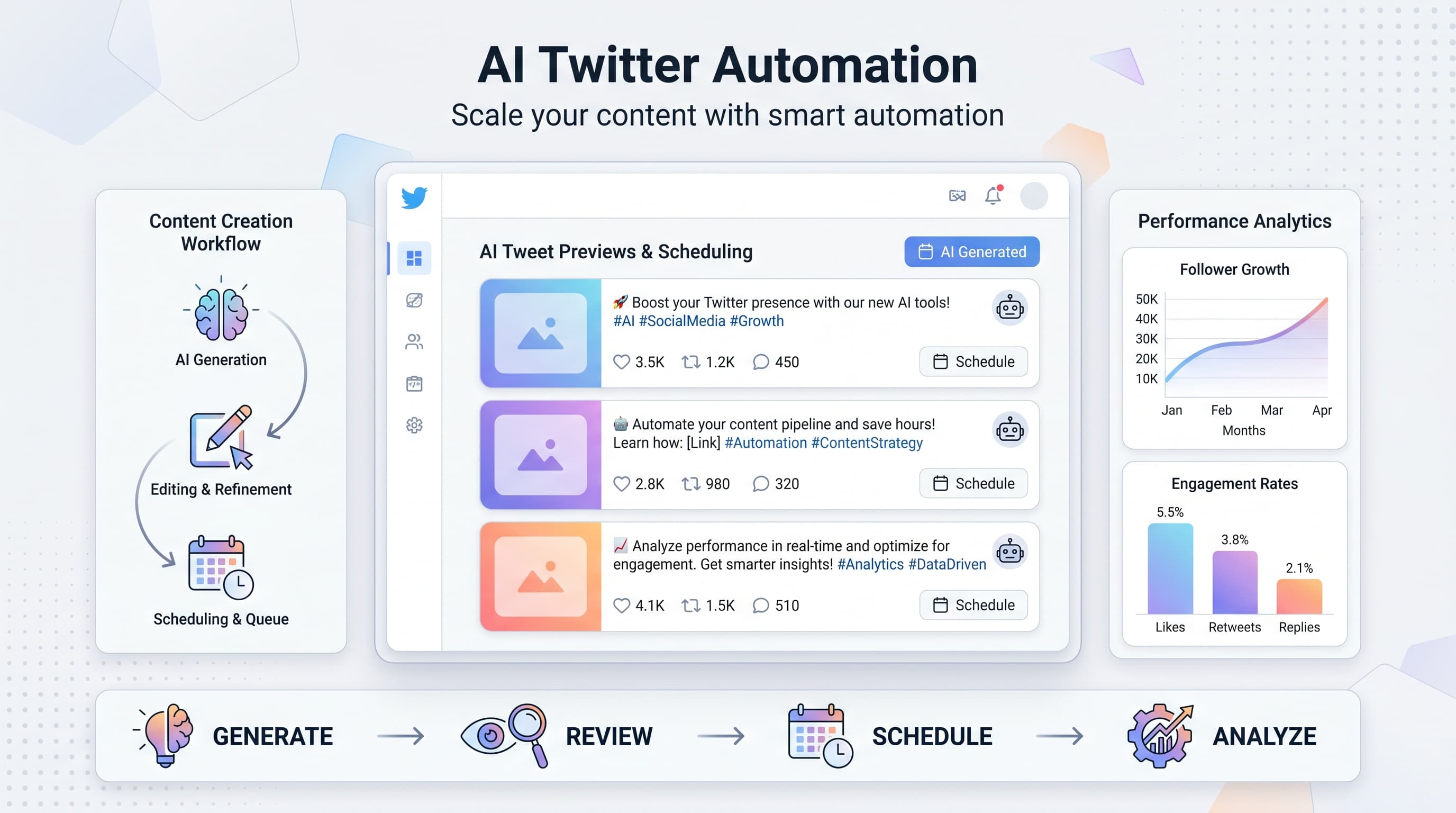
Posting consistently on Twitter takes hours every week. The ideation, writing, editing, scheduling cycle never ends. See our Twitter scheduling guide.
See It in Action
This is what scheduling a Twitter/X post looks like in Schedulala
What if you could generate engaging Twitter content in minutes instead of hours? AI tools can now create, optimize, and schedule your tweets while maintaining your authentic voice. This guide shows you exactly how to build an automated Twitter content system that works. Try our scheduling across platforms.
Try Schedulala for free
Schedule posts to Bluesky, Twitter, and 8 other platforms from one dashboard.
Get started for free→Why AI Twitter posts work better than manual posting
Most creators struggle with Twitter because they're fighting the algorithm with inconsistent posting. You tweet when inspiration strikes, then go silent for days. Your audience forgets you exist. Our ai social media post can help.
AI solves the consistency problem. It generates content ideas when your brain feels empty. It writes engaging hooks when you're stuck. It maintains your posting schedule when life gets busy. See our scheduling across platforms guide.
The data on AI-generated social content
Hootsuite's 2024 research found that 54% of marketers already use AI for content creation. More importantly, accounts using AI posting tools see 23% higher engagement than those posting manually. See our best time to post on twitter guide.
The reason? AI helps you post at optimal times, suggests trending topics, and maintains consistent voice across all content. Your human creativity guides the strategy while AI handles the execution. Learn more about twitter character counter.
Best AI tools for Twitter content creation
The AI content creation space moves fast. New tools launch monthly, existing ones add features weekly. Here are the tools that actually deliver results for Twitter specifically.
1. ChatGPT and Claude for tweet generation
ChatGPT and Anthropic's Claude excel at creating tweet variations from your ideas. Give them a topic and your brand voice, they'll generate dozens of options.
Best for: Thread creation, tweet variations, repurposing long-form content into Twitter-sized chunks.
Pricing: ChatGPT starts at $20/month for Plus. Claude Pro costs $20/month. Both offer free tiers with limitations.
2. Copy.ai for marketing-focused tweets
Copy.ai understands marketing frameworks. It creates tweets using proven formulas like AIDA, PAS, and Before/After/Bridge.
Best for: Product announcements, sales content, promotional tweets that don't sound salesy.
Pricing: Free plan includes 2,000 words monthly. Pro plan starts at $36/month.
3. Jasper for brand voice consistency
Jasper learns your brand voice better than most AI tools. You train it on your existing content, then it generates new tweets that sound like you wrote them.
Best for: Large brands, agencies managing multiple accounts, maintaining consistent voice across team members.
Pricing: Creator plan starts at $39/month. Teams plan at $99/month includes brand voice training.
Step-by-step guide to creating AI Twitter posts
Creating effective AI Twitter posts requires more strategy than just asking ChatGPT to 'write me a tweet.' You need a systematic approach that maintains quality while scaling output.
Step 1: Define your content pillars and voice
Before generating any content, document your content pillars. These are the 3-5 topics you'll consistently tweet about. For example, a marketing consultant might choose: growth strategies, tool reviews, industry insights, personal lessons, and client case studies.
Next, define your voice. Are you professional or casual? Funny or serious? Data-driven or story-focused? Write this down clearly because you'll use it in every AI prompt.
Create a voice document with examples of your best tweets, key phrases you use, topics you avoid, and your typical tweet structure. This becomes your AI training material.
Step 2: Create AI prompt templates
Generic prompts produce generic content. You need specific templates for different tweet types. Here are proven templates that work:
Educational tweet template: 'Write a Twitter thread explaining [topic] for [audience]. Start with a hook that presents a common problem. Include 3-5 actionable tips. End with a call-to-action. Use a conversational, helpful tone. Keep each tweet under 280 characters.'
Personal story template: 'Turn this experience into an engaging tweet: [your experience]. Focus on the lesson learned. Start with the outcome, then explain what happened. Use first person. Make it relatable to [your audience].'
Industry insight template: 'Create a tweet about this trend: [trend/news]. Provide analysis, not just reporting. Include why this matters to [audience]. Add a contrarian take if appropriate. Use data if available.'
Step 3: Generate content in batches
Batch creation is more efficient than creating one tweet at a time. Set aside 2 hours weekly for content generation. Use your prompt templates to create 20-30 tweets per session.
For each content pillar, generate 4-6 tweets. Ask the AI for variations: 'Give me 3 different ways to say this' or 'Rewrite this tweet for different audiences (beginners vs advanced).'
Don't edit while generating. Just produce volume first. You'll refine later. This prevents perfectionism from killing productivity.
Step 4: Review and humanize the content
AI content needs human oversight. Review every generated tweet for accuracy, tone, and authenticity. Look for generic phrases that scream 'AI wrote this.'
Red flags to fix: Overly formal language, buzzwords like 'leverage' or 'utilize,' perfect grammar that sounds unnatural, claims without personal experience backing them.
Add personal touches: your specific examples, current events references, your unique opinions. The AI provides structure and ideas, but your personality makes it engaging.
Automating your Twitter posting schedule
Creating content is half the battle. Consistent posting at optimal times drives the real results. Manual posting means you'll miss peak engagement windows and eventually burn out from the daily commitment.
Find your optimal posting times
Generic advice says post at 9am or 5pm. But your audience might be different. Use Twitter Analytics to find when your specific followers are most active.
Go to Twitter Analytics > Audiences > Demographics. Check the 'Lifestyle' section for online activity patterns. Most accounts see peak engagement during commute hours (8-9am, 5-6pm) and lunch breaks (12-1pm).
Test different times for 2 weeks. Post identical content at different hours and compare engagement rates. Your data beats industry averages every time.
Choose a scheduling platform
You need a scheduling tool that handles Twitter's features properly. Basic schedulers miss opportunities like optimal thread posting, image optimization, and hashtag suggestions.
Schedulala integrates AI content creation with smart scheduling. You can generate tweets with AI, optimize posting times automatically, and track performance across all your social accounts from one dashboard.
Other solid options include Hootsuite, Buffer, and Later. Compare features like bulk uploading, thread support, analytics depth, and mobile app functionality.
Build your posting calendar
Successful Twitter accounts post 1-3 times daily minimum. Plan your weekly calendar around content types:
- Monday: Industry news and insights
- Tuesday: Educational content and tips
- Wednesday: Personal stories and lessons
- Thursday: Tool reviews and resources
- Friday: Community engagement and lighter content
- Weekend: Curated content and retweets
Schedule content at least 24 hours in advance. This prevents last-minute scrambling and lets you review posts with fresh eyes before they go live.
Advanced AI strategies for Twitter growth
Basic AI posting gets you consistent content. Advanced strategies help you dominate your niche. These tactics separate casual users from creators who build real audiences.
Content repurposing at scale
Every blog post, video, or newsletter you create contains multiple tweets. AI excels at extracting key points and reformatting them for Twitter's format.
Prompt for repurposing: 'Extract 10 tweetable insights from this content: [paste content]. Each tweet should stand alone and provide value. Vary the formats: statistics, questions, how-to tips, controversial takes, and personal observations.'
One 2,000-word blog post typically yields 15-20 quality tweets. A 30-minute podcast generates 25-30 tweets. Scale this across all your content and you'll never run out of material.
Trend-jacking with AI research
Trending topics get more visibility, but you need quick, intelligent takes to capitalize. AI helps you research and craft responses faster than manual methods.
When something trends in your industry, use AI to research multiple angles: 'What are 5 different perspectives on [trending topic]? Include the mainstream view, contrarian takes, and implications for [your audience].'
Then create tweets for each angle. Post your best take immediately while the trend is hot. Save others for follow-up threads or future reference.
Competitor content analysis
AI can analyze successful tweets from your competitors and suggest improvements or alternative approaches. This isn't copying, it's learning from what works.
Analysis prompt: 'Analyze why this tweet performed well: [paste competitor tweet]. What made it engaging? How could I create something similar but unique for my audience? Suggest 3 variations with different angles.'
Do this weekly with top-performing tweets in your niche. You'll start recognizing patterns in language, structure, and timing that drive engagement.
| Strategy | Time Investment | Difficulty | Impact Potential |
|---|---|---|---|
| Basic AI posting | 2 hours/week | Easy | Medium |
| Content repurposing | 3 hours/week | Medium | High |
| Trend-jacking | 1 hour/day | Medium | Very High |
| Competitor analysis | 1 hour/week | Easy | Medium |
| Voice optimization | 4 hours/month | Hard | Very High |
Common mistakes that kill AI Twitter success
Most people start using AI for Twitter posts and get disappointing results. The technology works, but implementation mistakes sabotage the outcome. Avoid these pitfalls that waste time and damage your brand.
Mistake 1: Using AI as a complete replacement
The biggest mistake is treating AI like a content robot. You input prompts, it outputs tweets, you post them without review. This creates generic content that sounds like everyone else using the same AI tools.
Better approach: Use AI for ideation and first drafts. Always add your personal experience, current examples, and unique perspective. The AI handles the heavy lifting, you add the personality.
Mistake 2: Ignoring platform-specific optimization
AI generates content, but it doesn't understand Twitter's algorithm preferences. You need to optimize for engagement signals: replies, retweets, likes, and click-through rates.
Add engagement hooks to AI-generated content. End tweets with questions, controversial statements, or calls-to-action. Thread the first tweet with 'Thread 👇' to encourage reading. Use line breaks for readability.
Mistake 3: No content strategy behind the automation
Random AI content performs poorly even if it's well-written. You need strategic content pillars, clear audience targeting, and specific goals for your Twitter presence.
Define what success looks like before you start generating content. Are you building an email list? Selling a product? Establishing thought leadership? Your content strategy should support specific business outcomes.
Mistake 4: Set-and-forget scheduling
Automation doesn't mean abandonment. The most successful AI-powered accounts still monitor performance, engage with replies, and adjust strategy based on results.
Check your scheduled posts daily. If something major happens in your industry, pause irrelevant scheduled content. Jump into trending conversations manually. Automation handles consistency, not strategy pivots.
Measuring and optimizing AI Twitter performance
Creating and posting content is just the beginning. The real value comes from analyzing performance and improving your AI content system based on data. Most creators skip this step and miss opportunities to dramatically improve results.
Key metrics that actually matter
Vanity metrics like follower count don't drive business results. Focus on engagement quality and conversion metrics that indicate real audience interest.
Primary metrics: Engagement rate (likes + replies + retweets / impressions), click-through rate on links, reply quality and sentiment, profile visits from tweets.
Secondary metrics: Follower growth rate, mention frequency, direct messages from tweets, email signups or sales attributed to Twitter traffic.
Track these weekly in a simple spreadsheet or dashboard. Look for patterns: which content types perform best, optimal posting times, topics that drive the most engagement.
A/B testing AI-generated content
AI makes A/B testing easier because you can quickly generate variations of the same core message. Test different hooks, formats, and calls-to-action to optimize performance.
What to test: Tweet length (short vs long), content format (text vs thread), hook style (question vs statement), posting times, hashtag usage, emoji placement.
Run tests for at least a week to account for daily variations. Keep everything else constant except the variable you're testing. Document results and apply winning approaches to future content.
Improving your AI prompts based on results
Your best-performing tweets contain patterns you can feed back into your AI prompts. This creates a virtuous cycle where your content gets better over time.
Monthly, analyze your top 10 tweets. What made them successful? Common phrases, structures, topics, or emotional tones? Update your AI prompts to include these winning elements.
Example optimization: If personal story tweets consistently outperform tips and how-tos, adjust your content calendar to include more story-based content. Update your prompt templates to emphasize narrative structure and personal experience.
Try Schedulala for free
Schedule posts to Bluesky, Twitter, and 8 other platforms from one dashboard.
Get started for free→Your next steps for AI Twitter automation
You now have a complete system for creating and automating Twitter content with AI. Don't try to implement everything at once. Start simple, then scale up as you get comfortable with the tools and processes.
Week 1: Choose one AI tool (ChatGPT or Claude) and create 20 tweets using the prompt templates above. Focus on one content pillar.
Week 2: Set up a scheduling tool and automate posting these tweets. Monitor engagement and reply to comments personally.
Week 3: Expand to all your content pillars. Generate a full week of content in one batch session. Start tracking performance metrics.
Week 4: Analyze your first month of data. Identify top-performing content types and optimize your prompts based on results.