Telegram Bot for Scheduling: How to Automate Posts and Save Hours Daily
Learn how to create and use a telegram bot schedule posts system. Complete guide with step-by-step setup, automation tips, and best practices.

Quick answer
Automate Telegram posts using scheduling bots like ControllerBot or third-party tools like Schedulala that connect via the Telegram Bot API.
- •Telegram's Bot API allows automated posting to channels where your bot is an admin
- •Built-in scheduled messages support up to 100 pending messages per chat
- •Schedulala connects via official Telegram API for $9/month with cross-platform scheduling
- •Bots can send text, photos, videos, documents, and polls on a set schedule
Managing a Telegram channel feels like a full-time job. You're constantly checking the clock, rushing to post content, and hoping your audience is online. Try our Telegram scheduling.
See It in Action
This is what scheduling a Telegram post looks like in Schedulala
What if you could schedule weeks of posts in advance and let automation handle the heavy lifting? A Telegram bot for scheduling posts transforms your content strategy from reactive chaos into a predictable, scalable system. Our scheduling across platforms can help.
This guide walks you through everything you need to know about automating your Telegram posts. You'll learn how to set up scheduling bots, avoid common pitfalls, and build a posting schedule that grows your channel while you sleep. Our scheduling across platforms can help.
Try Schedulala for free
Schedule posts to Bluesky, Twitter, and 8 other platforms from one dashboard.
Get started for free→Why telegram scheduling beats manual posting
Manual posting kills productivity and limits growth. When you're tied to posting in real-time, you're stuck in a cycle of constant interruptions and missed opportunities. Our batch content creation can help.
Consider the math: if you post 3 times daily across multiple channels, you're interrupting your workflow 21 times per week just for posting. That's not counting the time spent crafting messages, finding media, or checking engagement. See our telegram font generator guide.
Time savings breakdown
Manual posting: 2-3 minutes per post, including context switching and platform navigation. For 21 weekly posts, that's 42-63 minutes of pure posting time, plus the productivity cost of constant interruptions. See our telegram line break generator guide.
Automated scheduling: 15 minutes to batch-schedule a week of content. Total weekly time investment drops to under 20 minutes, including review and adjustments.
The real benefit isn't just time savings. Scheduling lets you post consistently during peak engagement hours, even when you're sleeping or working on other projects. Your audience gets regular content, and you maintain momentum without being chained to your phone.
Types of telegram scheduling solutions
You have three main options for automating Telegram posts: custom bots, third-party services, and hybrid approaches. Each has distinct advantages depending on your technical skills and requirements.
1. Custom telegram bots
Building your own bot gives complete control but requires programming knowledge. You'll use Telegram's Bot API to create a bot that can schedule and send messages to your channels.
Pros: Free (beyond hosting costs), unlimited customization, no third-party dependencies, full data control.
Cons: Requires Python, Node.js, or similar programming skills. You handle server maintenance, security updates, and troubleshooting.
2. Third-party scheduling platforms
Services like Schedulala, Later, or Buffer handle the technical complexity. You connect your Telegram account, upload content, and set posting schedules through a user-friendly interface.
Pros: No coding required, professional interfaces, customer support, additional features like analytics and team collaboration.
Cons: Monthly subscription costs, potential platform limitations, dependency on third-party uptime.
3. Hybrid bot approaches
Some platforms offer bot-like functionality through Telegram itself. You interact with their bot to schedule posts, combining the convenience of messaging with scheduling features.
Pros: Familiar Telegram interface, quick setup, often more affordable than full platforms.
Cons: Limited advanced features, less robust than dedicated platforms, potential reliability issues.
For most content creators, third-party platforms offer the best balance of features and simplicity. Unless you have specific technical requirements or enjoy coding challenges, starting with a proven service saves time and reduces headaches.
Setting up telegram bot scheduling step-by-step
The setup process varies depending on your chosen approach, but the core steps remain consistent. Here's how to get your first automated posts running.
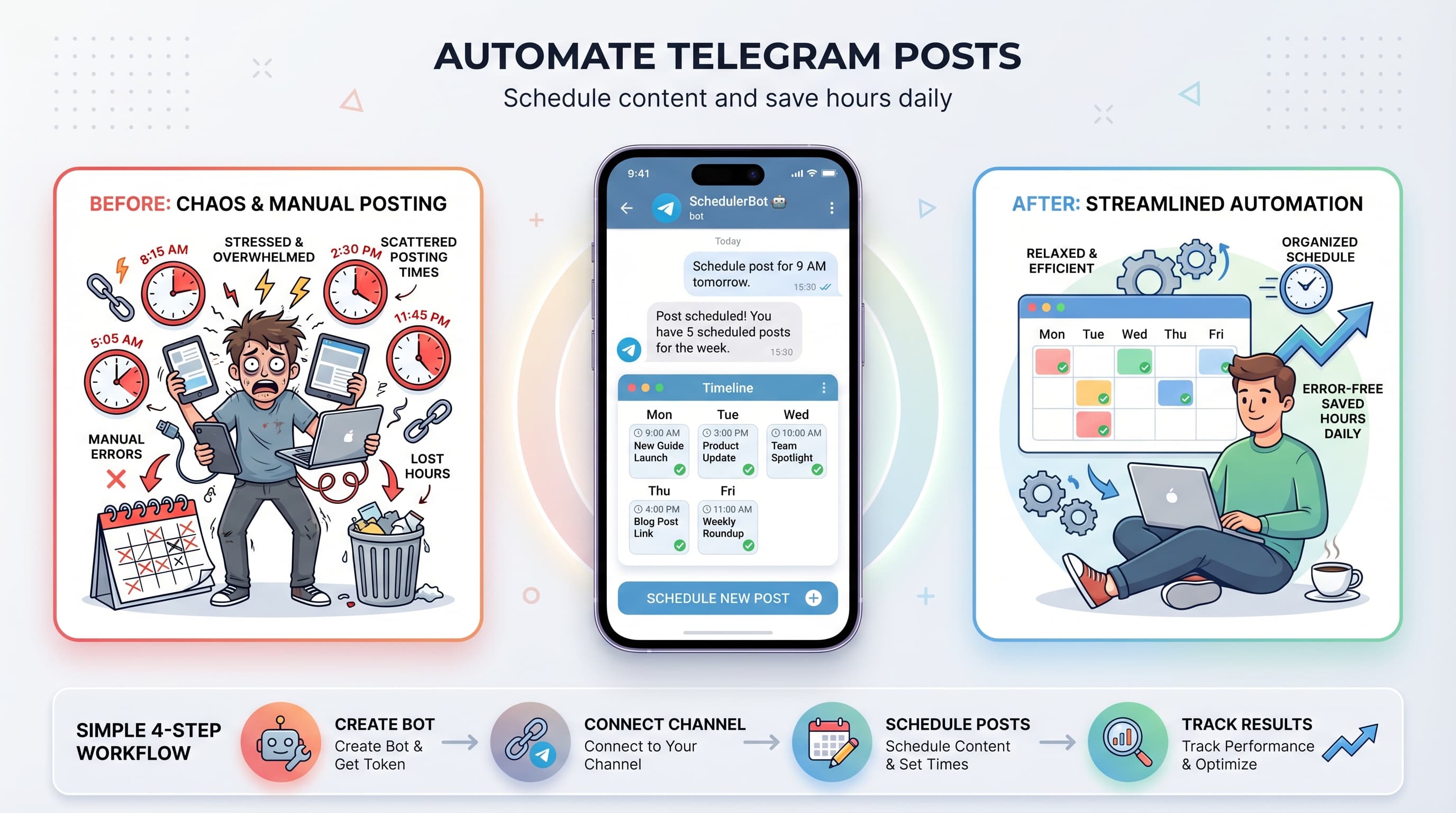
1. Create and configure your telegram bot
Start by messaging @BotFather on Telegram. This official bot creates and manages all other bots on the platform. Send \`/newbot\` and follow the prompts to choose a name and username for your bot.
BotFather will provide an API token that looks like \`123456789:ABCdefGHIjklMNOpqrsTUVwxyz\`. Save this token securely - it's your bot's password and shouldn't be shared publicly.
Test your bot by sending it a message. If everything works correctly, it won't respond (since you haven't programmed it yet), but it will appear in your chat list.
2. Add bot to your channel
Navigate to your Telegram channel settings and select 'Administrators'. Click 'Add Admin' and search for your bot's username. Grant it permission to 'Post Messages' at minimum.
The bot needs specific permissions based on what you want to automate. For basic scheduling, 'Post Messages' suffices. If you want to pin posts, delete messages, or manage other aspects, enable those permissions too.
You'll also need your channel's unique identifier (channel ID). For public channels, this is just the @username. For private channels, you'll need the numeric ID, which you can find using tools like @RawDataBot.
3. Connect to scheduling platform
If using a third-party service, look for Telegram integration in their platform settings. You'll typically enter your bot token and channel information through their interface.
Most platforms will test the connection by sending a verification message to your channel. This confirms that your bot has proper permissions and can communicate successfully.
Some services require additional setup steps, like webhooks or API permissions. Follow their specific documentation, as requirements vary between platforms.
4. Schedule your first post
Start with a simple text post to test the system. Write your message, select your channel, and choose a posting time about 10-15 minutes in the future.
Monitor the scheduled time closely for your first few posts. This helps you verify that timezone settings are correct and posts appear as expected.
Once basic text posts work reliably, experiment with media posts, formatting options, and more complex scheduling patterns.
Advanced telegram automation features
Basic scheduling is just the beginning. Modern telegram bots can handle sophisticated content strategies, from recurring posts to conditional publishing based on engagement metrics.
Recurring post patterns
Set up templates for content that repeats regularly. Daily motivational quotes, weekly roundups, or monthly announcements can be automated with minimal ongoing input.
Smart platforms let you create post series with variations. Instead of identical daily posts, you can rotate through different motivational themes or vary the posting format while maintaining consistency.
Consider seasonal adjustments to recurring content. Holiday schedules, summer/winter posting frequency changes, or event-based modifications keep your automated content feeling fresh and relevant.
Media and formatting automation
Modern bots handle rich media including images, videos, documents, and polls. You can schedule multimedia posts with captions, hashtags, and custom formatting.
Telegram's formatting options include bold, italic, \`monospace\`, and links. Some scheduling platforms provide visual editors that convert your formatting to Telegram's markdown automatically.
File size limits still apply to automated posts. Images must be under 10MB, videos under 50MB, and documents under 2GB. Plan your media accordingly when batch-uploading content.
Multi-channel coordination
If you manage multiple channels, coordinate posting schedules to avoid overwhelming your audience. Stagger posts by 30-60 minutes between channels that share subscribers.
Cross-promotion becomes powerful with automation. Schedule posts in Channel A that promote content from Channel B, creating a network effect that boosts engagement across your entire presence.
Version content for different audiences automatically. The same core message can be adapted for different channels with audience-specific language, examples, or calls-to-action.
Common scheduling mistakes and how to avoid them
Automation makes posting easier, but it also amplifies mistakes. A single error in your scheduling setup can result in days or weeks of problematic posts.
Timezone confusion disasters
The most common error is incorrect timezone configuration. Your audience expects posts during their peak hours, but misconfigured settings might schedule content for 3 AM local time.
Always verify timezone settings with test posts before scheduling bulk content. Pay special attention during daylight saving time transitions, which can shift your posting schedule by an hour.
If you serve a global audience, consider your primary demographic's timezone rather than your own. A US-based creator serving European audiences should schedule for European peak hours.
Content context failures
Automated posts lack real-time context awareness. A cheerful promotional post might go live during a crisis, making your brand seem tone-deaf or insensitive.
Build pause mechanisms into your workflow. Most platforms allow you to quickly stop all scheduled posts if you need to respond to breaking news or unexpected events.
Review your scheduled content weekly, especially posts scheduled far in advance. What seems relevant today might be outdated or inappropriate by the time it publishes.
Over-automation syndrome
Audiences can detect when content feels too mechanical. If every post has identical formatting, timing, and structure, engagement often drops as the content feels robotic.
Mix automated posts with spontaneous, real-time content. Aim for about 70% scheduled content and 30% live posts to maintain authenticity while benefiting from automation efficiency.
Vary your posting patterns slightly. Instead of posting exactly at 7:00 PM daily, alternate between 6:45, 7:00, and 7:15 PM to feel more natural.
Optimizing posting schedules for maximum engagement
The timing of your automated posts directly impacts their performance. Understanding your audience's behavior patterns lets you schedule content when it's most likely to be seen and shared.
Audience behavior analysis
Telegram provides basic analytics for channels with over 500 subscribers. Study these insights to identify when your audience is most active. Look for patterns across different days of the week and times of day.
Peak engagement often occurs in the evening (7-10 PM) and during lunch hours (12-1 PM) in your audience's timezone. However, every audience is different, so prioritize your own data over general recommendations.
Track engagement rates for posts at different times over several weeks. You might discover that your audience is unusually active during traditionally quiet hours, giving you a competitive advantage.
Content-specific timing strategies
Different content types perform better at different times. News updates and time-sensitive content work best during commute hours when people check their phones frequently.
Entertainment content and long-form posts perform well during evening leisure time. Educational content often sees good engagement during lunch breaks or early evenings when people have time to read thoroughly.
Promotional posts and calls-to-action typically perform better mid-week (Tuesday through Thursday) when decision-making is at its peak, rather than during Monday stress or Friday wind-down periods.
| Content Type | Best Posting Time | Peak Days |
|---|---|---|
| News/Updates | 7-9 AM, 5-7 PM | Mon-Fri |
| Entertainment | 7-10 PM | All week |
| Educational | 12-1 PM, 6-8 PM | Tue-Thu |
| Promotional | 10 AM-2 PM | Tue-Thu |
| Community Posts | 6-9 PM | Wed-Sun |
Remember that these are starting points, not rules. Your specific audience might have completely different preferences based on their demographics, interests, and lifestyle patterns.
Measuring and improving automated performance
Automation is only valuable if it improves your results. Regular performance analysis helps you refine your scheduling strategy and maximize the impact of your automated posts.
Key metrics to track
View rates: The percentage of your subscribers who see each post. Telegram's algorithm doesn't heavily suppress content, but timing still affects visibility.
Engagement rate: Reactions, comments, and shares per post. This indicates how compelling your content is and how well your timing aligns with audience availability.
Subscriber growth: Track how automated posting affects your channel's growth rate compared to manual posting periods. Consistent scheduling often improves retention and attracts new subscribers.
A/B testing automated content
Test different posting times by scheduling similar content at various hours and measuring performance. Run these tests for at least two weeks to account for weekly variation patterns.
Experiment with post frequency. Some audiences prefer daily updates, while others respond better to 2-3 high-quality posts per week. Track subscriber satisfaction and engagement changes as you adjust frequency.
Try different content formats within your automated schedule. Mix short updates, longer posts, media content, and polls to see what generates the best response from your automated posting strategy.
Iterating based on data
Monthly reviews of your automated posting performance help identify trends that aren't visible day-to-day. Look for gradual changes in engagement, seasonal patterns, or content preferences.
Adjust your scheduling templates based on performance data. If educational posts consistently perform better at 6 PM than 12 PM, update your automation rules to reflect this insight.
Don't make changes too frequently. Give each adjustment at least 2-3 weeks to show results before making additional modifications. Automation works best with consistent, data-driven optimization rather than constant tweaking.
Scaling your telegram automation strategy
Once basic automation works smoothly, you can expand your strategy to handle multiple channels, integrate with other platforms, and create more sophisticated content workflows.
Multi-platform coordination
Coordinate your Telegram automation with other social media platforms to create cohesive campaigns. Tools like Schedulala let you manage Telegram alongside Instagram, Twitter, and LinkedIn from one dashboard.
Adapt content for each platform while maintaining your core message. Your Telegram post might include more detail and context, while the Twitter version focuses on key points with relevant hashtags.
Cross-platform analytics become crucial when scaling. Track which platforms drive the most engagement, conversions, or subscriber growth to allocate your automation efforts effectively.
Content workflow optimization
Batch content creation sessions work perfectly with automation. Spend 2-3 hours weekly creating content for the entire following week, then schedule everything at once.
Develop content templates for different post types. Having frameworks for announcements, educational posts, promotions, and community content speeds up creation while maintaining quality.
Build approval workflows if you work with team members. Some platforms allow multiple people to create content while requiring manager approval before posts go live.
Advanced automation integrations
Connect your Telegram automation to other business tools using services like Zapier or IFTTT. Automatically post to Telegram when you publish a new blog post, launch a product, or hit business milestones.
RSS feed integration lets you automatically share content from your blog or other sources. Set up filters to ensure only relevant, high-quality content gets posted to maintain your channel's standards.
Customer service integration can trigger automated Telegram updates when you resolve support issues, ship products, or reach company goals, keeping your community informed without manual work.
Try Schedulala for free
Schedule posts to Bluesky, Twitter, and 8 other platforms from one dashboard.
Get started for free→Your next steps for telegram automation success
Telegram bot scheduling transforms content creation from a reactive chore into a strategic advantage. You can maintain consistent communication with your audience while focusing on higher-value activities like community building and content strategy.
Start simple with basic text post scheduling, then gradually add features like media automation, multi-channel coordination, and advanced timing optimization. The goal is reliable automation that enhances your content quality rather than replacing your authentic voice.
Success with Telegram automation comes from treating it as a tool that amplifies your existing content strategy, not a replacement for genuine audience connection. Use the time savings to create better content, engage more meaningfully with your community, and build the relationships that drive long-term growth.