How to Bulk Schedule YouTube Shorts: The Complete Guide to Batch Uploading Short-Form Content
Learn how to bulk schedule YouTube Shorts efficiently. Save hours with batch uploading, automation tools, and proven workflows for consistent posting.

Quick answer
Bulk schedule YouTube Shorts by batch-creating content, then uploading and scheduling multiple Shorts at once using YouTube Studio or Schedulala.
- •YouTube Studio lets you upload and schedule Shorts one at a time for free
- •Schedulala supports uploading and scheduling multiple Shorts for $9/month across 12 platforms
- •Batch-create a week of Shorts in one session to maintain consistent posting
- •Schedule Shorts alongside content for Instagram, TikTok, and 7 other platforms
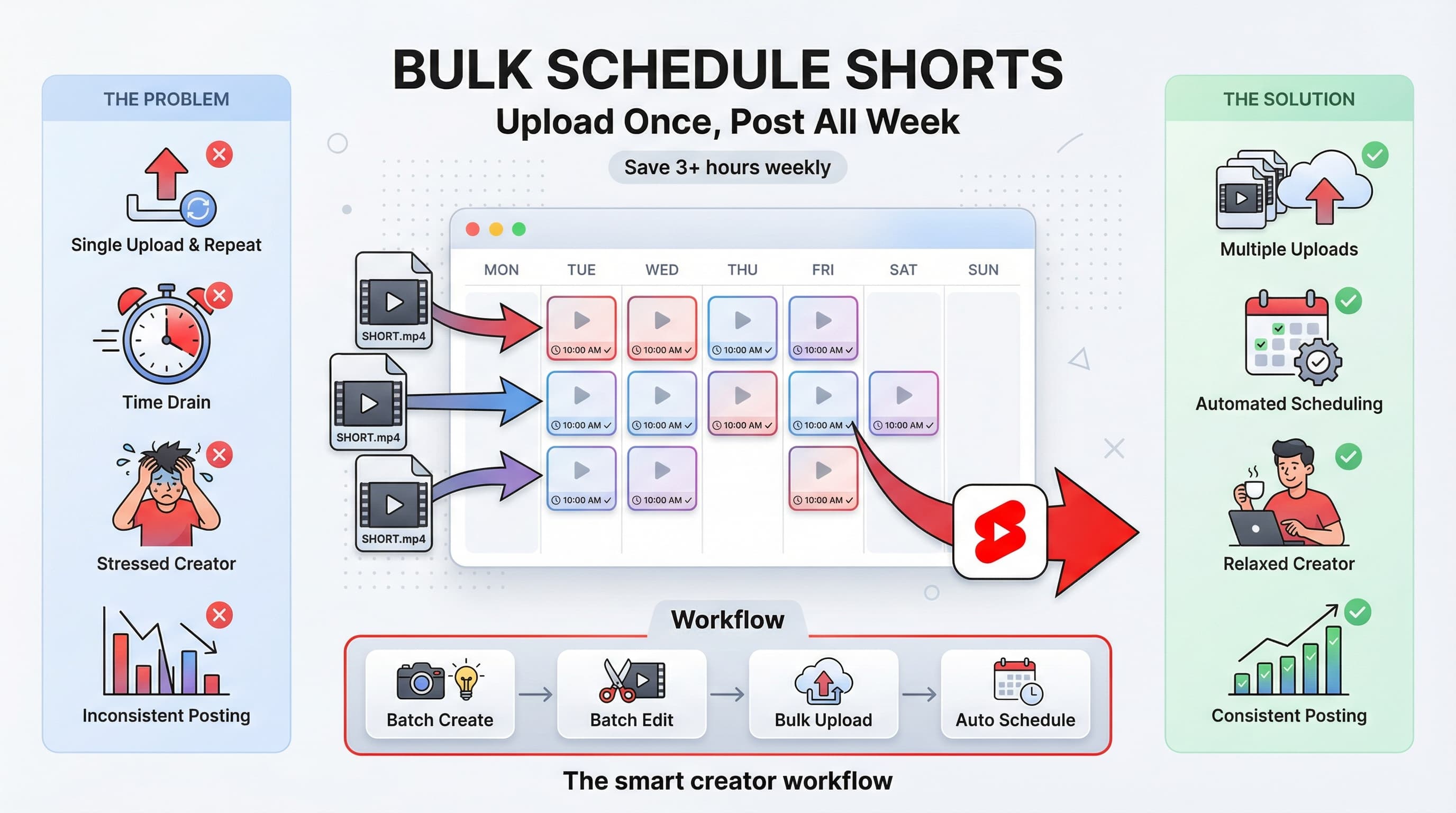
You have 47 YouTube Shorts sitting in a folder on your desktop. Each one took time to create, edit, and perfect. Now you're looking at manually uploading them one by one, setting titles, descriptions, and publish times for each. That's easily three hours of tedious work ahead of you. Learn more about YouTube scheduling.
There's a better way. Bulk scheduling YouTube Shorts lets you upload dozens of videos at once, set your posting schedule in advance, and walk away knowing your content will go live exactly when you planned. Learn more about scheduling across platforms.
I've helped creators schedule thousands of Shorts using various methods, from YouTube's native tools to third-party platforms. This guide breaks down every approach, so you can pick the one that matches your workflow and actually reclaim those hours. Our scheduling across platforms can help.
Try Schedulala for free
Schedule posts to Bluesky, Twitter, and 8 other platforms from one dashboard.
Get started for free→See It in Action
This is what scheduling YouTube Shorts looks like in Schedulala
Why bulk scheduling YouTube Shorts matters for your channel
YouTube's algorithm rewards consistency. Channels that post Shorts regularly see better performance than those posting in bursts followed by silence. The data backs this up: creators who maintain a steady posting schedule of 3 to 7 Shorts per week see 40% higher average views compared to irregular posters. Try our batch content creation.
But here's the problem. Creating Shorts consistently is hard enough. Adding the upload process on top of creation time burns out even dedicated creators. When uploading a single Short takes 5 to 10 minutes (writing the title, description, selecting the right thumbnail moment, setting visibility), scheduling 20 Shorts individually eats up your entire afternoon. See our best time to post on youtube guide.
The real cost of manual uploading
Let's do the math. If you're posting one Short daily (a solid strategy for growth), you're spending roughly 35 to 70 minutes per week just on the upload process. That's 30 to 60 hours per year doing something a tool could handle in minutes. Try our youtube character counter.
Those hours could go toward creating more content, engaging with comments, or analyzing what's actually working on your channel. Bulk scheduling isn't about being lazy. It's about being strategic with your limited time.
Method 1: YouTube Studio's native scheduling features
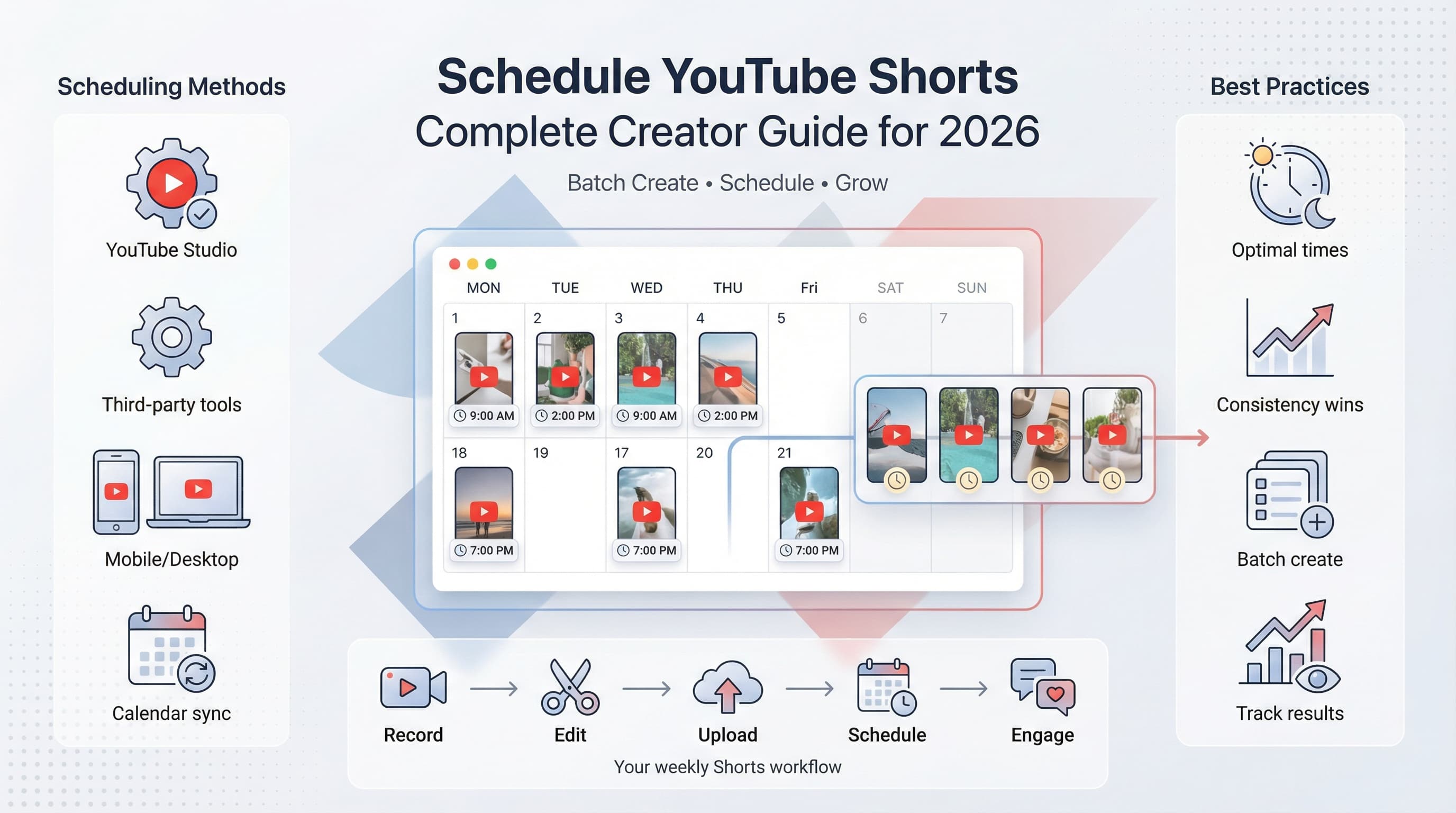
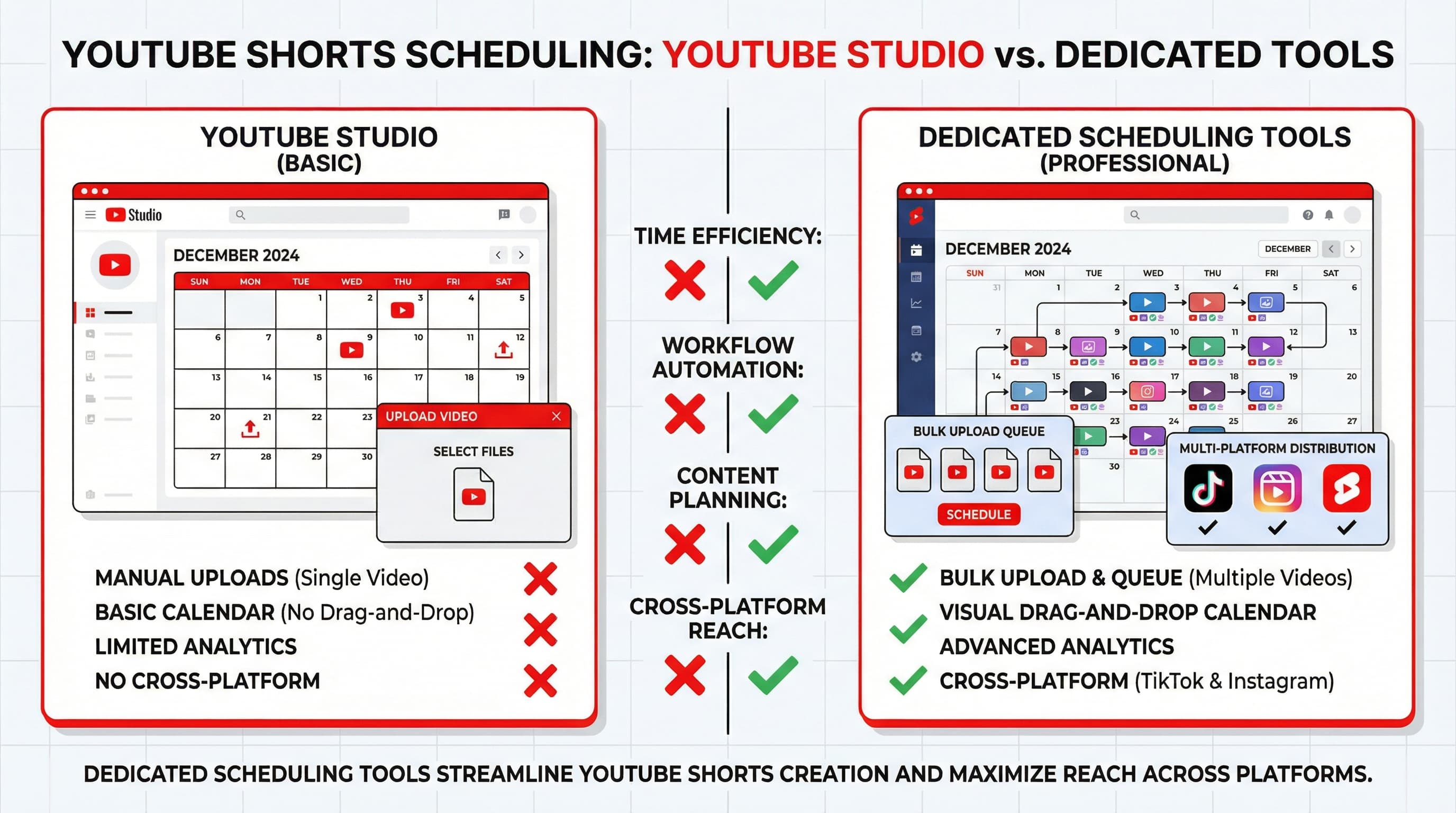
YouTube provides built-in scheduling through YouTube Studio, but calling it "bulk scheduling" requires some creative interpretation. The platform doesn't offer true batch uploading where you select 50 videos and schedule them all at once. Instead, you can upload multiple videos simultaneously and schedule each one individually.
How to schedule Shorts in YouTube Studio
Open YouTube Studio and click the Create button in the top right corner. Select "Upload videos" and drag multiple Short files into the upload window. YouTube will process them in parallel, creating separate draft entries for each.
Here's where the manual work begins. You need to click into each video, add the title and description, set the visibility to "Schedule," and pick your publish date and time. Then repeat for every single video in your batch.
The upload process step by step
First, prepare your video files. Shorts must be vertical (9:16 aspect ratio), under 60 seconds, and ideally have your most engaging moment in the first second. Name your files descriptively before uploading since YouTube will use the filename as a starting point for the title.
In YouTube Studio, navigate to Content, then click Create and Upload videos. Drag your batch of Shorts into the upload area. YouTube can handle 15 videos uploading simultaneously, though your internet connection might bottleneck this.
As each video processes, click the pencil icon to edit its details. Write your title (keep it under 100 characters and front-load the hook), craft a description with relevant keywords, and add hashtags. Including #Shorts in your tags helps YouTube categorize the content correctly, though it's no longer strictly required.
Under visibility, select Schedule and set your desired publish date and time. Consider your audience's timezone and peak activity hours. Click Schedule, then move to the next video.
Limitations of YouTube Studio for bulk scheduling
The native approach works, but it has real drawbacks. You can't apply the same schedule pattern across multiple videos (like "post one at 6 PM every day for the next month"). Each video needs individual attention. You also can't save description templates within Studio itself, meaning external tools or documents become necessary.
For creators managing one channel with a few Shorts per week, Studio's built-in features might suffice. For anyone operating multiple channels or maintaining a daily posting schedule, the time investment becomes unsustainable.
Method 2: Using third-party scheduling tools
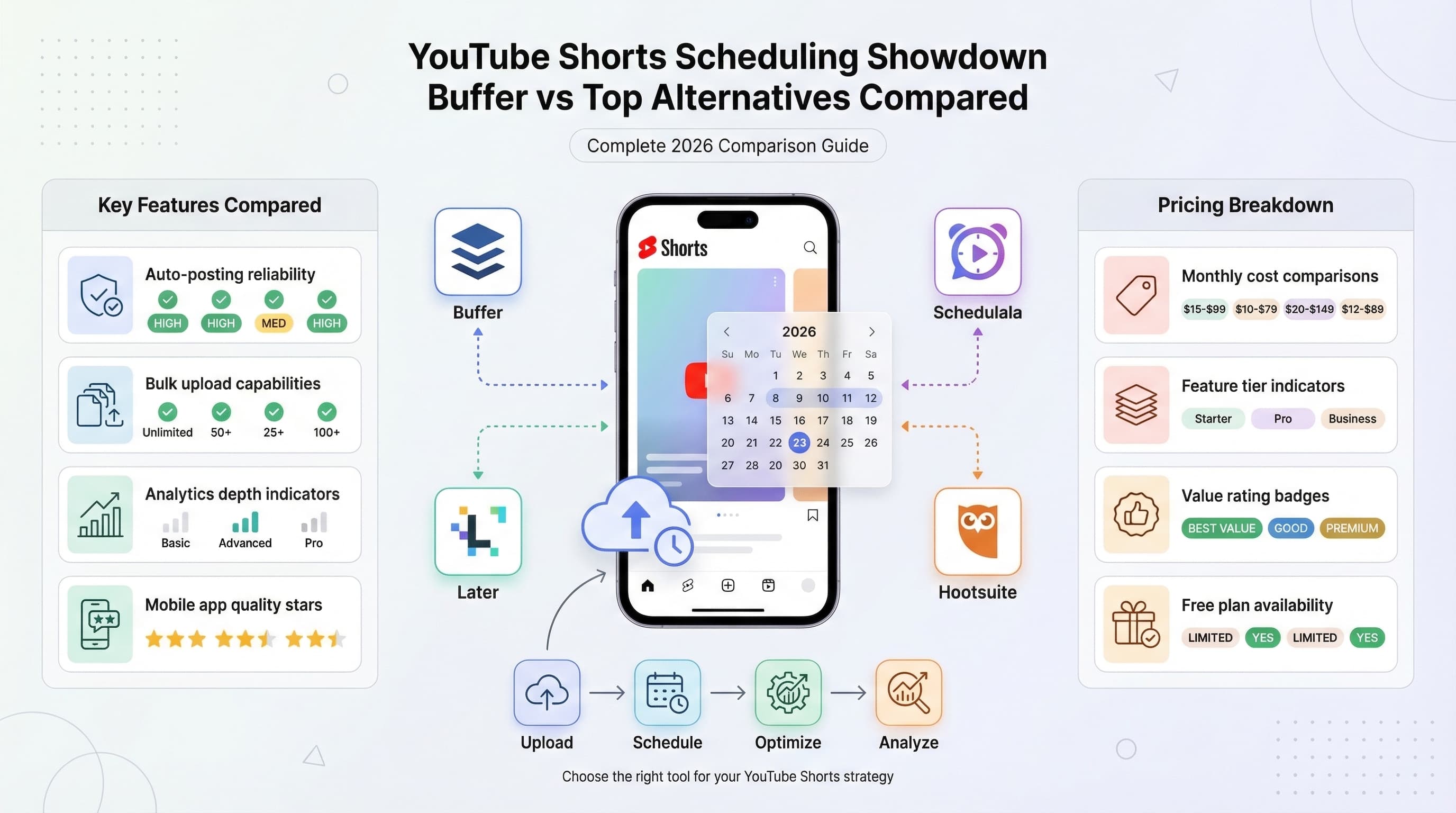
Third-party platforms designed specifically for social media scheduling handle YouTube Shorts much more efficiently than the native Studio. These tools let you upload batches of videos, apply scheduling rules across multiple pieces of content, and manage your entire content calendar from a single dashboard.
What to look for in a Shorts scheduling tool
Not all schedulers support YouTube Shorts equally. Some platforms only handle regular YouTube videos, treating Shorts as an afterthought. Others have built features specifically for short-form vertical content across YouTube, TikTok, and Instagram Reels.
The key features that matter: true bulk upload (selecting multiple files and scheduling them in one flow), recurring schedule patterns (post at the same time daily or weekly), content libraries for storing drafts, and cross-platform posting if you're repurposing content.
How bulk scheduling actually works with dedicated tools
With a proper scheduling platform, the workflow changes dramatically. You connect your YouTube channel through Google's official API (always verify that any tool uses the official API for security). Then you upload your batch of Shorts directly to the platform.
Most quality schedulers let you add titles, descriptions, and tags in bulk. Some even support CSV imports where you prepare a spreadsheet with all your metadata, upload it alongside your videos, and the tool matches everything automatically. This is where the real time savings happen.
Once your content is in the system, you can drag videos onto a calendar, apply preset posting times, or let the platform's AI suggest optimal scheduling windows based on your historical performance data. The tool then handles the actual publishing at the scheduled time.
| Feature | YouTube Studio | Dedicated Scheduler |
|---|---|---|
| Bulk file upload | Yes (up to 15) | Yes (often unlimited) |
| Bulk metadata editing | No | Yes |
| Recurring schedules | No | Yes |
| CSV/spreadsheet import | No | Usually yes |
| Cross-platform posting | No | Often yes |
| Content calendar view | Basic | Advanced |
| Team collaboration | Limited | Yes |
Setting up your bulk scheduling workflow
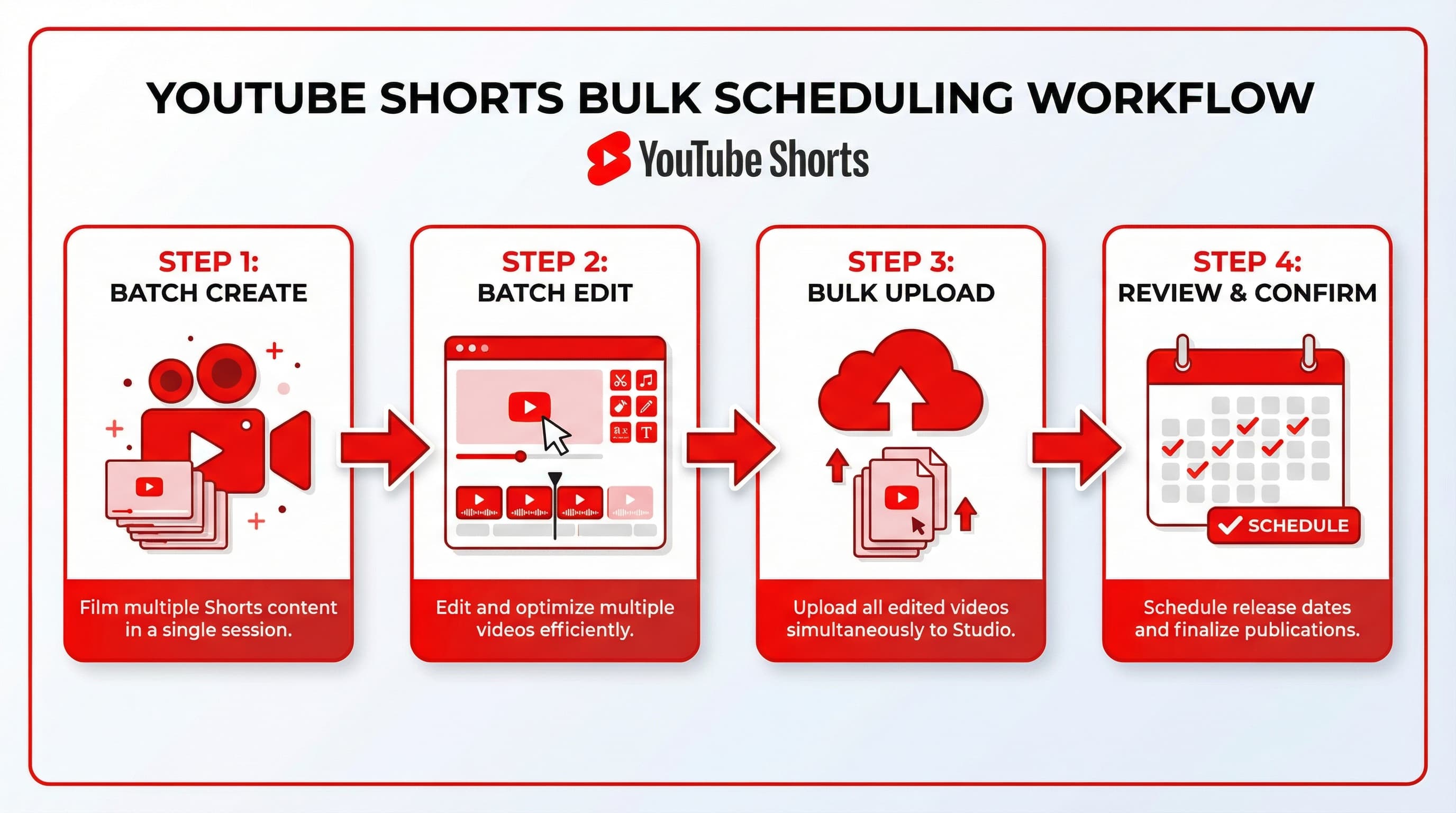
A workflow isn't just about the tools you use. It's about creating a repeatable system that removes decision fatigue and ensures consistent output. Here's how to build a bulk scheduling workflow that actually sticks.
Step 1: Batch your content creation
Before you can bulk schedule, you need bulk content. Set aside dedicated creation sessions where you film multiple Shorts in one sitting. Most successful Shorts creators batch 7 to 14 videos at a time, giving them one to two weeks of content from a single production session.
During these sessions, focus only on filming. Don't edit, don't upload, don't think about scheduling. Context switching kills productivity. Film everything, then move to the next phase.
Step 2: Batch your editing
Edit all your Shorts in another dedicated session. Export them with consistent naming conventions that include the intended publish order or date. Something like "2026-02-06_Hook-about-coffee.mp4" works well and keeps your files organized.
Create a master document or spreadsheet listing each video with its title, description, and relevant tags. This becomes your scheduling reference sheet and speeds up the upload process significantly.
Step 3: The bulk upload session
With your videos edited and metadata prepared, run a dedicated upload session. Open your scheduling tool or YouTube Studio, upload all files, and work through the metadata systematically. Having everything prepared in advance means you're just copying and pasting, not writing from scratch.
Set your schedule according to your posting strategy. If you're posting daily at 6 PM, apply that pattern across your batch. If you're testing different times, note which videos go out when so you can track performance later.
Step 4: Review and confirm
Before walking away, review your scheduled content. Check that publish dates are correct, titles display properly, and descriptions haven't been cut off. A five-minute review prevents embarrassing scheduling mistakes.
Some creators also schedule reminder notifications a few hours before each video goes live. This gives them a chance to promote the new Short on other platforms or prepare for community engagement.
Optimizing your Shorts for the algorithm before scheduling
Bulk scheduling saves time, but it won't save poorly optimized content. Before adding videos to your schedule, make sure each Short is positioned for success.
Titles that drive clicks
YouTube Shorts titles have less visual prominence than long-form video titles, but they still influence discovery. Keep titles under 50 characters when possible. Front-load the hook or curiosity element. Avoid clickbait that your content doesn't deliver on, since poor retention will tank your performance.
Test different title styles across your batch. Some creators see better results with question-based titles ("Why does this happen?"), while others win with statement hooks ("This changed everything"). Track what works for your specific audience.
Descriptions that boost discovery
Shorts descriptions don't appear prominently in the Shorts feed, but they influence YouTube's understanding of your content and can appear in search results. Write 2 to 3 sentences that naturally include relevant keywords. Add a call to action (subscribe, comment, watch the full video) and include 3 to 5 relevant hashtags.
When bulk scheduling, create description templates for different content categories. A cooking Short gets a different template than a tech tip Short. Having these ready means faster uploads without sacrificing SEO value.
Thumbnail frame selection
YouTube automatically selects a thumbnail frame from your Short, but you can override this choice. Pick a frame with clear facial expression (if you appear in the video), text overlay if present, or the most visually striking moment. This thumbnail appears when your Short shows up in search results and the Shorts shelf on your channel.
Timing your scheduled Shorts for maximum reach
When you schedule matters almost as much as what you schedule. The Shorts algorithm gives new content an initial testing window where it shows your video to a sample audience. Publishing when your audience is active can improve early engagement metrics.
Finding your audience's active hours
YouTube Analytics reveals when your subscribers are online. Navigate to Analytics, then Audience, and look for the "When your viewers are on YouTube" card. This shows a heatmap of activity by day and hour.
Schedule your Shorts to publish 30 to 60 minutes before peak activity periods. This gives YouTube time to process and start distributing your content right as your audience comes online.
General best practices for Shorts timing
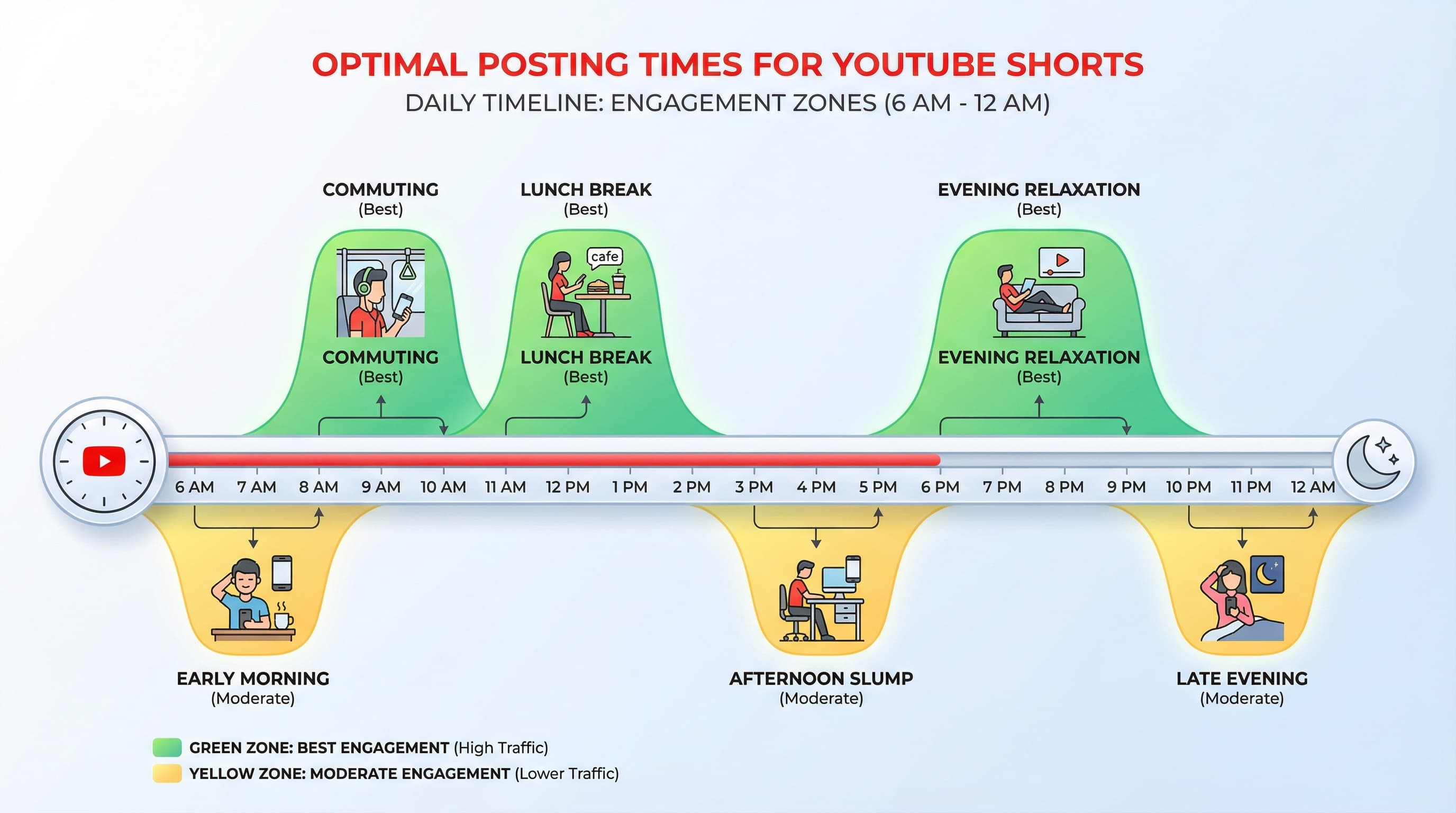
While your specific audience data should guide decisions, some patterns hold across many channels. Weekday mornings (7 to 9 AM local time) catch commuters and morning routines. Lunch hours (11 AM to 1 PM) see consistent activity. Evening hours (6 to 9 PM) often show the highest engagement as people wind down.
Weekends can be hit or miss depending on your niche. Entertainment and lifestyle content often performs well on weekend mornings. Business and productivity content typically sees lower weekend engagement.
When bulk scheduling, you might stagger posting times across your batch to test different windows. Schedule some Shorts for morning, some for evening, and compare performance after a few weeks. Use that data to refine your default posting time.
| Time Slot | Typical Performance | Best For |
|---|---|---|
| 6-8 AM | Good | Early risers, workout content |
| 8-10 AM | Strong | Commuters, news and tips |
| 11 AM-1 PM | Strong | Lunch break viewers |
| 3-5 PM | Moderate | Afternoon slump content |
| 6-9 PM | Highest | Entertainment, tutorials |
| 9 PM-12 AM | Good | Night owls, relaxation content |
Common mistakes when bulk scheduling Shorts
Bulk scheduling is powerful, but it introduces new ways to mess up. Here are the mistakes I see creators make repeatedly, and how to avoid them.
Mistake 1: Scheduling without a buffer
Scheduling your entire content library with no gap leaves no room for timely content. If something trending happens in your niche, you have no flexibility to capitalize on it without disrupting your schedule.
Build in buffer days or slots for spontaneous content. Instead of scheduling seven Shorts for seven days, schedule five and leave two slots open for reactive content or reshares of your best performers.
Mistake 2: Set it and forget it entirely
Bulk scheduling should free up time, not eliminate engagement entirely. Some creators schedule a month of content and disappear. Their comments go unanswered, they miss community questions, and engagement drops because the algorithm notices nobody's home.
Schedule your uploads, but stay present for engagement. Respond to comments, especially in the first few hours after each Short publishes. This activity signals to YouTube that you're an active creator worth promoting.
Mistake 3: Ignoring performance data
When you're scheduling weeks ahead, it's easy to keep pushing out content without checking what's actually working. A Short you scheduled three weeks ago might have flopped, revealing that your audience doesn't respond to that content type. If you've already scheduled more of the same, you're burning opportunities.
Review analytics weekly, even if content is pre-scheduled. Be willing to swap out or delete scheduled Shorts if performance data suggests a different direction.
Mistake 4: Duplicate or near-duplicate content
When batch creating, it's tempting to make minor variations of the same video. Three Shorts with slightly different takes on the same joke, five tutorials covering nearly identical tips. YouTube's algorithm can flag this as repetitive content, and viewers will get bored fast.
Vary your content within batches. Cover different topics, use different hooks, maintain variety even when creating efficiently.
Mistake 5: Wrong aspect ratio or length
Shorts require vertical video (9:16) under 60 seconds. When bulk uploading, it's easy to accidentally include a horizontal video or one that runs 63 seconds. These won't be classified as Shorts and won't appear in the Shorts feed.
Double-check every video in your batch before uploading. A quick scroll through your files checking dimensions and duration takes two minutes and prevents wasted effort.
Advanced bulk scheduling strategies
Once you've mastered basic bulk scheduling, these advanced tactics can multiply your efficiency and results.
Content series and themed batches
Create content series where each Short connects to others. A "Monday Tips" series, a "Weekend Challenge" series, or a numbered tutorial series gives viewers reasons to return. When bulk scheduling, you can prepare an entire series in advance and schedule it across multiple weeks.
Themed batches also streamline creation. If you're a cooking creator, dedicate one batch session to breakfast recipes, another to quick dinners, another to desserts. This mental focus produces better content faster than jumping between unrelated topics.
Cross-platform scheduling
Many Shorts creators also post to TikTok and Instagram Reels. The same vertical video can work across platforms with minor adjustments. Some scheduling tools let you upload once and publish to multiple platforms, each with platform-specific captions and scheduling.
When cross-posting, stagger your schedules. Don't publish the same video on all platforms simultaneously. Spread releases across 24 to 48 hours to maximize your content's exposure window and avoid flooding followers who follow you everywhere.
Using AI assistance in your workflow
AI tools can speed up the metadata portion of bulk scheduling. Use AI to generate title variations, description drafts, and hashtag suggestions. You'll still need to review and personalize the output, but starting from AI-generated options beats staring at a blank field.
Some creators also use AI for content ideation during planning sessions. Generate 50 video ideas, pick the 15 best, and batch create those. This removes the creative block that often stalls production.
Evergreen versus timely content balance
Bulk scheduling works best for evergreen content that stays relevant regardless of when it publishes. Tips, tutorials, entertainment, and educational content age well. Trend-reactive content, current events, and time-sensitive material don't belong in a bulk schedule.
Structure your content calendar with 70% evergreen (suitable for bulk scheduling) and 30% timely (created and posted reactively). This balance keeps your channel consistent while maintaining relevance.
Measuring success and refining your approach
Bulk scheduling means nothing if your content doesn't perform. Track these metrics to understand what's working and refine your approach over time.
Key metrics for Shorts performance
Views matter, but retention matters more. A Short with 100,000 views but 15% average watch time performed worse than one with 30,000 views and 80% retention. YouTube will push the higher-retention video to more people over time.
Also track swipe-away rate (how quickly people scroll past your Short), likes and comments relative to views, and subscriber conversions from each Short. These metrics reveal whether your content captures attention and builds your audience.
A/B testing through scheduled batches
Bulk scheduling lets you run informal A/B tests. Schedule two Shorts on similar topics with different hooks and compare performance. Test different posting times across your batch and track which windows deliver better results.
Document your tests and findings. After a month of scheduled content, review which titles, topics, and posting times outperformed others. Use those insights to guide your next batch.
When to break your schedule
Sometimes you need to override your schedule. A Short in your queue becomes irrelevant due to external events. A competitor posts something you should respond to quickly. A trend emerges that fits your niche perfectly.
Don't let bulk scheduling make you rigid. The schedule serves your channel growth, not the other way around. Be willing to pause, swap, or add content when opportunities arise.
Getting started: your first bulk scheduling session
Ready to try bulk scheduling? Here's a practical plan for your first session.
Week 1: Preparation
Create 7 to 10 Shorts in a batch creation session. Edit them all with consistent quality standards. Prepare a spreadsheet with title, description, and tags for each video. Choose your scheduling tool and connect your YouTube channel.
Week 2: Upload and schedule
Upload your batch to your scheduling tool or YouTube Studio. Apply your metadata from your prepared spreadsheet. Schedule one Short per day for the next week at your chosen optimal time. Review the schedule and confirm everything looks correct.
Week 3: Monitor and engage
As your scheduled Shorts publish, monitor their performance. Respond to comments within the first few hours of each post. Note which videos perform above or below expectations. Start preparing your next batch based on early learnings.
Week 4: Iterate
Review the full batch's performance. Identify patterns in what worked. Refine your content strategy, posting times, and workflow based on data. Upload and schedule your next batch with these improvements.
The bottom line on bulk scheduling YouTube Shorts
Bulk scheduling transforms YouTube Shorts from a daily grind into a manageable system. Instead of logging in every day to upload and optimize, you batch your work into focused sessions and let automation handle the rest.
The creators seeing the best results combine batch creation (filming multiple Shorts in one session), batch editing (processing all videos together), and batch scheduling (uploading and setting publish times in one sitting). This approach frees up mental energy for what actually matters: creating content your audience loves.
Start with YouTube Studio if you're posting just a few Shorts weekly. Graduate to a dedicated scheduling tool like Schedulala when you're managing more content or multiple channels. Either way, the time investment in setting up a bulk scheduling workflow pays dividends in consistency, reduced stress, and hours reclaimed for other priorities.
Your 47 Shorts don't have to consume your entire afternoon. With the right approach, you can schedule them all, set your calendar, and focus on creating the next batch while your channel runs on autopilot.
Try Schedulala for free
Schedule posts to Bluesky, Twitter, and 8 other platforms from one dashboard.
Get started for free→