Bluesky Custom Feeds: How to Use Them (Complete Guide for 2026)
Learn how to find, follow, and create Bluesky custom feeds. This guide covers feed algorithms, popular feed examples, and tips for curating your perfect.

Quick answer
Bluesky custom feeds are algorithm-powered content streams that anyone can create, pin, and share, replacing the one-size-fits-all algorithm.
- •Custom feeds filter posts by keywords, users, engagement, or other criteria
- •Pin your favorite feeds to your home screen for quick access alongside your Following feed
- •Popular feeds include trending topics, niche communities, and curated content collections
- •Getting featured in popular custom feeds increases your reach on Bluesky significantly
Your Bluesky timeline doesn't have to be a mess. Unlike other platforms that force-feed you content based on mysterious algorithms, Bluesky gives you the keys to build exactly the experience you want. Try our Bluesky scheduling.
See It in Action
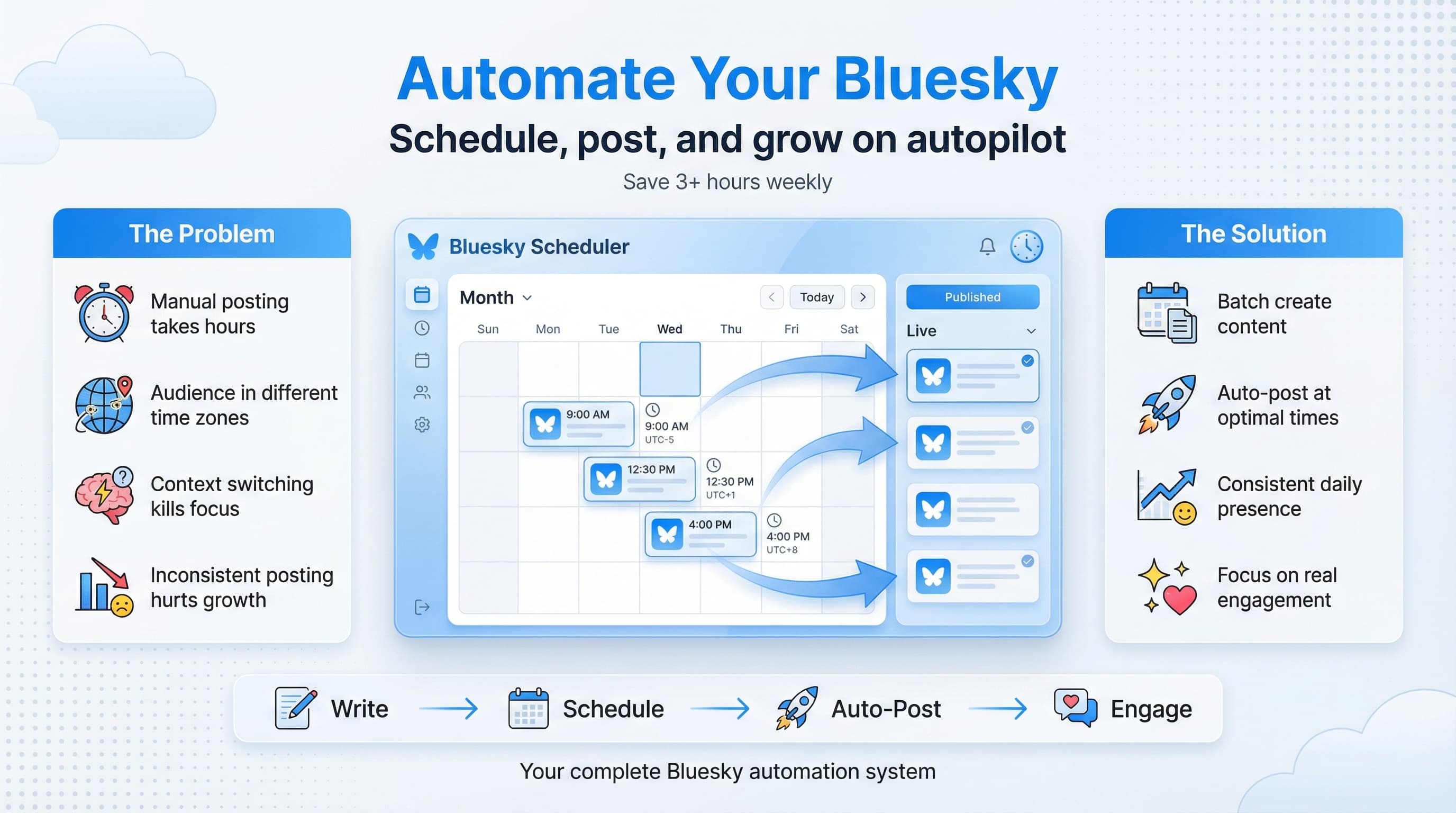
This is what scheduling a Bluesky post looks like in Schedulala
Custom feeds are one of Bluesky's most powerful features, yet most users barely scratch the surface. They follow a few popular feeds, maybe pin one to their sidebar, and call it a day. Our content calendar can help.
But what if you could see only posts with high engagement from accounts you don't follow? Or filter your timeline to show just posts about a specific topic, from a specific language, posted at a specific time? That's what custom feeds unlock. Our scheduling across platforms can help.
Try Schedulala for free
Schedule posts to Bluesky, Twitter, and 8 other platforms from one dashboard.
Get started for free→What are Bluesky custom feeds?
Custom feeds are algorithmic timelines that anyone can create and share on Bluesky. Think of them as saved searches on steroids, or personalized channels that pull in posts matching specific criteria. Our scheduling across platforms can help.
The default "Following" feed shows posts from accounts you follow in reverse chronological order. That's fine, but it's just one way to consume content. Custom feeds let you slice and dice the entire Bluesky firehose based on rules you set. Our bluesky line break generator can help.
How custom feeds differ from the main timeline
Your Following feed is simple: posts from people you follow, newest first. Custom feeds can pull from anywhere on Bluesky, filter by keywords, engagement metrics, media types, languages, and more. Some feeds surface content from accounts you've never seen before. Others help you filter down to just the content you care about most from people you already follow. Learn more about bluesky bio generator.
The technical magic happens through Bluesky's AT Protocol. Feed generators run on external servers that process the public firehose of posts and return filtered results. This decentralized approach means anyone with the technical chops can build and host their own feed algorithm.
The feed ecosystem
Bluesky has thousands of custom feeds created by the community. Some have millions of subscribers. Others serve niche communities of a few hundred people. The variety is staggering: news aggregators, topic-specific feeds, engagement-based discovery feeds, language filters, feeds that only show posts with images, feeds that exclude certain words, and everything in between.
This ecosystem evolves constantly. New feeds pop up daily, and the most useful ones spread through word of mouth and pinned recommendations. Unlike algorithmic timelines on other platforms, you always know why you're seeing something: because it matched the criteria of a feed you chose to follow.
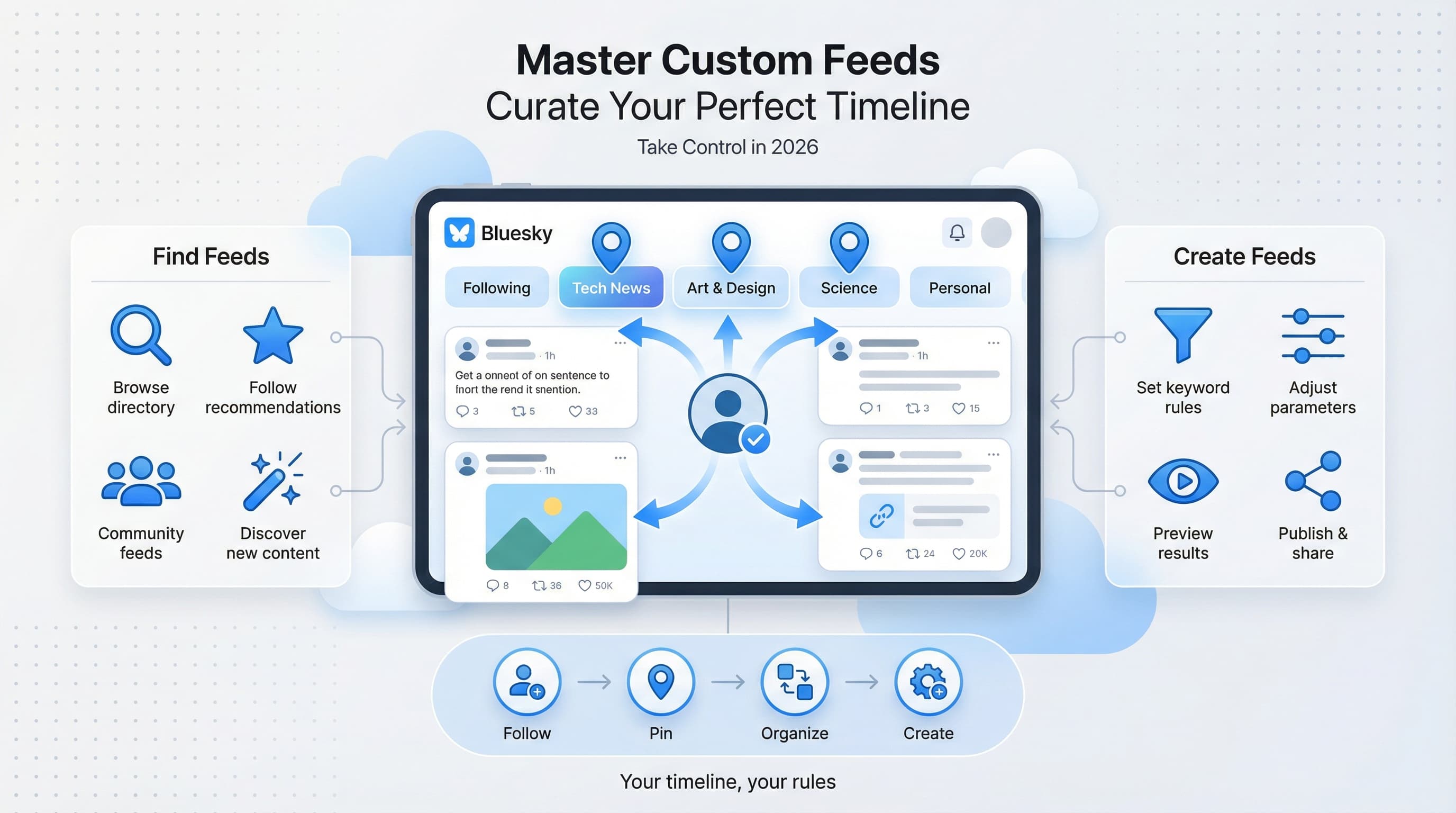
How to find and follow custom feeds
Finding great feeds takes a bit of exploration, but once you know where to look, you'll have more options than you can possibly use. Here's how to discover feeds that match your interests.
Method 1: The Feeds tab in the app
Open Bluesky and tap the search icon, then look for the "Feeds" tab. This shows you a directory of popular feeds organized by category. You can browse through trending feeds, search by name, or explore feeds that other users have saved.
The directory isn't exhaustive, but it's a solid starting point. Sort by popularity to see what the community finds most useful, or search for keywords related to your interests. Looking for photography content? Search "photo" or "photography" and you'll find several dedicated feeds.
Method 2: Feed links shared by other users
Many feeds spread through posts. Users share links to feeds they've discovered, often with explanations of what makes them useful. When you see a feed link in a post, tapping it opens the feed preview where you can see sample content and decide if you want to follow.
Pay attention to recommendations from accounts you trust. If someone whose content you enjoy recommends a feed, there's a good chance it'll surface the kind of posts you want to see. Some power users regularly share feed discoveries with their followers.
Method 3: Third-party feed directories
Several community-maintained directories catalog Bluesky feeds. Websites like Bluesky Feeds Directory and similar projects let you browse feeds with descriptions, subscriber counts, and sample posts. These directories often have better search and filtering than the in-app discovery.
Some directories categorize feeds by purpose: news, entertainment, specific fandoms, professional topics, and local communities. This makes it easier to find feeds when you know what you're looking for but don't know the exact name.
Popular feeds worth checking out
A few feeds have become community favorites for good reason. These aren't necessarily the "best" feeds (that depends entirely on your interests), but they demonstrate what's possible and give you a sense of feed variety.
| Feed Name | What It Does | Best For |
|---|---|---|
| Discover | Surfaces engaging posts from outside your network | Finding new accounts to follow |
| What's Hot | Shows trending posts based on engagement | Staying current with platform-wide conversations |
| Quiet Posters | Highlights posts from accounts that post infrequently | Not missing content from low-volume accounts |
| Popular With Friends | Posts that people you follow have liked | Trusted content discovery |
| Mutuals | Only shows posts from mutual follows | Focusing on your core community |
These general-purpose feeds work for most users, but the real power comes from topic-specific feeds. Whether you're into indie game development, climate science, woodworking, or K-pop, there's probably a feed for it.
Organizing and pinning your feeds
Following feeds is just step one. The real productivity gains come from organizing them effectively. Bluesky lets you pin feeds, reorder them, and switch between them quickly.
Pinning feeds to your home screen
Pinned feeds appear as tabs at the top of your home screen. Swipe left or right to move between them, or tap the tab directly. Most users pin 3 to 5 feeds for quick access, keeping their most-used feeds one swipe away.
To pin a feed, go to your Feeds list, tap the pin icon next to any feed, and drag to reorder. Your Following feed is pinned by default, but you can unpin it if you prefer starting with a different view. Some users rarely look at their Following feed, preferring curated topic feeds instead.
Creating a feed workflow
Think about how you use Bluesky throughout the day. Maybe you start mornings with a news-focused feed, switch to industry content during work hours, and browse entertainment feeds in the evening. Arrange your pinned feeds to match this flow.
I keep my pinned feeds in this order: Following (for catching up on friends), a professional topic feed (for work-relevant content), a discovery feed (for finding new accounts), and a "just for fun" feed (for entertainment). This matches my usage pattern and keeps the right content one swipe away.
Feed management tips
Your feed setup should evolve over time. Some tips for keeping your feeds organized and useful:
- Audit your feeds quarterly. Unfollow feeds that no longer serve you, and search for new ones as your interests shift.
- Don't over-pin. Having too many pinned feeds makes switching cumbersome. Keep it to your 5 most essential feeds.
- Use feed descriptions as reminders. When you forget what a feed does, check its description before unfollowing.
- Try feeds for at least a week before deciding. First impressions can be misleading, especially for engagement-based feeds that need time to understand your preferences.
Creating your own custom feed
Here's where things get interesting. You're not limited to feeds other people create. You can build your own custom feed tailored exactly to your needs, no coding required (for basic feeds, at least).
Using Skyfeed to build feeds
Skyfeed is the most popular no-code feed builder for Bluesky. It provides a visual interface where you can set rules like: include posts with these keywords, exclude posts with these words, only show posts with images, filter by language, require a minimum number of likes, and more.
The interface walks you through each option. Start with a name and description for your feed, then add filters. Each filter is a rule that posts must match (or avoid) to appear in the feed. You can combine multiple filters with AND/OR logic to create surprisingly sophisticated feeds.
Step-by-step: Building a basic topic feed
Let's walk through creating a simple feed that shows posts about, say, coffee. Here's the process:
- Go to Skyfeed and sign in with your Bluesky account
- Click "Create New Feed" and give it a name ("Coffee Talk" or whatever you like)
- Add a keyword filter for "coffee" (the builder shows you how)
- Optionally add filters to exclude spam patterns or require engagement minimums
- Preview the feed to see what posts it would show
- Publish the feed to make it live
The whole process takes about 5 minutes for a basic feed. Your new feed gets a unique URL you can share, and other users can follow it if you make it public.
Advanced feed creation
For more sophisticated feeds, you'll eventually hit the limits of no-code builders. This is where technical feed generators come in. If you can write code (or know someone who can), you can create feeds with custom logic that no-code tools can't replicate.
When to go custom
Custom coded feeds make sense when you need: machine learning classification (like sentiment analysis or topic detection), complex cross-referencing between accounts, real-time data from external sources, or performance optimization for high-volume feeds.
Most users never need this level of customization. But if you're building a feed for a large community or need logic that's too complex for visual builders, the AT Protocol documentation covers how to set up your own feed generator server.
Feed generator hosting options
Running a custom feed requires a server that processes the Bluesky firehose and responds to feed requests. Options range from simple (Cloudflare Workers, Vercel) to robust (dedicated servers for high-traffic feeds). The Bluesky team maintains starter templates and documentation for developers who want to build feed generators.
For most creators, Skyfeed handles hosting automatically. You build the feed, they run the infrastructure. Only go custom if Skyfeed's features genuinely don't meet your needs.
Using custom feeds strategically for content creators
If you create content on Bluesky (or manage accounts for clients), custom feeds become even more valuable. They're research tools, engagement monitors, and community building blocks all in one.
Research and inspiration
Create or follow feeds specific to your niche. A feed showing popular posts about your industry tells you what topics resonate. A feed showing questions people ask (hint: filter for posts containing "?") surfaces content opportunities. A feed showing what your competitors' followers engage with reveals what your audience might want.
I use a custom feed that shows highly-engaged posts from accounts in my industry that I don't follow. It's like a curated research stream of what's working for others, without cluttering my main following feed.
Monitoring mentions and conversations
Feeds can track keywords related to your brand, products, or areas of expertise. Set up a feed for your company name, product names, or your personal name to catch conversations you might otherwise miss. This is faster than searching manually and catches you up in one scroll.
Some creators build feeds for their content topics to find people asking questions they can answer. If you're known for, say, email marketing advice, a feed showing posts asking about email marketing is a goldmine of engagement opportunities.
Building community feeds
Custom feeds can serve your audience, not just yourself. Create a feed for your community: posts using a specific hashtag, posts from a list of accounts you curate, or posts matching topics your followers care about. Share the feed link and it becomes a gathering place.
Community feeds build loyalty. When people can find good content through a feed you maintain, they associate that value with you. It's a service that keeps giving, with minimal ongoing effort once it's set up.
Common mistakes with custom feeds (and how to avoid them)
After watching users struggle with feeds for the past couple of years, patterns emerge. Here are the mistakes I see most often, along with fixes.
Mistake 1: Following too many feeds
It's tempting to follow every interesting feed you discover. Resist. More feeds means more decision fatigue about where to look, and you'll inevitably stop checking most of them. Quality over quantity applies here.
The fix: follow generously, but pin sparingly. Keep your pinned feeds to 5 or fewer. Let the rest live in your feeds list for occasional browsing. Every few months, unfollow feeds you haven't looked at.
Mistake 2: Expecting instant feed perfection
New feeds, especially discovery-oriented ones, need time to calibrate. The first posts you see might not represent the feed at its best. Some feeds use engagement patterns that take a day or two to reflect your interests.
The fix: give new feeds a real trial period. Check them daily for at least a week before deciding they're not for you. If a feed is mostly good with occasional junk, that's normal. Perfect feeds don't exist.
Mistake 3: Ignoring feed settings and options
Some feeds have settings you can adjust. Others have variations (like "What's Hot Classic" vs "What's Hot" with different time windows). Users often follow the default without exploring alternatives that might fit better.
The fix: when you follow a feed, check if there are related feeds or settings. Read the feed description fully. Sometimes a small adjustment transforms a mediocre feed into exactly what you needed.
Mistake 4: Not using feeds for content research
Many users treat feeds purely as consumption tools. They miss the research potential: what topics trend, what formats perform, what questions people ask, what competitors post. Feeds are windows into your niche.
The fix: create or follow at least one feed specifically for research. Check it when planning content, not just when scrolling for entertainment. Take notes on patterns you notice.
Feeds and the future of Bluesky
Custom feeds aren't just a feature. They're central to Bluesky's philosophy about how social media should work. Understanding this context helps you make the most of feeds today and anticipate where they're heading.
Algorithmic choice vs algorithmic imposition
Traditional social platforms design algorithms to maximize engagement (read: time on platform, ad views). You don't choose the algorithm; it chooses what to show you based on what keeps you scrolling. The result is often rage-bait, controversy, and content that makes you feel bad but keeps you hooked.
Bluesky flips this. The platform provides infrastructure, and users (or third parties) build the algorithms. You pick which algorithm to use. You can switch anytime. If a feed starts going sideways, you unfollow it and choose another. Power shifts from the platform to the user.
What's coming for custom feeds
The feed ecosystem keeps maturing. Feed builders get more sophisticated, with more filter options and better interfaces. Machine learning powered feeds are emerging, offering personalization that adapts to your engagement patterns rather than just static rules.
We're also seeing feed monetization experiments. Some creators charge for access to premium feeds with exclusive curation. Whether this becomes common remains to be seen, but it hints at feeds becoming a real business opportunity for skilled curators.
The key takeaway: feeds are a core part of the Bluesky experience, and they're only getting more important. Investing time in understanding and customizing your feed setup pays off both now and as the platform evolves.
Your Bluesky feed action plan
Theory is nice, but action is better. Here's a concrete plan to upgrade your Bluesky feed experience this week:
Day 1: Audit your current setup
Open your feeds list. How many feeds do you follow? When did you last actually check each one? Unfollow any that you haven't looked at in a month. Identify which pinned feeds you use most and which just take up space.
Day 2: Find three new feeds
Spend 15 minutes exploring the feed directory. Search for keywords related to your interests or profession. Follow at least three new feeds that look promising. Don't pin them yet; just add them to your list.
Day 3-5: Test and evaluate
Check your new feeds daily. Notice which ones surface content you actually want to see. Take mental notes on signal-to-noise ratio. Which feeds make you say "oh, that's interesting"? Which feel like work to scroll through?
Day 6: Reorganize and pin
Based on your testing, reorganize your pinned feeds. Promote any new feeds that earned their spot. Unpin or unfollow feeds that disappointed. Arrange your pins in the order you'll actually use them.
Day 7: Create or customize one feed
Try building your own feed in Skyfeed, even a simple one. Or find a feed builder and experiment with filters. The goal isn't perfection; it's understanding what's possible. You'll never look at feeds the same way after creating one yourself.
Final thoughts on mastering Bluesky feeds
Custom feeds represent a fundamentally different approach to social media consumption. Instead of accepting whatever an algorithm decides to show you, you curate your own experience. That shift in control is small in practice (just following and unfollowing feeds) but massive in impact.
The users who get the most out of Bluesky tend to be intentional about their feeds. They don't just accept the default. They explore, experiment, create, and refine. Their timelines show them exactly what they want to see because they put in the work to make it that way.
You don't need to become a feed power user overnight. Start with one change: follow one new discovery feed, create one simple custom feed, or just reorganize your existing pins. Small improvements compound. A slightly better feed experience today becomes a dramatically better experience over months of refinement.
Try Schedulala for free
Schedule posts to Bluesky, Twitter, and 8 other platforms from one dashboard.
Get started for free→