How to Automate Bluesky Posts: The Complete Guide to Scheduling and Automation
Learn how to automate Bluesky posts with scheduling tools, API integrations, and smart workflows. Save hours weekly while growing your audience.

Quick answer
Automate Bluesky posting using Schedulala's direct API integration, which supports scheduled posts, threads, and image uploads.
- •Schedulala is one of the few scheduling tools with native Bluesky API support
- •Schedule single posts, threads, and image posts to Bluesky for $9/month
- •Bluesky's AT Protocol API is open and does not require special approval to use
- •Cross-post to Bluesky plus 9 other platforms simultaneously with Schedulala
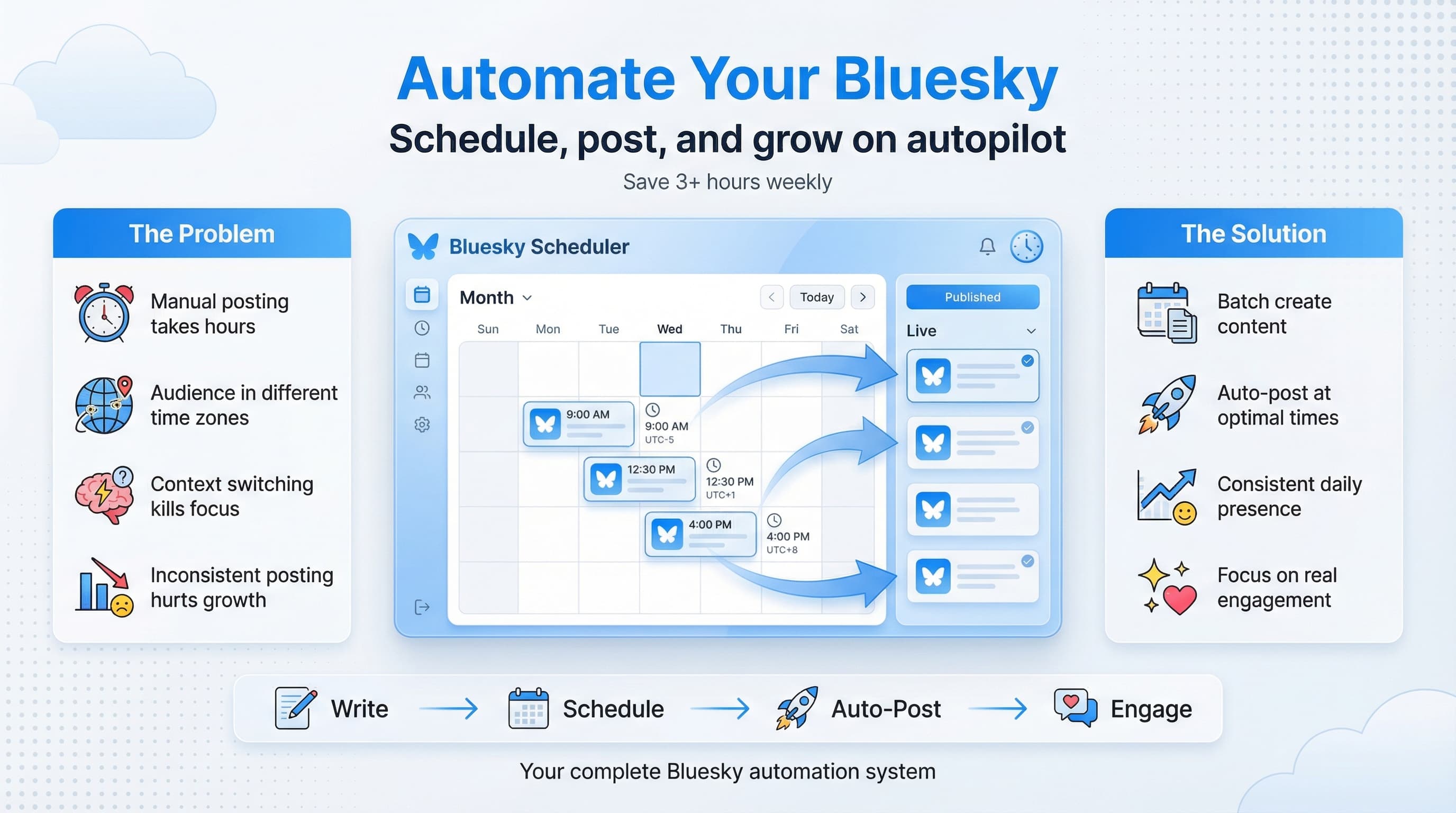
You just spent 45 minutes crafting the perfect Bluesky post. Great hook, solid insight, even found a relevant image. Then you realize your audience is mostly asleep because you're posting at 2 AM your time. Try our Bluesky scheduling.
This happens more than anyone wants to admit. The decentralized social web is exciting, but it comes with a timing problem. Your followers are scattered across time zones, and you can't be online 24/7. Learn more about scheduling across platforms.
What if you could write posts when inspiration strikes, then have them go live when your audience is actually scrolling? That's exactly what Bluesky automation makes possible. Our scheduling across platforms can help.
Try Schedulala for free
Schedule posts to Bluesky, Twitter, and 8 other platforms from one dashboard.
Get started for free→Why automating Bluesky posts matters more than you think
Bluesky isn't Twitter. The algorithm works differently, the community expects different things, and the platform's decentralized nature creates unique opportunities. But one thing remains constant: consistency wins. Try our batch content creation.
The accounts growing fastest on Bluesky share three characteristics. They post regularly, they respond to engagement quickly, and they show up when their audience is active. Two of those three can be automated. Try our bluesky line break generator.
The real cost of manual posting
Let's do some math. Say you post three times daily on Bluesky. Each post takes about 10 minutes when you factor in writing, finding or creating media, and choosing the right moment to publish. That's 30 minutes daily, or 3.5 hours weekly, just on posting. Our bluesky character counter can help.
Now add the context-switching cost. Every time you stop your actual work to post something, you lose focus. Research suggests it takes 23 minutes to fully refocus after an interruption. Three daily interruptions could cost you over an hour of productive work, on top of the posting time itself.
Automation doesn't just save time. It protects your ability to do deep work while maintaining a consistent presence.
The consistency advantage on Bluesky
Bluesky's feed algorithm (yes, it has one, despite the decentralization talk) favors accounts that post consistently. Not constantly, but consistently. The difference matters.
Posting 20 times in one day then disappearing for a week signals unreliability to both the algorithm and your followers. Posting twice daily at roughly the same times signals that you're worth following because you'll actually show up.
Automation makes consistency trivially easy. You batch-create content when you're in the zone, schedule it across the week, and your account looks active even when you're focused on other things.
Understanding Bluesky's API and AT Protocol
Before diving into tools, it helps to understand what makes Bluesky automation possible. Unlike some platforms that actively discourage third-party tools, Bluesky was built with openness in mind.
The AT Protocol foundation
Bluesky runs on the AT Protocol (Authenticated Transfer Protocol), which is designed to be open and interoperable. This means developers can build tools that interact with Bluesky without jumping through hoops or risking sudden API changes that break everything.
For you, this translates to more reliable automation. When a platform is built on open protocols, third-party scheduling tools can offer deeper integration and more stability than on closed platforms where access could be revoked at any moment.
The AT Protocol also supports features like custom feeds and data portability, which creates opportunities for more sophisticated automation down the line. Imagine scheduling posts that automatically target specific custom feeds, or creating automated workflows that respond to certain types of engagement.
API access for regular users
You don't need to be a developer to benefit from Bluesky's API. The scheduling tools available today handle all the technical complexity. You just need to connect your account, write your posts, and choose when they go live.
That said, understanding the basics helps you make better decisions about which tools to trust. Any legitimate scheduling tool will use Bluesky's official API endpoints and ask for appropriate permissions. Be wary of tools that ask for your password directly rather than using OAuth or app passwords.
Choosing the right Bluesky scheduling tool
The market for Bluesky automation tools is still maturing, which is both a challenge and an opportunity. You won't find as many options as exist for Instagram or Twitter, but the tools that do exist tend to be built by people who genuinely understand the platform.
What to look for in a scheduling tool
Not all scheduling tools are created equal. Some critical features separate the useful from the frustrating:
- Native Bluesky support (not just Twitter cross-posting that happens to work)
- Image and media scheduling with proper formatting
- Thread support for multi-post sequences
- Time zone handling that doesn't require mental math
- Draft saving for posts you're still refining
- Analytics to see what's actually working
The last point deserves extra attention. Scheduling without analytics is flying blind. You need to know which posts performed well, which times got the most engagement, and whether your automation strategy is actually working.
| Feature | Why It Matters | Questions to Ask |
|---|---|---|
| Multi-platform support | Manage Bluesky alongside other networks | Does it support your specific platforms? |
| Visual calendar | See your content plan at a glance | Can you drag and drop to reschedule? |
| Team collaboration | Essential for agencies and teams | What's the approval workflow like? |
| Bulk scheduling | Upload many posts at once | Does it support CSV import? |
| Queue-based posting | Automatically fill your schedule | How flexible is the timing? |
Schedulala for Bluesky automation
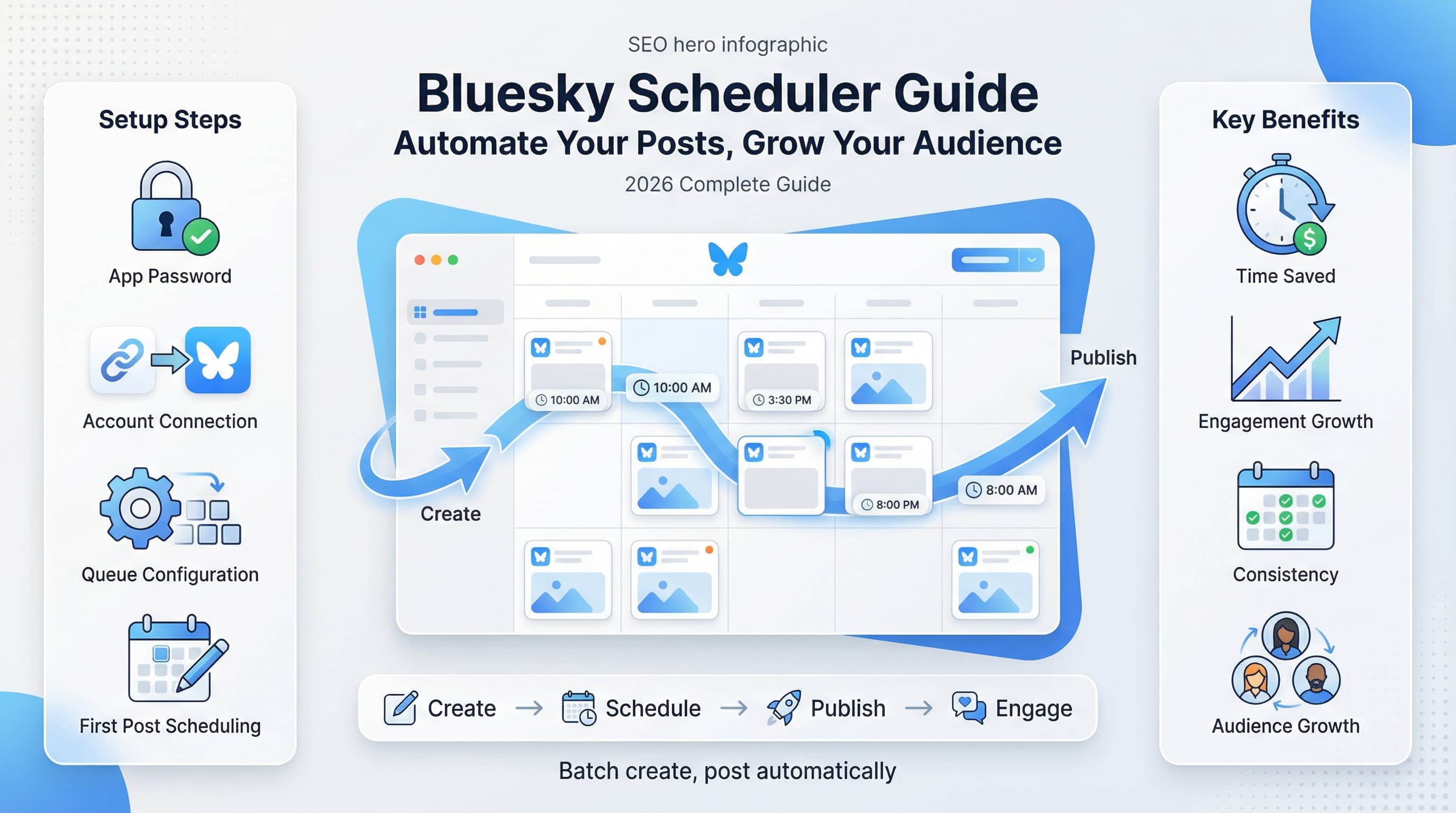
We built Schedulala specifically to solve the multi-platform scheduling problem, and Bluesky was a priority from the start. The platform connects directly to Bluesky's API, supports images and threads, and gives you a visual calendar that makes planning content intuitive.
One feature users particularly appreciate: optimal time suggestions based on when your audience is most active. Instead of guessing, you get data-driven recommendations that improve over time as the system learns your engagement patterns.
The analytics dashboard shows you exactly which posts drove the most engagement, making it easy to double down on what works. You can also manage multiple Bluesky accounts from a single dashboard, which is useful if you run both a personal brand and a business account.
Step-by-step: Setting up Bluesky automation
Theory is nice, but let's get practical. Here's exactly how to set up Bluesky automation from scratch, using Schedulala as the example (though the principles apply to most tools).
Step 1: Create an app password
Never give a third-party tool your main Bluesky password. Instead, create an app-specific password that can be revoked independently.
Go to your Bluesky settings, find the "App Passwords" section, and generate a new password. Give it a descriptive name like "Schedulala" so you remember what it's for. Copy this password immediately since you won't be able to see it again.
This password grants posting access without giving full control of your account. If you ever stop using the tool, you can revoke just this password without affecting anything else.
Step 2: Connect your account
In your scheduling tool, look for the option to add a new social account. Select Bluesky, enter your handle (including the full domain, like yourname.bsky.social), and paste the app password you just created.
The tool should verify the connection immediately. If it fails, double-check that you copied the entire app password and that your handle is spelled correctly. Custom domains work too, just use whatever handle you log into Bluesky with.
Step 3: Configure your posting schedule
Most tools let you set up a recurring schedule that new posts automatically fill. This is different from scheduling individual posts for specific times.
Start with a conservative schedule: maybe two or three posting slots per day. You can always add more later. Consider your audience's time zones when choosing times. If most of your followers are in Europe but you're in California, morning posts for you might hit their evening scroll time.
Good baseline times for general audiences: 8-9 AM (people checking phones during commute), 12-1 PM (lunch break scrolling), and 7-8 PM (evening wind-down). Adjust based on your specific audience as you gather data.
Step 4: Create your first scheduled posts
Now for the actual content. Write your posts in the scheduling tool's composer. Most tools let you preview exactly how the post will look on Bluesky, including how images will crop.
For your first batch, aim for variety. Mix different content types: questions to drive engagement, insights from your expertise, links to content you've created, and observations that show your personality. This variety helps you learn what resonates with your specific audience.
Add each post to your queue or schedule it for a specific time. For the queue approach, posts go out in order whenever your next scheduled time slot arrives. For specific timing, you control exactly when each post appears.
Step 5: Set up your content categories
Advanced scheduling tools let you create content categories that balance automatically. For example, you might create categories for "promotional" (links to your work), "educational" (tips and insights), and "engagement" (questions and conversation starters).
You can then set rules like "no more than 20% promotional posts" or "at least one engagement post daily." This prevents your feed from becoming monotonous or too sales-focused.
Even if your tool doesn't support formal categories, keep this balance in mind when batch-creating content. Scroll through your upcoming posts and check that the mix feels natural.
Advanced automation strategies
Basic scheduling is just the beginning. Once you have the fundamentals working, these advanced strategies can multiply your results.
Thread automation for long-form content
Bluesky threads (multi-post sequences) often outperform single posts for educational or story-based content. But creating threads manually is tedious, and posting them in real-time requires awkward pauses between each part.
Good scheduling tools let you compose entire threads in advance and post them as a complete sequence. Write all the parts, preview the flow, and schedule the whole thread to go live at once. The tool handles the rapid sequential posting that makes threads feel cohesive.
Thread structure matters. Start with a hook that promises value, deliver on that promise in the middle posts, and end with a clear takeaway or call to action. Number your threads (1/, 2/, etc.) so readers can follow even if they encounter a middle post first.
Cross-platform coordination
If you're active on multiple platforms, automation lets you coordinate without manual duplication. The key is adapting content for each platform rather than posting identical copies everywhere.
Bluesky has its own culture and norms. What works on Twitter might feel off on Bluesky. Use scheduling tools to maintain the same themes across platforms while adjusting tone, length, and format for each.
For example, a LinkedIn post might be professional and polished. The Bluesky version of the same idea could be more casual, perhaps formatted as a quick observation rather than a formal statement. Same insight, different packaging.
Evergreen content recycling
Some content stays relevant indefinitely. Tips, frameworks, and foundational insights don't expire. Why create new versions when the original still provides value?
Set up a system to recycle your best evergreen posts. Most followers won't see a post the first time anyway, and new followers definitely haven't seen your older content. Rotating proven posts through your schedule guarantees you're always sharing something that resonates.
The trick is spacing these appropriately. Don't repeat the same post within a month. Some tools let you set minimum intervals between repeats. Others require manual tracking. Either way, keep a list of your top-performing evergreen posts and incorporate them into your content rotation.
Engagement-triggered automation
More sophisticated setups can trigger actions based on engagement. For example, you might configure a system to save posts that exceed a certain engagement threshold, automatically adding them to your evergreen rotation.
This requires tools that integrate with automation platforms like Zapier or Make (formerly Integromat). The setup is more complex, but the payoff is a self-improving system that automatically identifies and preserves your best content.
Start simple. You can always add complexity later. Most people get more value from basic consistent scheduling than from elaborate automation workflows they never quite finish setting up.
Common mistakes that kill automation effectiveness
Automation makes things easier, but it also makes mistakes easier to scale. Here's what trips people up and how to avoid the same fate.
Mistake 1: Set it and forget it completely
Automation handles posting, not strategy. You still need to monitor what's working, adjust your approach, and stay connected to your audience. The accounts that fail at automation are the ones that schedule a month of content and then ignore their analytics entirely.
Check your scheduled content at least weekly. Look for posts that suddenly became irrelevant (referencing a current event that's now old news), engagement patterns that suggest timing changes, or feedback indicating your content mix needs adjustment.
Mistake 2: Ignoring real-time conversations
Scheduled posts get you visibility. Real engagement comes from actual conversations. If your automation runs while you never actually open Bluesky, you miss the relationship-building that turns followers into fans.
Block time for genuine engagement. Even 15 minutes daily to respond to replies, join relevant conversations, and interact with others' content makes a massive difference. Let automation handle the predictable work so you have energy for the human connection part.
Mistake 3: Over-scheduling
More posts doesn't mean more engagement. There's a point of diminishing returns, and pushing past it can actually hurt your reach. Followers unfollow accounts that flood their feeds, and the algorithm may deprioritize accounts that seem spammy.
For most accounts, 2-4 posts daily is plenty. Some high-volume accounts succeed with more, but they typically have dedicated content teams and established audiences that expect frequent updates. When in doubt, post less but make each post count.
Mistake 4: Generic content that screams 'automated'
Automation should be invisible to your audience. If your scheduled posts feel robotic, generic, or disconnected from current conversations, followers notice. They might not consciously think "this is automated," but they'll feel the difference.
Write scheduled content with the same voice and personality you'd use in real-time posting. Include specific details, opinions, and observations that feel distinctly yours. Avoid the temptation to use AI to generate endless content that's technically correct but lacks any real point of view.
Mistake 5: Not having a backup plan
What happens when something breaks? Tools have outages. APIs change. Accounts get temporarily locked for security verification. If your entire social strategy depends on automation with no fallback, disruptions hit hard.
Keep your login credentials accessible (not just saved in the scheduling tool). Know how to post manually if needed. Don't schedule so far in advance that you couldn't catch up manually if something went wrong for a few days.
Measuring your automation success
You can't improve what you don't measure. Here's how to track whether your Bluesky automation is actually working.
Key metrics to track
Not all metrics matter equally. Focus on these:
- Engagement rate per post (likes + replies + reposts divided by impressions)
- Follower growth rate (new followers per week)
- Reply rate (what percentage of posts generate actual conversations)
- Click-through rate on links (if you're driving traffic somewhere)
- Time saved (compare to your previous manual posting workflow)
That last metric is easy to overlook but important. If automation saves you three hours weekly, that's time you can reinvest elsewhere. Track it to remind yourself why you're doing this.
A/B testing with automation
Automation makes testing easier because you can precisely control variables. Test different posting times by scheduling similar content at different hours and comparing engagement. Test different content formats by alternating approaches and measuring results.
Document your tests. It's easy to forget what you were trying to learn when you scheduled something two weeks ago. Keep a simple log: what you tested, when, and what you learned.
When to adjust your strategy
Review your automation setup monthly at minimum. Look for patterns: Are certain types of posts consistently underperforming? Is a particular time slot dead? Have your follower demographics shifted in ways that suggest different content or timing?
Don't change everything at once. Make one adjustment, observe for a week or two, then evaluate. This lets you attribute results to specific changes rather than guessing which of five simultaneous tweaks made the difference.
| Signal | What It Might Mean | Potential Adjustment |
|---|---|---|
| Declining engagement rate | Content fatigue or wrong timing | Refresh content mix or test new times |
| High impressions, low engagement | Reach is fine but content doesn't resonate | Improve hooks and value proposition |
| Strong engagement but no follower growth | Entertaining but not follow-worthy | Add more unique insights and personality |
| Uneven performance across post types | Audience preferences are clear | Double down on what works, cut what doesn't |
Building a sustainable content system
Automation works best as part of a larger content system. Here's how to build something sustainable rather than scrambling for posts every week.
Batch content creation
Don't write posts one at a time. Set aside dedicated time (even just an hour weekly) to create multiple posts in a single session. You'll be more efficient, and the posts will have better thematic consistency.
Some people batch by time: "I write all my Bluesky content on Friday afternoons." Others batch by type: "I write all my tips posts today, all my questions tomorrow." Experiment to find what fits your brain.
Keep a running list of post ideas. When inspiration strikes at random moments, capture the idea in a notes app. During batch sessions, you're not starting from zero because you have a backlog of raw material to develop.
Content pillars for consistency
Define three to five content themes (pillars) that you'll consistently address. For a marketing consultant, this might be strategy tips, tool recommendations, industry observations, and personal stories. For a creator, maybe tutorials, behind-the-scenes, opinions, and fan interaction.
Pillars make content creation easier because you're not reinventing your approach every time. They also help followers know what to expect, which builds loyalty. People follow accounts for specific types of value, and pillars deliver that consistently.
The content buffer
Always stay at least a week ahead in scheduled content. This buffer protects you from life's chaos. If you get sick, travel unexpectedly, or just have an off week creatively, your Bluesky presence continues without interruption.
Two weeks is even better. Three weeks gives you real peace of mind. Going beyond a month can be risky because the content might become stale or irrelevant by posting time. Find your comfortable buffer zone and maintain it.
Final verdict: automation as your competitive edge
Bluesky is still in its growth phase. Early adopters who build strong presences now will have significant advantages as the platform matures. But building that presence manually is exhausting, especially if you're active on other platforms too.
Automation isn't cheating. It's working smarter. The best accounts on any platform combine authentic human connection with systematic content delivery. They're not choosing between being real and being consistent. They're doing both.
Start with the basics: choose a scheduling tool, connect your account, and schedule your first week of posts. You can refine your approach as you learn what works for your specific audience. The important thing is to start.
Bluesky automation isn't complicated. It's just unfamiliar. Once your system is running, you'll wonder why you ever posted manually. The hours you reclaim can go toward creating better content, engaging more meaningfully with your community, or just living your life outside social media.
That's the real promise of automation: not posting more, but posting better while working less. Your future self will thank you for setting this up today.
Try Schedulala for free
Schedule posts to Bluesky, Twitter, and 8 other platforms from one dashboard.
Get started for free→