Bluesky Moderation: How It Works and Why It's Different From Every Other Platform
Learn how Bluesky moderation works, from custom labelers to block lists. A complete guide to the decentralized approach changing social media safety.

Quick answer
Bluesky uses a decentralized moderation system with custom labelers and user-controlled filters instead of a single platform-wide moderation team.
- •Users choose their own moderation services (labelers) rather than relying on one central authority
- •Block lists and mute lists are shareable across the Bluesky network
- •Custom labelers can flag content types like NSFW, misinformation, or spam
- •This approach lets communities set their own moderation standards independently
Twitter has its Trust and Safety team. Facebook has the Oversight Board. Bluesky has something entirely different: you. Our Bluesky scheduling can help.
See It in Action
This is what scheduling a Bluesky post looks like in Schedulala
When Bluesky launched its moderation system, it didn't just create another set of community guidelines and a report button. It built an infrastructure where anyone can become a moderator, where communities can set their own standards, and where you control what you see (and what you don't). See our our guide on bluesky verification: how guide.
Sound confusing? It was for me too at first. But after spending months navigating Bluesky's moderation ecosystem, I've come to appreciate just how different this approach is. Here's everything you need to know about how Bluesky moderation works, from the basic blocking tools to the custom labeler system that's redefining what content moderation can look like. Try our how to repurpose content.
Try Schedulala for free
Schedule posts to Bluesky, Twitter, and 8 other platforms from one dashboard.
Get started for free→The philosophy behind Bluesky's moderation approach
Before we get into the how, let's talk about the why. Traditional social media platforms operate on a simple premise: the platform decides what's acceptable, and everyone follows those rules or gets banned. This creates several problems that Bluesky's team identified early on. Our batch content creation can help.
First, centralized moderation doesn't scale. Twitter employs thousands of moderators and still can't keep up with the volume of content posted every day. Reports sit in queues for weeks. Harmful content spreads before anyone at the company even sees it. Learn more about bluesky line break generator.
Second, one-size-fits-all moderation creates friction. What's acceptable in a gaming community might be totally inappropriate in a professional networking space. A meme that's hilarious to one group is deeply offensive to another. When a single company makes all these calls, someone's always unhappy. See our bluesky post formatter guide.
The AT Protocol Foundation
Bluesky is built on the AT Protocol, which treats moderation as a layer on top of the network rather than baked into it. Think of it like email: the underlying protocol (SMTP) doesn't care what you send, but your email provider can filter spam, your company can block certain senders, and you can set up your own rules.
This separation means Bluesky the company can enforce baseline rules while giving users and communities tools to add their own moderation on top. You're not just relying on Bluesky's judgment. You're building your own experience.
The result is a layered system where multiple entities can flag content, you choose which flags you trust, and the platform becomes genuinely customizable in ways other social networks simply aren't.
Understanding Bluesky's built-in moderation tools
Let's start with what Bluesky provides out of the box. Even if you never touch the advanced features, these baseline tools give you significant control over your experience.
Blocking and muting
Blocking on Bluesky works similarly to other platforms, but with a few twists. When you block someone, they can't see your posts, reply to you, or follow you. You also won't see their content in your feeds. Simple enough.
But here's where it gets interesting: your blocks can be public or private. Public blocks contribute to community-maintained block lists (more on those later). If you're comfortable sharing that you've blocked someone, that information helps others make similar decisions.
Muting is softer. The person doesn't know they're muted, they can still interact with your posts, but you won't see any of it. I use muting for people who aren't harmful, just annoying. That person who quote-tweets every hot take? Muted. The brand account that posts too much? Muted. No hard feelings, just a quieter feed.
Mute Words and Phrases
You can also mute specific words, phrases, hashtags, and even regex patterns. This is incredibly powerful for avoiding spoilers, filtering out topics you're tired of seeing, or reducing exposure to content that triggers you personally. During major events I'm not interested in, I'll mute related terms temporarily and unmute them when the discourse dies down.
The word mute feature also lets you specify where it applies. You can mute a word in your home feed but still see it in your notifications, or mute it everywhere. This granularity matters when you want to filter casually but still know if someone mentions you in that context.
Reporting content to Bluesky
Despite its decentralized philosophy, Bluesky still maintains a central moderation team that handles serious violations. You can report content for spam, harassment, impersonation, illegal content, and other violations of their community guidelines.
Reports go to Bluesky's Trust and Safety team, who can take action ranging from content removal to temporary suspensions to permanent bans. They've been fairly responsive in my experience, usually acting on clear violations within 24-48 hours.
The key thing to understand: Bluesky's built-in moderation is the floor, not the ceiling. It handles the worst stuff (illegal content, targeted harassment, spam networks) while the community tools handle everything else.
Labelers: Bluesky's secret moderation weapon
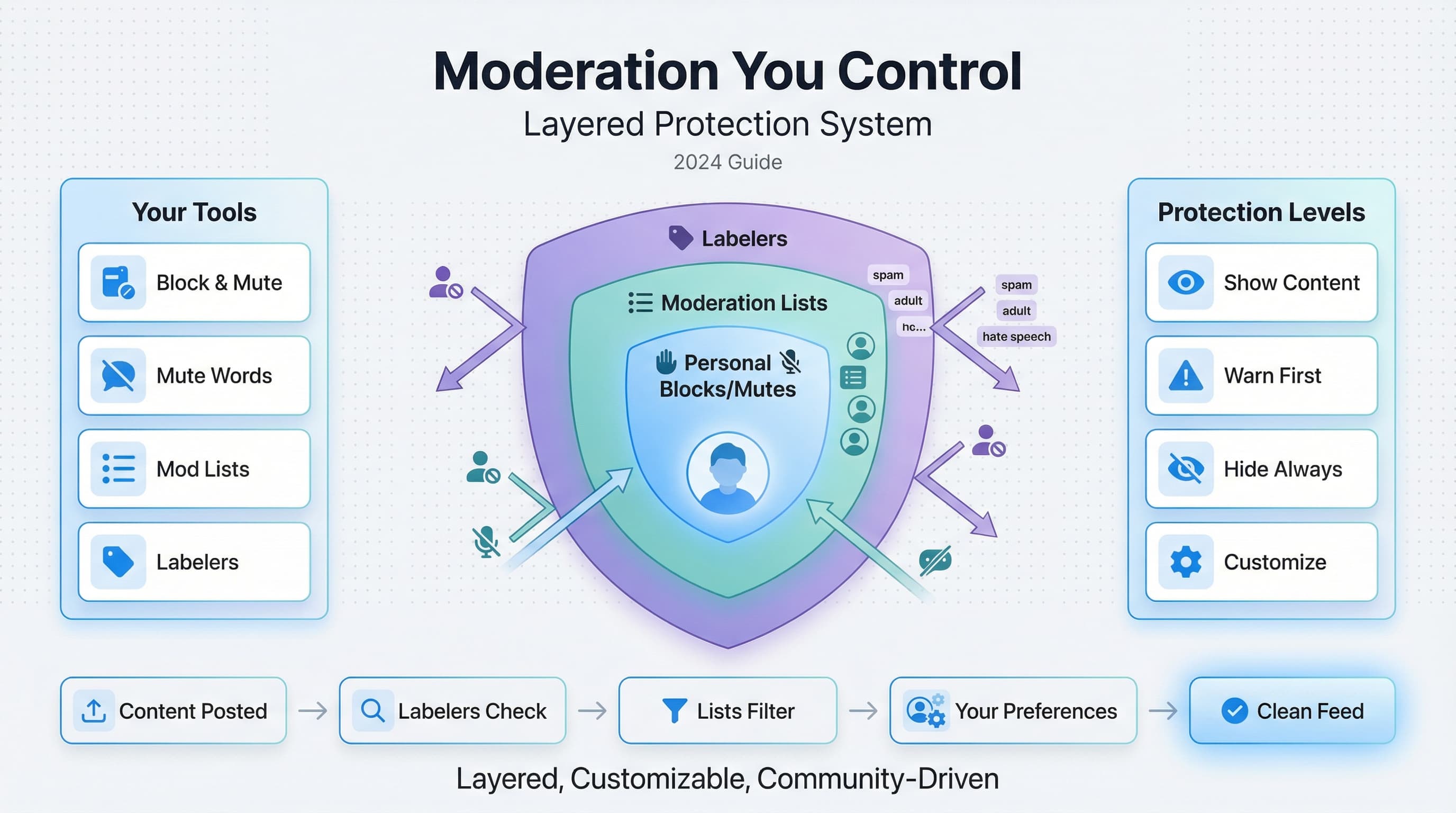
Here's where Bluesky's moderation gets genuinely interesting. Labelers are independent services that scan content and apply labels to posts and accounts. You choose which labelers to subscribe to, and their labels affect what you see.
Think of labelers like content rating systems, but run by communities rather than corporations. One labeler might focus on identifying explicit content. Another might label political content from various perspectives. A third might flag known spam accounts. You subscribe to the ones whose judgment you trust.
How labelers work technically
When you subscribe to a labeler, it runs alongside your normal feed. The labeler examines content (either automatically using algorithms or manually using human reviewers) and attaches labels to posts and accounts. When labeled content appears in your feed, Bluesky checks the label against your preferences.
You can set each label type to show (ignore the label), warn (show with a content warning you click through), or hide (remove from your feed entirely). This means two people subscribed to the same labeler can have completely different experiences based on their settings.
Example: The Adult Content Labeler
Bluesky's official adult content labeler identifies sexually explicit posts and accounts. If you're 18+, you can choose to see this content, see it behind warnings, or hide it completely. If you're under 18 (or haven't verified your age), this content is hidden by default with no option to enable it.
This approach lets adults access legal content while protecting minors, without Bluesky having to make blanket "no adult content" rules like some platforms do. The labeler handles identification; your preferences handle display.
Community-run labelers
The real power comes from community-created labelers. Anyone can run a labeler (it requires some technical knowledge, but the barrier isn't impossibly high). This has led to an ecosystem of specialized moderation services.
Some notable community labelers include services that identify known crypto scam accounts, labelers that flag AI-generated images, services focused on specific harassment networks, and labelers that track accounts involved in coordinated inauthentic behavior.
I personally subscribe to three labelers beyond Bluesky's defaults. One focuses on spam and scam detection with a solid track record. Another labels AI-generated images so I can filter them when I want to see human-created art. The third identifies accounts that have been involved in harassment campaigns, based on documentation from multiple sources.
Creating your own labeler
If you have technical skills and see a moderation gap, you can create your own labeler. This involves running a server that connects to the AT Protocol, implementing logic to identify content that should be labeled, and publishing your labels back to the network.
Small labelers can start with manual review processes. As they grow, many incorporate automated detection (machine learning models, keyword matching, behavioral analysis) to handle volume. The most successful labelers combine automated flagging with human review to minimize false positives.
Running a labeler is a responsibility. People trust your judgment to filter their experience. If your labeler starts flagging legitimate content incorrectly, users will unsubscribe quickly. Build your reputation through accuracy and transparency.
Moderation lists: crowdsourced protection
Moderation lists (often called modlists or block lists) are curated collections of accounts. When you subscribe to a modlist, you can choose to mute or block everyone on that list automatically. As the list maintainer adds or removes accounts, your blocks update accordingly.
This sounds simple, but the implications are significant. Instead of individually discovering and blocking every spam account or harassment network, you can subscribe to a well-maintained list and benefit from someone else's curation work.
Types of moderation lists
| List Type | Purpose | Example Use Case |
|---|---|---|
| Spam/Scam Lists | Block known spam and cryptocurrency scam accounts | Avoiding reply spam and phishing attempts |
| Harassment Network Lists | Block accounts involved in coordinated harassment | Protecting yourself from pile-on attacks |
| Topic-Based Lists | Block accounts that post heavily about specific topics | Avoiding political content or spoilers |
| Quality Filter Lists | Block low-quality accounts (bots, inactive, etc.) | Cleaning up your follower lists and replies |
| Personal Curation Lists | Individual's blocks shared publicly | Following trusted users' moderation choices |
Finding good moderation lists
The discovery of quality modlists is still somewhat word-of-mouth. People share lists they trust; you check who maintains them, review the criteria, and decide if you want to subscribe. Look for lists maintained by accounts with good reputations, clear documentation about what gets someone on the list, and reasonable size (very large lists might be too aggressive for your preferences).
Some accounts have built reputations specifically around list curation. They maintain multiple lists for different purposes and are transparent about their processes. Following these curators and seeing how they discuss moderation decisions can help you evaluate whether you trust their judgment.
Creating Your Own Moderation List
You can create modlists from your own blocks. If you've blocked 500 crypto spam accounts over the past year, you can publish that as a list others can subscribe to. You become a moderation resource for the community.
When maintaining a public list, consider documenting why accounts are added. This transparency helps subscribers understand your criteria and reduces pushback when you add accounts that people might not immediately recognize as problematic.
Content warnings and self-labeling
Bluesky's moderation isn't just about blocking bad content. It's also about giving creators tools to label their own posts appropriately. Content warnings (CWs) let you mark posts as containing sensitive content so viewers can make informed choices about whether to engage.
When to use content warnings
Content warnings are appropriate for adult content (required for explicit material), spoilers for movies, shows, books, and games, potentially disturbing imagery (medical photos, accident scenes, etc.), content that might trigger trauma responses (discussions of abuse, violence, etc.), and flashing images that could affect photosensitive viewers.
Using content warnings isn't censorship. You're still posting the content, but you're being considerate of people who might not want to see it unexpectedly. The Bluesky community generally appreciates thoughtful use of CWs, and you'll build a better reputation by using them appropriately.
How content warnings display
When you add a content warning, the post appears with a blurred image (if applicable) and a label describing why it's hidden. Viewers click to reveal the content. Their settings determine how aggressively content warnings appear, with some users showing all CW'd content by default, others always requiring a click.
Self-labeling interacts with the labeler system. If you consistently post adult content without self-labeling, Bluesky's adult content labeler (or community labelers) will label your posts anyway. Proper self-labeling shows you're a responsible community member and prevents your posts from being flagged by automated systems.
Step-by-step: setting up your moderation preferences
Let's walk through actually configuring Bluesky's moderation tools. Whether you're new to the platform or want to tighten up your existing settings, here's how to build a moderation setup that works for you.
Step 1: Access Moderation Settings
Go to Settings, then Moderation. You'll see sections for Content Filtering, Muted Words, Moderation Lists, and Labelers. We'll work through each section systematically.
Step 2: Configure Content Filtering
Start with the built-in content filters. Set your preferences for adult content (show, warn, or hide), hate group iconography, spam, and impersonation. Most users will want warnings or hiding for these categories.
If you're 18+, you can verify your age to unlock adult content settings. Without age verification, adult content remains hidden regardless of your preferences.
Step 3: Set Up Muted Words
Add words, phrases, and hashtags you want to filter. Consider muting trending topics you're tired of, potential spoilers for media you haven't consumed, terms associated with content that upsets you, and marketing buzzwords that indicate promotional content.
You can set expiration dates on muted words. Muting "election" for 30 days after a major vote, for example, lets you return to normal viewing once the discourse settles.
Step 4: Subscribe to Moderation Lists
Browse available moderation lists and subscribe to ones that match your needs. Start conservatively, with maybe 1-2 well-maintained lists. You can always add more later.
For each list, choose whether it should mute or block accounts. Muting is reversible and softer; blocking is more final. I use muting for topic-based lists and blocking for spam and harassment lists.
Step 5: Add Labelers
Subscribe to labelers beyond Bluesky's defaults. Research options in your areas of concern. Common choices include anti-spam labelers, AI content detection labelers, and harassment tracking labelers.
For each labeler, configure how each label type should be handled. You might want some labels to show warnings while others hide content entirely.
Common moderation mistakes to avoid
After watching how people interact with Bluesky's moderation tools, I've noticed several patterns that lead to frustration. Here's what to watch out for.
Over-subscribing to moderation lists
It's tempting to subscribe to every modlist that sounds useful. But each list adds accounts to your blocks, and the overlap between lists isn't always clear. You might end up blocking thousands of accounts based on criteria you don't fully understand.
Start with 2-3 highly trusted lists. Live with them for a few weeks. If you're still encountering problems, add more targeted lists. This gradual approach helps you understand what each list actually filters.
Ignoring labeler settings
Subscribing to a labeler is just the first step. If you don't configure how labels should be handled, you might not see any difference. Check each labeler's settings and ensure labels are set to warn or hide as appropriate.
Not using content warnings on your own posts
I see people get frustrated when their posts get labeled by automated systems. Often, they could have avoided this by adding appropriate content warnings themselves. Self-labeling gives you control over how your content is presented.
Expecting perfect moderation
No moderation system catches everything while catching nothing incorrectly. Labelers have false positives. Modlists include some accounts that probably shouldn't be there. Spam still gets through sometimes.
The goal is better, not perfect. If you're seeing significantly less garbage than before, your moderation setup is working even if it's not 100% accurate.
Bluesky moderation vs. other platforms
How does Bluesky's approach compare to what you're used to on other platforms? Here's a quick comparison.
| Feature | Bluesky | Twitter/X | Mastodon |
|---|---|---|---|
| Baseline Moderation | Central team handles serious violations | Central team (reduced recently) | Varies by instance |
| User Controls | Block, mute, mute words, modlists, labelers | Block, mute, limited mute words | Block, mute, domain blocks |
| Community Moderation | Labelers and modlists | Community Notes (limited scope) | Instance-level moderation |
| Customization | Highly customizable per-user | Minimal customization | Moderate (depends on instance) |
| Transparency | Labeler criteria often public | Opaque decision-making | Varies by instance |
The biggest difference is user agency. On Twitter, you're mostly at the mercy of the platform's decisions. On Mastodon, you're at the mercy of your instance admin's decisions. On Bluesky, you're building your own moderation stack with tools the platform provides.
This puts more responsibility on users, which isn't ideal for everyone. Some people want a platform to handle moderation so they don't have to think about it. If that's you, Bluesky's default settings work reasonably well, but you won't be using the platform to its full potential.
The future of Bluesky moderation
Bluesky's moderation system is still evolving. The team has discussed several features that might come to the platform, including better labeler discovery (making it easier to find quality labelers for your needs), improved modlist management (tools to see overlap between lists and audit your total blocks), enhanced appeal processes (making it easier to contest labels you think are incorrect), and federation with other AT Protocol servers (which will introduce new moderation challenges as the network grows).
The labeler ecosystem is still young. As more people build moderation tools and more users understand how to use them, I expect we'll see increasingly sophisticated community moderation emerge. Specialized labelers for particular communities, better coordination between labeler operators, and improved tooling for running labelers will all develop as the platform matures.
Making Bluesky moderation work for you
Bluesky's moderation system is genuinely different from what you've experienced on other platforms. It's more complex, more customizable, and puts more control in your hands. Whether that's a feature or a bug depends on how much you want to engage with moderation tools.
My recommendation: spend an hour setting up your moderation preferences properly. Subscribe to 2-3 trusted labelers, join a couple of well-maintained modlists, configure your content filtering preferences, and add muted words for topics you're tired of seeing. This one-time investment pays dividends in a cleaner, more enjoyable timeline.
Then, contribute to community moderation when you can. If you block a spam account, consider whether that block should be public. If you notice a pattern of problematic accounts, look into whether a modlist already tracks them. The system works better when more people participate.
Try Schedulala for free
Schedule posts to Bluesky, Twitter, and 8 other platforms from one dashboard.
Get started for free→