Enterprise Social Media Management: A Complete Guide for Scaling Teams in 2026
A practical guide to enterprise social media management: team structure, tools, approval workflows, compliance, and reporting that actually scale.

Managing one brand's social accounts is hard enough. Managing social media across a dozen business units, 40 regional pages, three languages, and a legal team that needs to sign off on every post involving the word "guarantee" is a different job entirely. Try our Instagram scheduling.
See It in Action
This is what scheduling an Instagram post looks like in Schedulala
That's enterprise social media management, and most of the advice floating around online was written for a solo marketer juggling two Instagram accounts. It doesn't hold up once you're coordinating 15 people across four time zones and trying to keep a consistent brand voice while your VP of Communications wants weekly reports that actually mean something. Our cross-platform analytics track 11 can help.
This guide is for the people who got handed that problem: marketing directors, social media managers at large companies, agency account leads juggling dozens of clients, and anyone building a social program that needs to survive turnover, audits, and a crisis or two along the way. See our social media scheduling tools guide.
What actually makes social media "enterprise" scale
It's not just headcount or revenue. An enterprise social media operation has a specific set of traits that change what tools and processes you need:. See our telegram engagement tips get guide.
- Multiple stakeholders who need visibility or sign-off before anything publishes (legal, compliance, brand, regional leads)
- Multiple brands, sub-brands, or locations operating under one organizational umbrella
- A content volume high enough that manual posting or single-person review becomes the bottleneck
- Reporting obligations to leadership that go beyond vanity metrics and need to tie back to business goals
- Risk exposure, meaning a bad post or a compromised account can cause real reputational or legal damage
If three or more of those apply to your org, you're operating at enterprise scale even if your team is only five people. The challenges aren't about size on paper, they're about coordination complexity. Learn more about best time to post on instagram.
Try Schedulala for free
Schedule posts to Bluesky, Twitter, and 8 other platforms from one dashboard.
Get started for free→The core challenges every enterprise social team runs into
1. Brand consistency across dozens of accounts
When one person manages a brand's social presence, voice consistency is automatic. It's in their head. Once you have 10 people posting on behalf of 12 regional pages, consistency becomes a system problem, not a personality problem. Learn more about instagram engagement calculator.
The fix is usually some combination of documented brand voice guidelines, content templates, and an approval layer that catches drift before it publishes. Without that structure, you end up with a Midwest regional page posting in a completely different tone than the flagship account, and nobody notices until a customer screenshots it.
2. Approval bottlenecks
Legal, compliance, and brand teams exist for good reason, but every added reviewer slows down publishing. A post that could go live in five minutes at a small company might take three days to clear review at a regulated enterprise (think finance, healthcare, or anything with strict advertising rules).
The goal isn't to eliminate review. It's to make the review process fast and trackable so content doesn't sit in someone's inbox for a week while a timely post goes stale.
3. Account access and security
Enterprise teams have turnover. Agencies rotate account managers. Interns come and go. If login credentials to your Facebook, Instagram, and LinkedIn accounts live in a shared spreadsheet, you've got a security problem waiting to happen.
Every departing employee who still has the Twitter password is a risk you don't need. Centralized access management through a scheduling platform (where you grant and revoke permissions without ever sharing the actual login) solves this cleanly.
4. Reporting that leadership actually cares about
A spreadsheet of likes and follower counts doesn't survive a budget review. Enterprise stakeholders want to know how social spend and headcount connect to pipeline, brand awareness lift, or customer retention. That means your reporting has to go deeper than platform-native analytics, which weren't built for cross-channel, cross-brand comparison.
Building the right team structure
There's no single org chart that works for every enterprise, but most mature social media operations land on one of three models. Picking the wrong one for your organization's size and culture is one of the most common (and most expensive) mistakes we see.
Centralized model
One central team manages all social accounts for every brand or region. This is the easiest model to keep consistent and the easiest to report on, since everything flows through the same people and the same calendar.
The downside: it doesn't scale well past a certain number of brands or regions, and local nuance (regional holidays, local slang, time zone-sensitive posting) tends to get flattened out. Works best for companies with fewer than 10 distinct social presences.
Decentralized model
Each business unit, region, or brand runs its own social team with its own calendar and strategy. Great for local relevance and speed. Terrible for consistency, and nearly impossible to report on in aggregate unless every team is using the same tools.
This model tends to work for large franchises or multi-brand holding companies where the brands genuinely operate independently, like separate restaurant chains under one parent company.
Hub-and-spoke model
A central team sets strategy, brand guidelines, and tooling. Regional or brand-level teams execute within that framework, with their own publishing permissions but shared templates, shared reporting, and a shared content calendar view.
This is the model most mid-to-large enterprises land on eventually, because it keeps brand consistency without forcing every piece of content through a single bottleneck. It does require a platform that supports granular permissions and multi-brand workspaces, which is where a lot of teams discover their current tool stack can't keep up.
| Model | Best for | Main risk |
|---|---|---|
| Centralized | Single brand, under 10 accounts | Slow to adapt to local needs |
| Decentralized | Independent multi-brand holding companies | Inconsistent voice, hard to report on |
| Hub-and-spoke | Most mid-to-large enterprises | Requires more sophisticated tooling |
Choosing a tech stack that holds up at scale
A lot of enterprise social media tool selections go wrong because a team evaluates a platform the way an individual creator would: does it post to Instagram, can I schedule a week of content, is the calendar view nice. Those things matter, but they're table stakes. At enterprise scale, the decision should come down to a short list of harder questions.
- Can the platform handle every account you actually run, across every platform you actually use, without forcing you into arbitrary bundles?
- Does pricing scale with headcount, with accounts, or with some confusing hybrid that punishes growth?
- Is there a real approval workflow, or just a comment field bolted onto a calendar?
- Can you grant and revoke access without sharing passwords?
- Does reporting roll up across brands, or do you need to export CSVs and stitch them together manually?
This is where Schedulala's pricing model tends to be a relief for growing teams. Plans are priced on a flat account count, not a bundle of "channel sets" or a per-seat fee that multiplies every time you hire. The Agency plan runs $99/month and covers 100 social accounts, usable in any combination across all 12 supported platforms (Instagram, TikTok, Twitter/X, LinkedIn, YouTube, Facebook, Threads, Bluesky, Pinterest, Telegram, Mastodon, and Google Business Profile). That means 100 Instagram accounts for a franchise group, or 20 accounts across eight platforms for a diversified brand, with no sub-limits forcing you into artificial groupings.
For teams managing multiple regional or sub-brand presences, the Team plan ($49/month, 25 accounts) is often the right starting point before scaling up to Agency as the account count grows. Every plan, including the entry-level Personal plan at $29/month, includes unlimited scheduled posts, so you're never rationing how much content you publish based on your pricing tier.
Annual billing on any plan gets you two months free (Personal at $290/year, Team at $490/year, Agency at $990/year), which matters when you're forecasting a social media line item for next year's budget.
Setting up approval workflows that don't slow everyone down
The biggest complaint we hear from enterprise social teams isn't about creativity, it's about speed. Content sits in approval queues for days. By the time it's cleared, the trending audio is over or the news hook is dead.
1. Define who actually needs to review what
Not every post needs legal review. Build a tiered system: routine content (product photos, blog promotion, community replies) goes through a single brand check. Anything touching claims, pricing, health, finance, or a current event goes through a second legal or compliance pass. Trying to run everything through every reviewer is how backlogs form.
2. Set a response-time SLA for reviewers
If a reviewer has 48 hours to respond before content auto-escalates to a backup approver, you avoid the single-point-of-failure problem where one person's vacation stalls your entire publishing schedule.
3. Build templates for recurring content types
Job postings, product launches, holiday greetings, customer testimonials: these recur constantly and rarely need a fresh legal read once the template language is approved once. Pre-approved templates cut review time to near zero for your highest-volume content categories.
4. Keep a visible audit trail
When something does go wrong, and eventually something will, you need to be able to show who approved what and when. This matters for internal accountability and, in regulated industries, for actual compliance audits.
Managing multiple brands and locations without losing your mind
If you're running social for a franchise, a multi-location business, or a holding company with several distinct brands, the math gets complicated fast. Ten locations times three platforms is 30 accounts before you even get to your corporate handles. Enterprises in retail, hospitality, healthcare networks, and financial services run into this constantly.
The practical approach is to separate what's centralized from what's local. Brand guidelines, visual templates, and crisis protocols should be set centrally and apply everywhere. Local posting (store openings, community events, local promotions) should stay with the people closest to that market, because they know what actually resonates in their area.
This is exactly where a flat account-count pricing model earns its keep. A franchise with 60 location pages across Facebook and Instagram, plus 10 corporate accounts across the rest of the platform list, lands comfortably inside the 100-account Agency plan without needing separate subscriptions per region or per brand. Compare that to tools that sell bundled "profile sets" (a fixed number of profiles per platform, per set) and you can end up paying for capacity you don't use on one platform while running short on another.
Set up a shared content library so local teams aren't reinventing templates for routine posts like holiday hours or review responses. A central team maintains the library, local teams pull from it and customize the details. This single change tends to cut content production time for multi-location teams by a significant margin because nobody's starting from a blank page.
A step-by-step process for building your enterprise social calendar
Most enterprise social teams I've talked to don't struggle with having ideas, they struggle with having a repeatable process to turn those ideas into a calendar that survives contact with 15 stakeholders. Here's a process that holds up.
1. Set your planning cadence
Quarterly for big campaigns and themes, monthly for the actual content calendar, weekly for real-time adjustments. Trying to plan everything monthly with no quarterly view means you're constantly surprised by product launches and seasonal moments that should have been obvious months out.
2. Pull in stakeholders before you build, not after
Get product, sales, and customer support input during planning, not as a review step after content is drafted. A quick 20-minute sync with sales each quarter will surface more useful content ideas than a month of internal brainstorming, and it means fewer surprise last-minute asks later.
3. Map content to each platform's actual strengths
Don't post the same asset everywhere and call it a strategy. A LinkedIn post about a product update should read differently from an Instagram carousel about the same update, which should read differently from a TikTok. Enterprise teams that skip this step end up with content that underperforms everywhere because it's optimized for nowhere.
4. Build in buffer for real-time content
Reserve roughly 15-20% of your calendar for reactive content: trending topics, news hooks, customer moments worth amplifying. A calendar that's 100% pre-planned a month out leaves no room to be relevant to what's actually happening.
5. Route everything through one scheduling system
When five teams are each scheduling content in their own tool, nobody has a full picture of what's going out when. Centralizing scheduling, even in a hub-and-spoke org structure where posting permissions stay distributed, gives you one place to catch conflicts, spot gaps, and build the cross-channel view leadership eventually asks for.
6. Review and adjust monthly
Look at what actually performed, not what you assumed would perform. Enterprise teams are notoriously slow to kill underperforming content formats because "that's just what we've always posted." Build the monthly review into your calendar process so it's not optional.
Reporting that survives a budget conversation
Platform-native analytics are built to make you feel good about your platform usage, not to answer the questions your CFO actually asks. "How does our social spend compare to the pipeline it generates" isn't a question Instagram Insights was built to answer, and it shouldn't be your only source of truth.
Enterprise reporting needs three layers. The operational layer tracks what's actually publishing, approval turnaround time, and posting consistency across accounts. The performance layer tracks engagement, reach, and growth trends across platforms and brands in one comparable view, not 12 separate dashboards. The business layer ties social activity to outcomes leadership cares about: website traffic from social, lead attribution, brand sentiment, or customer service deflection if your team handles support through social channels.
Most teams get stuck at layer one because it's the easiest to measure and the least useful to report upward. If your monthly report to leadership is mostly follower counts and likes, you're going to have a hard time defending headcount or budget at renewal time. Build toward the business layer even if it takes a quarter or two to get the attribution tracking right.
Compliance, legal risk, and brand safety at scale
The bigger the organization, the more ways a single social post can go wrong. Advertising claims that need substantiation, financial services language that triggers regulatory disclosure requirements, healthcare content that can't cross into medical advice, and plain old typos that end up in a trade publication's "social media fails" roundup.
A written social media policy isn't bureaucratic overhead, it's the thing that protects your team when something slips through. At minimum, that policy should cover what language requires legal review, who has publishing authority on each account, how quickly content can be taken down if something goes wrong, and who's authorized to speak on behalf of the company during a public incident.
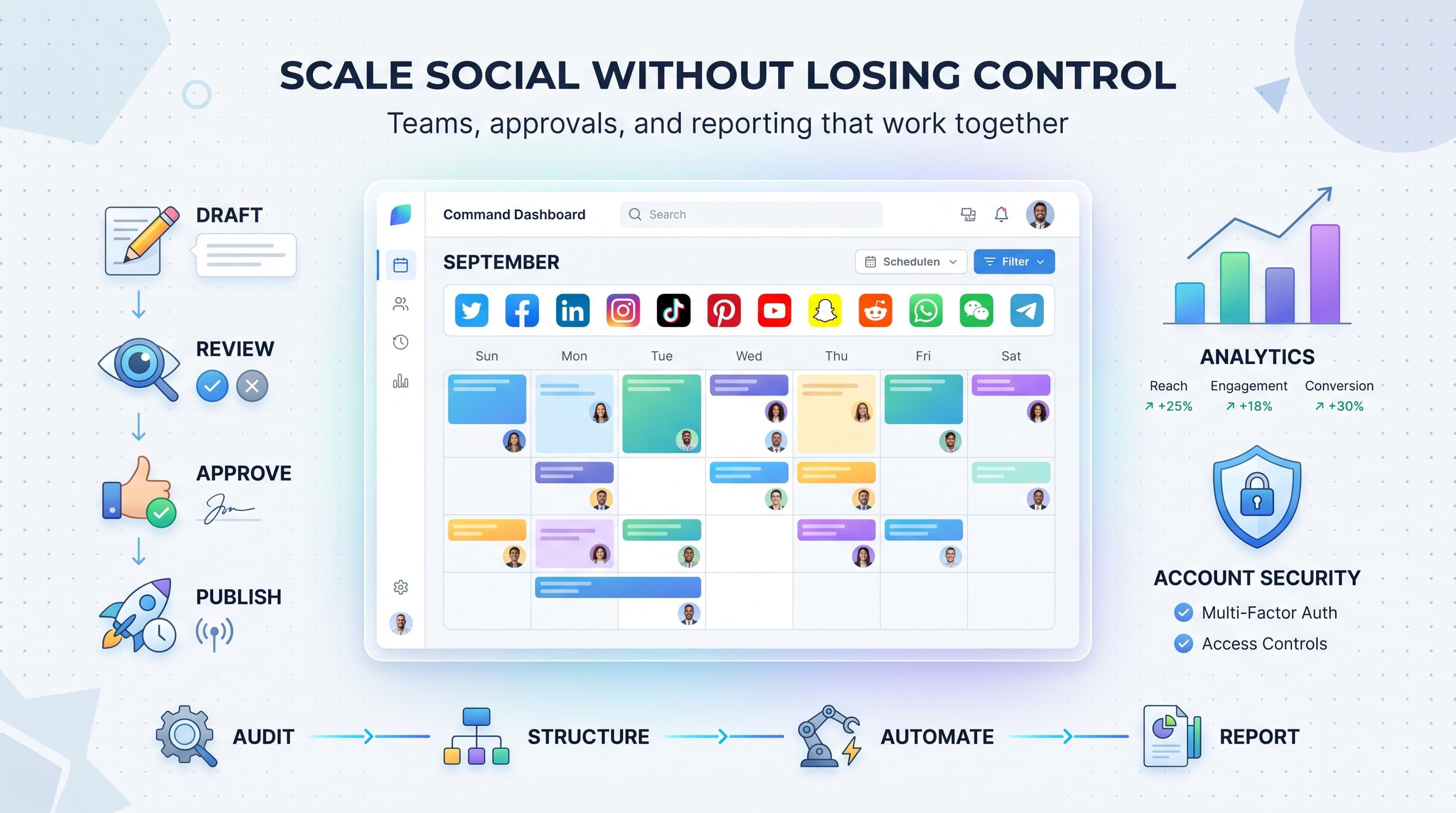
Account security belongs in this conversation too. Enterprise accounts get targeted by phishing attempts more than personal ones, because a compromised brand account with 500,000 followers is worth a lot to a bad actor. Two-factor authentication on every account, a documented offboarding process that revokes access the day someone leaves, and centralized login management through your scheduling platform (so individual team members never see raw passwords) are not optional at this scale.
If you operate internationally, add a regional compliance layer. Advertising rules, data privacy expectations, and even what's considered acceptable brand voice vary significantly by market. A joke that lands fine in the US market can be a genuine problem in a market with stricter advertising regulation around comparative claims. Build regional review into your approval chain for any content going out under a local market account.
Crisis management: have the plan before you need it
Every enterprise social team eventually deals with a crisis moment: a product recall, a PR issue, an employee controversy, a customer complaint that goes viral. The organizations that handle it well aren't the ones with the best instincts in the moment, they're the ones who wrote the plan months in advance and never needed to improvise under pressure.
Build a response tier system
Not every negative comment is a crisis. Define tiers: routine complaints handled by community management with existing templates, escalating issues that need a manager's eyes, and full crisis scenarios that trigger a predefined response team including legal and executive communications.
Pre-stage a pause protocol
When a real crisis hits, scheduled content needs to pause immediately across every account, not just the one directly involved. A cheerful product promo going out on a regional page the same day as a major incident is the kind of thing that ends up as a headline. Know in advance how to pause everything from a central dashboard, not account by account.
Designate spokespeople in advance
Decide who is authorized to respond publicly before you're in a crisis, not during one. Confusion about who speaks for the brand in the first hour of an incident is more damaging than almost anything else that can go wrong.
Common mistakes enterprise teams make (and how to avoid them)
- Buying tools based on logo count, not account structure. A platform that supports "unlimited integrations" but sells capacity in rigid bundles can still leave you overpaying or under-provisioned. Check whether your account count moves with your actual mix of platforms, not a forced bundle.
- Treating every post like it needs the same level of review. This is the single biggest cause of publishing delays. Tier your approval process or you'll bottleneck even your most routine content.
- Letting regional teams go completely rogue. Local relevance is good, but zero oversight means brand drift, inconsistent voice, and occasionally content that embarrasses the parent brand.
- Reporting metrics nobody asked for. Follower growth alone doesn't justify a budget line. Build reporting around the outcomes leadership actually cares about.
- Skipping the offboarding checklist. Former employees retaining account access is one of the most preventable security incidents in enterprise social media, and one of the most common.
- No documented crisis plan. Figuring out your response protocol in real time, during an actual crisis, almost always goes worse than following a plan written calmly in advance.
Where Schedulala fits into an enterprise social stack
No single tool replaces good process, but the right scheduling and publishing platform removes a lot of the friction that makes enterprise social media management harder than it needs to be. Schedulala supports all 12 major platforms (Instagram, TikTok, Twitter/X, LinkedIn, YouTube, Facebook, Threads, Bluesky, Pinterest, Telegram, Mastodon, and Google Business Profile) from a single calendar, so teams managing a wide platform mix aren't stitching together three different tools to cover everything their brand actually uses.
For enterprise and agency teams specifically, the flat account-count model (rather than per-seat fees or bundled profile sets) tends to map more naturally onto how real organizations are structured. A 60-location retail brand doesn't need "60 seats," it needs 60-plus social accounts managed by a smaller core team, which is exactly the model Schedulala's pricing is built around.
Every plan, from Personal through Agency, includes unlimited scheduled posts, so high-volume publishing teams aren't throttled by their subscription tier. And because there are no per-channel sub-limits, a brand that's heavy on Instagram and LinkedIn but light on Pinterest can allocate accounts however actually reflects its strategy instead of paying for capacity on platforms it barely uses.
Schedulala currently offers a 7-day free trial (a card is required to start it) so teams can test the workflow against their real account list before committing to an annual plan. For teams ready to commit, annual billing knocks two months off the price on every tier.
| Plan | Monthly price | Social accounts | Annual price (2 months free) |
|---|---|---|---|
| Personal | $29/mo | 10 accounts | $290/yr |
| Team | $49/mo | 25 accounts | $490/yr |
| Agency | $99/mo | 100 accounts | $990/yr |
Try Schedulala for free
Schedule posts to Bluesky, Twitter, and 8 other platforms from one dashboard.
Get started for free→A 90-day rollout plan for fixing your enterprise social setup
If everything above feels like a lot to implement at once, it is. You don't need to fix all of it in month one. Here's a phased approach that's worked for teams rebuilding their social operations from the ground up.
Days 1-30: Audit and consolidate
Inventory every account, every login, and every person with access. Kill dormant accounts. Move everything into a single platform for scheduling and access management. Document your current approval process, even if it's messy, so you have a baseline to improve from.
Days 31-60: Build the workflow
Write your tiered approval policy. Set SLAs for reviewers. Build your core content templates. Decide on your team structure (centralized, decentralized, or hub-and-spoke) and formally assign publishing permissions to match.
Days 61-90: Report and refine
Build your first cross-brand reporting dashboard tied to business outcomes, not just engagement. Run your crisis tabletop exercise. Review what's working from the first two months and adjust the process based on actual friction points your team ran into, not assumptions made in a planning meeting.
The bottom line
Enterprise social media management isn't about having more followers or posting more often. It's about building a system that stays consistent, stays secure, and stays reportable as your organization grows and your team changes. Most of the pain enterprise teams feel comes from process gaps, not from a lack of good ideas or good people.
If you're currently juggling spreadsheets, shared passwords, and a scheduling tool that caps you at a handful of accounts, that's usually the first thing worth fixing. Centralize access, set a flat and predictable pricing model that matches how your organization is actually structured, and build your approval workflow around risk tiers instead of treating every post the same way. The rest of enterprise social media management gets dramatically easier once that foundation is in place.
Try Schedulala for free
Schedule posts to Bluesky, Twitter, and 8 other platforms from one dashboard.
Get started for free→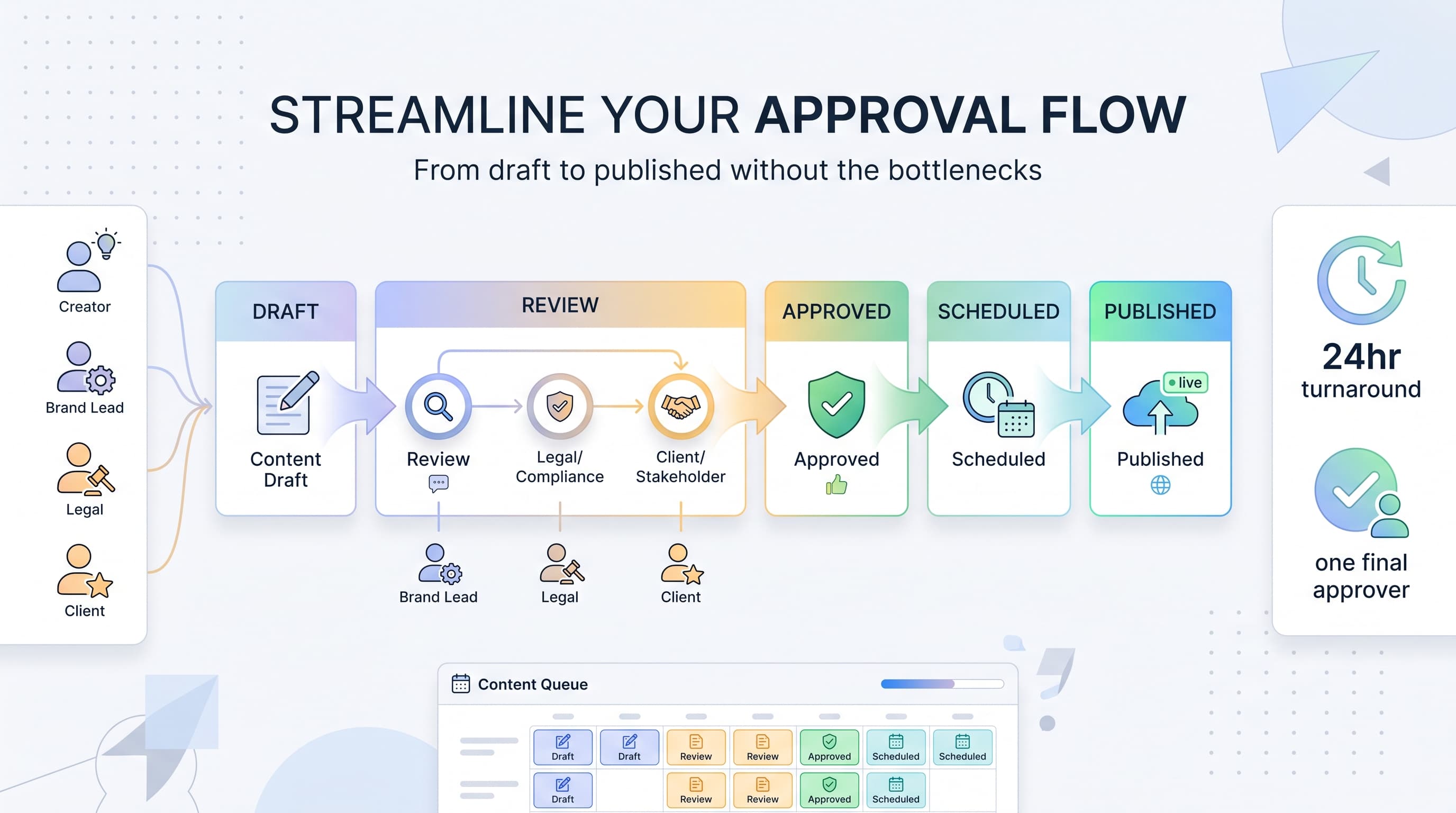
![Social Media Proposal Template [Free Download] - Win More Clients](/_next/image?url=%2Fblog%2Fsocial-media-proposal-template%2Fheader.jpeg&w=3840&q=75&dpl=dpl_6RiKV7dz1EjMEbYgqheh1pc2YPwv)