Social Media Approval Process: How to Streamline It Without Slowing Down Your Team
Learn how to build a social media approval process that catches mistakes without killing your posting speed. Step-by-step framework inside.

Your marketing manager approves a post on Tuesday. Legal flags it on Thursday. By the time everyone signs off, the trending topic it referenced is dead and your competitor already posted something similar. Sound familiar? Our social media automation can help.
A broken social media approval process doesn't just waste time, it costs you relevance. Social content lives and dies on timing, and every extra approval loop is a chance for your post to go stale before it ever ships. The good news: you don't have to choose between speed and oversight. You need a process that's clear enough to run itself. Learn more about how to automate bluesky.
This guide walks through how to build an approval workflow that actually works, who should be involved, what to automate, and the mistakes that quietly sabotage most teams' review process. Try our ai social media post.
Try Schedulala for free
Schedule posts to Bluesky, Twitter, and 8 other platforms from one dashboard.
Get started for free→Why most approval processes break down
Before fixing the process, it helps to know why it's broken in the first place. Most teams don't lack rules, they lack structure around those rules. Here's where things typically go wrong. Try our best time to post on instagram.
Too many approvers, not enough clarity
When five people can technically weigh in on a post but nobody knows who actually has final say, every piece of content turns into a committee decision. The post sits in limbo while people wait for someone else to respond first. See our best time to post on tiktok guide.
No defined turnaround time
If there's no expectation that feedback happens within 24 hours, feedback happens whenever. A timely post about an industry event or trending hashtag loses all value if it takes four days to get a green light.
Feedback scattered across channels
One comment comes in over Slack, another through email, a third as a verbal note in a hallway conversation. Nothing is tracked in one place, so changes get missed or applied inconsistently across versions of the same post.
Reviewing content with no context
A screenshot of a caption without the image, the hashtags, or the scheduled time doesn't give approvers enough information to make a real decision. They either rubber stamp it or ask questions that should've been answered up front.
What a good approval process actually looks like
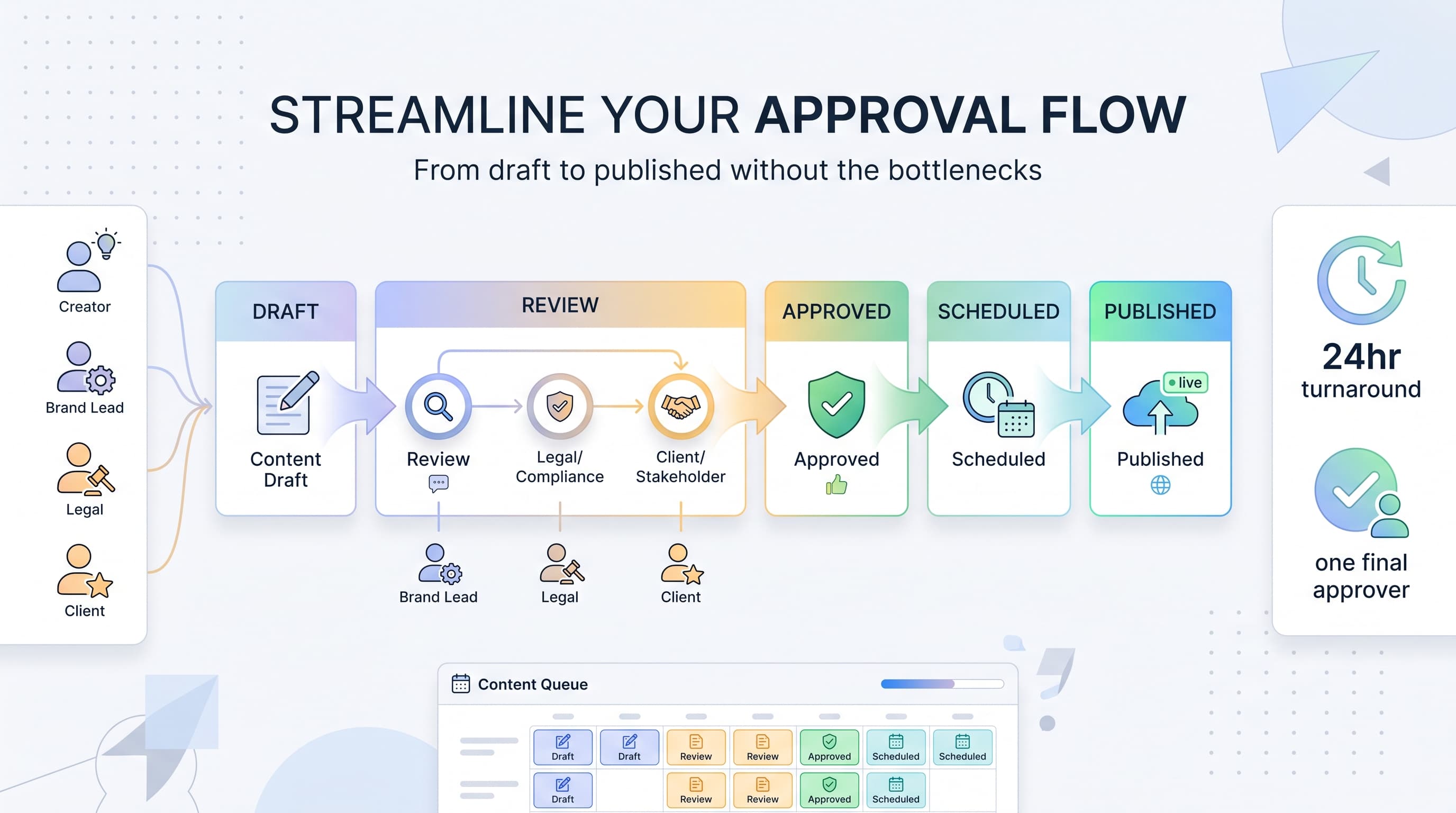
A streamlined approval process has three things most broken ones don't: a clear chain of command, a single source of truth for content review, and a deadline built into every step. It doesn't mean fewer eyes on your content. It means the right eyes see it at the right time, in the right order.
Think of it less as a gate and more as a relay race. Each person has a defined leg to run, they know exactly when the baton gets passed to them, and they know who's waiting on the other end. Nobody's guessing whether it's their turn.
Building your approval workflow step by step
1. Map out your approval chain
Start by writing down every type of content your team posts and who actually needs to approve each type. A product announcement might need marketing lead and legal sign off. A reply to a customer comment shouldn't need anyone at all. Not every post deserves the same level of scrutiny, and treating them equally is where a lot of bottlenecks start.
Separate your content into tiers. High-stakes content (campaigns, paid promotions, anything mentioning pricing or legal claims) goes through full review. Everyday content (behind-the-scenes posts, curated shares, routine updates) gets a single quick check or skips review entirely once your team has built trust in the process.
2. Assign one final decision maker per content tier
Committees don't approve content, people do. For each tier, name exactly one person who has the authority to say yes. Other reviewers can flag concerns, but if the content lead says it's good to go, it goes. This single change eliminates the back-and-forth of waiting for unanimous agreement.
3. Set a hard turnaround window
Give reviewers a specific window, like 24 hours for standard content and 2 hours for time-sensitive posts. Put this in writing and treat it like any other deadline. If someone misses it without flagging a delay, the post moves forward with a note that review is pending, rather than sitting frozen indefinitely.
4. Review content in context, not isolation
Reviewers should see the actual post as it will appear: image, caption, hashtags, and scheduled date, all together. This is exactly why reviewing from a scheduling tool beats reviewing from a shared doc or a string of Slack messages. When content is drafted and scheduled inside Schedulala, approvers see the full post preview and can comment directly on it instead of guessing how pieces fit together.
5. Keep all feedback in one thread
Every comment, edit request, and sign-off should live in a single place attached to the post itself. This matters more than it sounds. When feedback is centralized, there's a record of who approved what and when, which saves you when someone asks three weeks later why a post went out a certain way.
6. Build in an escalation path
Sometimes reviewers disagree, or a decision needs to go above the usual approver. Decide ahead of time who breaks ties. Without this, disagreements stall posts indefinitely while everyone waits for someone else to make the call.
Roles in the approval process: who should actually be involved
A lot of approval bottlenecks come from inviting too many people into the room. Here's a practical breakdown of who typically belongs in the loop and why.
| Role | What they review | Should they have final say? |
|---|---|---|
| Content creator / social manager | Drafts and submits content | No, unless no other approval is required |
| Brand or marketing lead | Tone, messaging, visual consistency | Yes, for most routine content |
| Legal/compliance | Claims, disclaimers, regulated language | Only on flagged content |
| Client (agency context) | Final sign-off before publishing | Yes, but with a deadline attached |
| Executive/founder | High-visibility campaigns only | Rarely, reserve for major launches |
Notice that legal and executives only show up for specific, flagged situations. If everything goes through every reviewer, you've rebuilt the bottleneck you were trying to remove. Build triggers instead: a post gets routed to legal only if it mentions a claim, a statistic, a competitor, or a regulated topic like health or finance.
How agencies can streamline client approvals
Agencies deal with a layer of complexity in-house teams don't: client sign-off. Clients are often slow to respond, review content on their own schedule, and sometimes approve one version while a teammate approves a different one, leading to confusion about which version is live.
The fix is to give clients a single, visual place to review content, rather than sending PDFs, screenshots, or spreadsheets. A shared calendar view where clients can see exactly what's scheduled, comment directly on individual posts, and approve with one click removes almost all of the friction. It also means you're not chasing down approvals across five different email threads for five different clients.
Set client-facing expectations early. Tell them upfront: content submitted by Wednesday needs feedback by Friday to go out the following week. Clients who understand the deadline tend to respect it. Clients who don't get told will always treat your deadline as a suggestion.
What to automate (and what not to)
Automation should remove busywork, not decision-making. Here's where it helps and where it doesn't.
Automate: routing and reminders
Set up automatic notifications the moment a post is submitted for review, with follow-up reminders if nobody responds within your turnaround window. This takes the burden off the content creator to chase approvers manually every day.
Automate: version tracking
Every time content gets edited after feedback, the previous version should be saved automatically. This way, if a stakeholder asks why something changed, you have a clear before-and-after instead of relying on memory.
Don't automate: the final decision
A human needs to make the actual call on whether content ships. No rule engine should auto-approve a post just because 48 hours passed with no feedback on a high-stakes campaign. Save auto-approval logic for your lowest-risk content tier only.
Common mistakes that slow down approvals
- Reviewing content in a format that doesn't match how it will actually post (screenshots instead of live previews)
- Letting every reviewer have equal weight, instead of naming one final decision maker
- No deadline on feedback, so posts sit for days waiting on a response
- Scattering comments across email, Slack, and verbal conversations with no single record
- Routing low-risk content (routine updates, comment replies) through the same heavy review as a major campaign
- Not telling clients or stakeholders what the turnaround expectation is, so they treat deadlines as optional
- Skipping a documented escalation path, so disagreements stall content indefinitely
Most of these mistakes come from treating all content the same way. A customer service reply and a product launch post do not need the same level of oversight, and trying to force both through an identical chain of command is the single biggest reason approval processes grind to a halt.
A simple approval framework you can copy
If you want a starting point rather than building your process from scratch, here's a framework that works for most teams, whether you're a solo marketer, a small team, or an agency juggling multiple clients.
- Tier your content into three levels: routine, standard, and high-stakes
- Routine content (replies, curated shares) posts with no review, or a single quick check from one teammate
- Standard content (regular posts, scheduled campaigns) goes to one approver with a 24-hour turnaround
- High-stakes content (paid campaigns, legal claims, major announcements) goes through a defined chain with a named final approver and, if needed, legal review
- All feedback happens in one place attached to the post itself, not scattered across tools
- Every tier has a clear deadline, and missed deadlines trigger an automatic reminder, not an indefinite wait
This framework works because it matches the level of scrutiny to the level of risk. Most teams waste the majority of their review time on content that was never going to cause a problem in the first place.
Where scheduling tools fit into the equation
A scheduling tool isn't just for queuing up posts, it's where your approval process should actually live. When drafts, comments, and sign-offs are attached directly to the scheduled post, you skip the step of exporting content into a separate review doc and then re-entering it after approval.
Schedulala lets teams build this straight into the content calendar. Drafts sit in the queue with full previews across all 12 supported platforms (Instagram, TikTok, Twitter/X, LinkedIn, YouTube, Facebook, Threads, Bluesky, Pinterest, Telegram, Mastodon, and Google Business Profile), so reviewers see exactly what will post, where, and when, before it ships. Comments stay attached to the specific post, and because every plan includes unlimited scheduled posts, there's no reason to batch-approve content just to avoid hitting a limit.
This matters especially for teams managing multiple brands or clients. Schedulala's account allowance is flat and flexible, meaning your 25 accounts on the Team plan (or 100 on Agency) can be split across platforms however your client roster actually looks, rather than being locked into rigid per-platform bundles that don't match your real workload.
Final takeaway
A fast approval process isn't about cutting corners. It's about putting structure around who reviews what, how long they get, and what happens when nobody responds. Fix the structure, and the speed follows.
Try Schedulala for free
Schedule posts to Bluesky, Twitter, and 8 other platforms from one dashboard.
Get started for free→