Instagram for Business: Complete Setup Guide to Drive Sales & Grow Your Brand in 2026
Learn how to set up Instagram for business and grow your brand. Step-by-step guide with optimization tips, content strategies, and growth tactics.

Quick answer
Set up an Instagram business account by switching to a Professional Account in settings and connecting your Facebook Page.
- •Instagram has 2 billion monthly active users and 200 million active business profiles
- •Business accounts unlock Insights, Shopping tags, contact buttons, and promotional tools
- •Post 3-5 feed posts, 3-5 Stories, and 2-3 Reels per week for optimal engagement
- •Schedule Instagram posts with Schedulala starting at $9/month with unlimited posts across 12 platforms
Your business needs to be on Instagram. With over 2 billion monthly active users and 500 million daily Stories views, Instagram isn't just a photo-sharing app anymore – it's a sales machine. Try our Instagram scheduling.
See It in Action
This is what scheduling an Instagram post looks like in Schedulala
But here's the thing: most businesses mess up their Instagram setup from day one. They treat it like a personal account, skip the business features, and wonder why their posts barely get seen. Sound familiar? Try our how to repurpose content.
This guide walks you through everything you need to set up Instagram for business the right way. We'll cover account optimization, content strategy, growth tactics, and the tools that actually move the needle. No fluff, just actionable steps you can implement today. Learn more about social media scheduling tools.
Try Schedulala for free
Schedule posts to Bluesky, Twitter, and 8 other platforms from one dashboard.
Get started for free→Why Instagram matters for business in 2026
Let's start with the numbers that matter. Instagram users spend an average of 53 minutes per day on the platform, and 83% of users say they discover new products and services through Instagram. That's not just engagement – that's buying intent. Learn more about youtube shorts ideas 100.
Instagram's business impact by the numbers
- 200 million business profiles actively use Instagram
- 130 million users tap on shopping posts every month
- 75% of users take action after seeing an Instagram ad
- 50% of people are more interested in brands they follow on Instagram
- Average engagement rate is 1.22% (higher than Facebook's 0.15%)
But raw numbers don't tell the whole story. Instagram's algorithm favors business accounts that use the platform's native features. Business profiles get access to Instagram Insights, Shopping tags, contact buttons, and promotional tools that personal accounts can't use. Our best time to post on instagram can help.
The platform has also evolved beyond pretty pictures. Instagram now supports video content, live streaming, Stories with interactive stickers, Reels for viral reach, and direct shopping integration. It's become a full-funnel marketing platform where you can build awareness, nurture leads, and drive sales all in one place. Learn more about instagram engagement calculator.
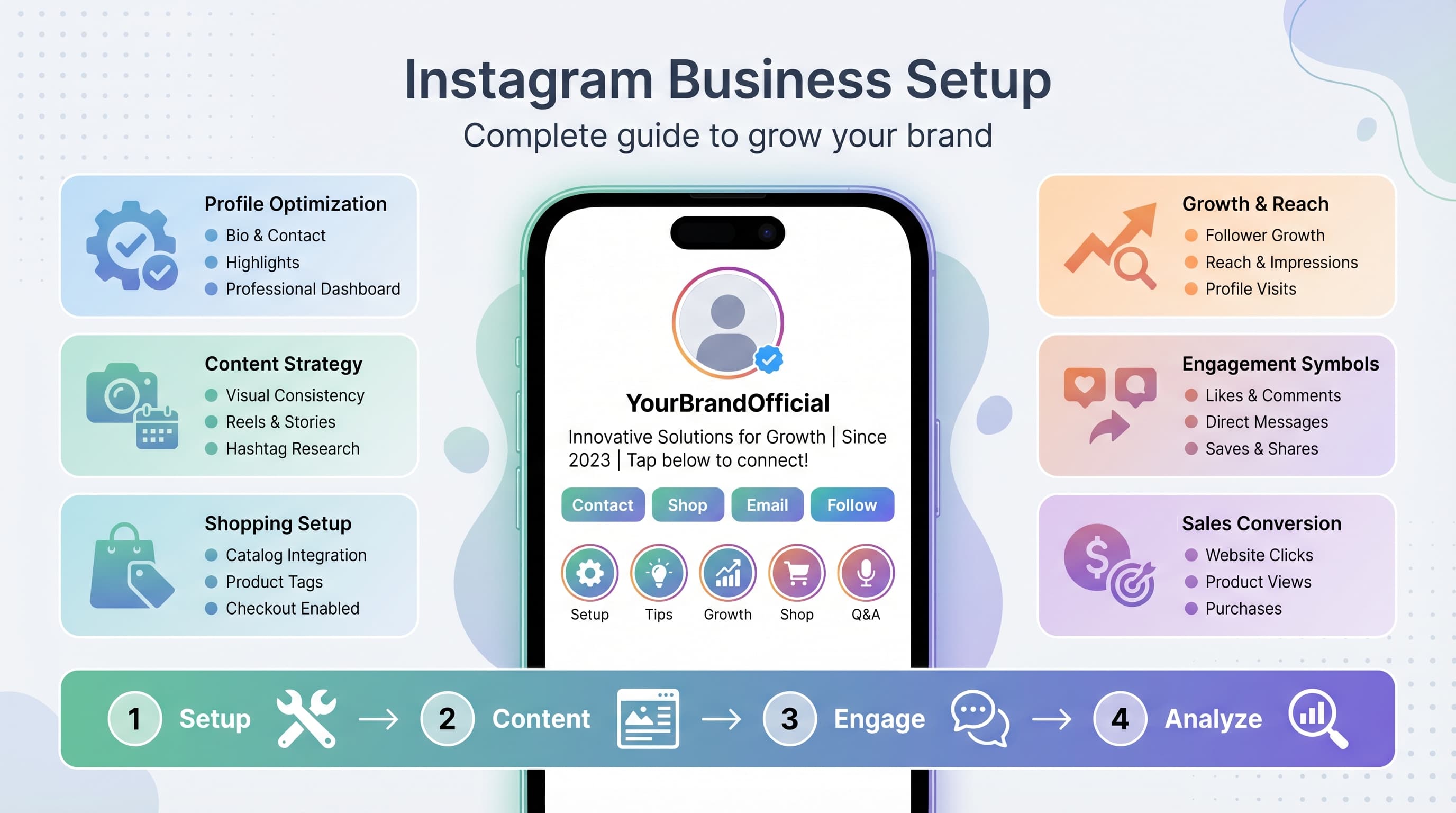
Step-by-step Instagram business account setup
Setting up your Instagram business account correctly from the start saves you headaches later. Here's exactly how to do it, including the settings most businesses overlook.
1. Convert to a business account (or create a new one)
If you already have a personal Instagram account, you can convert it to a business account. Go to Settings > Account > Switch to Professional Account > Business. If you're starting fresh, download the Instagram app and select 'Sign up for business' during registration.
Important decision point: Should you convert your personal account or start fresh? Convert if your existing content aligns with your business and you have engaged followers. Start fresh if your personal content doesn't match your brand or if you want complete separation.
2. Choose your business category
Instagram will ask you to select a business category. This affects which contact options appear on your profile and how Instagram categorizes your content. Popular categories include Retail Company, Personal Blog, Product/Service, Local Business, and Brand.
Pick the most specific category that fits your business. For example, choose 'Restaurant' instead of 'Local Business' if you run a restaurant. This helps Instagram show your content to users interested in your specific industry.
3. Connect your Facebook Page
Linking your Instagram business account to a Facebook Page unlocks additional features like cross-platform posting, advanced advertising options, and unified analytics. You'll need to be an admin of the Facebook Page to make this connection.
Go to Settings > Account > Linked Accounts > Facebook and log in to connect. Don't have a Facebook Page? Create one first – it takes five minutes and gives you access to Meta's full advertising ecosystem.
4. Add contact information and business details
Fill out your contact information completely: phone number, email address, and physical address (if applicable). This information appears as contact buttons on your profile, making it easy for customers to reach you.
Pro tip: Use a business phone number and email address, not personal ones. You can set up a free Google Voice number if you need a separate business line.
Optimize your Instagram business profile
Your Instagram profile is your digital storefront. Most users decide whether to follow you or buy from you within seconds of viewing your profile. Here's how to make those seconds count.
Profile photo strategy
Use your logo for brand recognition, but make sure it's readable at small sizes. Instagram profile photos display at 150x150 pixels, so intricate logos often become unrecognizable blobs. Test your logo by shrinking it down – if you can't clearly see what it is, simplify it or use a logomark instead.
For personal brands or service businesses, a professional headshot often works better than a logo. People buy from people, and a friendly face builds trust faster than corporate imagery.
Craft a compelling bio
You have 150 characters to explain what you do and why people should care. Skip the generic 'We provide quality services' nonsense. Instead, lead with a clear value proposition and include a call to action.
Winning bio formula:
- What you do (in customer language, not industry jargon)
- Who it's for or what problem you solve
- Social proof (awards, press mentions, number of customers)
- Call to action with emoji for visual break
Example: 'Digital marketing for local restaurants 🍕 Helped 200+ eateries increase online orders by 40% 📈 Get your free marketing audit ⬇️'
Strategic bio link usage
Instagram gives you one clickable link in your bio, so use it wisely. Don't waste it on your homepage – use it to drive specific actions that align with your business goals.
Best bio link strategies:
- Lead magnet: Free guide, template, or tool in exchange for email addresses
- Current promotion: Limited-time offer or seasonal campaign
- Link tree tool: Multiple links organized on one page (Linktree, Koji, etc.)
- Product catalog: Direct link to your best-selling product or service page
- Booking page: For service businesses, link directly to scheduling
Update your bio link regularly to match your current campaigns. If you're promoting a new product launch, holiday sale, or webinar registration, make sure your bio link supports that goal.
Highlight strategy
Instagram Highlights are your always-visible Stories that sit below your bio. Think of them as permanent navigation for your most important content. Most businesses waste Highlights on random content, but smart businesses use them strategically.
Essential Highlights for most businesses:
- About: Quick intro to your business, team, mission
- Products/Services: Showcase your main offerings with prices
- Reviews: Customer testimonials and social proof
- FAQ: Answer common questions to reduce customer service load
- Behind Scenes: Show your process, team, or company culture
- Press: Media mentions, awards, or recognition
Create custom Highlight covers that match your brand colors and style. Canva has free templates, or you can hire a designer on Fiverr for $10-20. Consistent visual branding makes your profile look professional and trustworthy.
Content strategy that drives business results
Pretty pictures don't pay the bills. Your Instagram content needs a strategy that connects with your audience and drives them toward your business goals. Here's how to create content that actually converts.
The 80/20 content rule
Follow the 80/20 rule: 80% of your content should provide value to your audience (education, entertainment, inspiration), and 20% can be direct promotion of your products or services.
Value-driven content ideas:
- Educational posts: How-to guides, tips, industry insights
- Behind-the-scenes: Your process, team, workspace, day-in-the-life
- User-generated content: Customer photos, reviews, success stories
- Inspirational content: Motivational quotes, success stories, transformations
- Entertainment: Memes, trending audio, relatable content
The goal is to build trust and authority first. When people see you as a helpful expert in your field, they're more likely to buy from you when you do promote something.
Content pillar framework
Content pillars are 3-5 main themes that guide your content creation. They ensure variety while staying focused on topics your audience cares about. Here's how to choose yours:
Example for a fitness business:
- Workout tips: Exercise demonstrations, form corrections, routine ideas
- Nutrition advice: Healthy recipes, meal prep, supplement guidance
- Motivation: Success stories, progress photos, mindset content
- Behind scenes: Gym life, trainer spotlights, daily routines
- Community: Client features, challenges, Q&A sessions
Rotate through your pillars to keep content balanced. If you post daily, you might do two workout posts, one nutrition post, one motivational post, and one behind-the-scenes post each week.
Visual consistency and branding
Instagram is a visual platform, so your content needs to look cohesive and professional. This doesn't mean every post needs the same filter, but there should be a recognizable style that screams 'you.'
Key visual elements to standardize:
- Color palette: 2-3 primary colors that reflect your brand
- Font choices: 1-2 fonts for text overlays and graphics
- Photo style: Bright/dark, minimal/busy, lifestyle/product-focused
- Logo placement: Consistent watermark or logo placement on graphics
- Template designs: Reusable layouts for quotes, tips, announcements
Tools like Canva, Adobe Express, or Later's creative tools make it easy to maintain visual consistency. Create templates for your most common post types, then customize them for each piece of content.
Hashtag strategy that actually works
Hashtags are still important for discoverability, but the strategy has changed. Instagram's algorithm now focuses more on content quality and engagement than hashtag volume.
Current best practices:
- Use 5-10 highly relevant hashtags instead of the maximum 30
- Mix popular, medium, and niche hashtags for different competition levels
- Research hashtags your target audience actually follows
- Create a branded hashtag for user-generated content campaigns
- Put hashtags in comments, not captions for cleaner appearance
Hashtag research process: Start with 2-3 broad hashtags related to your industry. Look at the 'Related' hashtags Instagram suggests. Check what hashtags your competitors and successful accounts in your niche are using. Use tools like Hashtagify or Display Purposes to find relevant options.
Track which hashtags drive the most engagement for your content. Instagram Insights shows you how many accounts discovered your post through hashtags, so you can double down on what works.
Instagram content formats and when to use them
Instagram offers multiple content formats, each with different strengths and audience behaviors. Understanding when and how to use each format maximizes your reach and engagement.
Feed posts: Your content foundation
Regular feed posts are your evergreen content that stays on your profile permanently. These posts typically get the highest engagement rates and are best for important announcements, detailed educational content, and showcasing your best work.
When to use feed posts:
- Product launches and major announcements
- Educational content with detailed captions
- High-quality photos of your work or products
- Customer testimonials and case studies
- Important company updates or news
Feed posts support up to 10 images or videos in a carousel format. Use carousels for step-by-step tutorials, before/after transformations, or multiple product angles. Carousels often get higher engagement because users swipe through multiple pieces of content.
Stories: Daily engagement and personality
Instagram Stories disappear after 24 hours (unless saved to Highlights) and appear at the top of followers' feeds. Stories feel more casual and personal, making them perfect for behind-the-scenes content and daily touchpoints with your audience.
Story content that works:
- Behind-the-scenes: Work process, team interactions, office/workspace
- Quick tips: Bite-sized advice using text overlays or voice notes
- Polls and questions: Interactive stickers to boost engagement
- Product teasers: Sneak peeks of upcoming launches or restocks
- User-generated content: Resharing customer posts and reviews
- Day-in-the-life: Personal side of your business journey
Stories have higher view rates than feed posts because they appear prominently at the top of the app. Use Stories to stay top-of-mind with your audience and drive traffic to your latest feed post or website.
Reels: Viral reach and algorithm favor
Instagram Reels are short-form videos (up to 90 seconds) that compete directly with TikTok. The algorithm heavily favors Reels, often showing them to users who don't follow you. This makes Reels your best bet for reaching new audiences.
Reel ideas for businesses:
- Quick tutorials: 30-60 second how-to videos
- Before/after reveals: Transformations, makeovers, problem-solving
- Trending audio: Use popular sounds with your business content
- Day in the life: Fast-paced look at your work routine
- Product demos: Show your product or service in action
- FAQ answers: Address common questions in video format
Reels optimization tips: Hook viewers in the first 3 seconds with a compelling opening. Use trending audio but make sure it fits your content naturally. Add captions since many users watch with sound off. Include a clear call-to-action in your caption.
IGTV and video posts: Long-form content
For videos longer than 90 seconds, you can post to IGTV or upload longer videos directly to your feed. Long-form video works well for detailed tutorials, interviews, webinars, or comprehensive product demonstrations.
Keep in mind that longer videos typically get lower engagement rates because fewer people watch them completely. Use longer formats strategically for high-value content where the length is justified by the depth of information.
Instagram Shopping and monetization features
Instagram has evolved into a full e-commerce platform where users can discover, research, and purchase products without leaving the app. Setting up Instagram Shopping correctly can significantly increase your sales and reduce friction in the buying process.
Setting up Instagram Shopping
Instagram Shopping requires several prerequisites before you can start tagging products in your posts. First, you need a business account connected to a Facebook Page. Second, you need to create a Facebook Shop or connect an existing e-commerce platform like Shopify, WooCommerce, or BigCommerce.
Step-by-step setup process:
- Ensure your business complies with Instagram's merchant agreement and commerce policies
- Set up a Facebook Shop with your product catalog
- Submit your account for review (can take a few days to several weeks)
- Once approved, enable Shopping in your Instagram settings
- Create your Instagram Shop by selecting products from your catalog
Important note: Instagram Shopping isn't available in all countries or for all business types. Check Instagram's current list of supported regions and eligible business categories before starting the setup process.
Product tagging strategies
Once Shopping is enabled, you can tag up to 5 products per single-image post or 20 products per carousel post. But just because you can tag products doesn't mean you should tag them in every post.
Smart product tagging approach:
- Lifestyle shots: Show products being used in real situations
- Product flatlays: Clean, well-lit photos highlighting product details
- User-generated content: Customer photos featuring your products
- Tutorial content: Tag products used in how-to posts or videos
- Outfit/bundle posts: Tag multiple complementary products together
Avoid over-tagging or tagging products in posts where they're barely visible. Users can sense when you're being pushy with product placement, and it hurts engagement. Focus on natural integration where the product tag adds value to the user experience.
Instagram Shop optimization
Your Instagram Shop is essentially a mini-website within Instagram where users can browse and purchase your products. Optimizing this experience is essential for converting browsers into buyers.
Shop optimization checklist:
- High-quality product photos: Multiple angles, good lighting, consistent styling
- Detailed product descriptions: Include benefits, materials, sizing, care instructions
- Competitive pricing: Research competitor prices and position accordingly
- Product collections: Group related items to encourage multiple purchases
- Featured products: Highlight best-sellers or seasonal items prominently
- Regular updates: Keep inventory current and add new products consistently
Use Instagram Insights to track which products get the most views, saves, and clicks. This data helps you understand what resonates with your audience and informs future product development or marketing focus.
Alternative monetization strategies
Not every business sells physical products, but that doesn't mean you can't monetize Instagram effectively. Service-based businesses, content creators, and consultants have multiple options for generating revenue.
Service business monetization:
- Lead generation: Drive traffic to contact forms or booking pages
- Digital products: Sell courses, templates, guides, or consultations
- Affiliate marketing: Promote other companies' products for commission
- Sponsored content: Partner with brands for paid posts (once you have significant following)
- Premium content: Offer exclusive content through subscription services
Focus on building trust and demonstrating expertise before pushing for sales. Share case studies, client results, and behind-the-scenes content that shows your process and builds credibility with potential customers.
Try Schedulala for free
Schedule posts to Bluesky, Twitter, and 8 other platforms from one dashboard.
Get started for free→Instagram analytics and performance tracking
You can't improve what you don't measure. Instagram provides robust analytics through Instagram Insights, but knowing which metrics matter and how to act on the data separates successful businesses from those spinning their wheels.
Key metrics that matter for business
Instagram Insights tracks dozens of metrics, but not all of them impact your business goals. Focus on metrics that connect directly to revenue, lead generation, or brand awareness depending on your objectives.
Revenue-focused metrics:
- Link clicks: Traffic driven to your website or landing pages
- Profile visits: Interest in learning more about your business
- Contact button taps: Direct inquiries from your profile
- Shopping product views: Interest in your products
- Story link clicks: Traffic from Stories (if you have 10k+ followers or verified account)
Engagement quality indicators:
- Saves: Content valuable enough to reference later
- Shares: Content worth recommending to others
- Comments: Meaningful conversations, not just emojis
- Story completion rate: Percentage who watch your entire Story
- Reel completion rate: How many people watch your Reels fully
Setting up conversion tracking
Instagram Insights shows you what happens on the platform, but it can't track what happens after users click through to your website. Setting up proper conversion tracking helps you understand the full customer journey and ROI of your Instagram efforts.
Tools for conversion tracking:
- Google Analytics: Set up UTM parameters on your bio links to track Instagram traffic
- Facebook Pixel: Track website actions from users who came from Instagram
- Link shorteners: Use tools like Bitly or Pretty Links to track click-through rates
- Landing page analytics: Create Instagram-specific landing pages to measure conversions
- Email marketing integration: Track how many Instagram visitors join your email list
Create a simple spreadsheet to track your key metrics weekly. Include follower growth, engagement rate, link clicks, and any business-specific metrics like leads generated or sales made. This gives you a clear picture of trends over time.
Content performance analysis
Regular content analysis helps you understand what resonates with your audience so you can create more of what works and less of what doesn't. Instagram Insights provides detailed data for individual posts and overall account performance.
Weekly content review process:
- Identify top performers: Which posts got the most engagement, saves, or clicks?
- Analyze common elements: What topics, formats, or posting times worked best?
- Review underperforming content: What can you learn from posts that flopped?
- Check audience demographics: Are you reaching your target market?
- Plan next week's content: Use insights to inform your content calendar
Look for patterns in your top-performing content. Maybe your audience loves behind-the-scenes Stories but ignores promotional posts. Or perhaps carousel posts consistently outperform single images. Use these insights to adjust your content strategy.
Growth strategies that work in 2026
Organic Instagram growth is still possible, but it requires a more strategic approach than it did in the platform's early days. The follow-for-follow and mass-hashtag strategies of the past don't work anymore. Here are the growth tactics that actually move the needle today.
Community engagement and relationship building
Instagram's algorithm prioritizes accounts that generate meaningful interactions. This means you need to actively engage with your community, not just post content and hope for the best.
Daily engagement routine:
- Respond to comments on your posts within 2-4 hours when possible
- Engage with your followers' content by liking and commenting meaningfully
- Reply to Story mentions and DMs promptly
- Participate in relevant conversations using hashtags and location tags
- Share user-generated content and tag the original creators
Set aside 15-20 minutes daily for genuine engagement. Focus on quality over quantity – a thoughtful comment on 10 posts is more valuable than generic comments on 50 posts. Build real relationships with your audience and industry peers.
Collaboration strategies
Collaborating with other accounts exposes your brand to new audiences who are already interested in your industry or niche. The key is finding the right collaboration partners and creating mutually beneficial partnerships.
Types of collaborations that work:
- Cross-promotion: Partner with complementary businesses to promote each other's content
- Guest posting: Create content for each other's accounts
- Joint giveaways: Combine audiences for prize collaborations
- Takeovers: Let industry experts take over your Stories for a day
- Co-created content: Work together on tutorials, interviews, or educational series
When reaching out for collaborations, focus on accounts with engaged audiences rather than just large follower counts. A micro-influencer with 5,000 engaged followers often delivers better results than a macro-influencer with 100,000 disengaged followers.
Consistent posting and scheduling
Consistency beats perfection on Instagram. The algorithm favors accounts that post regularly and maintain an active presence. However, consistent doesn't mean you need to post multiple times daily – it means you need a sustainable schedule you can maintain long-term.
Optimal posting frequency for most businesses:
- Feed posts: 3-5 times per week
- Stories: 3-5 times per week (can be daily if you have content)
- Reels: 2-3 times per week
- IGTV/Long videos: 1-2 times per week maximum
Use scheduling tools to maintain consistency even when you're busy. Schedulala, Later, Buffer, and Hootsuite all offer Instagram scheduling with varying features and pricing. Plan and create content in batches, then schedule it to post at optimal times for your audience.
Content batching workflow: Set aside 2-3 hours weekly for content creation. Plan your content themes, take photos or create graphics, write captions, and schedule everything at once. This approach is more efficient than creating content daily and ensures you maintain consistency even during busy periods.
Trending content and algorithm optimization
Instagram's algorithm changes frequently, but some optimization principles remain consistent. The algorithm prioritizes content that generates engagement, keeps users on the platform, and uses Instagram's newest features.
Algorithm-friendly practices:
- Use new features early: Instagram promotes accounts that adopt new tools and formats
- Post when your audience is active: Check Instagram Insights for optimal posting times
- Encourage engagement: Ask questions, create polls, use interactive stickers
- Cross-promote between formats: Mention your feed post in Stories, tease Reels in feed posts
- Stay on trending topics: Participate in relevant trends and conversations
Monitor trending hashtags, audio clips, and content formats in your industry. Tools like TrendTok or simply browsing the Explore page can help you identify trends early. Adapt trends to fit your brand voice and audience rather than copying them exactly.
Common Instagram business mistakes to avoid
Learning from others' mistakes is cheaper than making your own. Here are the most common Instagram business mistakes that hurt growth, engagement, and sales – and how to avoid them.
Over-promotional content
The biggest mistake businesses make on Instagram is treating it like a billboard. Constantly promoting your products or services without providing value turns your audience off and hurts your reach.
Signs you're being too promotional:
- Every post mentions your product or service
- Your captions always include a sales pitch
- You rarely share educational or entertaining content
- Your engagement rate keeps declining
- Followers ask questions but you only respond with sales messages
Fix: Follow the 80/20 rule religiously. For every promotional post, share four pieces of valuable content. Focus on building relationships and trust first – sales will naturally follow when people see you as a helpful expert.
Inconsistent branding and voice
Your Instagram should feel like a cohesive brand experience, not a random collection of posts. Inconsistent visual style, messaging, or voice confuses your audience and makes your business appear unprofessional.
Common branding mistakes:
- Visual inconsistency: Random filters, colors, and design styles
- Voice inconsistency: Formal posts mixed with casual slang without purpose
- Message confusion: Unclear what your business actually does or offers
- Quality variations: Professional photos mixed with blurry phone shots
- Brand personality unclear: No distinct voice or personality showing through
Fix: Develop a brand style guide that covers your color palette, fonts, photo style, and brand voice. Create templates for common post types and stick to your visual and messaging guidelines consistently.
Ignoring Instagram Stories
Many businesses focus solely on feed posts and ignore Stories, missing out on a huge opportunity for daily engagement and relationship building. Stories often get higher view rates than feed posts and feel more personal to users.
Why Stories matter:
- Stories appear at the top of the app, getting prominent visibility
- They feel more casual and personal, building stronger connections
- Interactive features (polls, questions, sliders) boost engagement
- You can post more frequently without overwhelming your feed
- Story viewers are your most engaged followers
Fix: Post 3-5 Stories per week minimum. Share behind-the-scenes content, quick tips, user-generated content, and use interactive stickers to encourage engagement.
Poor hashtag strategy
Hashtag mistakes are common and can significantly limit your content's reach. Using the wrong hashtags, too many hashtags, or the same hashtags repeatedly can hurt your discoverability.
Hashtag mistakes to avoid:
- Using irrelevant hashtags just because they're popular
- Copying the same hashtag set for every post
- Only using massive hashtags with millions of posts
- Neglecting niche hashtags your target audience follows
- Putting hashtags in captions instead of comments
Fix: Research hashtags specifically for each post. Mix popular, medium, and niche hashtags. Create different hashtag sets for different types of content. Track which hashtags drive the most engagement and discovery.
Not engaging with the community
Instagram is a social platform, but many businesses treat it like a broadcast channel. They post content but never respond to comments, engage with followers' content, or participate in conversations.
Engagement mistakes:
- Ignoring comments on your own posts
- Never liking or commenting on followers' content
- Slow response times to DMs and mentions
- Generic responses that feel automated
- Not acknowledging user-generated content about your brand
Fix: Dedicate 15-20 minutes daily to genuine engagement. Respond to comments thoughtfully, engage with your followers' content, and participate in relevant conversations in your industry.
Instagram advertising for business growth
While organic growth should be your foundation, Instagram ads can accelerate your results and help you reach specific business goals faster. Understanding when and how to use Instagram advertising effectively can provide significant ROI for your business.
When to start advertising on Instagram
Don't rush into Instagram advertising without a solid organic foundation. You need to understand your audience, have proven content that engages them, and clear business goals before spending money on ads.
Prerequisites for successful Instagram advertising:
- Consistent organic content that generates engagement
- Clear target audience understanding and persona development
- Conversion tracking set up on your website
- Sufficient budget to test and optimize (minimum $500-1000/month)
- Landing pages optimized for mobile traffic from Instagram
The best time to start advertising is when you have organic posts that consistently perform well. Use these high-performing posts as the foundation for your ad creative, since you already know they resonate with your audience.
Instagram ad formats and objectives
Instagram offers multiple ad formats and campaign objectives, each designed for different business goals. Choosing the right combination is essential for campaign success.
Ad formats:
- Photo ads: Single images that appear in feed and Stories
- Video ads: Short videos up to 60 seconds in feed, 15 seconds in Stories
- Carousel ads: Multiple images or videos users can swipe through
- Collection ads: Product catalogs that showcase multiple items
- Story ads: Full-screen ads that appear between user Stories
Campaign objectives for businesses:
- Traffic: Drive visitors to your website or landing page
- Conversions: Optimize for purchases, sign-ups, or other valuable actions
- Lead generation: Collect contact information without users leaving Instagram
- Brand awareness: Reach new audiences interested in your industry
- Engagement: Increase likes, comments, and shares on your content
Targeting strategies that work
Instagram's targeting capabilities are powered by Facebook's extensive data collection, allowing you to reach very specific audiences. The key is finding the balance between specific enough to be relevant and broad enough to have sufficient reach.
Effective targeting approaches:
- Custom audiences: Target people who visited your website or engaged with your content
- Lookalike audiences: Reach people similar to your existing customers
- Interest targeting: Target users interested in topics related to your business
- Behavior targeting: Reach people based on purchase behavior and device usage
- Demographic targeting: Age, location, income, and lifestyle characteristics
Start with custom audiences (website visitors, email subscribers) since these people already know your brand. Then create lookalike audiences based on your best customers. These two targeting methods typically provide the best ROI for most businesses.
Ad creative best practices
Your ad creative needs to stop users mid-scroll and compel them to take action. Instagram users see hundreds of pieces of content daily, so your ads need to stand out while feeling native to the platform.
Creative elements that perform:
- Mobile-first design: Created specifically for mobile viewing
- Strong visual hook: Eye-catching first frame or image that stops scrolling
- Clear value proposition: Obvious benefit or solution within first 3 seconds
- Social proof: Customer testimonials, reviews, or user-generated content
- Strong call-to-action: Clear next step you want users to take
Test multiple creative variations for each campaign. Try different images, headlines, and calls-to-action to see what resonates best with your audience. Instagram's algorithm will automatically show the best-performing creative more frequently.
Advanced Instagram business strategies
Once you've mastered the basics, these advanced strategies can help you maximize your Instagram ROI and stay ahead of competitors who are still stuck on basic tactics.
Instagram SEO optimization
Instagram functions as a search engine, with users searching for content using keywords, hashtags, and location tags. Optimizing your content for search within Instagram can significantly increase discoverability.
Instagram SEO elements to optimize:
- Username: Include relevant keywords if possible without being spammy
- Bio: Use searchable terms your audience would look for
- Captions: Include relevant keywords naturally in your post descriptions
- Alt text: Add descriptive alt text to images for accessibility and searchability
- Hashtags: Research and use hashtags your audience actually searches for
- Location tags: Use specific locations when relevant to attract local traffic
Research what terms your ideal customers search for on Instagram. Use Instagram's search function to see what autocompletes when you start typing relevant terms. Include these keywords naturally in your content without keyword stuffing.
Influencer partnership strategies
Working with influencers can expand your reach and build credibility, but successful influencer partnerships require strategy beyond just finding people with large followings.
Types of influencer partnerships:
- Micro-influencers (1K-100K followers): Higher engagement rates, lower costs
- Industry experts: Credibility and authority over follower count
- Customer advocates: Existing customers who love your brand
- Employee advocates: Your own team members sharing behind-the-scenes content
- Nano-influencers (under 1K followers): High engagement in specific niches
Vetting potential partners: Look at engagement quality, not just quantity. Check that their audience aligns with your target market. Review their previous brand partnerships to ensure they maintain authenticity. Always negotiate usage rights and performance expectations upfront.
Cross-platform integration
Instagram shouldn't exist in isolation from your other marketing channels. Integrating Instagram with your email marketing, website, and other social platforms amplifies your results across all channels.
Integration strategies:
- Email marketing: Feature Instagram content in newsletters, promote exclusive Instagram content to subscribers
- Website integration: Embed Instagram feeds, add social proof through user-generated content
- Blog content: Repurpose blog posts into Instagram content series
- Video content: Share YouTube videos as IGTV, create Instagram versions of longer content
- Customer service: Use Instagram DMs as a customer support channel
Create content once and adapt it for multiple platforms rather than creating unique content for each channel. This approach maximizes your content ROI while maintaining consistency across your brand presence.
Community building and user-generated content
Building a genuine community around your brand creates long-term value that extends far beyond individual posts or campaigns. Active communities provide social proof, reduce customer acquisition costs, and increase customer lifetime value.
Community building tactics:
- Branded hashtags: Create memorable hashtags for customers to use
- User-generated content campaigns: Encourage customers to share photos using your products
- Community challenges: Monthly themes or contests that encourage participation
- Customer spotlights: Regularly feature customer success stories or transformations
- Exclusive content: Behind-the-scenes or early access content for engaged followers
Respond to and share user-generated content to show appreciation and encourage more submissions. Create clear guidelines for what type of UGC you're looking for and always credit original creators when sharing their content.
Instagram tools and resources for business success
The right tools can streamline your Instagram management, improve your content quality, and provide insights that help you make data-driven decisions. Here are the essential tools every Instagram business should consider.
Content creation and design tools
Creating professional-looking content doesn't require expensive software or design skills. These tools make it easy to produce high-quality visuals and videos for your Instagram account.
Design tools:
- Canva: Templates for posts, Stories, and Highlights with Instagram-specific sizing
- Adobe Creative Suite: Professional-level design tools for advanced users
- PicMonkey: User-friendly design platform with social media templates
- Over: Mobile app for adding text and graphics to photos
- Unfold: Story templates and layouts for creative storytelling
Video creation tools:
- InShot: Mobile video editor perfect for Reels and Stories
- Adobe Premiere Pro: Professional video editing for complex projects
- Loom: Screen recording for tutorial content
- Animoto: Automated video creation from photos and clips
- Kapwing: Browser-based video editor with templates
Scheduling and management platforms
Consistency is key on Instagram, but manually posting every day isn't sustainable. Scheduling tools help you maintain regular posting while freeing up time for engagement and strategy.
Top scheduling platforms:
- Schedulala: Comprehensive social media scheduling with Instagram-specific features
- Later: Visual content calendar with auto-posting for feed and Stories
- Hootsuite: Multi-platform scheduling with team collaboration features
- Buffer: Simple scheduling interface with basic analytics
- Sprout Social: Enterprise-level tool with advanced analytics and reporting
Key features to look for: Auto-posting capability, Stories scheduling, bulk upload options, analytics integration, team collaboration tools, and mobile app functionality. Most platforms offer free trials, so test a few to find what works best for your workflow.
Analytics and research tools
While Instagram Insights provides basic analytics, third-party tools offer deeper insights and competitive analysis that can inform your strategy.
Analytics tools:
- Iconosquare: Detailed Instagram analytics with competitor benchmarking
- Socialbakers: AI-powered insights and content optimization recommendations
- Sprout Social: Comprehensive reporting across all social platforms
- Google Analytics: Track Instagram traffic and conversions on your website
- Mention: Monitor brand mentions and hashtag performance across Instagram
Research tools:
- Hashtagify: Hashtag research and trend analysis
- Brand24: Social listening and competitor monitoring
- BuzzSumo: Content research and influencer identification
- Audiense: Audience analysis and segmentation
- Social Blade: Follower growth tracking and competitor analysis
Measuring Instagram ROI and business impact
The ultimate question every business owner asks about Instagram is: 'Is this actually driving revenue?' Measuring Instagram ROI requires connecting social media metrics to business outcomes and understanding which activities contribute most to your bottom line.
Setting up conversion tracking
To measure Instagram's impact on your business, you need to track what happens after users leave Instagram and visit your website. This requires setting up proper tracking systems that connect social media traffic to business outcomes.
Essential tracking setup:
- Google Analytics: Set up goal tracking for key actions (purchases, sign-ups, downloads)
- UTM parameters: Add tracking codes to your bio links and Story links
- Facebook Pixel: Track Instagram users who visit your website
- CRM integration: Connect social media leads to your customer database
- Email marketing tracking: Monitor Instagram traffic that converts to email subscribers
Create unique landing pages for Instagram campaigns to better track conversion rates. Use tools like Google's Campaign URL Builder to create UTM-tagged links that identify Instagram traffic in your analytics.
Key performance indicators for business Instagram accounts
Not all Instagram metrics matter for business success. Focus on KPIs that directly connect to revenue generation, lead quality, and long-term customer value.
Revenue-focused KPIs:
- Conversion rate: Percentage of Instagram visitors who complete desired actions
- Customer acquisition cost: How much you spend on Instagram to gain each customer
- Customer lifetime value: Revenue generated from Instagram-acquired customers
- Return on ad spend (ROAS): Revenue generated per dollar spent on Instagram ads
- Lead quality score: How often Instagram leads become paying customers
Brand awareness KPIs:
- Brand mention volume: How often people mention your business on Instagram
- Share of voice: Your brand mentions compared to competitors
- Branded search increase: Growth in people searching for your brand name
- Direct traffic increase: Website visitors typing your URL directly
- Customer survey responses: Brand awareness and recall metrics
Calculating Instagram ROI
Instagram ROI calculation depends on your business model and objectives, but the basic formula remains consistent: (Revenue Generated - Investment Made) / Investment Made × 100 = ROI percentage.
Investment includes:
- Time spent: Content creation, posting, engagement (calculate hourly rate)
- Tools and software: Scheduling platforms, design tools, analytics services
- Advertising spend: Money spent on Instagram ads and boosted posts
- Content creation: Photography, videography, graphic design costs
- Influencer partnerships: Payments to influencers or collaboration costs
Revenue attribution methods:
- First-touch attribution: Credit Instagram with customers who first discovered you there
- Last-touch attribution: Credit the final touchpoint before purchase
- Multi-touch attribution: Distribute credit across all customer touchpoints
- Time-decay attribution: Give more credit to recent interactions
Most small businesses should use first-touch attribution for brand awareness campaigns and last-touch for direct response campaigns. Track both to get a complete picture of Instagram's impact on your business.
Long-term value beyond direct sales
Instagram's value extends beyond immediate sales. The platform builds brand equity, customer relationships, and market intelligence that provide long-term business benefits.
Intangible benefits to consider:
- Customer service efficiency: Reduced support costs through proactive communication
- Product development insights: Feedback and ideas from engaged community
- Talent acquisition: Attracting better employees through strong brand presence
- Partnership opportunities: Collaborations and business development through social connections
- Market research: Understanding customer preferences and behavior patterns
- Competitive intelligence: Monitoring competitor activities and industry trends
Document these qualitative benefits alongside your quantitative metrics. While harder to measure, they often provide significant long-term value that justifies your Instagram investment even when direct ROI appears modest.
Try Schedulala for free
Schedule posts to Bluesky, Twitter, and 8 other platforms from one dashboard.
Get started for free→Your Instagram business success action plan
You now have a comprehensive roadmap for Instagram business success, but information without action is worthless. Here's your step-by-step implementation plan to turn this guide into real business results.
Week 1: Foundation setup
- Convert to business account or create new business account
- Complete profile optimization: photo, bio, contact info, Highlights
- Connect Facebook Page and set up basic business information
- Install Google Analytics and Facebook Pixel on your website
- Research and create initial hashtag sets for your content pillars
Week 2: Content strategy development
- Define your content pillars and posting schedule
- Create brand style guide (colors, fonts, photo style)
- Set up content creation templates in Canva or your preferred tool
- Plan your first month of content using the 80/20 rule
- Choose and set up a scheduling tool for consistent posting
Week 3: Content creation and launch
- Create and schedule your first week of posts
- Set up Instagram Shopping (if applicable to your business)
- Establish daily engagement routine and time blocks
- Create your first set of Stories Highlights
- Start following and engaging with accounts in your industry
Month 2: Optimization and growth
- Analyze your first month's performance using Instagram Insights
- Adjust content strategy based on what performed best
- Start creating Reels to increase reach and discovery
- Identify potential collaboration partners and influencers
- Test your first Instagram ad campaign (if budget allows)
Month 3 and beyond: Scale and systematize
- Implement advanced strategies: user-generated content campaigns, partnerships
- Set up comprehensive ROI tracking and monthly reporting
- Create systems for customer service and community management
- Develop long-term content calendar and seasonal campaigns
- Consider team expansion or advanced tools as your account grows