Instagram Shopping Setup Guide: Turn Your Feed Into a Sales Machine
Complete Instagram shopping setup guide with step-by-step instructions, best practices, and optimization tips to boost your sales through Instagram.

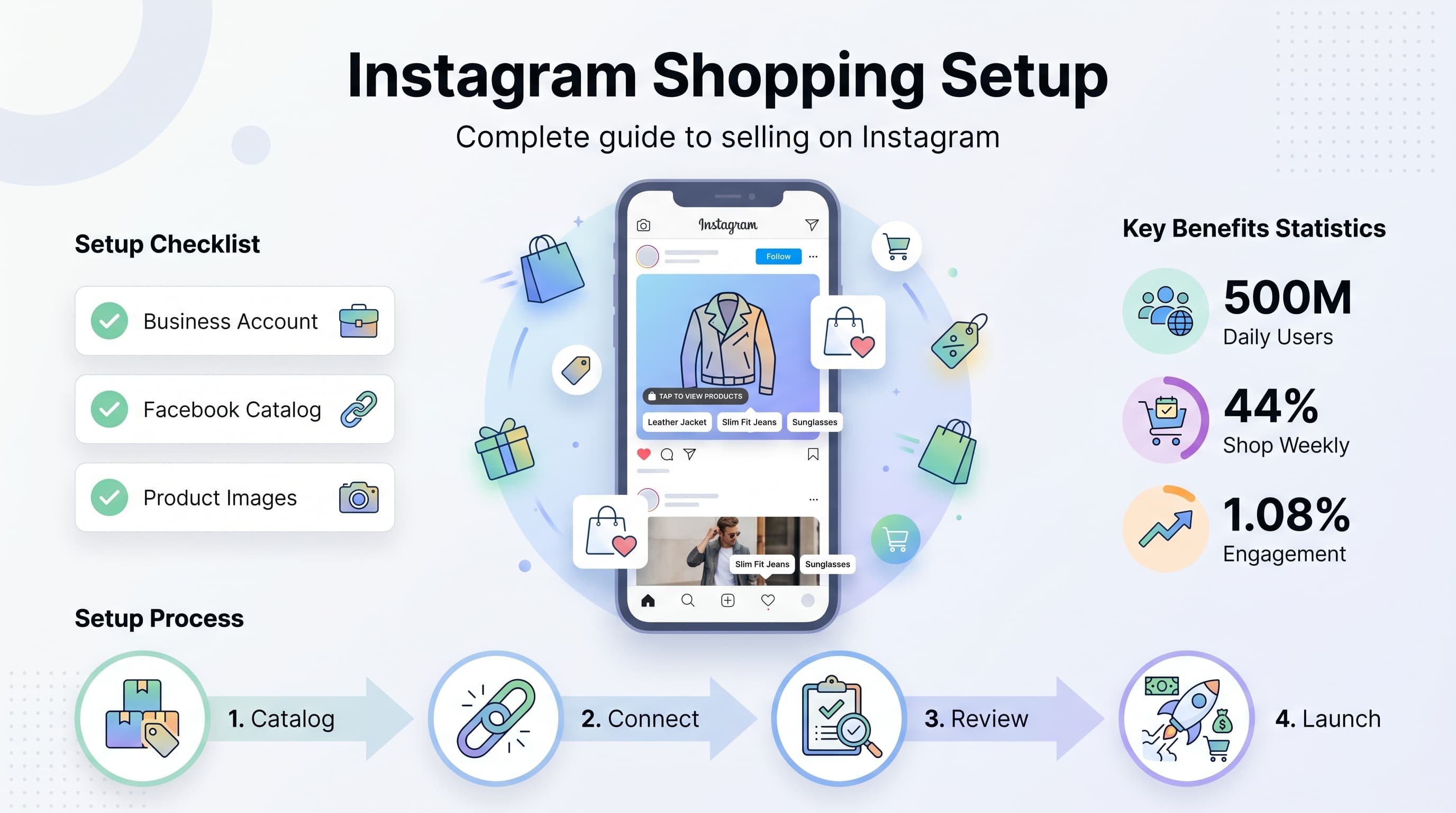
Instagram Shopping transforms your regular posts into clickable storefronts. With over 500 million people using Instagram Stories daily and 200 million users visiting at least one business profile each day, the platform has become a goldmine for e-commerce brands. Our Instagram scheduling can help.
See It in Action
This is what scheduling an Instagram post looks like in Schedulala
But here's the thing: most businesses set up Instagram Shopping wrong. They rush through the process, miss crucial optimization steps, and wonder why their conversion rates stay flat. This guide walks you through the complete setup process and shares the tactics that actually move the needle. See our how to repurpose content guide.
Try Schedulala for free
Schedule posts to Bluesky, Twitter, and 8 other platforms from one dashboard.
Get started for free→What is Instagram Shopping and why it matters
Instagram Shopping lets customers discover and buy products directly from your Instagram posts and Stories. When someone taps a product tag, they see details like price, description, and a direct link to purchase on your website. See our the best story scheduler: guide.
The numbers speak for themselves. Brands using Instagram Shopping see an average of 1.08% engagement rate compared to 0.96% for regular posts. More importantly, 44% of Instagram users shop on the platform weekly, and these shoppers have an average order value 10% higher than other social commerce channels. Learn more about scheduling across platforms.
Key Benefits of Instagram Shopping
- Seamless shopping experience - Customers stay in the Instagram app longer
- Higher conversion rates - Reduces friction between discovery and purchase
- Better product visibility - Your products appear in Instagram's shopping tab
- Rich analytics - Track which products generate the most interest and sales
- Cross-platform integration - Works with Facebook Shop automatically
The key difference between regular Instagram posts and Shopping posts is intent. Regular posts build awareness and engagement. Shopping posts capture purchase intent at the moment someone discovers your product. Our best time to post on instagram can help.
Prerequisites before you start
Instagram Shopping isn't available to everyone automatically. You need to meet specific requirements and have the right accounts set up before diving into product catalogs and shopping tags. Our instagram engagement calculator can help.
1. Business account requirements
First, you need an Instagram Business or Creator account. Personal accounts can't access Shopping features. If you're still using a personal account, switch to Business in your settings under 'Account Type'.
Your business must also comply with Instagram's commerce policies. This means no prohibited items like weapons, adult products, or illegal substances. Instagram reviews each Shopping application manually, so policy violations will result in immediate rejection.
2. Facebook Business Manager setup
Instagram Shopping runs through Facebook's commerce platform, so you need a Facebook Business Manager account connected to your Instagram profile. This isn't just a regular Facebook page - it's the full Business Manager dashboard.
In Business Manager, you'll create your product catalog, manage inventory, and handle all the technical aspects of your shopping setup. Your Instagram account links to this catalog to pull product information for shopping tags.
Make sure your Facebook Business Manager account has admin access to both your Facebook page and Instagram account. Without proper permissions, the connection process fails and you'll waste time troubleshooting access issues.
3. Supported regions and currencies
Instagram Shopping is available in over 50 countries, but the features vary by region. US businesses get the full suite including product ads, shopping in Stories, and the Instagram Shop tab. Other regions might have limited features.
Check Instagram's current list of supported countries before starting setup. If you're in an unsupported region, you can still tag products, but customers will be redirected to your website instead of seeing in-app product details.
Currency support also varies by region. Instagram automatically detects your business location and currency from your Facebook Business Manager settings, so ensure these details are accurate before proceeding.
Step-by-step Instagram Shopping setup process
The setup process involves multiple platforms and can take 2-7 days for Instagram's review team to approve your application. Here's the exact sequence that works consistently.
Step 1: Create your Facebook product catalog
Log into Facebook Business Manager and navigate to 'Catalogs' in the main menu. Click 'Create Catalog' and choose 'E-commerce' as your catalog type. This tells Facebook you're selling physical products that can be shipped.
Name your catalog something descriptive like '[Your Brand] Product Catalog' and add your business website. Facebook uses this information during the review process to verify your business legitimacy.
You have three options for adding products: manual upload, data feed, or e-commerce platform integration. For most businesses, connecting your existing e-commerce platform (Shopify, WooCommerce, BigCommerce) is the fastest option.
Step 2: Connect Instagram to your catalog
In Facebook Business Manager, go to 'Instagram Accounts' and select your connected Instagram profile. If it's not connected yet, use the 'Add Instagram Account' option and follow the authentication process.
Once connected, navigate to the 'Shopping' section and select your product catalog from the dropdown menu. This links your Instagram account to the specific catalog you created in Step 1.
Facebook will now review your account and catalog for policy compliance. This review typically takes 1-3 business days, but can extend to a week during busy periods. You'll receive an email notification when the review is complete.
Step 3: Submit for Instagram Shopping review
Open the Instagram app and go to Settings > Business > Shopping. You should see your connected catalog here. Tap 'Request Review' to submit your account for Instagram Shopping approval.
Instagram's review team checks that your business and products comply with their commerce policies. They look at your website, product descriptions, and overall business legitimacy.
Common reasons for rejection include incomplete product information, policy violations, or mismatched business details between Instagram and Facebook. Make sure your business name, website, and contact information are consistent across all platforms.
Step 4: Configure your Instagram Shop
Once approved, you'll see a 'Shop' tab appear on your Instagram profile. This is your dedicated storefront where customers can browse your entire product catalog without leaving Instagram.
Customize your shop by adding collections, featuring specific products, and writing compelling collection descriptions. Collections help organize your products by category, season, or any other grouping that makes sense for your business.
Set up your shop policies including shipping, returns, and customer service information. These details appear when customers tap on products and help build trust before they visit your website to complete purchases.
Optimizing your product catalog for maximum visibility
A well-optimized product catalog is the foundation of successful Instagram Shopping. Poor product data leads to low visibility in Instagram's shopping recommendations and reduced conversion rates.
High-quality product images
Instagram is a visual platform, so your product images make or break your Shopping success. Use high-resolution images (at least 1024x1024 pixels) with consistent lighting and backgrounds.
Include multiple angles of each product. The main image should show the product clearly on a clean background, while additional images can show the product in use, different angles, or lifestyle contexts.
Avoid text overlays on product images. Instagram's algorithm favors clean product shots, and text can interfere with the platform's image recognition technology that helps categorize and recommend your products.
- Primary image: Clean background, product centered, no text overlays
- Secondary images: Different angles, scale references, detail shots
- Lifestyle images: Product in use, styled settings, customer photos
- Consistency: Same lighting and background style across all products
Compelling product descriptions
Product descriptions appear when customers tap on shopping tags, so make them count. Focus on benefits over features, and include keywords that customers might search for.
Keep descriptions concise but informative. Include key details like materials, dimensions, care instructions, and what makes your product unique. Avoid generic descriptions that could apply to any similar product.
Use emotional language that connects with your target audience. Instead of 'blue cotton t-shirt,' try 'soft cotton tee that becomes your weekend favorite.' The goal is to help customers envision owning and using your product.
Strategic pricing and inventory management
Your pricing strategy affects how Instagram displays your products in search and recommendations. Instagram tends to favor products with competitive pricing within their category.
Keep inventory levels updated in real-time. Nothing frustrates customers more than tapping on a product only to find it's out of stock. Use automated sync between your e-commerce platform and Facebook catalog to avoid this issue.
Consider using Instagram's sale price feature for promotions. When you mark down products in your catalog, Instagram displays both the original and sale price, which can increase click-through rates.
Creating effective shopping posts and Stories
Having Instagram Shopping enabled is just the beginning. Success comes from creating compelling content that showcases your products naturally while encouraging purchases.
Best practices for shopping posts
Don't make every post a sales post. Mix product-focused content with lifestyle, behind-the-scenes, and educational posts. The 80/20 rule works well: 80% valuable content, 20% direct selling.
When you do create shopping posts, show products in context. Instead of just posting a product photo, show someone wearing or using the item. This helps customers visualize the product in their own lives.
Use natural product placement in your captions. Instead of 'Buy our new dress,' try 'This flowy dress has been perfect for transitioning from summer to fall. The fabric is so comfortable and the color works with everything in my closet.'
- Tag strategically: Only tag products that are prominently featured in the image
- Limit tags: Use 3-5 product tags maximum per post to avoid looking spammy
- Tell stories: Use captions to share how the product fits into customers' lives
- Include calls to action: 'Tap to shop' or 'Link in bio for more colors'
Instagram Stories shopping features
Stories offer more dynamic shopping opportunities than feed posts. The product sticker lets you highlight items with customizable colors and styles that match your brand aesthetic.
Use the 'swipe up' or 'link' sticker in combination with product stickers to drive immediate action. Create urgency with limited-time offers or showcase new arrivals when they're most likely to generate interest.
Story highlights let you organize shopping content permanently. Create highlights for 'New Arrivals,' 'Customer Favorites,' or 'Sale Items' to help followers find products easily.
User-generated content for social proof
Encourage customers to share photos using your products and repost the best content (with permission). User-generated content provides authentic social proof that's more convincing than brand-created content.
When reposting customer photos, add product tags so their followers can easily shop the items. This extends your reach to potential customers who are already interested in your products.
Create a branded hashtag for customers to use when posting about your products. Monitor this hashtag regularly for repost opportunities and to engage with customer content.
Advanced Instagram Shopping strategies
Once your basic Instagram Shopping setup is running smoothly, these advanced strategies can significantly boost your conversion rates and average order value.
Instagram Shopping ads and promotion
Shopping ads take your tagged products beyond your organic reach. These ads appear in users' feeds, Stories, and the Explore tab, targeting people based on their shopping behavior and interests.
Start with dynamic product ads that automatically promote your catalog to people who have visited your website or engaged with your Instagram content. These ads require minimal setup but deliver strong ROI for most e-commerce brands.
Collection ads work particularly well for fashion and lifestyle brands. They feature a hero image or video with smaller product images below, letting customers browse multiple items before clicking through to your website.
| Ad Type | Best For | Average CTR | Setup Difficulty |
|---|---|---|---|
| Dynamic Product Ads | Retargeting website visitors | 1.85% | Easy |
| Collection Ads | Showcasing product ranges | 1.92% | Medium |
| Single Image Shopping | Promoting specific products | 1.71% | Easy |
| Video Shopping Ads | Demonstrating product use | 2.1% | Medium |
Cross-platform integration strategies
Your Instagram Shopping setup automatically creates a Facebook Shop with the same product catalog. Use this integration to run coordinated campaigns across both platforms, reaching customers wherever they prefer to shop.
Connect your email marketing platform to sync customer data between Instagram shoppers and your email list. Customers who engage with your shopping posts but don't purchase immediately can be added to targeted email sequences.
Use Instagram Shopping insights to inform your broader marketing strategy. Products that perform well on Instagram often succeed in other channels, while poor performers might need better positioning or pricing adjustments.
Seasonal and event-based campaigns
Plan your Instagram Shopping content around key shopping seasons and events. Black Friday, holiday seasons, and back-to-school periods see significant increases in Instagram shopping activity.
Create special collections in your Instagram Shop for seasonal promotions. Limited-time collections create urgency and make it easy for customers to find relevant products during peak shopping periods.
Use Instagram's scheduling tools or third-party platforms to maintain consistent posting during busy periods. Consistent presence during high-intent shopping times significantly impacts conversion rates.
Common Instagram Shopping mistakes to avoid
Even with a perfect setup, certain mistakes can tank your Instagram Shopping performance. Here are the most common pitfalls and how to avoid them.
Over-tagging products in posts
The biggest mistake is tagging every possible product in every post. This makes your content look spammy and actually decreases engagement rates. Instagram's algorithm favors posts with natural, relevant product tags.
Only tag products that are clearly visible and central to the image. If someone is wearing five different items but only the dress is prominently featured, tag only the dress.
Limit yourself to 5 product tags maximum per post. Too many tags create a cluttered experience and confuse customers about what they should focus on.
Inconsistent product information
Mismatched product details between Instagram and your website create friction that kills conversions. When customers tap a product tag showing one price but find a different price on your website, they lose trust and abandon the purchase.
Regularly audit your product catalog to ensure prices, availability, and descriptions match across all platforms. Set up automated sync if possible, or schedule weekly manual reviews.
Pay special attention to seasonal pricing changes and inventory updates. Out-of-stock products that still appear available in Instagram Shopping create poor customer experiences.
Neglecting Instagram Shop customization
Many brands set up their Instagram Shop and never touch it again. Your shop should be a curated, regularly updated showcase of your best products, not just a dump of your entire catalog.
Create themed collections that make browsing easy and logical. 'New Arrivals,' 'Best Sellers,' and 'Sale Items' are good starting points, but consider more creative groupings that reflect how customers actually shop.
Update your featured products regularly. Stale product features suggest an inactive business and reduce customer confidence in your brand.
Ignoring Instagram Shopping analytics
Instagram provides detailed analytics about which products generate the most interest, clicks, and conversions. Ignoring this data means missing opportunities to optimize your product mix and content strategy.
Review your shopping analytics monthly to identify top-performing products and underperforming inventory. Use these insights to adjust your content calendar and promotional focus.
Track metrics like product detail page views, website clicks, and conversion rates to understand the full customer journey from Instagram discovery to purchase completion.
Measuring Instagram Shopping success
Success metrics for Instagram Shopping go beyond simple follower counts or post engagement. Focus on metrics that directly tie to business outcomes and revenue generation.
Key performance indicators to track
Product discovery rate measures how often users tap on your product tags relative to your post impressions. A healthy discovery rate indicates that your content successfully drives product interest.
Website click-through rate from product detail pages shows how compelling your product information and pricing are. Low click-through rates suggest issues with product presentation or pricing strategy.
Conversion rate from Instagram traffic tells you how well your website converts Instagram shoppers compared to other traffic sources. Instagram shoppers often have different intent and behaviors than search or email traffic.
| Metric | Good Benchmark | Excellent Performance |
|---|---|---|
| Product Tag CTR | 2-4% | 5%+ |
| Shop Tab Engagement | 8-12% | 15%+ |
| Instagram Traffic CVR | 1.5-2.5% | 3%+ |
| Average Order Value | 10% higher than avg | 20% higher than avg |
Tools for tracking Instagram Shopping ROI
Instagram's native analytics provide basic shopping metrics, but connecting Google Analytics gives you deeper insights into customer behavior and conversion paths.
Set up UTM parameters for Instagram traffic to distinguish between different types of Instagram visits. Use separate parameters for organic shopping posts, Stories, and paid shopping ads.
Facebook Business Manager provides additional insights about catalog performance and cross-platform shopping behavior. Use these insights to optimize both your Instagram and Facebook shopping strategies simultaneously.
Troubleshooting common setup issues
Even following the setup process perfectly, you might encounter technical issues or approval problems. Here are solutions to the most common Instagram Shopping setup problems.
Account approval delays and rejections
If your Instagram Shopping application is taking longer than a week, check that your business information is consistent across Instagram, Facebook, and your website. Mismatched business names or addresses trigger extended reviews.
Rejection notices often lack specific details, but common issues include incomplete product catalogs, policy violations, or websites that don't meet Instagram's requirements. Ensure your website has clear privacy policies, shipping information, and customer service contacts.
After fixing rejection issues, wait at least 7 days before reapplying. Multiple rapid applications can flag your account for additional scrutiny and longer review times.
Product catalog sync problems
Catalog sync issues usually stem from formatting problems in your product data feed. Check that all required fields are populated and formatted correctly according to Facebook's specifications.
If products aren't appearing in Instagram after successful catalog upload, verify that your product images meet Instagram's requirements and that products are marked as available and approved in your catalog.
For e-commerce platform integrations, ensure your platform's Instagram Shopping app is updated to the latest version. Outdated integrations often cause sync failures and missing products.
Shopping tags not working properly
If you can't add product tags to posts, verify that your Instagram Shopping approval is still active and that your account hasn't violated any policies since approval.
Products must be approved in your Facebook catalog before they can be tagged on Instagram. Check your catalog for any products showing 'pending review' or 'rejected' status.
Sometimes product tags don't appear immediately after posting. Wait 15-30 minutes before assuming there's a technical problem, as Instagram's systems sometimes need time to process shopping tags.
Try Schedulala for free
Schedule posts to Bluesky, Twitter, and 8 other platforms from one dashboard.
Get started for free→