SocialBee Alternatives: 8 Similar Tools That Could Work Better for You
Looking for SocialBee alternatives? Compare 8 similar social media scheduling tools with features, pricing, and pros/cons to find your perfect match.

Quick answer
Top SocialBee alternatives include Schedulala, Buffer, Later, and Hootsuite for social media scheduling with different pricing models.
- •SocialBee starts at $29/month for 5 profiles with content categories and recycling
- •Schedulala offers one account on each of 12 platforms for $9/month with unlimited posts across 12 platforms
- •Buffer charges $6/channel/month; Later starts at $25/month for 1 user
- •Schedulala supports Bluesky and Telegram which SocialBee does not
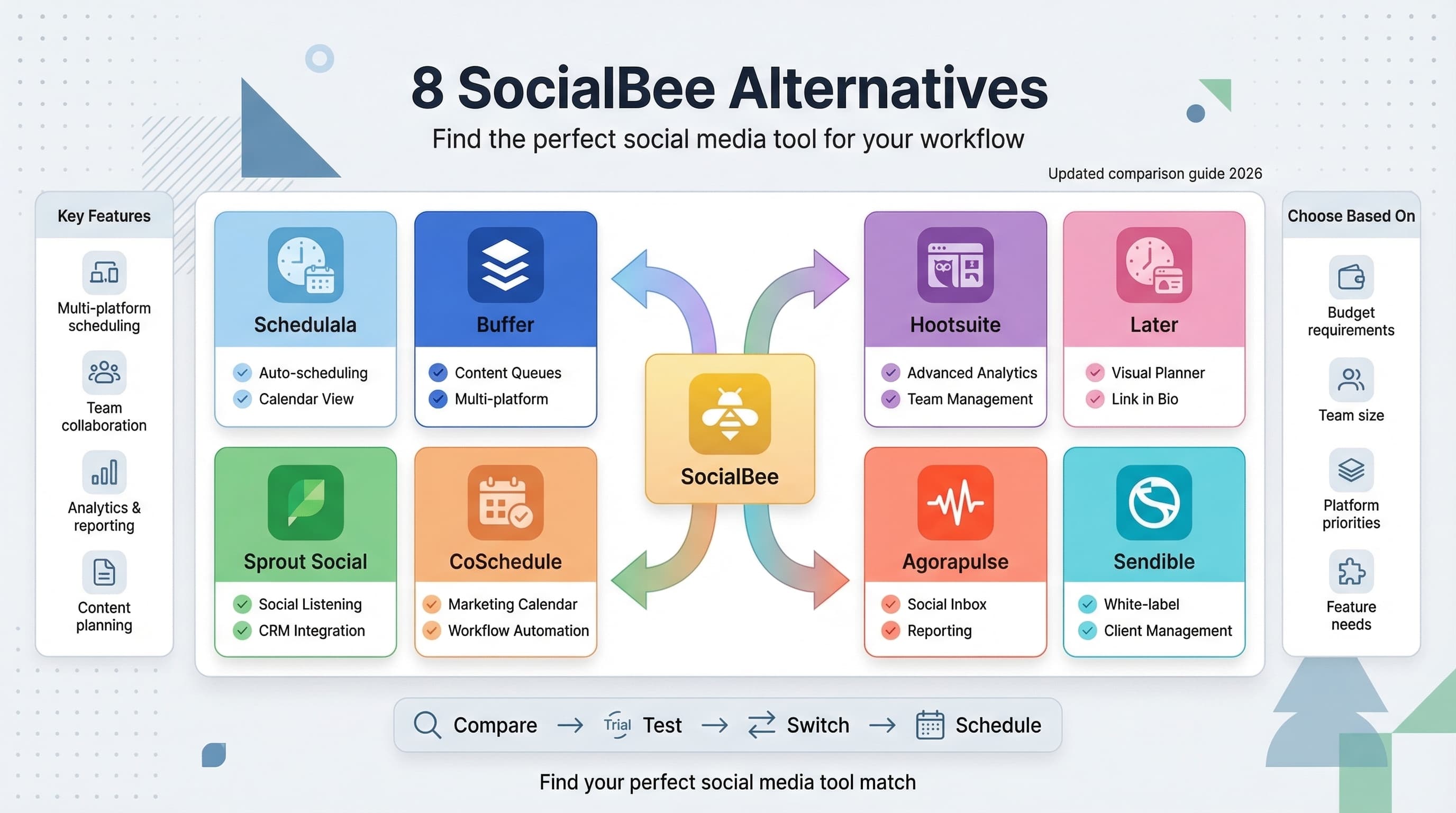
SocialBee is a solid social media management tool, but it's not the only game in town. Learn more about Instagram scheduling.
See It in Action
This is what scheduling an Instagram post looks like in Schedulala
Whether you're hitting budget constraints, missing specific features, or just curious about what else is available, there are plenty of alternatives worth considering. Try our how to repurpose content.
Which SocialBee alternative might actually work better for your specific needs? See our content calendar guide.
Try Schedulala for free
Schedule posts to Bluesky, Twitter, and 8 other platforms from one dashboard.
Get started for free→Why look for SocialBee alternatives?
Don't get me wrong, SocialBee has its strengths. The content categorization feature is clever, and their RSS feed integration works well for content curation. But after using it alongside several other tools, I've noticed some gaps that might matter to you. Learn more about scheduling across platforms.
The pricing can get steep quickly if you need more social profiles. Their analytics feel basic compared to what some competitors offer. And honestly, the user interface feels a bit cluttered when you're trying to schedule posts quickly. Our best time to post on instagram can help.
Some users also find the learning curve steeper than expected. The content categorization that makes SocialBee unique can actually slow you down if you just want to schedule posts without sorting everything into buckets first. Our instagram engagement calculator can help.
1. Schedulala
Best for: Straightforward scheduling without the complexity
Let's start with the obvious choice. Schedulala takes a different approach than SocialBee by focusing on what most people actually need: simple, reliable post scheduling across multiple platforms.
Where SocialBee makes you categorize everything, Schedulala lets you just schedule posts. No forced workflows, no content buckets to manage. You write a post, pick your platforms, set the time, done.
The platform supports all the major social networks you'd expect, plus some newer ones like Threads and Bluesky that other tools are still catching up on. The bulk upload feature is particularly handy if you're planning content in batches.
What sets it apart is the cross-posting intelligence. Instead of posting identical content everywhere, you can customize posts for each platform while managing everything from one dashboard. Instagram gets hashtags, LinkedIn gets professional tone, Twitter gets threading support.
Pricing comparison
SocialBee starts at $29/month for 5 social profiles. Schedulala's pricing is more flexible, especially if you need to manage multiple brands or have seasonal posting needs.
Key advantages over SocialBee
- Faster posting workflow without mandatory categorization
- Better platform-specific customization
- More modern interface that doesn't overwhelm
- Support for newer platforms like Threads
- Bulk scheduling that actually works smoothly
2. Buffer
Best for: Teams and comprehensive analytics
Buffer is probably the most well-known alternative to SocialBee, and for good reason. It's been around longer than most social media tools and has refined its approach based on years of user feedback.
The free plan is genuinely useful, unlike some competitors who basically offer trial versions. You get 3 social accounts and 10 scheduled posts per account, which works for personal brands or small businesses just starting out.
Buffer's analytics are significantly better than SocialBee's. The engagement reports show you which types of content perform best, optimal posting times based on your actual audience, and competitor analysis that helps you benchmark your performance.
The team collaboration features are where Buffer really shines compared to SocialBee. Multiple team members can draft posts, request approvals, and manage publishing schedules without stepping on each other's toes. The approval workflows are particularly useful for agencies or larger companies.
Where Buffer beats SocialBee
Buffer's mobile apps are notably better. You can manage your entire social media presence from your phone, including editing scheduled posts, responding to comments, and checking analytics. SocialBee's mobile experience feels like an afterthought.
The Pablo image creation tool (built into Buffer) is surprisingly useful for quick visual content. While not as sophisticated as dedicated design tools, it beats SocialBee's limited image editing options.
Potential drawbacks
Buffer doesn't have SocialBee's RSS integration, which might matter if you rely heavily on content curation. The content categorization system that some users love about SocialBee doesn't exist in Buffer either.
3. Hootsuite
Best for: Enterprise users and comprehensive social listening
Hootsuite is the heavyweight champion of social media management tools. If SocialBee feels too simple and you need industrial-strength features, Hootsuite might be your answer.
The platform supports more social networks than SocialBee, including some business-focused platforms like LinkedIn Company Pages with full functionality. YouTube scheduling works better here too, with proper thumbnail support and description formatting.
Social listening is where Hootsuite completely outclasses SocialBee. You can monitor brand mentions, track hashtags, and even set up alerts for competitor activity. This level of monitoring simply doesn't exist in SocialBee.
The custom reporting features are enterprise-grade. You can create branded reports for clients, set up automated report delivery, and track ROI metrics that go way beyond basic engagement numbers.
Team management advantages
Hootsuite's permission system is granular in ways SocialBee can't match. You can give someone access to Instagram but not Twitter, or let them draft posts but not publish them. For agencies managing multiple client accounts, these controls are essential.
The assignment and approval workflows support complex organizational structures. Posts can be routed through multiple approval levels, assigned to specific team members, and tracked through completion.
The reality check
Hootsuite is expensive. The professional plan costs more than SocialBee's top tier, and you'll likely need add-ons that increase the price further. The interface can also feel overwhelming if you're used to simpler tools.
Setup time is significant. While SocialBee lets you start scheduling posts within minutes, Hootsuite requires configuration of streams, permissions, and monitoring settings before it becomes truly useful.
4. Later
Best for: Visual content and Instagram-heavy strategies
Later started as an Instagram scheduling tool and it shows. If your social media strategy leans heavily on visual platforms, Later might serve you better than SocialBee.
The visual content calendar is genuinely useful, not just pretty. You can see how your Instagram grid will look before posts go live, drag and drop to rearrange posting order, and maintain a cohesive visual brand across your feed.
Later's media library is more sophisticated than SocialBee's. You can organize images and videos with tags, search by color or content type, and even see which assets perform best across different posts.
The hashtag suggestion feature actually learns from your content and audience. Instead of generic hashtag lists, Later analyzes which tags work for your specific niche and suggests relevant alternatives.
Instagram-specific advantages
Later supports Instagram features that SocialBee doesn't handle well. Stories scheduling works reliably, including polls, questions, and other interactive elements. The link in bio tool creates a clickable landing page for your Instagram traffic.
Instagram Shopping integration lets you tag products directly in posts and track which content drives sales. This e-commerce focus is absent from SocialBee entirely.
Limitations to consider
Later doesn't match SocialBee's RSS integration or content curation features. If you rely on automated content discovery and posting, you'll need to change your workflow.
Twitter and LinkedIn feel like afterthoughts compared to the Instagram experience. The posting interface is fine, but you lose the visual planning advantages that make Later special.
5. Sprout Social
Best for: Customer service integration and detailed analytics
Sprout Social positions itself as more than a scheduling tool. It's a complete social media management platform that excels at turning social interactions into business results.
The unified inbox feature consolidates messages, comments, and mentions from all platforms into one manageable stream. You can respond to customer questions, handle complaints, and engage with followers without jumping between different social networks.
Analytics go deeper than SocialBee's surface-level metrics. Sprout Social tracks customer satisfaction scores, response times, and even sentiment analysis of mentions and comments. You can see not just how many people are talking about your brand, but how they feel about it.
The content optimization suggestions are based on actual performance data from your accounts. Instead of generic best practice advice, Sprout Social tells you specifically when your audience is most active and what types of content generate the most engagement.
Customer service advantages
Sprout Social's ticketing system turns social media comments into trackable customer service cases. You can assign issues to team members, set priority levels, and ensure no customer question gets lost.
Response templates and saved replies speed up customer service without sacrificing personalization. The system can automatically categorize incoming messages and suggest appropriate responses.
The investment required
Sprout Social is significantly more expensive than SocialBee. The standard plan costs about double what you'd pay for SocialBee's equivalent tier. The advanced features that justify this cost might not matter if you don't use social media for customer service.
Learning curve is steeper than simpler alternatives. While powerful, Sprout Social requires time investment to set up workflows, configure analytics, and train team members on the customer service features.
6. CoSchedule
Best for: Content marketing integration and editorial calendars
CoSchedule approaches social media as part of a broader content marketing strategy. If you're publishing blog posts, sending newsletters, and running social campaigns that need to work together, CoSchedule might solve problems SocialBee can't.
The editorial calendar shows your entire content marketing timeline in one view. Blog posts, social media campaigns, email newsletters, and even offline marketing activities can be planned and coordinated from the same dashboard.
Social templates in CoSchedule automatically generate multiple social posts when you publish new blog content. Instead of manually creating tweets, LinkedIn posts, and Facebook updates for each article, the system creates variations and schedules them at optimal times.
The ReQueue feature (similar to SocialBee's evergreen posting) automatically fills gaps in your posting schedule with your best-performing content. But CoSchedule's version is smarter about avoiding repetition and adapting content for different time periods.
Content marketing advantages
CoSchedule's headline analyzer helps optimize social media post copy, not just blog headlines. You can test different versions of posts and see which language is likely to perform better before scheduling.
The asset organization system handles more than just images and videos. You can store brand guidelines, content templates, and campaign assets in one searchable library that team members can access across projects.
Complexity considerations
CoSchedule might be overkill if you only need social media scheduling. The content marketing features that make it powerful also make it more complex than SocialBee.
Integration requirements mean you'll get the most value if you use CoSchedule for more than just social media. The ROI is harder to justify if you don't need the blog integration, email marketing coordination, and editorial calendar features.
7. Agorapulse
Best for: Community management and engagement tracking
Agorapulse focuses on the engagement side of social media that many scheduling tools, including SocialBee, treat as an afterthought. If building community and managing conversations matters as much as posting content, Agorapulse deserves consideration.
The inbox system organizes all social interactions by priority and type. New followers, comments on your posts, brand mentions, and direct messages are sorted automatically so you can respond to the most important interactions first.
Competitor analysis tools let you benchmark your performance against other brands in your industry. You can see their posting frequency, engagement rates, and top-performing content without manually tracking everything.
Social media ROI tracking connects social activities to business results. You can track conversions from social media campaigns, calculate customer acquisition costs, and prove the value of your social media efforts with actual revenue numbers.
Engagement management
Agorapulse's comment moderation tools help maintain brand reputation. You can set up automatic responses for common questions, hide inappropriate comments, and flag messages that need management attention.
The follower analysis feature identifies your most engaged community members and influential followers. This information helps you build relationships with people who can amplify your content organically.
Scheduling limitations
While Agorapulse handles basic scheduling well, it doesn't match SocialBee's content categorization or RSS integration features. The posting interface is functional but not as streamlined as dedicated scheduling tools.
Content creation features are minimal compared to tools like Later or Buffer. You'll need separate tools for image editing, hashtag research, and content planning.
8. Sendible
Best for: Agencies managing multiple client accounts
Sendible is built specifically for agencies and consultants managing social media for multiple clients. If you're outgrowing SocialBee because you need better client management features, Sendible might be the answer.
The white-label options let you brand the platform with your agency's logo and colors. Clients can access their own dashboards without seeing your other accounts or being reminded they're using a third-party tool.
Client reporting is more sophisticated than SocialBee's analytics. You can create custom reports that highlight metrics each client cares about, schedule automatic report delivery, and include your agency branding throughout.
The permission system is granular enough for complex client relationships. You can give clients access to approve posts without letting them see pricing information, or allow them to view analytics while restricting scheduling permissions.
Agency-specific features
Sendible's client onboarding process helps systematize new account setup. Templates for different industry types speed up the initial configuration and ensure consistency across client accounts.
Time tracking and billing integration help agencies measure profitability per client. You can see how much time your team spends on each account and whether your pricing covers the actual work required.
The content approval workflows support complex agency hierarchies. Junior staff can draft posts, account managers can review them, and clients can give final approval before publishing.
Individual user limitations
Sendible's agency focus makes it unnecessarily complex for individual users or small businesses. Features you'll never use add interface clutter and increase the learning curve.
Pricing reflects the agency market, making it expensive compared to alternatives designed for individual users. The value proposition only makes sense if you're managing multiple client accounts.
How to choose the right SocialBee alternative
After testing all these platforms, the best SocialBee alternative depends on what frustrated you about SocialBee in the first place and what you prioritize most.
If you want simpler scheduling
Schedulala and Buffer offer the cleanest, fastest posting workflows. You won't miss SocialBee's content categorization system if you prefer straightforward scheduling.
If you need better analytics
Sprout Social and Hootsuite provide enterprise-level reporting that makes SocialBee's analytics look basic. The extra cost might be justified if data-driven decisions matter to your strategy.
If visual content dominates your strategy
Later's Instagram-focused features and visual content calendar offer capabilities SocialBee can't match. The trade-off is weaker performance on text-based platforms.
If you're managing an agency
Sendible and Hootsuite provide the client management, white-labeling, and permission controls that SocialBee lacks. Individual users don't need this complexity.
| Tool | Best For | Starting Price | Key Advantage |
|---|---|---|---|
| Schedulala | Simple scheduling | $9/month | Cross-platform customization |
| Buffer | Team collaboration | $6/channel/month | Mobile app quality |
| Hootsuite | Enterprise users | $49/month | Social listening |
| Later | Visual content | Free plan | Instagram grid preview |
| Sprout Social | Customer service | $249/month | Unified inbox |
| CoSchedule | Content marketing | $19/month | Editorial calendar |
| Agorapulse | Community management | $49/month | Engagement tracking |
| Sendible | Agencies | $29/month | White-label options |
Final verdict
SocialBee isn't a bad tool, but it's not the best fit for everyone. The alternatives I've covered here each solve different problems and prioritize different aspects of social media management.
For most users frustrated with SocialBee's complexity, Schedulala or Buffer provide cleaner workflows without sacrificing essential features. If you need enterprise capabilities, Hootsuite and Sprout Social justify their higher costs with advanced functionality.
The key is matching the tool to your actual workflow, not the workflow you think you should have. SocialBee's content categorization is clever, but if it slows you down instead of helping, simpler alternatives will serve you better.
Try Schedulala for free
Schedule posts to Bluesky, Twitter, and 8 other platforms from one dashboard.
Get started for free→
![Why I Switched from Hootsuite [Honest Review + Better Alternatives]](/_next/image?url=%2Fblog%2Fswitch-from-hootsuite%2Fheader.jpeg&w=3840&q=75&dpl=dpl_6RiKV7dz1EjMEbYgqheh1pc2YPwv)