Telegram for Educators: Build a Course Community That Actually Engages Students
Learn how to use telegram for education. Build engaged course communities, share resources, and connect with students using Telegram's powerful features.

Your students check their phones constantly, but somehow they miss every single course announcement you send via email. Sound familiar? Our Telegram scheduling can help.
See It in Action
This is what scheduling a Telegram post looks like in Schedulala
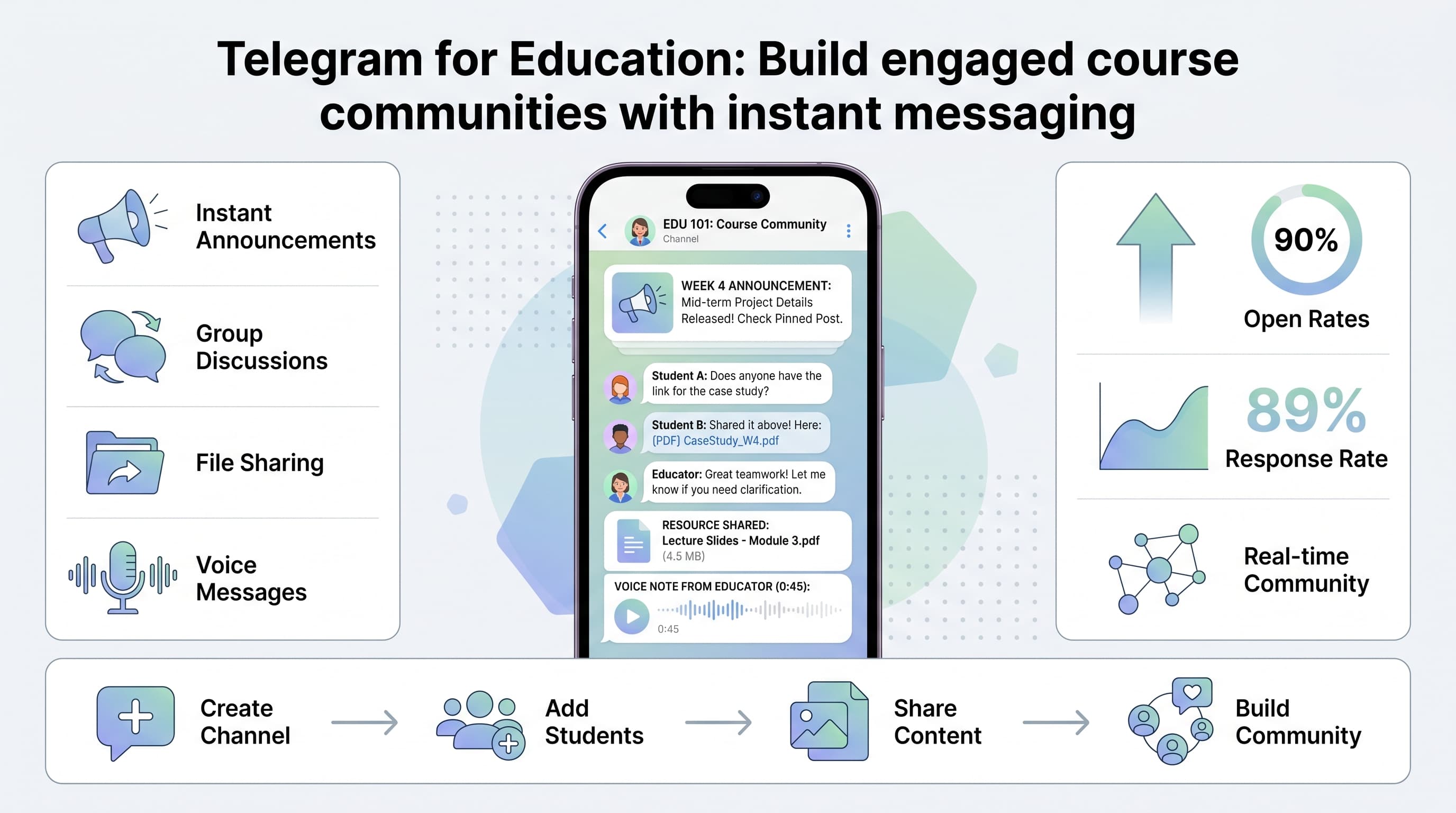
While you're fighting inbox algorithms and hoping students check their university email, your competitors are building thriving educational communities on Telegram. They're getting 90% message open rates, instant student feedback, and engagement levels that make traditional LMS platforms look prehistoric. Our telegram content ideas what can help.
This isn't just another social media trend. Telegram has become the go-to platform for educators worldwide because it combines the immediacy of messaging with the organizational power of channels and groups. Whether you're teaching a coding bootcamp, running language classes, or managing university courses, Telegram can transform how you connect with students. See our scheduling across platforms guide.
Try Schedulala for free
Schedule posts to Bluesky, Twitter, and 8 other platforms from one dashboard.
Get started for free→Why educators are switching to Telegram
Traditional educational platforms fail because they treat communication like an afterthought. Students get buried in confusing interfaces, miss important updates, and struggle to connect with classmates. Telegram solves these problems with a simple premise: education should be conversational, not bureaucratic. Try our how to automate bluesky.
1. Instant reach without algorithm interference
Unlike social media platforms that hide your content behind algorithms, every message you send in a Telegram channel reaches every subscriber immediately. When you post an assignment reminder at 9 PM, students see it within seconds, not whenever Facebook decides to show it to them. Learn more about telegram font generator.
Dr. Sarah Chen, who runs a biology program at UC Berkeley, saw her student response rates jump from 23% to 89% after moving course announcements from email to Telegram. Students told her they actually look forward to course updates now because they're conversational and timely. Try our telegram line break generator.
2. Rich media sharing made simple
Telegram handles everything from quick voice notes explaining complex concepts to large video files demonstrating practical skills. You can share documents up to 2GB, send voice messages while walking between classes, and post quick polls to gauge student understanding.
Language teachers particularly love this feature. Instead of wrestling with clunky LMS platforms to upload pronunciation examples, they record voice messages directly in Telegram. Students can listen repeatedly, respond with their own attempts, and get immediate feedback from both instructors and peers.
3. Community building that actually works
The magic happens when students start helping each other. Telegram's group features create natural study communities where advanced students mentor newcomers, classmates share resources, and everyone feels connected to the learning process.
A coding bootcamp in Austin uses Telegram groups for each cohort. Students share debugging tips, celebrate small wins, and support each other through challenging projects. The instructor estimates that 60% of student questions get answered by peers before they need to step in, creating a self-sustaining learning community.
Setting up your educational Telegram presence
The key to Telegram success in education lies in understanding the difference between channels and groups, then using both strategically. Most educators make the mistake of creating one big group for everything, leading to chaos and confusion.
1. Create your announcement channel first
Start with a broadcast channel for course announcements, assignment deadlines, and important updates. This is your digital bulletin board where only you (and designated teaching assistants) can post, but all students can read and react.
Name it clearly: "Biology 101 - Spring 2024" or "JavaScript Bootcamp Announcements." Add a description that explains what students can expect: weekly assignments, deadline reminders, and course updates. Pin a welcome message that sets expectations and provides basic course information.
Enable reactions so students can quickly acknowledge they've seen important messages. A thumbs-up reaction serves as a digital receipt, helping you track who's staying engaged with course communications.
2. Build discussion groups for interaction
Create separate groups for student discussions, questions, and collaboration. This is where the real learning community develops. Students can ask questions, share resources, form study groups, and help each other with assignments.
For larger courses, consider creating multiple focused groups: "Bio 101 - General Questions," "Bio 101 - Lab Partners," and "Bio 101 - Study Groups." This prevents important questions from getting buried in social chatter while still maintaining community connections.
Set clear community guidelines from day one. Pin a message outlining what's appropriate (course questions, study tips, relevant resources) and what belongs elsewhere (personal drama, off-topic discussions, spam). Students appreciate clear boundaries and self-moderate when expectations are explicit.
3. Organize with hashtags and pins
Develop a simple hashtag system to organize content: #assignment for homework posts, #resource for supplementary materials, #deadline for time-sensitive information. Students can search these hashtags to find exactly what they need without scrolling through weeks of messages.
Pin essential messages in both channels and groups. Your course syllabus, assignment schedule, and contact information should always be accessible at the top of your main channel. In discussion groups, pin current assignment details and submission guidelines.
Update pinned messages regularly. Nothing screams "inactive instructor" like a pinned message about an assignment from three weeks ago. Keep your pinned content current and relevant to maintain student trust and engagement.
Content strategies that keep students engaged
The difference between a thriving educational Telegram community and a digital ghost town comes down to content strategy. Students need variety, value, and reasons to check back regularly. Here's how successful educators structure their Telegram content to maximize engagement and learning outcomes.
1. Daily micro-learning posts
Share one small, digestible piece of course-related content every day. This could be a vocabulary word for language classes, a coding tip for programming courses, or a historical fact for humanities subjects. Keep these posts under 100 words and highly visual when possible.
A Spanish teacher posts a "Word of the Day" every morning at 8 AM, complete with pronunciation audio, example sentences, and a simple image. Students start looking forward to these posts and often share them with friends, extending your course reach organically.
The key is consistency and timing. Pick a schedule and stick to it religiously. Students develop habits around your content, checking Telegram at specific times because they know valuable information will be waiting.
2. Interactive polls and quizzes
Telegram's poll feature is perfect for quick knowledge checks, gathering opinions, and maintaining engagement between classes. Create polls that review previous lessons, preview upcoming topics, or gauge student understanding of complex concepts.
A chemistry professor uses weekly polls to identify which concepts need more explanation: "Which topic from this week needs more review in Friday's class?" Students vote anonymously, providing honest feedback that shapes lesson planning. Poll results often reveal knowledge gaps that wouldn't surface in traditional classroom settings.
Mix serious academic polls with lighter engagement content. "Which historical figure would you want as a study buddy?" or "What's your preferred study snack?" keeps the community feel alive while maintaining educational focus. Students engage more with academic content when they feel personally connected to the space.
3. Behind-the-scenes educator content
Share your teaching process, research interests, and professional insights. Students connect better with instructors they see as real people, not just academic authorities. This personal touch transforms transactional course interactions into meaningful educational relationships.
Post photos from conferences you attend, share articles that influence your thinking, or explain how you approach difficult concepts. A philosophy professor shares voice messages walking through their thought process while preparing lectures, giving students insight into how experts think through complex problems.
Document your own learning journey. When you discover new research, attend workshops, or change your perspective on course topics, share that evolution with students. This modeling of lifelong learning often inspires students more than perfect, polished presentations.
Advanced Telegram features for educators
Once you've mastered basic channels and groups, Telegram offers sophisticated features that can automate routine tasks, personalize student interactions, and create more dynamic learning experiences. These advanced features separate professional educational Telegram setups from basic messaging groups.
1. Scheduled messages for consistent communication
Use Telegram's scheduled messaging to maintain consistent communication without being tied to your phone 24/7. Schedule assignment reminders for Sunday evenings, motivational messages for Monday mornings, and deadline alerts for appropriate advance notice.
A business professor schedules her entire week of content every Sunday morning: case study introductions on Mondays, mid-week concept reinforcements on Wednesdays, and weekend reflection prompts on Fridays. Students receive consistent value without the instructor needing to remember daily posting.
This feature is particularly valuable for educators teaching across time zones or managing multiple courses. Schedule key communications to reach students when they're most likely to be checking their phones, typically between 7-9 AM and 6-8 PM in their local time zones.
2. Bots for automation and interactivity
Integrate educational bots to handle routine tasks and create interactive learning experiences. Quiz bots can automatically grade multiple-choice reviews, while reminder bots can send personalized study prompts based on individual student progress.
The @PollBot creates sophisticated surveys that go beyond Telegram's built-in polls, allowing for complex feedback collection and anonymous course evaluations. Language instructors use @ImageBot to automatically generate visual vocabulary cards, while math teachers employ calculator bots for quick problem-solving demonstrations.
Set up welcome bots that automatically onboard new students, providing course information, community guidelines, and initial resource links. This ensures consistent orientation experiences regardless of when students join your channels or groups.
3. File organization and resource libraries
Create dedicated channels for course resources, organized by topic or week. Unlike traditional LMS platforms, Telegram's search function makes finding specific documents intuitive and fast. Students can search for "week 3 reading" or "assignment template" and find exactly what they need.
Use Telegram's file forwarding feature to curate resources from multiple sources. When you find relevant articles, videos, or documents in other Telegram channels or external sources, forward them to your resource channel with added context about how they relate to course objectives.
Encourage students to contribute to resource libraries by submitting useful materials they discover. A marketing class maintains a shared resource channel where students post relevant case studies, industry articles, and tool recommendations, creating a collaborative knowledge base that benefits everyone.
Building student engagement and participation
Getting students to join your Telegram channels is just the beginning. Sustaining meaningful engagement requires intentional strategies that make students feel valued, heard, and motivated to participate actively in the learning community.
1. Recognition and celebration systems
Create regular opportunities to highlight student achievements, both academic and participatory. Weekly Student Spotlight posts featuring excellent assignments, helpful peer contributions, or creative problem-solving approaches motivate continued engagement while providing learning examples for other students.
Implement a point system for community participation: helpful answers, resource sharing, and constructive feedback all earn recognition. A graphic design instructor awards monthly badges for different types of contributions, creating friendly competition and encouraging diverse forms of participation.
Celebrate improvement, not just excellence. Recognize students who show progress, ask thoughtful questions, or help classmates struggle through difficult concepts. This inclusive approach maintains engagement across different skill levels and learning paces.
2. Peer learning facilitation
Structure activities that require students to teach each other. Peer explanation challenges where students must explain concepts to classmates in their own words create deeper understanding while building community connections.
Organize virtual study groups through Telegram's voice chat features. Students can screen-share problems, discuss readings, and work through assignments together outside formal class times. The instructor occasionally drops in to provide guidance but lets students drive the conversations.
Create mentor partnerships between advanced and beginning students. Upper-level students earn credit or recognition for helping newcomers navigate course material, while beginners get personalized support that supplements formal instruction. These relationships often extend beyond single courses, building lasting academic networks.
3. Real-time feedback and adaptation
Use Telegram's immediacy to adjust teaching approaches based on student feedback. Quick polls before, during, and after lessons help identify confusion points, pacing issues, and interest levels that inform future sessions.
Encourage students to ask questions immediately when they arise, rather than waiting for designated office hours. A "Confusion Channel" dedicated specifically to concept clarification ensures no student falls behind due to accumulated misunderstandings.
Share your decision-making process with students. When you adjust assignment due dates, modify lesson plans, or add supplementary materials based on their feedback, explain the reasoning publicly. This transparency builds trust and demonstrates responsive teaching practices.
Privacy and safety considerations
Educational Telegram use requires careful attention to privacy, safety, and professional boundaries. Establishing clear guidelines protects both educators and students while maintaining the informal, accessible atmosphere that makes Telegram effective for learning communities.
1. Professional boundary management
Create separate Telegram accounts for educational purposes, distinct from personal profiles. This separation protects your private communications while maintaining professional relationships with students. Use your institutional email or formal name for educational accounts to establish clear context.
Establish communication hours and stick to them. Students appreciate responsive instructors, but 24/7 availability creates unsustainable expectations and blurs professional boundaries. Set automatic responses during off-hours that acknowledge messages and provide expected response timeframes.
Define appropriate conversation topics and redirect off-topic discussions diplomatically. Personal counseling, grade disputes, and sensitive academic issues should move to private channels or traditional office hours rather than public group discussions.
2. Student privacy protection
Never share student performance data, attendance information, or personal details in group settings, even when celebrating achievements. Individual accomplishments can be recognized without revealing specific grades or comparative performance metrics.
Educate students about Telegram privacy settings and encourage them to use usernames rather than phone numbers for course-related communications. Provide guidance on profile privacy settings that protect personal information while enabling educational participation.
Be transparent about data retention and usage policies. Explain how long course channels will remain active, whether conversations will be archived, and how student information is protected. This transparency builds trust and ensures compliance with educational privacy regulations.
3. Content moderation strategies
Appoint trusted students or teaching assistants as group moderators to help maintain community standards and respond to issues when you're unavailable. Train moderators on escalation procedures and provide clear guidelines for handling common situations.
Implement progressive response policies for inappropriate content: first warnings, temporary restrictions, and ultimately removal from groups if necessary. Document these policies clearly and apply them consistently to maintain fair community standards.
Use Telegram's reporting features for serious violations and maintain records of problematic interactions. Educational institutions often require documentation of digital communications issues for student conduct or academic integrity investigations.
| Feature | Educational Benefit | Implementation Tip |
|---|---|---|
| Channels | One-way announcements | Use for syllabi, assignments, deadlines |
| Groups | Two-way discussions | Create topic-specific groups for organization |
| Polls | Quick feedback | Weekly concept checks and opinion gathering |
| File Sharing | Resource distribution | Organize with hashtags and clear naming |
| Voice Messages | Personal connection | Great for pronunciation and explanations |
| Scheduled Posts | Consistent communication | Batch content creation for busy weeks |
Measuring success and iterating
Effective educational Telegram use requires ongoing assessment and refinement. Unlike traditional metrics like test scores or attendance, Telegram success shows up in engagement patterns, community health, and learning outcome improvements that may not be immediately obvious.
1. Engagement analytics that matter
Track message response rates rather than just view counts. A channel with 100 subscribers where 80 students regularly react, comment, or share content is more successful than one with 500 passive followers. Quality engagement indicates actual learning community development.
Monitor peer-to-peer interactions in discussion groups. When students start answering each other's questions, sharing resources independently, and maintaining conversations without instructor prompting, you've successfully created a self-sustaining learning community.
Pay attention to participation patterns over time. Initial enthusiasm often drops after 2-3 weeks, but sustainable communities show consistent engagement levels with periodic spikes around major assignments or interesting topics. Identify what content types maintain long-term interest.
2. Student feedback integration
Conduct mid-semester pulse checks through anonymous polls or dedicated feedback channels. Ask specific questions about content preferences, communication frequency, and community value rather than general satisfaction ratings.
Create feedback loops where student suggestions directly influence channel management. When students request more visual content, different posting times, or specific resource types, test these changes and report back on results. This collaborative approach increases investment in community success.
Track correlation between Telegram engagement and traditional academic performance. Many educators find that students active in Telegram communities show improved assignment submission rates, better class attendance, and stronger peer relationships that support academic success.
3. Continuous improvement strategies
Experiment with content timing and frequency based on engagement patterns. Post analytics show when students are most active, but individual class cultures may differ from general usage trends. Test different schedules and measure response rates to optimize communication timing.
Rotate content formats regularly to maintain interest and accommodate different learning preferences. Balance text posts with voice messages, static images with interactive polls, and instructor-generated content with student contributions. Variety prevents community staleness.
Document successful strategies and failed experiments for future course iterations. Build a personal playbook of effective Telegram techniques, seasonal content ideas, and student engagement approaches that can be refined and repeated across different teaching contexts.
Common mistakes to avoid
Even well-intentioned educators can undermine their Telegram communities through common missteps. Learning from these frequent mistakes helps you build stronger educational channels from the start while avoiding pitfalls that kill student engagement.
- Over-posting announcements - Flooding channels with every minor update trains students to ignore your messages. Batch similar information and prioritize truly important communications.
- Ignoring community guidelines - Students need clear expectations about appropriate behavior, but many educators skip this crucial setup step. Unclear boundaries lead to chaos and eventual community breakdown.
- Mixing personal and professional accounts - Using your personal Telegram for educational purposes compromises privacy and creates awkward boundary situations with students and parents.
- Neglecting regular maintenance - Successful Telegram communities require ongoing attention. Inactive channels quickly become digital ghost towns that reflect poorly on your course quality.
- Forcing participation - Making Telegram engagement mandatory often backfires, creating resentful compliance rather than genuine community investment. Keep it valuable and voluntary.
- Inconsistent posting schedules - Students develop habits around your content. Irregular posting destroys the reliability that makes Telegram channels valuable study resources.
- Failing to moderate discussions - Unmoderated groups often devolve into off-topic chatter or become dominated by a few vocal students, alienating others and reducing educational value.
Try Schedulala for free
Schedule posts to Bluesky, Twitter, and 8 other platforms from one dashboard.
Get started for free→