Telegram for Nonprofits: Complete Guide to Free Communication and Community Building
Discover how telegram nonprofits can use this free platform for community building, donor communication, and volunteer coordination. Complete setup guide.

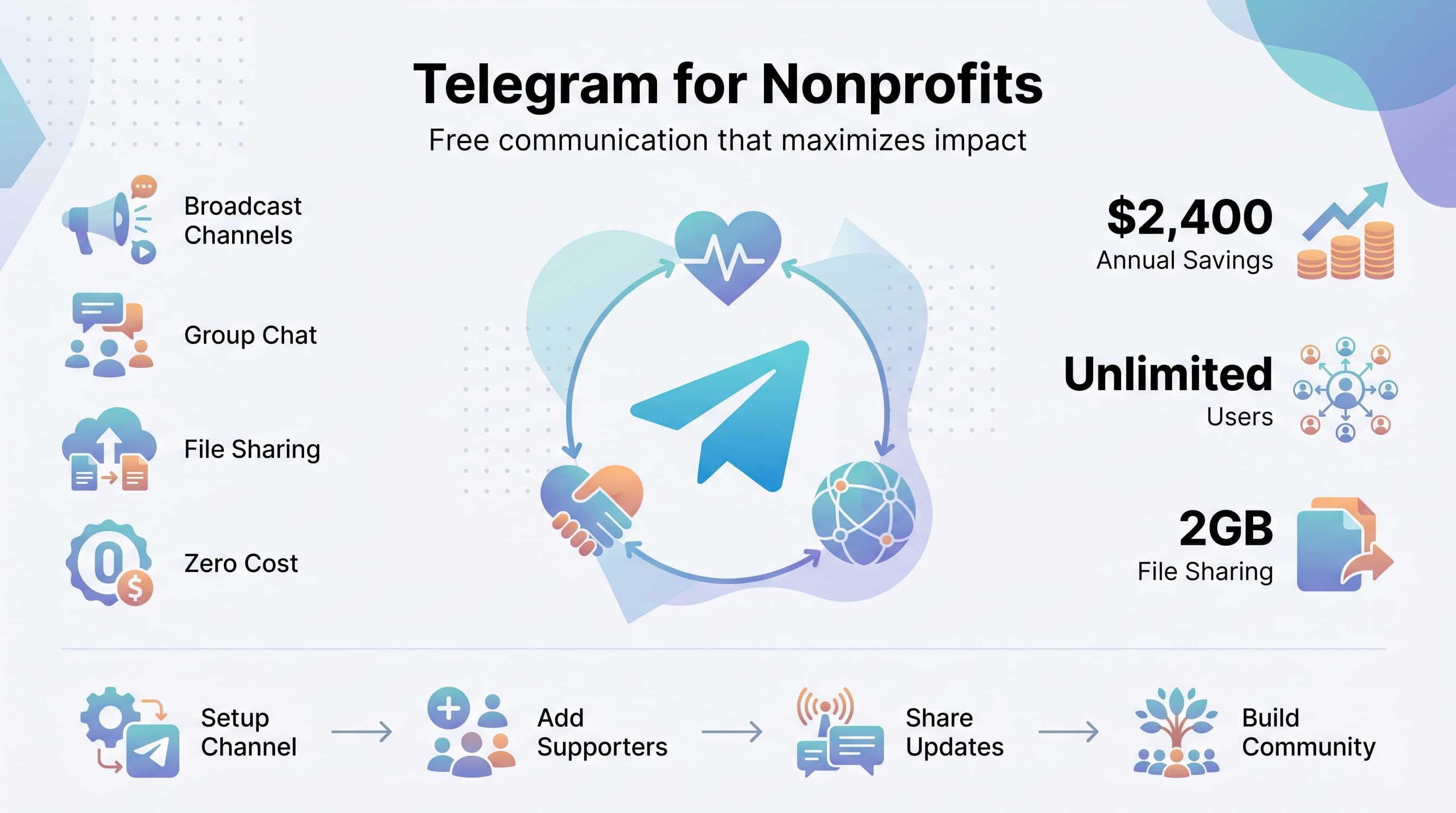
Nonprofit organizations face a constant challenge: maximizing impact while minimizing costs. Every dollar spent on administrative tools is a dollar not directly serving your mission. That's where Telegram comes in as a game-changing communication platform that costs absolutely nothing but delivers enterprise-level features. See our Telegram scheduling guide.
See It in Action
This is what scheduling a Telegram post looks like in Schedulala
Unlike expensive communication tools that can drain your budget, Telegram offers unlimited messaging, file sharing, and community building features completely free. Whether you're coordinating volunteers, updating donors, or building supporter communities, this platform can transform how your nonprofit communicates without touching your precious funding. Try our scheduling across platforms.
Try Schedulala for free
Schedule posts to Bluesky, Twitter, and 8 other platforms from one dashboard.
Get started for free→Why nonprofits choose Telegram over other platforms
1. Zero cost, maximum features
Telegram provides unlimited messaging, file sharing up to 2GB per file, voice and video calls, and broadcast channels to unlimited subscribers. Compare this to paid platforms like Slack or Microsoft Teams that charge per user monthly. For a nonprofit with 50 volunteers and staff, you could save $300-500 monthly just on communication tools. See our how to automate bluesky guide.
The platform generates revenue through premium features for power users, but basic nonprofit needs are covered completely free. No hidden fees, no user limits, no storage restrictions that matter for typical nonprofit use. Try our content calendar.
2. Privacy and security built-in
Nonprofits often handle sensitive information about beneficiaries, donors, and programs. Telegram uses end-to-end encryption for secret chats and stores regular messages on encrypted servers. This level of security typically costs extra on business communication platforms. Learn more about telegram font generator.
The platform also allows you to set message auto-deletion timers, perfect for sharing sensitive coordination details that shouldn't persist indefinitely. Your nonprofit's communications stay protected without requiring IT expertise or additional security subscriptions. Our telegram line break generator can help.
3. Works everywhere, requires nothing
Your volunteers and staff likely use different devices and operating systems. Telegram works seamlessly across iOS, Android, Windows, Mac, and Linux, plus any web browser. Unlike some nonprofit management tools that require specific software installations, Telegram just works.
Field workers in areas with limited connectivity can still receive and send messages when they reconnect. The app handles poor network conditions gracefully, making it ideal for nonprofits operating in challenging environments.
Essential Telegram features every nonprofit should use
Broadcast channels for donor updates
Channels let you broadcast messages to unlimited subscribers who can't reply directly, keeping your updates clean and focused. This is perfect for donor newsletters, program updates, or emergency communications. Unlike email newsletters that get buried in inboxes, Telegram messages appear as push notifications.
You can schedule messages in advance, post photos and videos up to 2GB, and track view counts to understand engagement. Many nonprofits find their Telegram channels get 3-5x higher engagement than email newsletters.
Groups for team coordination
Telegram groups support up to 200,000 members with admin controls, message pinning, and file sharing. Create separate groups for different functions: volunteer coordination, board communications, event planning, or program-specific teams.
The reply and thread features keep conversations organized, while admin tools let you manage permissions and remove problematic members. You can also create invite links with expiration dates for temporary volunteers or event-specific coordination.
Bots for automation
Telegram bots can automate routine nonprofit tasks without requiring technical skills. Use bots to collect volunteer availability, send automatic thank-you messages to donors, or gather feedback after events. The BotFather makes creating simple bots surprisingly easy.
Pre-built bots can handle polls, reminders, file organization, and even integrate with Google Sheets for simple database management. This automation frees up staff time for mission-critical work instead of administrative tasks.
File sharing and collaboration
Share documents, images, videos, and any file type up to 2GB without compression or quality loss. This eliminates the need for separate file storage services. Create shared folders using groups where team members can access all project files.
The search function works across all messages and files, making it easy to find that budget document from three months ago or the volunteer contact list shared last week. Everything stays accessible without complex folder structures or file naming conventions.
Step-by-step setup guide for nonprofits
1. Create your nonprofit's Telegram presence
Download Telegram and create an account using your organization's phone number if available. Choose a professional username that includes your nonprofit's name or mission focus. This username becomes your permanent identifier, so choose carefully.
Add a profile photo using your organization's logo and write a bio that briefly explains your mission. This information appears when people search for your organization or when you join groups and channels.
2. Set up your main communication channel
Create a broadcast channel for general organizational updates. Name it clearly (like 'Green Earth Foundation Updates') and add a description explaining what subscribers can expect. Enable comments if you want engagement, or keep them off for announcement-only channels.
Post an introduction message explaining your nonprofit's work and what type of content you'll share. Pin this message so new subscribers immediately understand the channel's purpose. Add your website and contact information to the channel description.
3. Create internal working groups
Set up private groups for different functions: board members, volunteer coordinators, program staff, and project-specific teams. Make group names descriptive and professional. Add relevant team members and establish basic communication guidelines.
Configure admin settings to prevent unauthorized members from adding others and set group permissions based on each team's needs. Some groups might allow all members to post, while others need tighter control with admin-only posting.
4. Integrate with existing workflows
Connect Telegram to your current processes gradually. Start by moving one type of communication (like volunteer scheduling) to Telegram, then expand as your team becomes comfortable. Don't try to replace everything at once.
Train key team members on Telegram features they'll use most. Create simple guides for common tasks like sharing files, using polls for decision-making, or scheduling messages. The easier you make adoption, the faster your team will embrace the new system.
Nonprofit communication strategies that work
Donor engagement without overwhelming
Use Telegram channels to share impact stories, behind-the-scenes content, and urgent needs without filling up donors' email inboxes. Post 2-3 times weekly with high-quality content: photos from the field, volunteer spotlights, or brief program updates.
Create exclusive content for your Telegram subscribers, like early access to annual reports or invitations to virtual coffee chats with program beneficiaries. This makes supporters feel valued while building a closer community around your mission.
During fundraising campaigns, use Telegram for real-time progress updates and thank-you messages. The immediate notification system creates urgency and connection that email campaigns often lack.
Volunteer coordination made simple
Create project-specific groups for events or ongoing programs. Use polls to check availability, share location pins for meeting spots, and post real-time updates during events. Volunteers appreciate clear, immediate communication about changes or needs.
Set up automatic welcome messages for new volunteers joining your groups. Include essential information like your organization's mission, communication guidelines, and key contact persons. This onboarding reduces confusion and sets expectations.
Use Telegram's scheduling feature to send reminders about upcoming volunteer opportunities or deadlines. Schedule these messages during optimal times when volunteers are most likely to respond positively.
Crisis communication and rapid response
During emergencies or urgent situations, Telegram's instant notifications ensure your team receives critical information immediately. Create specific protocols for different crisis types and designate who has authority to send emergency broadcasts.
Use location sharing features to coordinate field response teams. Team members can share their real-time locations during disaster response or outreach programs, improving safety and coordination.
The platform's reliability during network congestion makes it valuable for nonprofits working in crisis situations where other communication methods might fail.
Advanced features for growing nonprofits
Bot automation for common tasks
Create simple bots to handle routine inquiries about volunteer opportunities, donation processes, or program information. This reduces staff workload while providing instant responses to supporters' questions.
Use existing bots like @PollBot for decision-making, @ReminderBot for deadline tracking, or @FileToBot for converting documents between formats. These ready-made solutions solve common nonprofit operational needs without custom development.
Set up webhook integrations to connect Telegram with your donor management system, volunteer database, or project management tools. This creates seamless workflows between platforms your nonprofit already uses.
Analytics and engagement tracking
Monitor your channel's view counts, subscriber growth, and message engagement to understand what content resonates with your audience. This data helps refine your communication strategy without expensive analytics tools.
Track which types of posts generate the most engagement: impact stories, volunteer opportunities, or educational content. Use these insights to plan future content that maximizes supporter interest and action.
Compare Telegram engagement rates with your other communication channels to allocate resources effectively. Many nonprofits find Telegram provides better engagement per hour invested than traditional social media platforms.
Integration with fundraising efforts
Share donation links directly in messages with context about immediate needs or matching gift opportunities. Telegram's link preview feature makes donation pages look professional and trustworthy within the app.
Create fundraising countdown campaigns using pinned messages that update daily with progress toward goals. The visual progress creates momentum and encourages sharing among supporters.
Use Telegram to thank donors personally and share specific impact updates about how their contributions were used. This personal touch strengthens donor relationships and increases retention rates.
| Communication Need | Traditional Solution | Telegram Solution | Annual Savings |
|---|---|---|---|
| Donor newsletters | MailChimp ($50/month) | Telegram Channel | $600 |
| Team messaging | Slack ($8/user/month) | Telegram Groups | $2,400 (25 users) |
| File sharing | Dropbox ($15/month) | Telegram File Sharing | $180 |
| Video calls | Zoom ($15/month) | Telegram Calls | $180 |
| Total Savings | $3,360 |
Common mistakes nonprofits make with Telegram
Over-messaging and notification fatigue
The biggest mistake is treating Telegram like email and sending too many messages. Unlike email, Telegram messages appear as push notifications by default. Bombarding subscribers leads to quick unsubscribes and damaged relationships.
Establish a posting schedule and stick to it. Most successful nonprofit channels post 2-4 times weekly maximum. Quality matters more than quantity. One compelling story beats five generic updates every time.
Mixing audiences inappropriately
Don't put board members, volunteers, and general supporters in the same groups. Each audience needs different information and has different engagement expectations. Create separate spaces for different stakeholder groups.
Keep sensitive organizational discussions in private groups with appropriate access controls. Information meant for staff shouldn't accidentally reach donor channels or public groups.
Ignoring privacy and security basics
Even though Telegram is secure, train your team on basic privacy practices. Don't share sensitive beneficiary information, donor details, or financial data in regular groups. Use secret chats for truly sensitive communications.
Set up two-factor authentication on organizational accounts and establish clear guidelines about who can create official channels or groups representing your nonprofit.
Failing to integrate with existing systems
Telegram works best when it complements your existing workflows, not when it creates parallel systems. Integrate Telegram communications with your donor database, volunteer management system, and project planning tools.
Don't abandon email entirely. Use Telegram for immediate, informal communication and email for formal documentation, receipts, and official correspondence. Each platform serves different purposes.
Real nonprofit success stories
Local food bank transforms volunteer coordination
City Harvest Food Bank replaced their phone tree and email system with Telegram groups for coordinating 200+ weekly volunteers. They created location-specific groups for each distribution site and used polls to check availability for special events.
Results: Volunteer response time improved from 24 hours (email) to 2 hours (Telegram). Last-minute cancellations decreased by 60% because volunteers could quickly find replacements through the groups. The organization saved 15 hours weekly on volunteer coordination admin work.
Environmental nonprofit builds global community
Ocean Cleanup Project uses Telegram channels to coordinate beach cleanups across 30 countries. Local organizers share photos, results, and challenges in real-time, creating a sense of global collaboration and shared purpose.
Their main channel has 15,000 subscribers who receive weekly impact updates and urgent calls for action. During Earth Day campaigns, they coordinate simultaneous events across time zones using Telegram's scheduling features.
Education nonprofit streamlines donor relations
Books for All Foundation replaced quarterly printed newsletters with weekly Telegram updates featuring photos of students, reading progress, and thank-you videos. Donors feel more connected to the daily impact of their contributions.
Major donors receive personalized updates through private channels showing exactly how their specific contributions were used. This transparency increased donor retention by 35% and average gift size by 20%.
Getting started checklist
- Download Telegram and create your organization's account
- Set up a main broadcast channel for supporters and donors
- Create private groups for internal team coordination
- Design content calendar with 2-3 posts weekly maximum
- Train key team members on essential features
- Integrate Telegram into one existing workflow as a test
- Establish communication guidelines and posting permissions
- Add Telegram contact information to your website and materials
- Create welcome messages for new subscribers and group members
- Monitor engagement and adjust strategy based on results
Try Schedulala for free
Schedule posts to Bluesky, Twitter, and 8 other platforms from one dashboard.
Get started for free→