17 Best Free Social Media Management Tools to Streamline Your Social Presence
Discover the top free social media management tools that help you schedule posts, track analytics, and manage multiple accounts without breaking the bank.

Quick answer
The best free social media management tools include Buffer (3 channels), Canva's scheduler, Meta Business Suite, and TweetDeck for Twitter/X.
- •Buffer's free plan supports 3 channels with 10 posts each
- •Meta Business Suite is fully free for scheduling Facebook and Instagram
- •Schedulala offers a free trial, then $9/month for one account on each platform across 12 platforms
- •Most free tools limit platforms, post volume, or analytics features
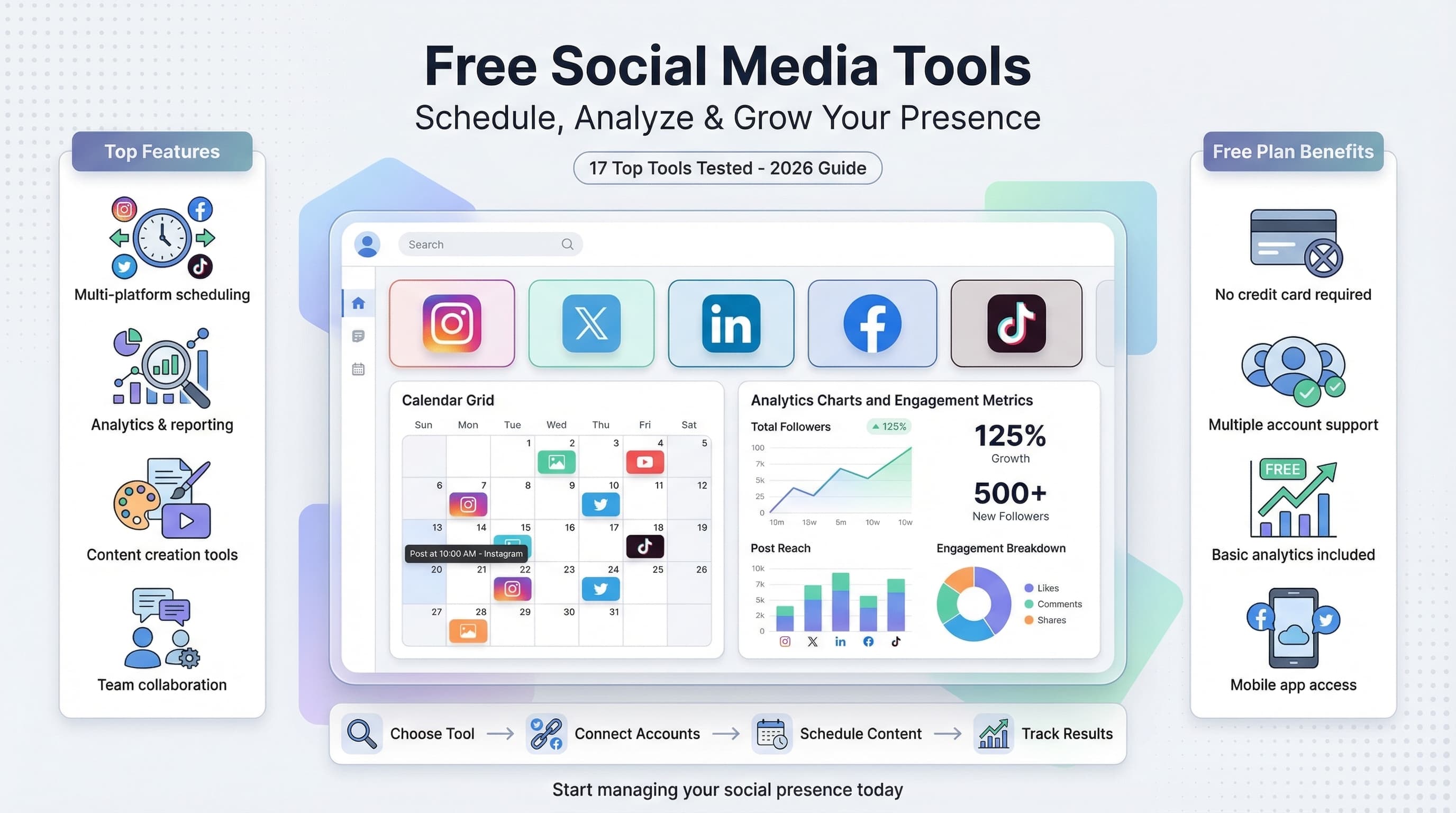
Managing social media accounts shouldn't cost a fortune, especially when you're just starting out or working with a tight budget. Learn more about LinkedIn scheduling.
See It in Action
This is what scheduling a LinkedIn post looks like in Schedulala
The good news is that dozens of free social media management tools offer powerful features that rival their premium counterparts. Try our scheduling across platforms.
But which ones actually deliver on their promises without hidden limitations or pushy upgrade prompts? Learn more about scheduling across platforms.
Try Schedulala for free
Schedule posts to Bluesky, Twitter, and 8 other platforms from one dashboard.
Get started for free→After testing over 40 different platforms, we've narrowed down the list to the tools that genuinely help you save time and grow your audience. These aren't just "freemium" tools with useless features - they're platforms that provide real value at zero cost. Our how to repurpose content can help.
We've organized them by their strongest features, from scheduling powerhouses to analytics wizards, so you can find the perfect match for your specific needs. See our best time to post on linkedin guide.
1. Schedulala - Multi-Platform Scheduling Made Simple
Why Schedulala Stands Out
Schedulala tops our list because it solves the biggest pain point for social media managers: posting to multiple platforms without losing your mind. There is no free plan, but the 7-day free trial (card required) covers scheduling for up to one account on each of 12 platforms across Instagram, Twitter, LinkedIn, Facebook, TikTok, and more. See our linkedin hashtag generator guide.
What sets it apart is the clean, intuitive interface that doesn't overwhelm you with unnecessary features. You can batch-schedule a week's worth of content in under 30 minutes, and the visual calendar makes it easy to spot gaps in your posting schedule.
The platform also includes basic analytics to track your top-performing posts, helping you understand what resonates with your audience without diving into complex data dashboards.
- Free plan includes: 3 social accounts, unlimited posts, basic analytics
- Supported platforms: Instagram, Twitter, LinkedIn, Facebook, TikTok, Pinterest, YouTube
- Best for: Small businesses and content creators who need reliable multi-platform scheduling
2. Buffer - The Pioneer of Social Scheduling
Buffer's Free Offering
Buffer practically invented social media scheduling, and their free plan remains one of the most generous in the industry. You get 3 social channels and can schedule up to 10 posts per channel, which translates to 30 scheduled posts at any given time.
The platform excels at suggesting optimal posting times based on when your audience is most active. Their Pablo tool (now integrated) lets you create simple graphics with quotes or text overlays directly within the platform.
Buffer's browser extension is particularly handy - you can share articles, images, or videos from anywhere on the web with just two clicks. The analytics, while basic, provide clear insights into reach, engagement, and click-through rates.
- Free plan includes: 3 channels, 10 scheduled posts per channel, basic analytics
- Supported platforms: Facebook, Instagram, Twitter, LinkedIn, Pinterest
- Best for: Consistent posting with curated content from around the web
3. Later - Visual Content Planning Champion
Visual-First Approach
Later built their reputation on Instagram scheduling, and it shows in their visual-first design. The free plan allows 1 social profile per platform (up to 4 platforms total) with 30 posts per month across all accounts.
The visual content calendar is Later's crown jewel. You can drag and drop posts to rearrange your content schedule, preview how your Instagram feed will look, and even plan out Instagram Stories with their visual planner.
Their media library automatically saves all your uploaded content, making it easy to repurpose images and videos across different campaigns. The hashtag suggestions feature analyzes your content and recommends relevant hashtags to boost discoverability.
- Free plan includes: 1 profile per platform (4 platforms max), 30 posts monthly, visual calendar
- Supported platforms: Instagram, Facebook, Twitter, Pinterest, TikTok, LinkedIn
- Best for: Visual brands and Instagram-heavy strategies
4. Hootsuite - Enterprise Features on a Budget
Feature-Rich Free Tier
Hootsuite's free plan is surprisingly robust for a platform that primarily targets enterprise clients. You can connect 3 social profiles and schedule up to 5 posts in advance, with access to their comprehensive dashboard that displays all your social feeds in one place.
The platform's strength lies in social listening and monitoring. Even on the free plan, you can set up basic streams to monitor mentions, hashtags, and keywords across multiple platforms. This makes it excellent for customer service and reputation management.
Hootsuite's bulk scheduling feature lets you upload a CSV file with up to 350 posts, though you can only have 5 scheduled at any time. Their mobile app is particularly well-designed, making it easy to manage your social presence on the go.
- Free plan includes: 3 social profiles, 5 scheduled posts, basic analytics, social listening
- Supported platforms: Facebook, Instagram, Twitter, LinkedIn, YouTube
- Best for: Businesses that need social monitoring alongside scheduling
5. SocialBee - Content Categorization Master
Organized Content Strategy
SocialBee offers a unique approach with their 14-day free trial that provides full access to their premium features, followed by a limited free plan. What makes them special is their content categorization system that helps maintain a balanced posting strategy.
You can create different content categories (like promotional, educational, entertaining) and set posting schedules for each category. This ensures you're not overwhelming your audience with sales content or forgetting to share valuable educational material.
The platform includes RSS feed integration, so you can automatically share blog posts or news articles from your favorite sources. Their evergreen posting feature recycles your best-performing content automatically.
- Free plan includes: 1 workspace, 5 social profiles, content categories, RSS feeds
- Supported platforms: Facebook, Twitter, LinkedIn, Instagram, Pinterest, Google My Business
- Best for: Content creators who want to maintain variety in their posting strategy
6. Crowdfire - Content Discovery and Curation
AI-Powered Content Suggestions
Crowdfire takes a different approach by focusing on content discovery and curation. Their free plan supports 3 social accounts with 10 posts per account, but the real value lies in their content recommendation engine.
The platform analyzes your niche and suggests articles, images, and trending topics that would interest your audience. You can customize these suggestions by adding relevant keywords and topics, making it easier to find fresh content to share.
Their image editing tools are surprisingly sophisticated for a free tool, with templates, filters, and the ability to add text overlays. The automatic hashtag generator creates relevant hashtags for each post based on your content and industry.
- Free plan includes: 3 accounts, 10 posts per account, content recommendations, image editing
- Supported platforms: Facebook, Instagram, Twitter, LinkedIn, Pinterest, YouTube, WordPress
- Best for: Marketers who struggle with content ideas and need curation assistance
7. Zoho Social - CRM Integration Specialist
Business-Focused Features
Zoho Social is part of the larger Zoho business suite, which shows in their approach to social media management. The free plan includes 1 brand (up to 7 channels) with 1 team member, making it ideal for solo entrepreneurs or small businesses.
What sets Zoho apart is their CRM integration capabilities. You can track leads generated from social media, monitor customer interactions, and even create custom reports. The publishing calendar is clean and functional, with bulk scheduling options.
Their SmartQ feature analyzes your audience's online behavior to suggest optimal posting times, while the social listening tools help you monitor brand mentions and industry keywords.
- Free plan includes: 1 brand (7 channels), SmartQ scheduling, basic analytics, 1 team member
- Supported platforms: Facebook, Twitter, LinkedIn, Instagram, Google My Business
- Best for: Businesses using other Zoho tools or needing CRM integration
8. SocialPilot - Team Collaboration Focus
Built for Teams
SocialPilot offers a 14-day free trial with full features, then transitions to a limited free plan. Even the free version includes 3 social media accounts and basic scheduling functionality, but where it shines is team collaboration.
The platform includes client management features that are rare in free tools. You can create client groups, assign team members to specific accounts, and set up approval workflows. The content calendar supports team comments and suggestions.
Their bulk scheduling feature is particularly impressive, supporting up to 500 posts via CSV upload. The analytics dashboard provides insights across all connected platforms, with white-label reporting options.
- Free plan includes: 3 accounts, team collaboration tools, bulk upload, basic analytics
- Supported platforms: Facebook, Twitter, LinkedIn, Instagram, Pinterest, Google My Business, TikTok
- Best for: Agencies and teams managing multiple client accounts
9. Creator Studio - Facebook's Native Solution
Direct from Facebook
Facebook Creator Studio (now part of Meta Business Suite) is completely free and offers the most comprehensive tools for managing Facebook and Instagram accounts. Since it's built by Meta, you get access to features that third-party tools can't provide.
You can schedule posts, Stories, Reels, and IGTV content directly from the platform. The analytics are incredibly detailed, showing reach, engagement, and audience demographics that third-party tools often can't access due to API limitations.
The monetization features are particularly valuable for content creators, including brand collaboration tools, creator bonus programs, and detailed revenue analytics. The rights manager helps protect your content from unauthorized use.
- Free plan includes: Unlimited Facebook and Instagram accounts, advanced analytics, monetization tools
- Supported platforms: Facebook, Instagram only
- Best for: Businesses and creators focused primarily on Facebook and Instagram
10. LinkedIn Publishing - Professional Network Native
Built for Professional Content
LinkedIn's native publishing platform is often overlooked but provides powerful tools for professional content creators. You can schedule posts, publish long-form articles, and access detailed analytics about your professional network's engagement.
The platform includes LinkedIn-specific features like employee advocacy tools, where team members can easily share company content. The analytics show not just engagement metrics but also professional insights like job titles and industries of people engaging with your content.
LinkedIn Pages also include lead generation forms that integrate directly with posts, making it easy to capture contact information from engaged prospects. The event promotion tools help drive attendance to webinars and professional gatherings.
- Free plan includes: Unlimited LinkedIn accounts, advanced professional analytics, lead gen forms
- Supported platforms: LinkedIn only
- Best for: B2B marketers and professional service providers
11. TweetDeck - Twitter Power User Essential
Twitter Management Made Easy
TweetDeck remains the go-to tool for serious Twitter users, despite being owned by Twitter (now X). The completely free platform provides a multi-column dashboard that lets you monitor multiple Twitter feeds, lists, and searches simultaneously.
You can schedule tweets, create Twitter threads, and monitor hashtags and mentions in real-time. The advanced search functionality helps you find conversations relevant to your industry, making it easier to engage authentically with potential customers.
The team collaboration features allow multiple users to manage the same Twitter account, with activity logging to track who posted what. Custom timelines and filters help you focus on the most important conversations.
- Free plan includes: Unlimited Twitter accounts, real-time monitoring, team collaboration, advanced search
- Supported platforms: Twitter/X only
- Best for: Twitter-focused strategies and real-time engagement
12. Google Analytics - Social Traffic Insights
Understanding Social ROI
While not a traditional social media management tool, Google Analytics provides crucial insights that most social media managers overlook. The social reports show exactly how much traffic and revenue your social media efforts generate.
You can track the customer journey from social media click to final purchase, identifying which platforms drive the highest-quality traffic. The assisted conversions report shows how social media contributes to sales even when it's not the final click.
Setting up goals and conversion tracking helps you understand the true ROI of your social media efforts. The audience insights reveal demographics and interests of visitors coming from different social platforms.
- Free plan includes: Unlimited website tracking, social media analytics, conversion tracking, audience insights
- Supported platforms: All platforms (tracks referral traffic)
- Best for: Measuring social media ROI and understanding customer journey
13. Canva - Visual Content Creation Powerhouse
Design Tool with Social Features
Canva has evolved beyond just design to include social media scheduling features in their free plan. You get access to thousands of templates specifically sized for different social platforms, plus the ability to schedule posts directly to Facebook, Twitter, and LinkedIn.
The platform's strength lies in creating consistent, professional-looking visuals without design experience. Their brand kit feature (limited in free plan) helps maintain visual consistency across all your content. The collaboration tools let team members comment on and edit designs together.
Recent additions include video editing tools, animation features, and a presentation maker that can repurpose content for different formats. The background remover and magic resize features save significant time when creating multiple variations of the same content.
- Free plan includes: 250,000+ templates, basic scheduling, 5GB storage, collaboration tools
- Supported platforms: Facebook, Twitter, LinkedIn (scheduling), plus export for all others
- Best for: Creating professional visuals without design skills
14. IFTTT - Automation Specialist
Connect Everything with Everything
IFTTT (If This Then That) isn't a traditional social media tool, but it's incredibly powerful for automating social media workflows. The free plan includes 3 applets that can automate repetitive tasks across different platforms and services.
You can set up automations like automatically sharing new blog posts to multiple social platforms, saving Instagram photos to Google Drive, or cross-posting between different social accounts. The weather-triggered posts feature lets you create location-specific content automatically.
The platform connects with hundreds of services beyond social media, so you can create complex workflows that involve email, calendar apps, smart home devices, and more. Popular social media automations include sharing new YouTube videos to Twitter and Facebook automatically.
- Free plan includes: 3 applets, 600+ service connections, basic automation triggers
- Supported platforms: Most major social platforms plus hundreds of other services
- Best for: Automating repetitive tasks and connecting different tools
15. Mention - Social Listening and Monitoring
Know What People Are Saying
Mention offers a limited free plan focused on social listening and brand monitoring. You can track up to 2 mentions per month with 1,000 mentions tracked, which is perfect for small businesses wanting to monitor their online reputation.
The platform monitors social media platforms, blogs, forums, and news sites for mentions of your brand, competitors, or industry keywords. Real-time alerts help you respond quickly to customer complaints or capitalize on positive mentions.
The sentiment analysis feature automatically categorizes mentions as positive, negative, or neutral, helping you prioritize which conversations need immediate attention. The influence score shows which users have the biggest impact when they mention your brand.
- Free plan includes: 2 alerts, 1,000 mentions monthly, sentiment analysis, basic reports
- Supported platforms: All major social platforms, web, news sites, blogs
- Best for: Small businesses wanting basic brand monitoring
16. Bitly - Link Management and Analytics
Track Every Click
Bitly provides essential link shortening and tracking capabilities that every social media manager needs. The free plan includes 1,000 links per month with detailed click analytics, which is more than enough for most small businesses.
Beyond simple link shortening, you get geographic data showing where clicks are coming from, device information, and referring sites. This helps you understand which social platforms drive the most traffic and adjust your strategy accordingly.
The custom branded domains feature (limited in free plan) helps maintain brand consistency even in shortened links. QR code generation for offline marketing campaigns bridges the gap between traditional and digital marketing efforts.
- Free plan includes: 1,000 links monthly, click analytics, QR codes, basic customization
- Supported platforms: Works with all social platforms and marketing channels
- Best for: Tracking link performance and maintaining clean, professional links
17. Unsplash - High-Quality Stock Photography
Professional Photos for Free
While not a management tool per se, Unsplash provides unlimited access to high-quality stock photos that can transform your social media presence. All photos are free to use for commercial purposes without attribution required (though it's appreciated).
The platform's search functionality is sophisticated, with filters for orientation, color, and style. Collections created by other users provide curated sets of photos around specific themes, saving time when looking for consistent imagery.
The Unsplash API integrates with many design and social media tools, so you can access their photo library directly from platforms like Canva, Buffer, and others. New photos are added daily by professional photographers worldwide.
- Free plan includes: Unlimited photo downloads, commercial use rights, API access
- Supported platforms: Use anywhere, integrates with most design and social tools
- Best for: Adding professional photography to social content without budget constraints
How to Choose the Right Free Tool for Your Needs
Matching Tools to Goals
The best free social media management tool depends entirely on your specific needs and constraints. Start by identifying your primary goal: is it scheduling efficiency, analytics insights, content creation, or team collaboration?
Consider your platform priorities as well. If you're primarily focused on Instagram and Facebook, Creator Studio provides features that third-party tools can't match. For Twitter-heavy strategies, TweetDeck remains unbeatable for real-time engagement.
Think about your content creation workflow too. If you struggle with design, Canva's integrated scheduling makes sense. If you need help finding content to share, Crowdfire's curation features could save hours each week.
Questions to Ask Yourself
- How many social media accounts do you need to manage?
- Do you need team collaboration features?
- Is advanced analytics important for your strategy?
- How much content do you typically post per month?
- Do you need help with content creation or just scheduling?
- Which platforms drive the most business results for you?
Maximizing Free Tool Benefits
Getting the Most Value
The key to success with free social media tools is understanding their limitations and working within them strategically. Most free plans have monthly posting limits, so focus on quality over quantity and use scheduling to maintain consistency.
Combine multiple free tools to create a comprehensive social media management system. Use Schedulala for multi-platform scheduling, Canva for visual content, Google Analytics for ROI tracking, and platform-native tools for advanced features.
Take advantage of free trial periods for premium features. Many tools offer 14-30 day trials that let you test advanced capabilities before committing to a paid plan. Use these trials strategically during busy periods or campaign launches.
Free Tool Combinations That Work
- Content Creator Stack: Schedulala + Canva + Unsplash + Google Analytics
- Small Business Bundle: Buffer + Creator Studio + TweetDeck + Bitly
- Agency Starter Kit: SocialPilot + Later + Mention + IFTTT
- B2B Professional Suite: LinkedIn Publishing + Hootsuite + Zoho Social + Google Analytics
Common Mistakes to Avoid
Free Tool Pitfalls
Many users make the mistake of trying to manage too many tools simultaneously. While combining tools can be powerful, using 10 different free tools creates more complexity than value. Start with 2-3 core tools and master them before adding others.
Don't ignore the learning curve associated with each platform. Free tools often have less customer support, so budget extra time for figuring out features and workflows. Join user communities and Facebook groups where other users share tips and solutions.
Avoid becoming too dependent on any single free tool, especially smaller platforms that might change their free offerings or shut down entirely. Always have a backup plan and keep your content and data organized so you can migrate if necessary.
When to Consider Upgrading
Growth Indicators
Free tools work well for getting started, but certain growth milestones indicate it might be time to invest in paid solutions. If you're consistently hitting monthly posting limits or need to manage more accounts than free plans allow, upgrading becomes necessary.
Team collaboration needs often trigger upgrades too. Most free plans support only one user, so growing teams need paid plans for multiple logins, approval workflows, and role-based permissions.
Advanced analytics become crucial as your social media efforts generate real business results. Free analytics are usually limited to basic metrics, while paid plans provide deeper insights into ROI, audience demographics, and conversion tracking.
Upgrade Triggers
- Consistently hitting free plan limits (posts, accounts, users)
- Need for advanced analytics and reporting
- Team collaboration requirements
- Client management for agencies
- Integration needs with CRM or other business tools
- Customer support requirements for business-critical activities
Final Verdict: Best Free Social Media Tools
After extensive testing, the clear winners depend on your primary use case. For comprehensive multi-platform scheduling, Schedulala offers the best balance of features and usability in their free plan. Buffer remains the most reliable choice for consistent posting with their generous free limits.
Visual brands should prioritize Later for Instagram-focused strategies, while businesses need the monitoring capabilities of Hootsuite. Don't overlook platform-native tools like Creator Studio and LinkedIn Publishing, which often provide deeper features than third-party alternatives.
Remember that the best tool is the one you'll actually use consistently. Choose based on your workflow preferences and platform priorities rather than trying to use every free tool available. Master a few tools well rather than juggling many poorly.
Try Schedulala for free
Schedule posts to Bluesky, Twitter, and 8 other platforms from one dashboard.
Get started for free→