Buffer Free Plan: Is It Enough for Your Social Media Strategy?
Complete breakdown of Buffer's free plan features, limitations, and whether it's enough for your social media needs. Plus better alternatives.

Quick answer
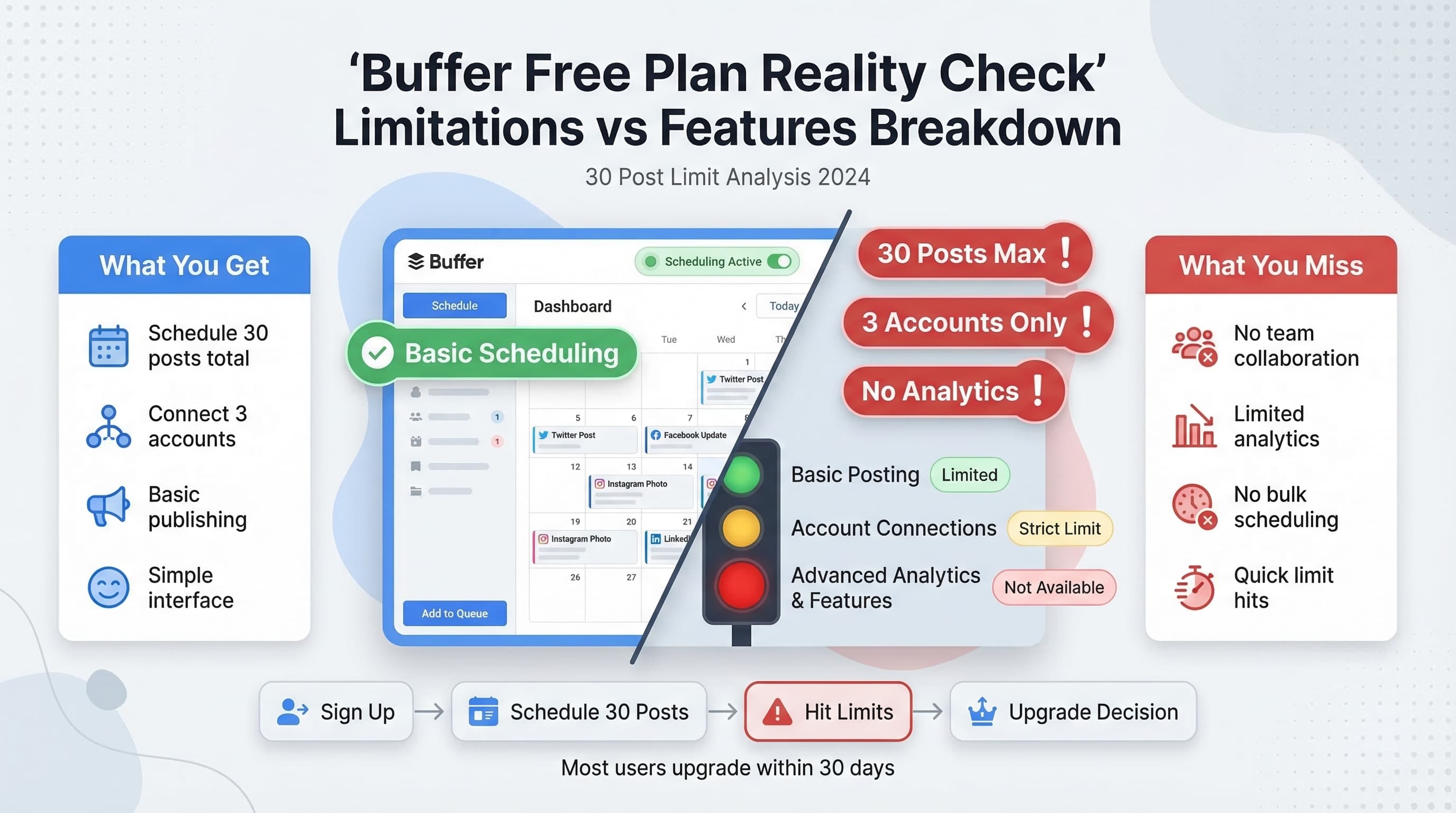
Buffer's free plan supports 3 social channels with 10 scheduled posts per channel but lacks analytics, team features, and most integrations.
- •Buffer Free: 3 channels, 10 scheduled posts per channel, basic publishing only
- •No analytics, no team collaboration, no Instagram Reels scheduling on the free plan
- •Buffer's paid Essentials plan starts at $6/channel/month ($60/month for 10 channels)
- •Schedulala offers 10 accounts with unlimited posts for $9/month across 12 platforms
Buffer's free plan promises to manage your social media without spending a dime. But after using it for months, I've discovered some serious limitations that might surprise you. See our Instagram scheduling guide.
See It in Action
This is what scheduling an Instagram post looks like in Schedulala
With over 160,000 businesses using Buffer, their free tier is one of the most popular social media management options available. Try our scheduling across platforms.
Is Buffer's free plan actually enough for your business, or will you hit frustrating roadblocks that force an upgrade? See our content calendar guide.
Try Schedulala for free
Schedule posts to Bluesky, Twitter, and 8 other platforms from one dashboard.
Get started for free→What You Actually Get with Buffer's Free Plan
Buffer's free plan includes some genuinely useful features, but the devil is in the details. Let me break down exactly what you're working with. See our scheduling across platforms guide.
Core Features Included
The free plan connects up to three social media accounts across platforms like Facebook, Instagram, Twitter, LinkedIn, and Pinterest. You can schedule up to 10 posts per connected account, which sounds reasonable until you do the math. See our best time to post on instagram guide.
That's a maximum of 30 scheduled posts total across all your accounts. For most businesses posting daily across multiple platforms, you'll burn through this limit in about a week. See our instagram engagement calculator guide.
Publishing and Analytics
Buffer's publishing tools work smoothly on the free plan. You can schedule posts in advance, add images and videos, and use their browser extension to share content on the go. The interface is clean and intuitive.
Analytics are extremely limited though. You get basic engagement metrics for individual posts, but no comprehensive reporting, audience insights, or performance comparisons. This makes it nearly impossible to optimize your strategy.
Major Limitations That Will Frustrate You
After testing Buffer's free plan extensively, several limitations become deal-breakers for serious social media management.
The 10-Post Bottleneck
The 10 posts per account limit isn't just restrictive, it's poorly designed. Once you hit the limit, you can't schedule anything new until older posts publish. This creates constant scheduling interruptions.
I found myself checking Buffer daily to see if slots had freed up, which defeats the purpose of batch scheduling. You end up spending more time managing the tool than creating content.
Even worse, Buffer counts failed posts against your limit. If a post fails to publish due to a platform issue, that slot remains occupied until you manually delete it.
Analytics That Tell You Nothing
The free plan's analytics are basically useless for making strategic decisions. You can see likes, shares, and comments for individual posts, but there's no way to identify patterns or trends.
You can't compare post performance, track follower growth, or understand optimal posting times. These insights are essential for improving your social media results, but they're locked behind Buffer's paid plans.
Without proper analytics, you're essentially posting blind and hoping for the best.
No Team Collaboration
If you work with teammates, assistants, or clients, Buffer's free plan won't work. There's no way to add team members, assign roles, or collaborate on content.
You can't even leave notes or approve posts. Everything has to go through a single account holder, creating bottlenecks and communication issues.
Who Buffer's Free Plan Actually Works For
Despite its limitations, Buffer's free plan isn't completely useless. There are specific scenarios where it makes sense.
Personal Brands and Hobbyists
If you're managing personal social media accounts or a small hobby blog, the free plan might suffice. You're probably not posting daily across multiple platforms, so the 30-post limit won't bother you.
Personal users can get by with basic scheduling and don't typically need detailed analytics or team features. The free plan works fine for maintaining a consistent but light social media presence.
Testing Before Committing
The free plan serves as a decent trial run for Buffer's interface and core features. You can test their scheduling workflow, see how posts look across platforms, and evaluate the user experience.
However, don't expect this trial to give you a realistic sense of whether Buffer meets your actual needs. The limitations are too severe to judge the platform's true capabilities.
Very Small Businesses
Brand new businesses with minimal social media activity might squeeze value from the free plan for a few months. If you're only posting a few times per week across 2-3 platforms, you can make it work.
But as soon as your business grows and needs consistent content, you'll outgrow these limits quickly. Plan for an upgrade within 3-6 months if your business is growing.
Buffer's Paid Plans: Are They Worth the Upgrade?
Once you hit Buffer's free plan walls, the natural question is whether their paid tiers offer enough value to justify the cost.
Essentials Plan ($5/month)
Buffer's cheapest paid plan bumps you up to 8 social accounts and 100 scheduled posts per account. That's 800 total posts, which solves the scheduling bottleneck for most small businesses.
You also get basic analytics with post performance data and optimal timing suggestions. It's a significant improvement over the free plan, but still limited compared to other tools in this price range.
The Essentials plan includes one team member, so you can add an assistant or colleague. However, there are no approval workflows or advanced collaboration features.
Team Plan ($10/month)
The Team plan adds unlimited team members and basic approval workflows. Analytics improve with audience insights and hashtag performance data. You can also access Buffer's content calendar view.
For small teams serious about social media, this tier provides adequate functionality. The analytics are good enough for basic optimization, and the collaboration features work for simple workflows.
Agency Plan ($100/month)
Buffer's top tier is designed for agencies managing multiple client accounts. It includes advanced analytics, white-label reports, and client management features.
However, at $100 per month, you're competing with much more powerful platforms like Hootsuite, Sprout Social, or even more affordable alternatives that offer similar features for less money.
| Plan | Price | Accounts | Posts | Team Members | Analytics |
|---|---|---|---|---|---|
| Free | $0 | 3 | 30 total | 1 | Basic |
| Essentials | $5/mo | 8 | 800 total | 1 | Standard |
| Team | $10/mo | 8 | 800 total | Unlimited | Advanced |
| Agency | $100/mo | 25 | 2000 total | Unlimited | White-label |
Better Alternatives to Buffer's Free Plan
Before committing to Buffer's ecosystem, consider these alternatives that often provide better value, especially for growing businesses.
Schedulala: More Features, Better Value
Schedulala has no free plan: you test it on a 7-day free trial (card required), then plans start at $9/month for one account on each of 12 platforms. You get unlimited posts across every connected account on all plans, plus scheduling features like bulk upload and content recycling.
The analytics are more comprehensive from day one, including competitor tracking and hashtag research tools. Team collaboration features are available at lower price points than Buffer.
For businesses serious about social media growth, Schedulala provides better long-term value without the artificial constraints that make Buffer frustrating to use.
Later's Visual Content Focus
Later specializes in visual platforms like Instagram and Pinterest. Their free plan allows 30 posts per platform (not total), making it more generous than Buffer for visual content creators.
The visual content calendar and Instagram-specific features like hashtag suggestions make it particularly valuable for brands focused on visual storytelling.
Hootsuite's Enterprise Features
While Hootsuite's free plan is limited to 3 social profiles and 5 scheduled posts, their paid plans offer significantly more powerful features than Buffer at comparable price points.
Advanced analytics, social listening, and team collaboration tools make Hootsuite better for businesses that will eventually need enterprise-grade social media management.
Common Mistakes When Using Buffer's Free Plan
I've seen businesses make several critical errors when trying to maximize Buffer's free tier. Avoid these pitfalls to get the most value possible.
Mistake 1: Scheduling Too Far in Advance
With only 30 post slots total, scheduling weeks in advance is a terrible strategy. You'll fill your entire queue and then scramble when you need to post timely content or respond to current events.
Instead, schedule only 7-10 days ahead. This leaves room for spontaneous posts and trending topics while still maintaining consistency.
Mistake 2: Ignoring Platform-Specific Limitations
Buffer's free plan has different restrictions for different platforms. Instagram posts require more setup than Twitter posts, and some content types aren't supported at all.
Test each platform's features before building your content strategy. You might discover that certain post types or formats don't work with the free plan.
Mistake 3: Not Planning for Growth
Many users get comfortable with Buffer's free plan and don't plan for increased posting frequency. When your business grows and needs more content, you're stuck with an inadequate tool.
Plan your social media tool budget from the beginning. If you expect to post daily across multiple platforms within six months, start with a paid tool that can grow with you.
Mistake 4: Relying on Buffer for Analytics
Buffer's free analytics are so limited that they can actually mislead you about your social media performance. Don't make strategic decisions based on their basic metrics.
Use platform-native analytics (Facebook Insights, Instagram Analytics, Twitter Analytics) for actual performance data. Buffer's free plan is for scheduling only, not analysis.
Making Buffer's Free Plan Work: Practical Strategies
If you're determined to make Buffer's free plan work for your situation, here are practical strategies to maximize its limited features.
Strategic Account Selection
Choose your three connected accounts carefully. Focus on your most important platforms where you post most frequently. Don't waste slots on platforms where you post sporadically.
Most businesses should prioritize Facebook, Instagram, and either Twitter or LinkedIn depending on their audience. Pinterest and other platforms can be managed manually if needed.
Batch Scheduling System
Create a weekly scheduling routine to maximize your 30 posts. Dedicate one hour each week to scheduling content, timing it so posts publish and free up slots for the next batch.
Schedule Monday through Wednesday during your weekly planning session, then schedule Thursday through Sunday mid-week. This prevents you from running out of slots unexpectedly.
Content Recycling Strategy
Since you can't schedule many posts, make each one count by recycling high-performing content. Create variations of successful posts to maximize reach without using extra slots.
Turn one blog post into multiple social media posts: a quote card, a tip list, a behind-the-scenes photo, and a direct link post. This stretches your content without requiring more scheduling slots.
When You Should Definitely Upgrade or Switch
Certain business scenarios make Buffer's free plan completely impractical. Recognize these situations early to avoid frustration and wasted time.
High-Volume Content Needs
If your strategy involves posting multiple times daily across platforms, Buffer's free plan will become unusable within days. E-commerce businesses, news sites, and active personal brands need much higher posting limits.
Any business planning to post more than 4-5 times per week per platform should skip the free plan entirely. You'll outgrow it before you even learn the interface properly.
Team Collaboration Requirements
If multiple people need access to your social media scheduling, Buffer's free plan won't work. There's no sharing, no approval workflows, and no way to coordinate team efforts.
Even a two-person team will struggle with Buffer's single-user limitation. The workaround of sharing login credentials creates security risks and coordination problems.
Data-Driven Marketing
Businesses that rely on analytics to optimize their social media strategy shouldn't bother with Buffer's free plan. The analytics are too basic to provide actionable insights.
If you need to track ROI, identify top-performing content, or understand audience behavior, invest in a tool with proper analytics from the start. Don't waste time with inadequate data.
The Bottom Line: Is Buffer's Free Plan Worth It?
After extensive testing and real-world usage, Buffer's free plan works for a very narrow set of use cases. It's adequate for personal accounts, hobby projects, or brand new businesses with minimal social media activity.
However, any serious business will outgrow the limitations quickly. The 30-post total limit, lack of analytics, and missing team features make it impractical for professional social media management.
The biggest problem isn't just the restrictions, but how they interrupt your workflow. Constantly managing post limits and working around feature gaps wastes time that should be spent creating great content and engaging with your audience.
Try Schedulala for free
Schedule posts to Bluesky, Twitter, and 8 other platforms from one dashboard.
Get started for free→