ChatGPT for Social Media: Prompts & Tips to Create Better Content
Learn how to use ChatGPT social media prompts to create engaging posts, captions, and content that drives results. Includes 50+ proven prompts.

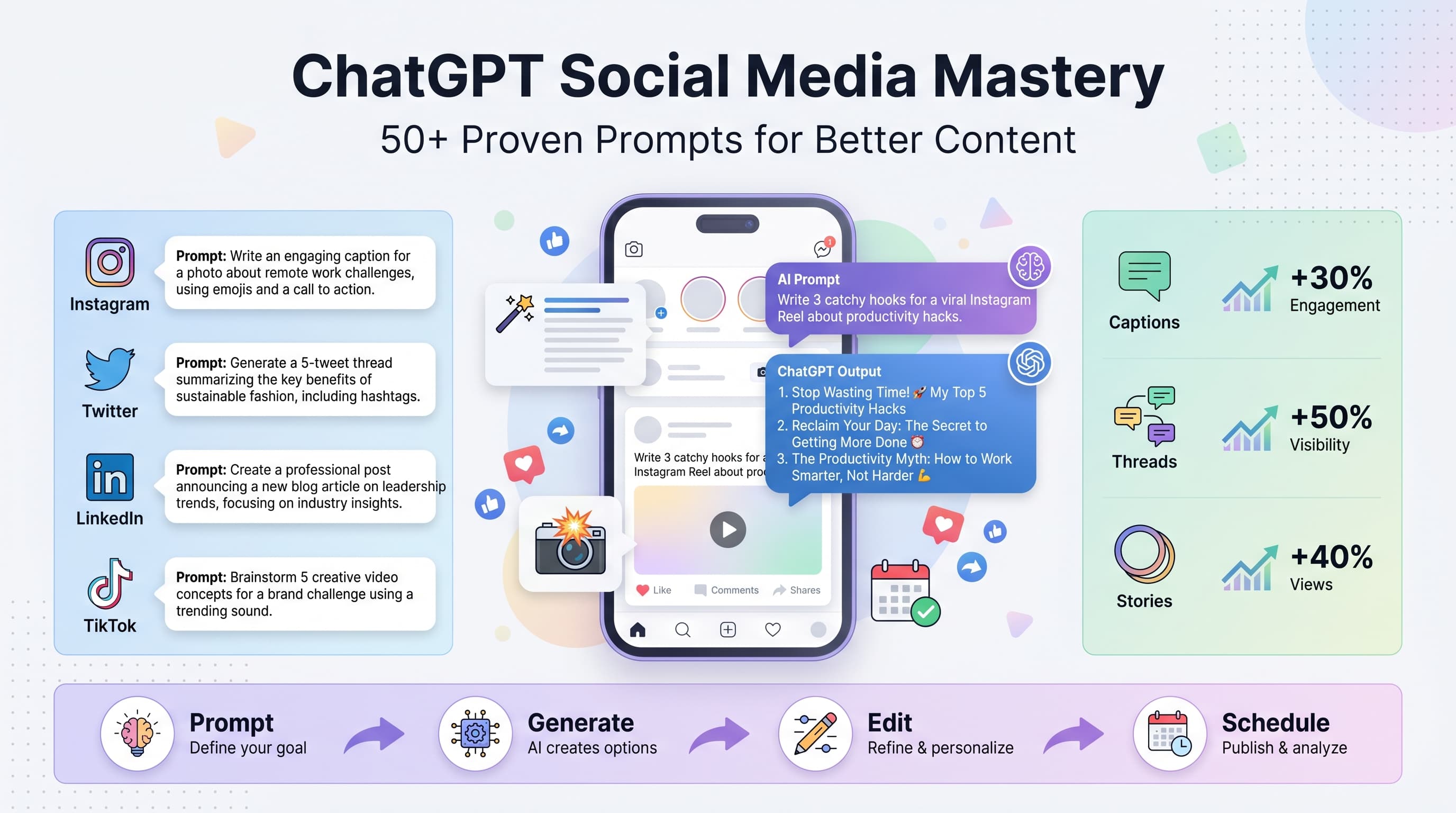
Staring at a blank screen, trying to come up with your next social media post? You're not alone. Our Telegram scheduling can help.
See It in Action
This is what scheduling a Telegram post looks like in Schedulala
The average social media manager spends 2-3 hours daily creating content. That's 15+ hours per week just thinking of what to post. But what if you could cut that time in half while actually improving your content quality? See our scheduling across platforms guide.
ChatGPT can be your creative partner, helping you generate ideas, write captions, create engaging hooks, and even plan entire content calendars. The key is knowing exactly how to prompt it for social media success. Our how to repurpose content can help.
Try Schedulala for free
Schedule posts to Bluesky, Twitter, and 8 other platforms from one dashboard.
Get started for free→Why ChatGPT works so well for social media
Social media content follows predictable patterns. There are proven formulas for viral tweets, Instagram captions that drive engagement, and LinkedIn posts that get shared. ChatGPT excels at pattern recognition and can adapt these formulas to your specific brand voice and audience. Try our batch content creation.
Unlike other AI writing tools that feel robotic, ChatGPT can match your tone, understand context, and even inject personality into your posts. The trick is teaching it what works for your brand through specific, detailed prompts. Try our telegram line break generator.
What ChatGPT does best for social media
- Caption writing - Turns basic ideas into engaging posts
- Hook generation - Creates scroll-stopping opening lines
- Content ideation - Brainstorms topics based on trends or themes
- Repurposing content - Adapts one piece across multiple platforms
- Hashtag research - Suggests relevant tags for better discoverability
- Audience engagement - Writes comments and replies that sound natural
Setting up ChatGPT for social media success
Before diving into specific prompts, you need to train ChatGPT on your brand voice and social media style. This upfront work will make every subsequent prompt more effective. Try our telegram font generator.
1. Create your brand context prompt
Start every ChatGPT session with a comprehensive brand brief. This teaches the AI your voice, audience, and content preferences.
Example brand context prompt:
"You're writing social media content for [Brand Name], a [industry] company that helps [target audience] [main benefit]. Our brand voice is [tone descriptors]. We avoid corporate jargon and speak directly to our audience's pain points. Our followers are primarily [demographics] who struggle with [specific challenges]. We post about [content themes] and want every post to provide immediate value."
2. Define your content goals
Tell ChatGPT what you want each post to accomplish. Different goals require different approaches:
- Engagement posts - Focus on questions, polls, or controversial takes
- Educational content - Emphasize tips, tutorials, or insights
- Brand awareness - Highlight your unique value proposition
- Community building - Encourage sharing and discussion
- Lead generation - Include clear calls-to-action
3. Specify platform requirements
Each social platform has unique constraints and best practices. Always specify which platform you're creating content for:
| Platform | Character Limit | Best Practices |
|---|---|---|
| 280 characters | Punchy, conversation-starting | |
| 2,200 characters | Visual storytelling, hashtag-heavy | |
| 3,000 characters | Professional, value-driven | |
| 240 characters | Community-focused, shareable | |
| TikTok | 150 characters | Trending, hook-heavy |
50+ proven ChatGPT prompts for social media
Here are battle-tested prompts organized by content type and platform. Copy these exactly, then customize the bracketed sections for your brand.
Content ideation prompts
Weekly content brainstorming
"Generate 10 social media post ideas for [industry] that address [specific audience pain point]. Each idea should be unique, actionable, and relevant to current trends. Format as: Post type, Hook, Main message, CTA."
Trending topic angles
"[Trending topic] is popular right now. Give me 5 unique angles to discuss this topic that would appeal to [target audience] while showcasing [your expertise area]. Avoid generic takes - I want controversial or unexpected perspectives."
Content series planning
"Create a 7-part content series about [topic] for [platform]. Each post should build on the previous one while being valuable standalone. Include post titles, key points, and engagement hooks for each part."
Platform-specific caption prompts
Instagram captions
"Write an Instagram caption for [image description] that starts with a relatable hook, provides value about [topic], and ends with a question to drive comments. Use a conversational tone and include 5-7 relevant hashtags. Keep it under 150 words."
"Create 5 different Instagram story captions for [content type]. Each should be under 20 words and designed to get people to swipe up or engage with polls/questions."
Twitter/X content
"Write a Twitter thread about [topic] that starts with a controversial hook and provides 5-7 actionable tips. Each tweet should be under 260 characters and end with a natural transition to the next tweet."
"Create 10 different tweet variations for this message: [your core message]. Include different hooks, angles, and calls-to-action. Make some conversational, some educational, and some provocative."
LinkedIn posts
"Write a LinkedIn post about [professional topic] that starts with a story or surprising statistic, provides practical advice, and ends with a thoughtful question. Use short paragraphs and include relevant professional hashtags."
"Transform this industry insight into a LinkedIn post that positions me as a thought leader: [your insight]. Make it valuable for [target professional audience] and encourage meaningful discussion in comments."
Engagement-focused prompts
Question posts
"Create 10 engaging questions about [industry topic] that would spark debate in my [platform] community. Questions should be specific enough to get detailed responses but broad enough for most followers to have opinions."
Poll ideas
"Generate 5 poll ideas for [platform] about [topic area]. Each poll should have 2-4 clear options, relate to my audience's daily challenges, and provide insights I can use for future content."
Community building
"Write a post that encourages my [platform] followers to share their experiences with [relevant challenge]. Make it feel safe and supportive, and give them a specific framework for sharing."
Advanced ChatGPT techniques for social media
Once you master basic prompts, these advanced techniques will help you create more sophisticated, brand-aligned content.
1. Voice mimicking technique
Feed ChatGPT examples of your best-performing posts to learn your voice:
"Here are 3 of my top-performing [platform] posts: [paste posts]. Analyze the writing style, tone, and structure. Then write 5 new posts about [topic] using the same voice and approach."
This technique helps maintain consistency across all your AI-generated content while keeping your authentic brand voice.
2. Content repurposing workflows
Turn one piece of content into multiple platform-specific posts:
"Take this blog post [title/summary] and create: 1 LinkedIn article preview, 3 Twitter thread topics, 5 Instagram carousel slides, and 1 TikTok video hook. Each should highlight different angles and match platform conventions."
This approach maximizes your content ROI and ensures consistent messaging across platforms.
3. Audience-specific variations
Create different versions of the same message for different audience segments:
"Write this message for 3 different audiences: 1) Complete beginners to [topic], 2) Intermediate practitioners, 3) Advanced experts. Adjust complexity, examples, and calls-to-action for each group."
Use this for A/B testing or targeting specific follower segments.
4. Emotional trigger integration
Psychology-based prompts that tap into specific emotions:
- FOMO posts: "Create content that makes people feel like they're missing out on [opportunity] if they don't [action]."
- Aspirational content: "Write a post that helps followers visualize their success after implementing [solution]."
- Problem agitation: "Highlight the frustration of [common problem] in a way that makes followers want to find a solution."
- Social proof: "Frame this success story in a way that makes it feel achievable for similar people."
Optimizing ChatGPT output for each platform
Raw ChatGPT output often needs platform-specific tweaks to maximize performance. Here's how to optimize for each major platform.
Instagram optimization
Instagram favors visual storytelling and community engagement. When editing ChatGPT output:
- Break long paragraphs into single-line sentences for better mobile readability
- Add relevant emojis to increase engagement (but don't overdo it)
- Include 5-10 hashtags naturally within the caption text
- End with questions that encourage comments
- Use Instagram-specific language like 'double-tap if you agree'
Example optimization:
ChatGPT output: "Time management is crucial for entrepreneurs because it directly impacts productivity and business growth."
Optimized for Instagram: "Time management isn't just important for entrepreneurs... it's EVERYTHING ⏰\n\nWhen you master your schedule, you master your business growth.\n\nBut here's what most people get wrong about #timemanagement 👇\n\nWhat's your biggest time management struggle? Comment below! 💬"
Twitter/X optimization
Twitter rewards brevity, personality, and conversation starters:
- Cut unnecessary words - every character counts
- Start with hooks that make people want to retweet
- Use line breaks strategically for visual impact
- Include relevant handles when mentioning tools or people
- Add controversial or counter-intuitive angles
Thread optimization tip: Ask ChatGPT to number each tweet and include natural transitions like "Here's why this matters:" or "But there's a catch:"
LinkedIn optimization
LinkedIn content should sound professional but approachable:
- Open with industry-relevant stories or statistics
- Use professional language but avoid corporate jargon
- Include actionable takeaways professionals can implement
- End with thought-provoking questions about industry trends
- Add 3-5 relevant professional hashtags
LinkedIn's algorithm also favors posts that generate comments, so always ask questions that require more than yes/no answers.
TikTok and short-form video optimization
Even though TikTok is video-first, captions matter for discoverability:
- Write captions that work as video scripts
- Include trending hashtags and sounds when relevant
- Use hooks that work in the first 3 seconds
- Add text overlay suggestions for key points
- Include clear calls-to-action like 'Save this post'
Common ChatGPT mistakes to avoid
Even experienced users make these mistakes that hurt their social media performance. Here's what to watch out for.
1. Generic, obvious content
The mistake: Asking for generic tips without context or specificity.
Bad prompt: "Give me 10 social media tips"
Better prompt: "Give me 10 unconventional social media strategies that work specifically for B2B SaaS companies with small marketing teams"
The more specific your prompt, the more unique and valuable your content becomes.
2. Forgetting platform context
The mistake: Using the same content across all platforms without optimization.
Always specify the platform in your prompt and understand its unique culture. A LinkedIn post about productivity should sound different from a TikTok video about the same topic.
3. Ignoring brand voice consistency
The mistake: Not providing enough context about your brand personality.
Create a brand voice document with specific examples of how you communicate. Include what you do say, what you don't say, and your unique perspective on industry topics.
4. Not editing AI output
The mistake: Copying and pasting ChatGPT responses without review.
Always edit for:
- Platform-specific formatting and character limits
- Your authentic voice and personality
- Current trends and timely references
- Accurate information and claims
- Proper hashtags and mentions
5. Overcomplicating prompts
The mistake: Writing extremely long, convoluted prompts that confuse the AI.
Keep prompts clear and focused. If you need multiple elements, break them into separate prompts or use numbered lists to organize your requirements.
Building efficient ChatGPT workflows
The real power of ChatGPT comes from creating repeatable workflows that save time while maintaining quality. Here's how to build systems that scale.
1. Content batching workflow
Instead of creating content one post at a time, batch your ChatGPT sessions:
Monday morning prompt session:
- Generate 20 content ideas for the week
- Pick the top 10 and create detailed outlines
- Write captions for 5 posts across different platforms
- Create engagement questions for each post
- Plan hashtag strategies
This approach is more efficient than daily content creation and ensures consistency in quality and voice.
2. Template-based system
Create reusable prompt templates for your most common content types:
Educational post template:
"Write a [platform] post that teaches [target audience] how to [specific skill]. Start with a relatable problem, provide [number] actionable steps, and end with a question about their experience. Use [brand voice descriptors] and include relevant hashtags."
Save these templates and just fill in the variables for quick content creation.
3. Content repurposing pipeline
Create a systematic approach to repurpose content across platforms:
- Start with long-form content (blog post, video, podcast)
- Extract 3-5 key points using ChatGPT
- Create platform-specific versions of each point
- Develop follow-up content that dives deeper
- Plan engagement responses for anticipated comments
4. Feedback integration loop
Use ChatGPT to analyze and improve your content performance:
"Here are the engagement metrics for my last 10 posts: [data]. Analyze what elements the high-performing posts have in common and suggest 5 ways to incorporate these elements into future content."
This creates a continuous improvement cycle that makes your content better over time.
Measuring and improving your ChatGPT content
Creating content is just the first step. You need systems to track what works and continuously improve your ChatGPT prompts and processes.
Track these key metrics
Monitor different metrics based on your content goals:
| Content Goal | Primary Metrics | Secondary Metrics |
|---|---|---|
| Brand Awareness | Reach, Impressions | Mentions, Share of voice |
| Engagement | Comments, Shares, Saves | Time spent on post |
| Lead Generation | Click-through rate, Conversions | Cost per lead |
| Community Building | Comments, DMs, Mentions | Follower retention rate |
A/B testing ChatGPT variations
Test different ChatGPT approaches systematically:
- Hook styles - Question vs. statement vs. statistic opens
- Content length - Short punchy posts vs. longer detailed posts
- Call-to-action placement - Beginning vs. middle vs. end
- Tone variations - Professional vs. casual vs. humorous
- Visual descriptions - Detailed vs. simple prompts for image content
Run these tests for at least 2 weeks to get reliable data.
Refining your prompt library
Keep a document tracking your most effective prompts:
- High-performing prompts - What generated your best content
- Platform-specific winners - Best prompts for each social platform
- Audience segment variations - What works for different follower groups
- Seasonal adjustments - How to modify prompts for holidays or trends
Review and update this library monthly based on performance data.
Advanced content strategies with ChatGPT
Once you've mastered basic ChatGPT social media usage, these advanced strategies will set your content apart from competitors.
1. Personality-driven content creation
Train ChatGPT to write in the voice of different personalities or archetypes relevant to your brand:
"Write this social media post from the perspective of a [mentor/rebel/innovator/expert] who [specific background]. Use their typical language patterns, concerns, and way of explaining concepts."
This technique helps you create varied content that appeals to different personality types in your audience while maintaining authenticity.
2. Trend integration workflow
Use ChatGPT to quickly capitalize on trending topics:
"[Current trend] is trending. Give me 3 ways to connect this trend to [your industry] that provide genuine value to [target audience]. Avoid forced connections - only suggest angles that make natural sense."
Follow up with: "Now write a [platform] post for the best angle that feels timely but not forced."
3. Story framework adaptation
Use proven storytelling frameworks with ChatGPT:
- Before/After/Bridge: "Create a post showing the before state [problem], after state [solution], and bridge [your method] for [specific scenario]."
- Problem/Agitation/Solution: "Write about [common problem], agitate the frustration around it, then present [your solution] as the resolution."
- Hero's Journey: "Tell a story where [customer type] faces [challenge], meets [mentor/tool], and achieves [transformation]."
4. Competitive content analysis
Use ChatGPT to analyze and improve upon competitor content:
"Here's a popular post from my competitor: [paste post]. Analyze what makes it effective, then create 3 variations that cover the same topic but with [your unique angle/expertise]. Make sure each variation offers something the original doesn't."
This isn't about copying - it's about understanding what resonates and adding your unique perspective.
5. Engagement prediction and optimization
Before posting, use ChatGPT to predict and improve engagement potential:
"Rate this post's engagement potential from 1-10 and explain your reasoning: [your post]. Then suggest 3 specific improvements to increase engagement without changing the core message."
This gives you an objective perspective before publishing.
Combining ChatGPT with scheduling tools
The real magic happens when you combine ChatGPT's content creation power with smart scheduling and automation tools. This creates a content system that works while you sleep.
Content calendar integration
Use ChatGPT to create comprehensive content calendars:
"Create a 30-day content calendar for [brand] posting on [platforms]. Include content themes, post types, and key messages for each day. Consider [industry events, holidays, product launches]. Format as a table with dates, platforms, post types, and main topics."
Then use scheduling tools to automatically post this content at optimal times for your audience.
Cross-platform optimization
Create content once, then adapt it for multiple platforms:
"Take this core message: [your message] and create optimized versions for Twitter, LinkedIn, Instagram, and Facebook. Each should maintain the key point but match platform conventions and character limits."
Schedule these variations to post at different times to maximize reach without overwhelming any single platform.
Automated engagement responses
Prepare response templates for common comments and questions:
"Create 5 response templates for common questions about [your topic/product]. Each response should be helpful, on-brand, and encourage further conversation. Vary the tone from friendly to professional."
While you should personally handle important conversations, having templates speeds up routine responses.
Troubleshooting common ChatGPT issues
Even with great prompts, you'll occasionally get outputs that miss the mark. Here's how to diagnose and fix common issues.
When content feels too generic
Problem signs: Content could apply to any brand, lacks personality, uses corporate buzzwords
Solutions:
- Add more specific context about your audience's exact problems
- Include examples of your brand voice and personality
- Ask for controversial or contrarian takes on common topics
- Request specific examples rather than general advice
- Tell ChatGPT what NOT to include (buzzwords, clichés)
When tone doesn't match your brand
Problem signs: Too formal, too casual, doesn't sound like you, off-brand language
Solutions:
- Provide 2-3 examples of your actual writing
- Specify what words and phrases to avoid
- Describe your tone with specific adjectives (witty, direct, encouraging)
- Include your target audience's language and slang
- Ask ChatGPT to rewrite in a more [specific tone] voice
When content lacks engagement hooks
Problem signs: No clear call-to-action, doesn't invite comments, feels complete rather than conversation-starting
Solutions:
- Always specify the desired engagement outcome in your prompt
- Ask for controversial or debate-worthy angles
- Request specific questions that require detailed answers
- Include phrases like "What's your experience with...?"
- Add follow-up prompts: "Now add 3 engagement questions"
When output is too long or too short
Problem signs: Doesn't fit platform requirements, too verbose or too brief for the context
Solutions:
- Specify exact character or word counts in prompts
- Break long content into digestible chunks
- Ask for "punchy" or "detailed" versions as needed
- Use follow-up prompts: "Make this 50% shorter" or "Expand this with examples"
- Request bullet points for complex topics
Try Schedulala for free
Schedule posts to Bluesky, Twitter, and 8 other platforms from one dashboard.
Get started for free→The future of AI-powered social media
ChatGPT is just the beginning. As AI tools become more sophisticated, the brands that learn to use them strategically now will have a massive advantage.
The key is finding the sweet spot between AI efficiency and human authenticity. Your audience doesn't want perfect robot content - they want valuable, helpful information delivered in a voice they trust.
Start with the prompts and techniques in this guide, but don't stop there. Experiment, test, and iterate. Save what works, discard what doesn't, and continuously refine your approach based on real performance data.
![Social Media Proposal Template [Free Download] - Win More Clients](/_next/image?url=%2Fblog%2Fsocial-media-proposal-template%2Fheader.jpeg&w=3840&q=75&dpl=dpl_6RiKV7dz1EjMEbYgqheh1pc2YPwv)