Facebook Ads vs Boosted Posts: What Actually Works (and When to Use Each)
Facebook ads vs boosted posts: see which drives better ROI, when to use each, and how to avoid wasting ad budget in 2026.

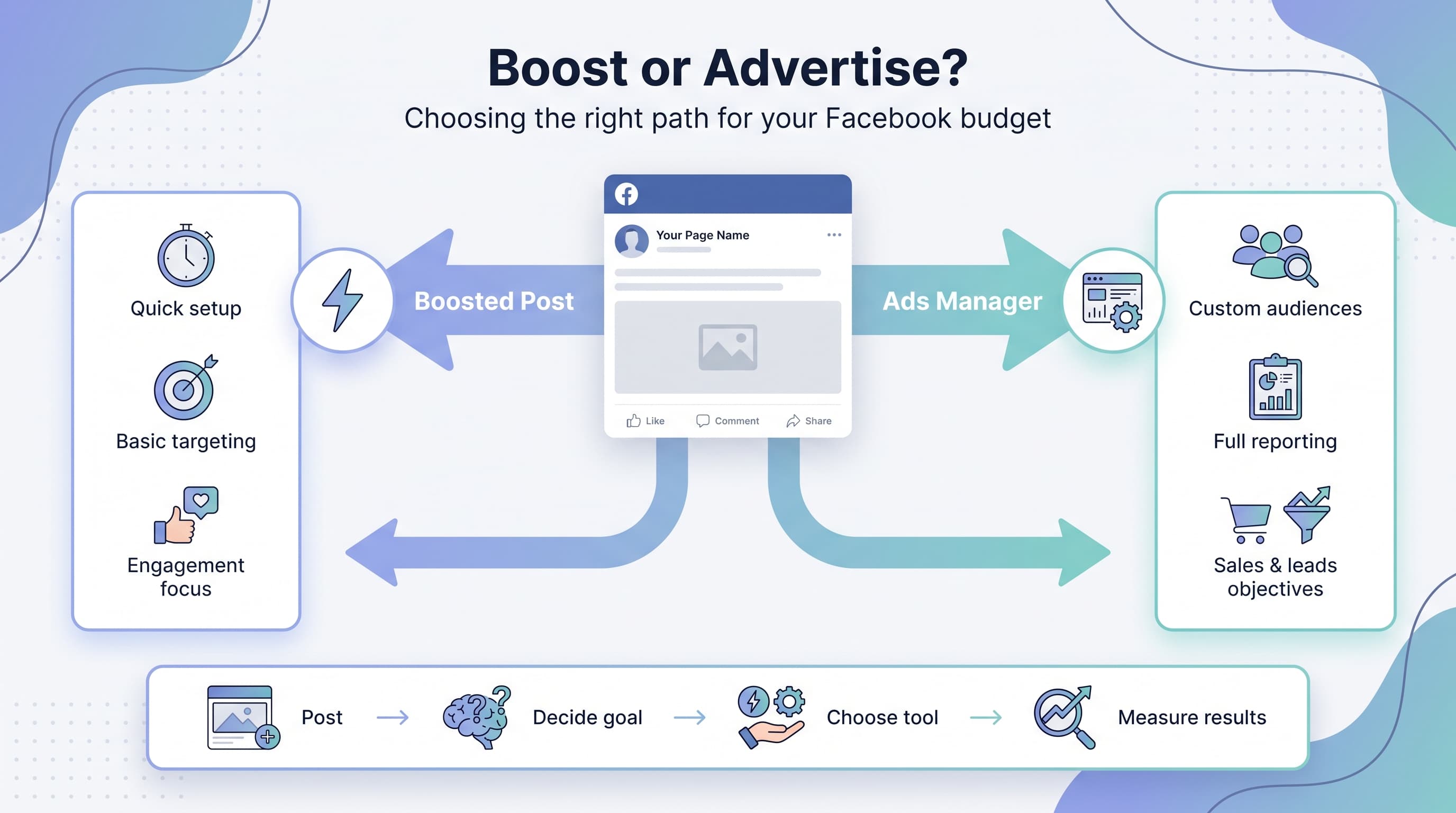
You post something on your business Page, it starts picking up likes and comments, and then that little blue Boost post button shows up underneath it, practically begging to be clicked. Meanwhile you know there's a whole Ads Manager sitting behind Meta's Business Suite that people swear by for actually driving sales. So which one deserves your budget? Our Facebook scheduling can help.
See It in Action
This is what scheduling a Facebook post looks like in Schedulala
This isn't a trivial question. Boosting posts and running ads through Ads Manager use the same auction and the same inventory, but they are not the same tool. One is built for speed and simplicity. The other is built for control and results. Mixing them up is one of the fastest ways to burn through a monthly ad budget with nothing to show for it. Learn more about youtube shorts engagement get.
We're going to break down exactly how boosted posts and Facebook Ads differ, where each one wins, where each one falls short, and how to decide which to use based on what you're actually trying to accomplish. No fluff, just the mechanics and the numbers that matter. Try our bluesky content ideas 50.
Try Schedulala for free
Schedule posts to Bluesky, Twitter, and 8 other platforms from one dashboard.
Get started for free→What each option actually is
Boosted posts: the one-click option
Boosting takes a post that already exists on your Page, whether it's organic or something you scheduled ahead of time, and pays to put it in front of more people. You click Boost, pick a budget, choose a rough audience (age, location, a few interests), and Facebook does the rest. There's no campaign structure, no ad sets, and very little decision-making required. Our 25 social media content can help.
It's designed for speed. Facebook built the boost flow for small business owners who don't have time to learn Ads Manager and just want more eyes on a post. That accessibility is the whole point, and also the whole limitation. See our best time to post on facebook guide.
Boosted posts default to the objective 'Engagement' or sometimes 'Awareness' behind the scenes, which means Facebook's algorithm optimizes for likes, comments, and shares rather than clicks to your website or purchases. That's a meaningful distinction that a lot of business owners never realize until they check their sales numbers and wonder why the boost didn't move the needle. Learn more about facebook line break generator.
Facebook Ads Manager: the full toolkit
Ads Manager is where actual campaigns live. You choose a specific objective (traffic, leads, sales, app installs, video views, and more), build custom audiences from your website pixel, customer lists, or lookalikes, and control placements across Facebook, Instagram, Messenger, and Audience Network individually if you want to.
You can run multiple ad sets within one campaign to test different audiences against each other, run multiple creative variations to see which one performs, and set specific bid strategies and budget rules. Ads Manager also gives you granular reporting: cost per result, return on ad spend, breakdowns by age, gender, device, and placement.
The tradeoff is a learning curve. Ads Manager has a genuine interface complexity problem, and a lot of small business owners open it once, get overwhelmed, and go back to boosting. That's understandable, but it's also expensive in the long run if your goal is anything beyond likes.
Head-to-head comparison
| Factor | Boosted posts | Facebook Ads (Ads Manager) |
|---|---|---|
| Setup time | Under 2 minutes | 10 to 30 minutes for a proper campaign |
| Objectives available | Mostly engagement, some awareness | Sales, leads, traffic, app installs, video views, awareness, and more |
| Audience targeting | Basic: location, age, gender, a handful of interests | Full custom audiences, lookalikes, website retargeting, layered interest and behavior targeting |
| Placement control | Automatic, limited manual control | Full control over Facebook, Instagram, Messenger, and Audience Network placements |
| A/B testing | Not available | Built in, test creative, audiences, and placements against each other |
| Reporting depth | Reach, engagement, basic clicks | Cost per result, ROAS, funnel breakdowns, attribution windows |
| Best objective fit | Social proof and visibility on existing content | Direct response goals: sales, leads, sign-ups |
| Learning curve | Minimal | Moderate to steep for beginners |
Targeting and audience control
This is where the gap between the two options is widest. Boosted posts let you narrow an audience by location, age range, gender, and a short list of broad interests. That's enough to keep an ad from showing to people three time zones away, but it's nowhere near enough to reach the specific people most likely to buy from you.
Ads Manager lets you build a custom audience from your email list, retarget people who visited specific pages on your site in the last 30, 60, or 180 days, and create a lookalike audience modeled on your best existing customers. You can also layer targeting: people interested in yoga AND who follow fitness influencers AND who live within 15 miles of your studio, for example. Boosting can't come close to that level of specificity.
If you're a local coffee shop trying to get more people in the neighborhood aware you exist, boosting's basic targeting is honestly fine. If you're an ecommerce brand trying to reach people who abandoned their cart last week, you need Ads Manager and a pixel set up. There's no way around that.
Cost and budget efficiency
This is where things get counterintuitive. Boosting feels cheaper because the interface makes it easy to set a $20 budget and move on. But because boosting typically optimizes for engagement rather than a business result, the cost per actual outcome (a sale, a lead, a booking) tends to be much higher than a properly built Ads Manager campaign targeting the same audience.
We've seen small businesses boost a post for $50 and get a wall of likes and a couple of comments, with zero traceable sales. Run that same $50 through Ads Manager with a Conversions objective and a pixel tracking checkout completions, and you at least know exactly what that money bought, down to the individual sale.
Ads Manager also gives you cost control tools boosting doesn't: bid caps, cost caps, and budget optimization across multiple ad sets so Facebook automatically shifts spend toward whichever audience or creative is performing best. Boosting spends the whole budget on one audience with one piece of creative, no matter how it performs relative to alternatives.
If you're testing a small budget and just want visibility, boosting's simplicity has some appeal. But dollar for dollar, when the goal is a measurable business result, Ads Manager tends to produce a lower cost per outcome because it's actually optimizing toward that outcome instead of toward likes.
Creative formats and campaign objectives
Boosted posts are limited to whatever format the original post used: a single image, a short video, or a carousel if your Page setup supports it. You can't build a Collection ad, an Instant Experience, a lead form ad, or a dynamic product ad through the boost flow. What you posted is what you're boosting.
Ads Manager unlocks every format Meta offers, including lead generation forms that capture emails without leaving Facebook, dynamic product ads pulling directly from your product catalog, and Advantage+ shopping campaigns that automatically test dozens of creative combinations. If your business sells physical products online, dynamic ads alone are worth learning Ads Manager for.
There's also the objective mismatch problem. A lot of business owners boost a post that says 'Shop now, 20% off this weekend' expecting it to drive sales, but because boosting typically optimizes for engagement or reach rather than conversions, Facebook shows that post to people likely to comment or like it, not necessarily people likely to buy. Ads Manager lets you pick 'Sales' as the objective directly, and the algorithm optimizes toward people who take that specific action.
Reporting and optimization
Boosted post reporting lives inside the Page's activity tab and shows reach, engagement, and a handful of surface-level metrics. It's fine for a gut check: did more people see this than usual? It tells you almost nothing about whether the spend produced a sale, a lead, or anything tied to revenue.
Ads Manager's reporting is a different world entirely. You get cost per result, return on ad spend, breakdowns by age, gender, region, device, and placement, and the ability to build custom columns showing exactly the metrics that matter to your business. You can compare performance across multiple ad sets side by side and kill the underperforming ones without touching the winners.
This reporting depth also feeds back into optimization. Ads Manager lets you set rules that automatically pause an ad set if cost per result climbs above a threshold, or increase budget on ad sets performing above a certain ROAS. Boosting has none of this. Once you set the boost budget, you're mostly along for the ride until it ends.
Common mistakes businesses make with each
- Boosting every post that gets decent organic traction. Organic performance doesn't predict ad performance because the audience and intent are different. Test with a small ad budget before committing more.
- Boosting a post with a sales-focused CTA. If you want purchases, use Ads Manager's Sales objective with a pixel installed. Boosting a 'buy now' post optimizes for engagement, not purchases.
- Running Ads Manager campaigns without a pixel or Conversions API set up. Without proper tracking, even Ads Manager's advanced targeting can't optimize toward real outcomes.
- Treating boosting as a substitute for a content strategy. Boosting an average post rarely fixes weak creative. Fix the content first, then decide if it's worth paid amplification.
- Never revisiting old campaigns. Ads Manager rewards ongoing optimization. Set a recurring reminder to check cost per result and adjust or kill underperforming ad sets weekly.
Who should choose what
Solo owner or very small local business
If you run a nail salon, a coffee shop, or a neighborhood service business and mostly want more local awareness, boosting is a reasonable starting point. Keep budgets small ($5 to $15 per boost), boost posts with clear photos and a simple message, and set the objective toward local awareness where the option is available.
That said, once you're spending more than $100 to $150 a month on boosts with no real tracking of whether it's bringing in customers, it's worth the afternoon it takes to set up a basic Ads Manager campaign instead.
Growing ecommerce or service business
If sales, bookings, or leads are the goal, skip boosting almost entirely and build campaigns in Ads Manager with the pixel installed on your site. Dynamic product ads, retargeting for cart abandoners, and lookalike audiences based on past purchasers will consistently outperform anything boosting can offer.
This is also where a consistent organic posting habit pays off, because the posts performing best organically become good candidates to rebuild as proper ad creative inside Ads Manager, rather than just clicking Boost on them directly.
Agencies and multi-client teams
If you're managing Facebook presence for multiple clients, boosting individual posts one by one across accounts doesn't scale. Ads Manager's Business Manager structure, shared audiences, and campaign templates let you replicate winning setups across clients quickly, and the reporting makes it far easier to justify ad spend in a client report.
Since most agencies are also managing organic publishing calendars across a dozen or more accounts at once, using a scheduling tool like Schedulala to keep the organic content flowing across Facebook and 11 other platforms, then handing off top performers to the Ads Manager side of the house, keeps the whole workflow from becoming chaos. Schedulala's plans run from Personal at $29 a month for 10 social accounts up to Agency at $99 a month for 100 accounts, all with unlimited scheduled posts, so the organic side doesn't eat up hours that should go toward campaign strategy.
Try Schedulala for free
Schedule posts to Bluesky, Twitter, and 8 other platforms from one dashboard.
Get started for free→A simple decision framework
If you're still not sure which one fits your next campaign, run through these questions in order. First, what's the actual goal: more people seeing content, or a specific business action like a sale or a booking? If it's the first, boosting is a fine, low-effort option. If it's the second, go to Ads Manager.
Second, do you have a pixel or Conversions API installed on your website? If not, and your goal involves your website at all, set that up before spending another dollar on ads of any kind. Without it, you're optimizing blind no matter which tool you use.
Third, how much are you planning to spend per month? Under $50 a month, the complexity of Ads Manager might not be worth the setup time and boosting is defensible. Above $200 a month, the reporting and targeting gap becomes expensive to ignore, and Ads Manager will almost always produce a better cost per result.
Finally, do you already have organic posts performing well? Those are your best raw material. Take the top performer from the last month, rebuild it as a proper ad inside Ads Manager targeting a specific audience with a specific objective, and compare the results directly against what boosting that same post would have cost you. Most businesses that run this test once never go back to boosting for anything beyond casual visibility.
Try Schedulala for free
Schedule posts to Bluesky, Twitter, and 8 other platforms from one dashboard.
Get started for free→