Facebook Marketplace for Business: The Complete Guide to Selling, Setup, and Growth in 2026
Learn how to use Facebook Marketplace for business in 2026: setup, listing tips, pricing strategy, and how to manage it alongside your other channels.

Facebook Marketplace isn't just a place where your neighbor sells a used couch anymore. It's turned into one of the biggest overlooked sales channels for small businesses, and most companies still treat it like an afterthought. See our Facebook scheduling guide.
If you're running a shop, a service business, or an ecommerce brand and you haven't set up a proper Marketplace presence, you're leaving money on the table. Local buyers browse Marketplace the way they used to browse classified ads, except now it's tied directly to Facebook's massive audience and its built-in messaging, reviews, and payment tools. Learn more about how to repurpose content.
This guide walks through exactly how to set up Facebook Marketplace for business, what to sell (and what not to), how to price and photograph listings that actually convert, and how to fold Marketplace into a broader social strategy without it eating your entire week. See our social media scheduling tools guide.
Try Schedulala for free
Schedule posts to Bluesky, Twitter, and 8 other platforms from one dashboard.
Get started for free→What Facebook Marketplace actually is for businesses
Facebook Marketplace launched in 2016 as a peer-to-peer classifieds feature, but it's grown into something much bigger. It now reaches over a billion people across dozens of countries every month, and a huge chunk of those people use it specifically to shop from local businesses, not just other individuals. See our scheduling across platforms guide.
For a business, Marketplace works differently depending on whether you're a local brick-and-mortar shop, a service provider, or an ecommerce brand shipping products nationally. Local businesses can list items tied to a specific location so nearby buyers see them first. Ecommerce sellers can connect a product catalog and list dozens or hundreds of SKUs at once through Commerce Manager. Either way, the appeal is the same: buyers are already there, already scrolling, and already in a buying mindset. See our best time to post on facebook guide.
The key thing to understand is that Marketplace sits inside Facebook itself. It's not a separate app or a bolt-on tool. That means every listing you post is discoverable both through Marketplace search and, potentially, through your Page and organic reach if you cross-post smartly. It also means every inquiry lands in Messenger, so your response time on Marketplace directly affects your response time metric on your Page. See our facebook image size guide guide.
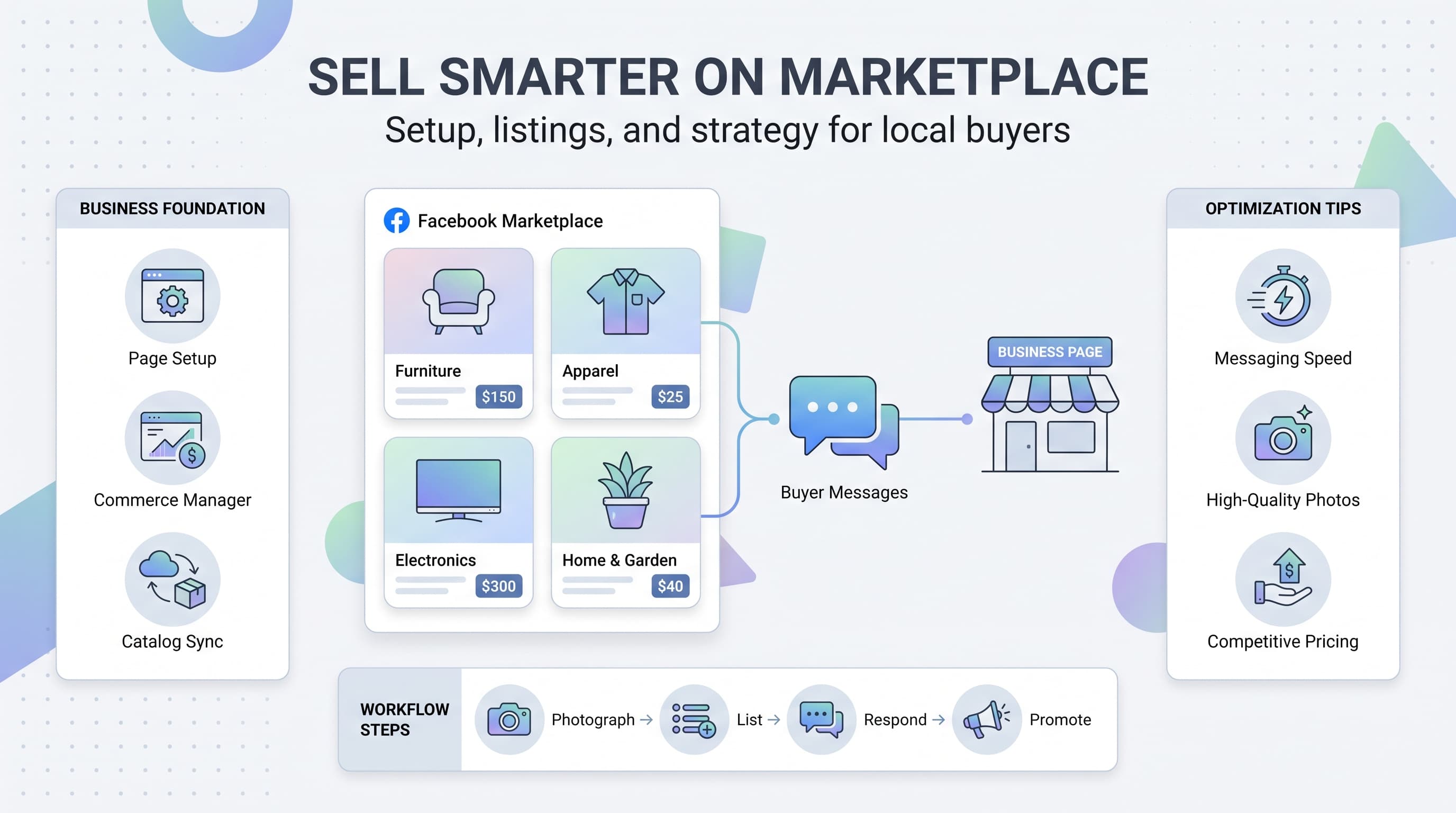
Setting up Facebook Marketplace for business, step by step
1. Start from a business account, not a personal profile
You can technically list items from a personal profile, but that limits you to individual listings and puts your personal profile in front of strangers. Businesses should list through a Facebook Page, ideally connected to Commerce Manager, so listings are tied to your brand and not your personal name.
If you don't already have a Facebook Business Page, create one before touching Marketplace. It's the foundation everything else builds on, including reviews, messaging, and eventually running ads to boost your listings.
2. Set up Commerce Manager for catalog selling
If you have more than a handful of products, don't manually create each Marketplace listing one at a time. Set up a product catalog in Commerce Manager, either by connecting your ecommerce platform (Shopify, WooCommerce, BigCommerce, and similar) or uploading a spreadsheet feed. Once the catalog syncs, your items can appear on Marketplace automatically.
This matters more than people expect. A synced catalog keeps your pricing, inventory, and descriptions consistent everywhere instead of drifting out of date on Marketplace while your website updates in real time.
3. Verify your business details
Fill out your Page's About section completely: address (if you have a physical location or serve a local area), hours, website, and contact info. Marketplace pulls from this data to build trust with buyers who are deciding whether to message a stranger about a product.
Businesses with a completed profile, a few reviews, and a real profile photo get noticeably more inquiries than pages that look half-finished. Buyers on Marketplace are more cautious than shoppers on a polished ecommerce site, so every trust signal counts.
4. Choose your listing type
Facebook Marketplace supports a few listing formats: single item listings, multiple quantity listings (good for ecommerce), vehicle listings, home listings, and services. Pick the category that matches your business honestly. Miscategorized listings get flagged or buried in search less often, but they also just perform worse because buyers browsing 'furniture' won't find your service business listed under the wrong tag.
What to sell on Marketplace (and what to skip)
Not every business fits the Marketplace model. It shines for physical, visually simple products: furniture, home goods, clothing, electronics, tools, plants, and similar categories where a photo tells most of the story. It also works well for local services like cleaning, landscaping, tutoring, and repair work, where you can list a flat rate or starting price.
Where Marketplace struggles is with complex B2B offerings, high-consideration purchases that need a sales conversation before pricing even makes sense, and anything that requires heavy explanation. If your product needs three paragraphs of context before a buyer understands what they're looking at, Marketplace probably isn't your best channel for it, though it can still work as a top-of-funnel awareness play.
A lot of ecommerce brands use Marketplace as a clearance and overstock channel too. It's an easy way to move slow inventory to local buyers without discounting your main storefront in a way that trains regular customers to wait for sales.
| Category | Good fit for Marketplace? | Why |
|---|---|---|
| Furniture & home goods | Yes | Visual, local pickup makes sense, price-driven decisions |
| Apparel & accessories | Yes | Fast browsing, catalog sync works well |
| Local services | Yes | Buyers search by category and location |
| Electronics | Yes, with caveats | High demand but watch for scam-prone buyer behavior |
| B2B software or consulting | No | Too complex for a single-image listing format |
| High-ticket custom work | Partial | Good for awareness, not for closing the sale |
Writing listings that actually convert
1. Photos do most of the selling
Marketplace is a scroll-first, visual-first experience. Buyers decide whether to click a listing in about a second based on the thumbnail photo alone. Use natural light, a clean background, and at least three angles. If you're selling apparel, show it worn. If you're selling furniture, show it in a real room, not just against a blank wall.
Avoid stock photos when you can. Buyers on Marketplace expect authenticity, and a real photo of the actual item builds more trust than a polished catalog shot, even if the catalog shot looks nicer.
2. Write titles the way people search
Marketplace search behaves a lot like a classified ad site. Include the brand, the type of item, the size or dimensions, and the condition, in that order, when it applies. 'Mid-century modern oak dining table, seats 6' will outperform something vague like 'Beautiful dining table for sale' every time.
3. Price with local context
Search a few comparable listings in your area before setting a price. Marketplace buyers negotiate more than typical ecommerce shoppers, so build a small amount of room into your price if you're comfortable haggling, or state 'firm' clearly in the description if you're not.
For businesses selling multiples of the same product, keep pricing consistent with your website unless you're specifically using Marketplace as a clearance channel. Buyers do cross-check, and a price mismatch damages trust fast.
4. Respond fast, every time
Marketplace shows buyers your typical response time before they even message you. Slow responders get skipped in favor of sellers who reply within the hour. If you can't monitor Messenger constantly, set expectations in the listing itself, like noting your response hours, and use saved replies for common questions such as availability and pickup location.
Marketplace vs your Facebook Page vs a Facebook Shop
These three things get confused constantly, and businesses often set up one without realizing they need all three working together. Your Facebook Page is your business's home base: reviews, posts, hours, and contact info. A Facebook Shop is a storefront tab on your Page where customers browse your full catalog and can potentially check out without leaving Facebook. Marketplace is the discovery layer where individual listings show up in search and local browsing feeds.
Think of it like a mall. Your Page is your store's storefront and sign. Your Shop is the shelves inside. Marketplace is the mall directory that tells shoppers you exist and what you're selling right now.
When these three are connected properly through Commerce Manager, updating your product catalog once updates it everywhere. When they're not connected, you end up manually re-listing the same product in three places and inevitably letting one of them go stale.
| Feature | Facebook Page | Facebook Shop | Marketplace |
|---|---|---|---|
| Purpose | Brand presence & reviews | Full catalog storefront | Individual listing discovery |
| Best for | Trust building | Browsing multiple products | Local, search-driven buyers |
| Setup effort | Low | Medium | Low to medium (catalog sync helps) |
| Checkout | N/A | Possible on-platform | Usually off-platform / local pickup |
Boosting Marketplace listings and running ads
Organic Marketplace reach is decent but limited by category and radius. If a listing is underperforming, you can boost it through the same Ads Manager tools you'd use for a regular Facebook ad. Boosted listings show up higher in relevant search results and to a wider radius than the default local audience.
For catalog sellers, dynamic ads that pull from your Commerce Manager feed tend to outperform boosting individual listings one at a time, since they automatically show the right product to the right shopper based on browsing behavior. If you're running a small local business with a handful of listings, a straightforward boost with a small daily budget ($5 to $10 a day for a week) is usually enough to test whether paid reach is worth it for your category.
Don't boost everything by default. Boost the listings that are already getting some organic interest but stalling, and skip boosting items priced so low that ad spend would eat your margin.
Fitting Marketplace into your broader social strategy
Marketplace listings don't exist in a vacuum. The businesses that get the most out of it treat listings like content: they photograph products once and reuse those photos across their Facebook Page posts, Instagram, and other channels, instead of treating Marketplace as a separate, disconnected task.
This is where a scheduling tool earns its keep. If you're already planning product posts, promotions, and announcements across Facebook, Instagram, and other channels, it makes sense to plan your Marketplace-adjacent content (the Page posts that drive people toward your listings, restock announcements, and 'new arrivals' teasers) on the same calendar instead of managing it separately in your head.
Schedulala supports Facebook alongside 11 other platforms, including Instagram, TikTok, LinkedIn, Pinterest, and Threads, so you can schedule the Page posts and promotional content that drive traffic toward your Marketplace listings without hopping between five different apps to plan it. Every plan includes unlimited scheduled posts, so there's no cap forcing you to ration your content calendar around Marketplace promotion weeks versus everyday posting.
A simple workflow that works well: photograph new inventory once, list it on Marketplace and your Shop the same day, then schedule two or three Page posts over the following week that reference the new items and point people to check them out. That single photo session ends up powering a week of content instead of a single listing that disappears into the scroll after a day.
See It in Action
This is what scheduling a Facebook post looks like in Schedulala
Common mistakes businesses make on Marketplace
1. Listing from a personal account
This mixes personal and professional identity, limits your tools, and looks less trustworthy to buyers who want to know they're dealing with a real business, not a stranger with a truck full of inventory.
2. Letting listings go stale
A listing that's been up for three months with no updates signals to Marketplace's algorithm that it's low priority, and it signals to buyers that maybe it's not actually available. Refresh photos, adjust pricing, or relist items that have been sitting too long.
3. Ignoring messages for hours or days
Marketplace buyers move fast and message multiple sellers at once when comparison shopping. If you take a day to respond, you've likely already lost the sale to someone who answered in twenty minutes.
4. Skipping the description
Some sellers rely on the title and photo alone. A short description covering condition, dimensions, pickup or shipping details, and any flaws upfront reduces back-and-forth messaging and filters out buyers who wouldn't have been a good fit anyway.
5. Not watching for scam attempts
Marketplace, like any classifieds platform, attracts occasional bad actors. Watch for buyers who overpay and ask for a refund of the difference, requests to move payment off-platform immediately, or unusually urgent shipping requests. Trust your instincts and stick to local pickup with cash or a verified payment method when something feels off.
Getting started this week
If you're starting from zero, don't try to build the perfect Marketplace strategy on day one. Set up your Page profile completely, list five to ten of your best-selling or most photogenic products, and respond to every message within an hour for the first two weeks. Watch which categories and listing styles get the most inquiries, then double down there.
Once you have a rhythm, connect Commerce Manager if you're managing more than a handful of SKUs, and start planning the Page content around your listings instead of treating Marketplace as a side project. Businesses that give it a real month, with consistent listings and fast responses, almost always come away surprised by how much local demand was sitting there waiting.
Marketplace won't replace your ecommerce site or your Page as your main channel, but it doesn't need to. It's a discovery layer for local, price-sensitive, and browsing-mode buyers who might never have found you otherwise. Treat it that way, keep it fed with fresh listings, and it earns its spot on your weekly to-do list.
Try Schedulala for free
Schedule posts to Bluesky, Twitter, and 8 other platforms from one dashboard.
Get started for free→