Instagram Engagement Rate: How to Calculate & Improve Your Performance in 2026
Learn how to calculate your Instagram engagement rate and discover proven strategies to boost your engagement by up to 300% in 2026.

Your Instagram engagement rate is plummeting, and you don't know why. You're posting consistently, using hashtags, and creating quality content, but your likes and comments keep dropping. Try our Instagram scheduling.
See It in Action
This is what scheduling an Instagram post looks like in Schedulala
Here's the thing: most creators are calculating their engagement rate wrong. They're using vanity metrics that don't reflect true performance, which leads to misguided strategies that actually hurt their growth. Try our scheduling across platforms.
Try Schedulala for free
Schedule posts to Bluesky, Twitter, and 8 other platforms from one dashboard.
Get started for free→What is Instagram engagement rate?
Instagram engagement rate measures how actively your audience interacts with your content. It's the percentage of people who see your posts and take action - whether that's liking, commenting, sharing, or saving. Learn more about how to repurpose content.
But here's where most people mess up: they calculate it based on follower count instead of reach. This gives you a false picture of your actual performance because not all your followers see every post. See our batch content creation guide.
Why engagement rate matters more than follower count
Instagram's algorithm prioritizes content that generates engagement. Posts with higher engagement rates get shown to more people, creating a snowball effect. A small account with 5% engagement rate will often outperform a large account with 1% engagement rate. Try our best time to post on instagram.
Brands and partners also look at engagement rate when choosing influencers to work with. They'd rather partner with someone who has 10,000 engaged followers than 100,000 passive ones. Learn more about instagram engagement calculator.
How to calculate Instagram engagement rate
There are three main ways to calculate engagement rate, and each tells you something different about your performance. Most people only know the first method, which is why their numbers are often misleading.
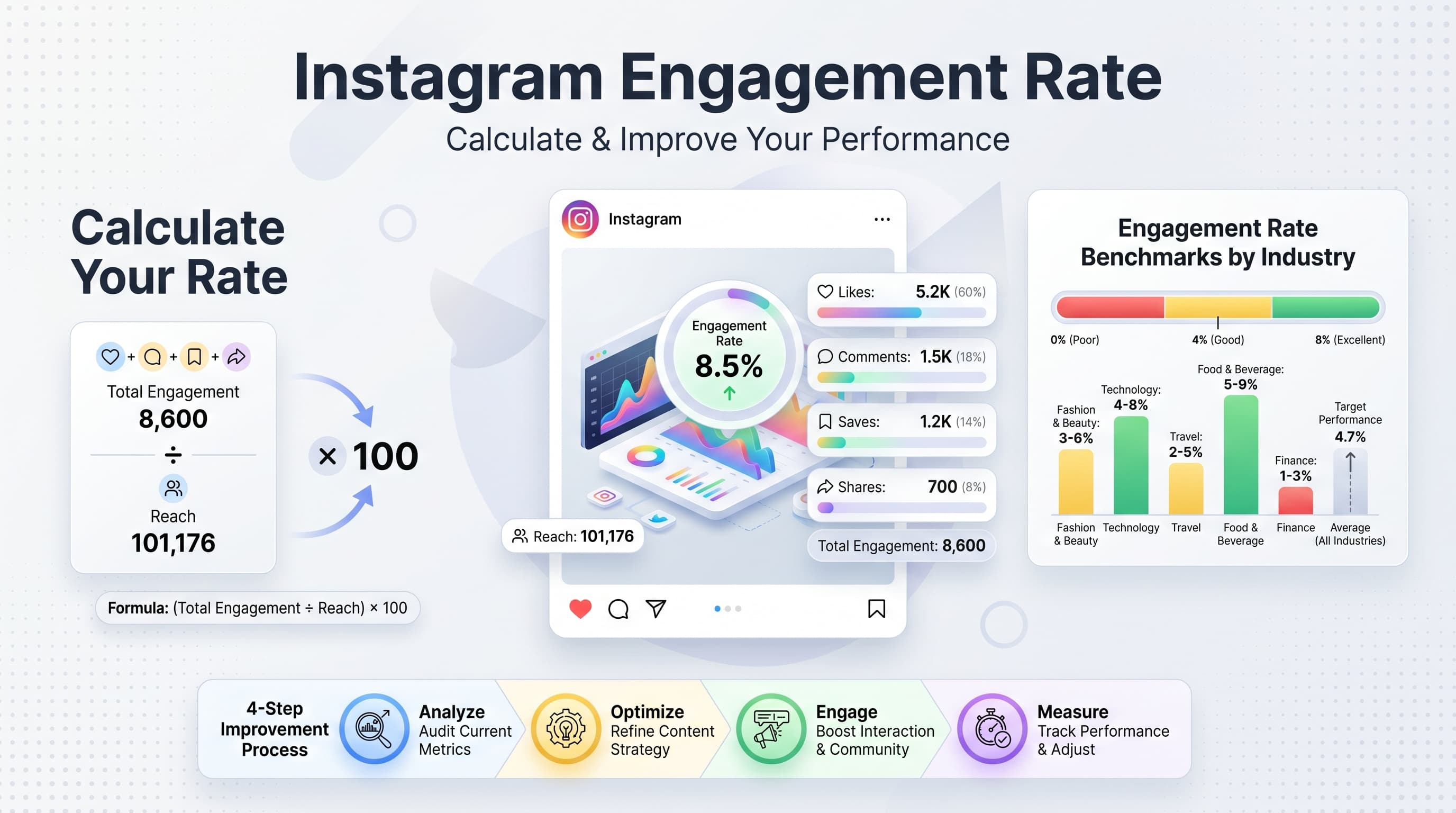
1. Engagement rate by reach (most accurate)
This is the gold standard for measuring engagement because it shows how many people who actually saw your post engaged with it.
Formula: (Total Engagement / Reach) × 100
Example: Your post got 500 likes and 50 comments (550 total engagement) and reached 10,000 people. Your engagement rate by reach is (550 / 10,000) × 100 = 5.5%
To find your reach on Instagram, go to your post insights and look for the 'Accounts Reached' metric. This tells you exactly how many unique accounts saw your content.
2. Engagement rate by impressions
This method uses impressions instead of reach. Impressions count every time your post was viewed, including multiple views from the same person.
Formula: (Total Engagement / Impressions) × 100
Example: Same post with 550 engagement but 15,000 impressions = (550 / 15,000) × 100 = 3.67%
This method typically gives you lower percentages because impressions are usually higher than reach. Use this when you want to understand engagement relative to total content consumption.
3. Engagement rate by followers (least accurate)
This is the most common method, but also the least useful for understanding actual performance.
Formula: (Total Engagement / Follower Count) × 100
Example: 550 engagement with 50,000 followers = (550 / 50,000) × 100 = 1.1%
The problem with this method is that Instagram's algorithm means only a fraction of your followers see each post. You might have amazing engagement from people who see your content, but this method makes it look poor because it includes all your followers.
What counts as engagement on Instagram
Not all Instagram interactions are created equal. The platform weights different types of engagement differently in its algorithm, and understanding this hierarchy can help you optimize your content strategy.
| Engagement Type | Algorithm Weight | Easy to Get? |
|---|---|---|
| Comments | High | Hard |
| Shares (DMs) | Very High | Very Hard |
| Saves | Very High | Hard |
| Likes | Medium | Easy |
| Profile Visits | Medium | Medium |
| Story Replies | High | Medium |
| Story Shares | Very High | Hard |
When calculating your engagement rate, include likes, comments, shares, and saves. Don't count story views or profile visits unless you're specifically measuring story engagement rate.
Comments vs likes: why quality beats quantity
Instagram's algorithm heavily favors comments over likes because comments indicate deeper engagement. A post with 100 likes and 50 comments will typically perform better than a post with 200 likes and 10 comments.
This is why engagement pods (groups that artificially inflate likes) often backfire. They increase your like count but don't generate meaningful comments, which signals to Instagram that your content isn't genuinely engaging.
Focus on creating content that naturally encourages comments. Ask questions, share controversial opinions, or post content that makes people want to tag their friends.
Instagram engagement rate benchmarks by industry
Engagement rates vary significantly across different industries and account sizes. What's considered good performance for a fashion brand might be mediocre for a food account.
| Industry | Average Rate | Good Rate | Excellent Rate |
|---|---|---|---|
| Food & Beverage | 1.86% | 3.5% | 6%+ |
| Fashion | 1.08% | 2.5% | 5%+ |
| Beauty | 1.15% | 2.8% | 5.5%+ |
| Fitness | 1.45% | 3.2% | 6.5%+ |
| Travel | 1.53% | 3.0% | 6%+ |
| Business | 0.96% | 2.0% | 4%+ |
| Technology | 0.84% | 1.8% | 3.5%+ |
| Education | 1.36% | 2.7% | 5%+ |
These benchmarks are based on engagement rate by followers, which is the most commonly reported metric. Remember to adjust your expectations based on your account size too.
How account size affects engagement rate
Smaller accounts typically have higher engagement rates because they have more intimate relationships with their followers. As you grow, maintaining high engagement becomes increasingly difficult.
- Nano influencers (1K-10K): 3-7% average
- Micro influencers (10K-100K): 1.5-4% average
- Mid-tier influencers (100K-1M): 1-3% average
- Macro influencers (1M+): 0.5-2% average
Don't panic if your engagement rate drops as you gain followers. This is normal and expected. Focus on maintaining the absolute number of engaged users rather than the percentage.
Try Schedulala for free
Schedule posts to Bluesky, Twitter, and 8 other platforms from one dashboard.
Get started for free→11 proven strategies to improve your Instagram engagement rate
Improving your engagement rate isn't about gaming the system. It's about creating genuine connections with your audience and giving them reasons to interact with your content.
1. Post when your audience is most active
Timing can make or break your post's performance. Instagram shows your content to a small group of followers first, and if they engage quickly, it gets shown to more people.
Check your Instagram Insights to see when your followers are most active. Go to Insights > Audience > Most Active Times. This shows you the days and hours when your specific audience is online.
General best times across industries: Tuesday-Thursday, 11 AM-1 PM and 7-9 PM in your audience's timezone. But your audience might be different, so always check your own data.
2. Write captions that spark conversations
Your caption is just as important as your visual content. It's what turns a passive viewer into an active participant.
Conversation starters that work: Share unpopular opinions, ask specific questions, create 'this or that' scenarios, share behind-the-scenes stories, or ask followers to share their experiences in the comments.
Avoid generic questions like 'What do you think?' Instead, ask specific things like 'Which of these three strategies have you tried?' or 'What's the biggest mistake you made when starting out?'
3. Use the right hashtags strategically
Hashtags help new people discover your content, but using them wrong can actually hurt your engagement rate.
The 70-20-10 hashtag strategy: 70% niche-specific hashtags (10K-100K posts), 20% broader relevant hashtags (100K-500K posts), 10% popular hashtags (500K+ posts).
Avoid banned or broken hashtags, which can shadow-ban your content. Test your hashtags by searching for them and checking if recent posts appear in the results.
4. Respond to comments quickly and meaningfully
Instagram's algorithm pays attention to how quickly you respond to comments and the quality of your responses.
Respond within the first hour if possible, and give more than just an emoji or 'thanks!' Write thoughtful responses that continue the conversation and encourage others to join in.
Pro tip: Pin meaningful comments to the top of your comment section. This shows new viewers the type of engagement you want and often encourages similar responses.
5. Create content worth saving
Saves are one of Instagram's highest-weighted engagement signals. Create content that people want to reference later.
High-save content types: Tutorials, tips and tricks, quotes, templates, checklists, before/after transformations, and infographics with valuable information.
Add a call-to-action encouraging saves: 'Save this post for later!' or 'Bookmark this for your next project!' But don't overdo it - only ask for saves when your content truly warrants it.
6. Use Instagram Stories strategically
Stories don't directly affect your feed engagement rate, but they keep your account active in followers' minds, which leads to better feed performance.
Use Stories to tease upcoming posts, share behind-the-scenes content, and create interactive experiences with polls, questions, and quizzes.
Cross-promotion strategy: Share your feed posts to your Stories with a call-to-action like 'Double-tap if you agree!' This can drive additional engagement to your main posts.
7. Collaborate with others in your niche
Collaborations expose your content to new audiences who are already interested in your niche, leading to higher-quality engagement.
Collaboration ideas: Instagram takeovers, joint Live sessions, collaborative posts, tagged partnerships, and cross-promotion in Stories.
Focus on quality over quantity. One collaboration with someone who has a highly engaged audience is worth more than ten collaborations with accounts that have high follower counts but low engagement.
8. Analyze your top-performing content
Your best-performing posts contain clues about what your audience wants to see more of.
Go through your top 10 posts from the last three months and identify patterns: What topics performed best? What format (single image, carousel, video)? What caption style? What time were they posted?
Create a content template based on these patterns, but don't just copy your successful posts. Use the insights to inform new content that follows similar formulas.
9. Post consistently without overwhelming
Consistency builds audience expectations and keeps you visible in the algorithm, but posting too much can actually hurt your engagement rate.
Optimal posting frequency: 3-7 posts per week for most accounts. Quality always beats quantity. One great post per day outperforms three mediocre posts.
Use scheduling tools to maintain consistency without burning out. Plan your content in advance and batch create when possible.
10. Engage authentically with your community
Engagement is a two-way street. If you want people to engage with your content, you need to engage with theirs too.
Spend 15-20 minutes daily engaging with posts from your followers and accounts in your niche. Leave meaningful comments, not just emojis or generic phrases.
Community engagement strategy: Comment on posts from your niche hashtags, respond to Stories from followers, and participate in conversations on posts from accounts similar to yours.
11. Experiment with different content formats
Instagram favors accounts that use all of its features. Diversify your content across different formats to maximize your reach and engagement.
Format variety: Single images, carousel posts, Reels, IGTV videos, and live broadcasts. Test each format and see what resonates with your audience.
Don't abandon formats that don't perform immediately. Sometimes it takes time for your audience to adapt to new content types, and Instagram often promotes newer features in the algorithm.
Common Instagram engagement rate mistakes to avoid
Even with the best intentions, many creators make mistakes that hurt their engagement rate. Here are the most common pitfalls and how to avoid them.
Buying fake followers or using engagement pods
This might seem like a shortcut, but it's actually a long-term disaster for your engagement rate.
Fake followers don't engage with your content, which signals to Instagram that your content isn't interesting. This hurts your reach and makes it harder to build genuine engagement.
Better approach: Focus on organic growth strategies. It takes longer, but you'll build an audience that actually cares about your content.
Ignoring your analytics
Many creators post blindly without checking what's working and what isn't.
Check your Instagram Insights weekly. Look at which posts got the highest engagement rates, what times your audience is most active, and which hashtags drove the most reach.
Action step: Set a weekly 30-minute appointment with yourself to review your analytics and plan content based on what you learn.
Focusing only on likes
Likes are the most visible form of engagement, but they're not the most valuable.
Comments, saves, and shares signal deeper engagement and are weighted more heavily by Instagram's algorithm.
Strategy shift: Create content that naturally encourages comments and saves, not just likes. Ask questions, share tips, create tutorials.
Posting at random times
Posting when your audience isn't online severely limits your potential engagement.
Instagram's algorithm gives posts an initial push to a small percentage of your followers. If those people aren't online, your post gets poor initial engagement and doesn't get shown to more people.
Solution: Use your Instagram Insights to find your audience's peak activity times and schedule posts accordingly.
Tools to track and improve your Instagram engagement rate
While Instagram's native analytics provide basic insights, specialized tools can give you deeper analysis and help you optimize your strategy more effectively.
Native Instagram Insights
Available for business and creator accounts, Instagram Insights shows you reach, impressions, and engagement for individual posts and your account overall.
Key metrics to track: Accounts reached, profile visits, website clicks, and individual post engagement rates. Use this data to identify your best-performing content types and optimal posting times.
Limitation: Data is only available for the past 30 days, making long-term trend analysis difficult.
Third-party analytics tools
Tools like Sprout Social, Hootsuite, and Later provide more detailed analytics and historical data that Instagram Insights doesn't offer.
Advanced features: Competitor analysis, hashtag performance tracking, audience growth analysis, and automated reporting.
Cost consideration: Most comprehensive tools start at $30-50 per month, but the insights can pay for themselves through improved performance.
Content planning and scheduling tools
Consistent posting is crucial for maintaining engagement rates, and scheduling tools help you post at optimal times even when you're not available.
Key features to look for: Visual content calendar, optimal time suggestions, hashtag recommendations, and performance tracking.
Free options: Creator Studio (Facebook's tool), Buffer free plan, and Later free plan offer basic scheduling with limited analytics.
Advanced Instagram engagement strategies for 2026
As Instagram's algorithm continues to evolve, new opportunities emerge for creators who stay ahead of the curve. Here are advanced strategies that are working now.
Micro-community building
Instead of trying to appeal to everyone, focus on building a tight-knit community of highly engaged followers.
Tactics: Create recurring content series, use consistent hashtags that your community can follow, regularly feature follower content, and respond personally to regular commenters.
This approach leads to higher engagement rates because your audience feels personally connected to your content and community.
Cross-platform content strategy
Use other platforms to drive engaged traffic to your Instagram content.
Implementation: Share Instagram post teasers in your email newsletter, create TikTok videos that direct viewers to see the full tutorial on Instagram, or use Pinterest to drive traffic to your Instagram carousel posts.
Traffic from other platforms often engages more because they're already interested in your content and made an intentional decision to visit your Instagram.
AI-assisted content optimization
Use AI tools to analyze your top-performing content and identify patterns you might miss manually.
Applications: Caption analysis to identify high-engagement phrases, visual element analysis to understand what images perform best, and hashtag optimization based on performance data.
Remember: AI should inform your strategy, not replace your creative judgment. Use insights to guide human creativity, not replace it.
Try Schedulala for free
Schedule posts to Bluesky, Twitter, and 8 other platforms from one dashboard.
Get started for free→Your Instagram engagement rate action plan
Knowledge without action doesn't improve your engagement rate. Here's a practical 30-day plan to implement what you've learned.
Week 1: Audit and baseline
- Calculate your current engagement rate using the reach method for your last 10 posts
- Identify your top 3 performing posts and analyze what made them successful
- Check your Instagram Insights to find your audience's peak activity times
- Audit your hashtag strategy and research 30 new relevant hashtags
Week 2: Content optimization
- Create 5 posts using formats similar to your top performers
- Write captions that ask specific questions or encourage saves
- Test posting at your identified optimal times
- Respond to every comment within 2 hours
Week 3: Community engagement
- Spend 20 minutes daily engaging with posts from your niche hashtags
- Collaborate with one account in your niche (even if it's just cross-commenting)
- Create one piece of highly saveable content (tutorial, tip list, or template)
- Use Stories to drive engagement to your feed posts
Week 4: Analyze and optimize
- Calculate your new engagement rate and compare to your baseline
- Identify which strategies had the biggest impact
- Double down on what worked and eliminate what didn't
- Plan your content strategy for the next month based on your learnings