Instagram Notes: What They Are & How to Use Them to Boost Engagement
Learn everything about Instagram notes - what they are, how to create them, best practices, and creative ways to boost engagement with your followers.

Instagram Notes launched quietly in late 2022, and most creators still don't know they exist. That's a mistake. Our Instagram scheduling can help.
See It in Action
This is what scheduling an Instagram post looks like in Schedulala
These tiny text updates appear at the top of your followers' DMs and can drive more engagement than your regular posts. Think of them as Instagram's version of Twitter's old status updates, but with a twist that actually works. See our content calendar guide.
Try Schedulala for free
Schedule posts to Bluesky, Twitter, and 8 other platforms from one dashboard.
Get started for free→What are Instagram notes exactly
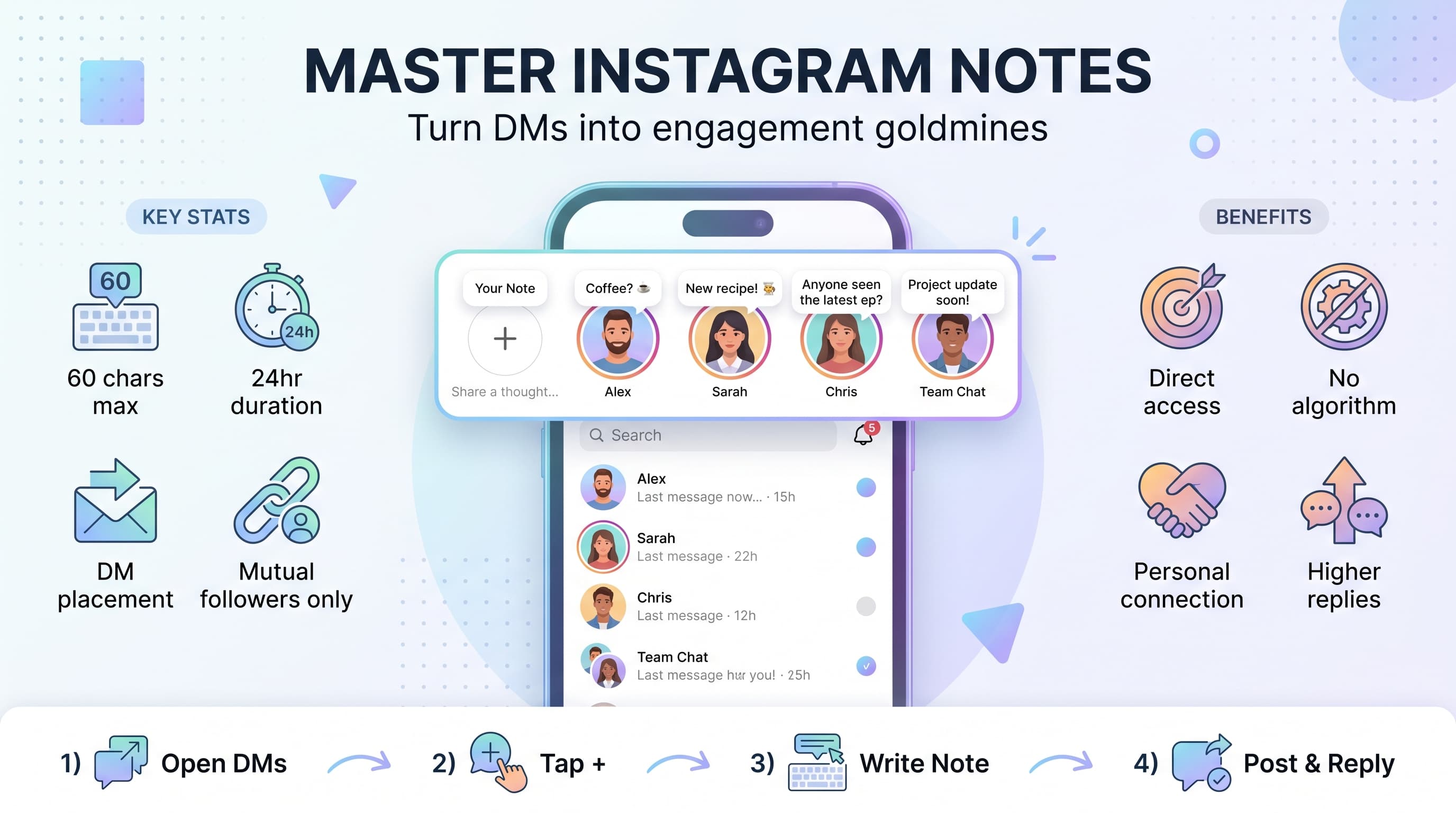
Instagram Notes are short text updates (up to 60 characters) that appear at the top of your followers' Direct Messages inbox. They're visible for 24 hours, just like Stories, but they live in a completely different space where your audience checks messages daily. See our how to repurpose content guide.
When you post a Note, it shows up as a small bubble with your profile picture and text. Your followers can reply directly, turning your Note into a private conversation. This creates an intimate connection that regular posts can't match. Learn more about bluesky content ideas 50.
The genius of Notes lies in their placement. While Stories compete with hundreds of other circles at the top of the main feed, Notes get prime real estate in DMs where people actually pay attention. Your followers see them every single time they check their messages. Our best time to post on instagram can help.
How to create your first Instagram note
Creating a Note takes less than 30 seconds once you know where to look. Instagram buried this feature pretty deep in the interface, which explains why so few people use it. Our instagram engagement calculator can help.
1. Open your Instagram DMs
Tap the message icon in the top right corner of your Instagram home screen. This takes you to your Direct Messages inbox where you'll see all your conversations.
If you don't see the Notes section at the top, try updating your Instagram app. The feature rolled out gradually and older app versions don't support it.
2. Find the Notes section
Look at the very top of your DMs screen. You should see a row of profile pictures with a plus sign on the left. This is where Notes appear.
The plus sign might be labeled 'Your note' or just show as a simple + icon. This is your entry point to creating Notes.
3. Write your note
Tap the plus sign and you'll get a text box with 60 characters to work with. That's roughly the length of a short tweet, so every word counts.
You can use emojis, but they count toward your character limit. The interface shows a countdown as you type, which helps you make every character count.
4. Choose your audience
Instagram gives you two options: share with followers you follow back, or share with close friends. Most creators choose 'followers you follow back' to maximize reach while keeping it personal.
Close friends Notes work great for exclusive behind-the-scenes content or personal updates you don't want everyone to see.
5. Post and track responses
Hit share and your Note goes live immediately. Unlike posts that need time to gain traction through the algorithm, Notes appear instantly in your followers' DMs.
When people reply to your Note, those responses come through as regular DMs. This creates genuine conversations that can lead to stronger follower relationships.
Best practices that actually work
Most creators treat Notes like mini posts, but that's missing the point entirely. Notes work because they feel personal and conversational, not promotional.
The 60-character limit forces you to be creative and direct. You can't ramble or over-explain. This constraint actually makes Notes more engaging because followers can consume them instantly.
Ask questions that spark replies
Questions work incredibly well in Notes because they appear in a space where people expect to have conversations. Try 'Coffee or tea?' or 'Best pizza topping?' for easy engagement.
Avoid complex questions that need long answers. Remember, you want replies that can fit comfortably in a DM, not essays. Simple either/or questions get the most responses.
Personal questions work better than business ones. 'What's your weekend plan?' gets more replies than 'What's your biggest marketing challenge?' Save the business talk for regular posts.
Share behind-the-scenes moments
Notes excel at showing your human side. 'Editing at 2am again' or 'Dog interrupted my meeting' create connection without requiring perfect content.
These glimpses into your real life make followers feel like they know you personally. That emotional connection translates to higher engagement on your regular content too.
Use strategic timing
Post Notes when your audience typically checks messages, not when they scroll the main feed. Early morning and evening work well because people check DMs during commutes and before bed.
Unlike regular posts that need to catch the algorithm at the right moment, Notes have a full 24 hours to be seen. This takes pressure off perfect timing while still rewarding strategic posting.
Creative ways to use Instagram notes
The most successful creators use Notes strategically as part of their broader content strategy. These aren't random thoughts, but calculated moves to deepen audience relationships.
Tease upcoming content
Use Notes to build anticipation for your main content. 'New tutorial dropping at 3pm' or 'Wait until you see today's before/after' creates excitement and ensures your followers watch for your next post.
This strategy works because Notes reach your most engaged followers first. These are the people who follow you back and message you, so they're likely to engage with your teased content immediately after it goes live.
Gather content ideas
Notes are perfect for quick polls and feedback requests. 'Tutorial on editing or posting strategy?' gives followers a voice in your content while showing you care about their preferences.
The replies you get through Notes tend to be more honest and detailed than public comments. People feel safer sharing real opinions in private messages, giving you better insights into what your audience actually wants.
Share daily affirmations or tips
If your brand aligns with motivation or education, daily Notes can become a habit your followers look forward to. 'Comparison is the thief of joy' or 'Ship the imperfect version' provide value in bite-sized doses.
Consistency matters here more than creativity. Followers start checking their DMs specifically to see your daily wisdom, which increases overall engagement with your account.
Announce flash sales or exclusive offers
Notes feel exclusive because not everyone sees them. Use this psychology for limited-time offers that reward your most engaged followers. 'Link in bio, 50% off next 2 hours only' creates urgency and exclusivity.
This works especially well for digital products or services where you can fulfill orders immediately. The private nature of Notes makes the offer feel like a special inside deal.
Common mistakes that kill engagement
Notes seem simple, but there are several ways to mess them up that will make your audience ignore future updates. Avoid these rookie mistakes to keep your Notes effective.
Being too promotional
Notes that feel like ads get ignored fast. 'Check out my new course!' sounds desperate and breaks the intimate vibe that makes Notes special. Save direct promotion for your regular posts and Stories.
Instead, build relationships first. Share interesting thoughts, ask questions, and engage in conversations. When followers genuinely like you as a person, they'll naturally be more interested in your products.
Posting too frequently
Your Note replaces your previous one, so posting multiple Notes per day means most followers will only see your latest update. One thoughtful Note per day works better than three rushed ones.
Think of Notes like texting a friend. You wouldn't send someone five separate texts throughout the day unless you had something important to say each time. The same courtesy applies to your followers.
Ignoring replies
When followers reply to your Notes, they're starting a conversation with you personally. Ignoring these replies defeats the entire purpose of using Notes to build relationships.
You don't need to write novels in response, but acknowledging replies with a quick 'Thanks!' or answering their question shows you care about the interaction. This encourages more people to respond to future Notes.
Advanced strategies for power users
Once you've mastered basic Notes, these advanced techniques can turn your Instagram DMs into a powerful engagement engine that drives real business results.
Create Note series
Plan connected Notes that tell a story over several days. 'Day 1 of building my home office' followed by daily updates creates anticipation and gives followers a reason to check back.
Document challenges, wins, and lessons learned. This transparency builds trust and makes followers feel invested in your journey. They'll start rooting for your success and engaging more with your content.
Cross-promote with Stories
Mention your Note in your Stories to drive more people to check their DMs. 'Left a question in your DMs' encourages followers to look for your Note while teaching them where to find future updates.
This strategy expands your Note's reach beyond people who follow you back. Regular followers who don't qualify for Notes can still participate by messaging you directly.
Track what works
Pay attention to which Notes generate the most replies and DM conversations. Questions about weekend plans might get 20 responses while business tips get 5. Use this data to craft more engaging Notes.
Instagram doesn't provide analytics for Notes, so track manually in a simple spreadsheet. Note the topic, time posted, and number of replies. Patterns will emerge quickly.
Integrating notes with your content strategy
Notes work best when they complement your regular Instagram content, not compete with it. Think of them as the personal conversation that happens alongside your public content performance.
Use Notes to show the human side that doesn't fit in your regular posts. If your main content is polished and professional, Notes can reveal the messy, real moments that make you relatable.
Content calendar integration
Plan Notes alongside your regular posts in your content calendar. When you're posting a tutorial, your Note might ask 'Anyone else struggle with this?' to drive engagement.
This coordination ensures your Notes support your main content goals while maintaining their conversational feel. The planning prevents random, pointless Notes that dilute your message.
Building community
Regular Notes create a sense of community among your most engaged followers. They start to expect your daily check-ins and look forward to responding, creating a loyal inner circle.
This community becomes your testing ground for new ideas and your strongest advocates when you launch new products or services. They feel personally connected to your success.
| Content Type | Best Note Strategy | Example |
|---|---|---|
| Educational | Ask for topic requests | What should I teach next? |
| Behind-the-scenes | Share real moments | Spilled coffee on my notes |
| Product launch | Build anticipation | Something big coming Monday |
| Personal brand | Show personality | Pineapple on pizza: yes or no? |
| Community building | Start conversations | How's everyone's week going? |
Measuring success with Instagram notes
Success with Notes isn't measured in likes or shares, but in conversations started and relationships deepened. The metrics that matter are different from your regular Instagram analytics.
Focus on reply rates, conversation length, and how Notes impact your overall DM engagement. A good Note should generate genuine conversations, not just quick emoji reactions.
Key metrics to track
Reply rate: How many followers respond to each Note. Aim for 5-10% of your Note viewers, which is incredibly high for any social media format.
Conversation depth: Do replies lead to back-and-forth conversations? Multi-message exchanges indicate stronger engagement than single responses.
Cross-platform impact: Do followers who engage with your Notes also interact more with your posts and Stories? This indicates Notes are strengthening overall relationships.
The future of Instagram notes
Instagram continues to update Notes with new features, making them more powerful for creators and businesses. Recent additions include the ability to add music and collaborate with other accounts on shared Notes.
The trend toward more intimate, conversation-driven social media favors features like Notes over traditional posting. As audiences become fatigued with polished content, authentic interaction becomes more valuable.
Smart creators are building Note strategies now while the feature is still underutilized. Early adoption gives you a competitive advantage as more people discover this engagement goldmine hiding in their DMs.
Try Schedulala for free
Schedule posts to Bluesky, Twitter, and 8 other platforms from one dashboard.
Get started for free→