AI Instagram Captions: How to Generate Great Ones That Drive Engagement
Learn how to create compelling AI Instagram captions that boost engagement. Step-by-step guide with tools, templates, and proven strategies.

Writing Instagram captions day after day is exhausting. You stare at that blank screen, trying to come up with something clever, engaging, or at least not boring for the 47th post this month. Our Instagram scheduling can help.
See It in Action
This is what scheduling an Instagram post looks like in Schedulala
What if AI could handle the heavy lifting while you focus on creating amazing content? The right AI tools can generate captions that sound like you, engage your audience, and actually drive results. Our batch content creation can help.
Try Schedulala for free
Schedule posts to Bluesky, Twitter, and 8 other platforms from one dashboard.
Get started for free→Why AI captions work better than you think
AI isn't trying to replace your voice. It's learning from millions of high-performing captions to understand what works. The best AI caption tools analyze engagement patterns, trending topics, and audience behavior to suggest content that resonates. See our the best story scheduler: guide.
Here's what makes AI captions surprisingly effective: they remove the guesswork. Instead of wondering if your caption will land, AI uses data from successful posts to guide the tone, length, and structure. See our scheduling across platforms guide.
1. Consistency at scale
AI maintains your brand voice across hundreds of posts. Feed it examples of your best-performing content, and it learns your style, humor, and messaging approach. Try our best time to post on instagram.
This consistency builds trust with your audience. They know what to expect from your brand, whether you're posting once a day or ten times. See our instagram character counter guide.
2. Data-driven optimization
The best AI tools analyze what works in your industry. They spot patterns in high-engagement posts and apply those insights to your content.
For example, if posts with questions get 40% more comments in your niche, AI will naturally incorporate more questions into your captions.
3. Speed without sacrifice
Generate multiple caption variations in seconds, not hours. Test different approaches, tones, and calls-to-action without burning out your creative energy.
This speed lets you focus on strategy instead of execution. Spend time analyzing what works rather than struggling with writer's block.
Best AI tools for Instagram captions
Not all AI caption generators are created equal. Some produce generic, robotic text that screams 'AI wrote this.' Others understand nuance, context, and brand personality.
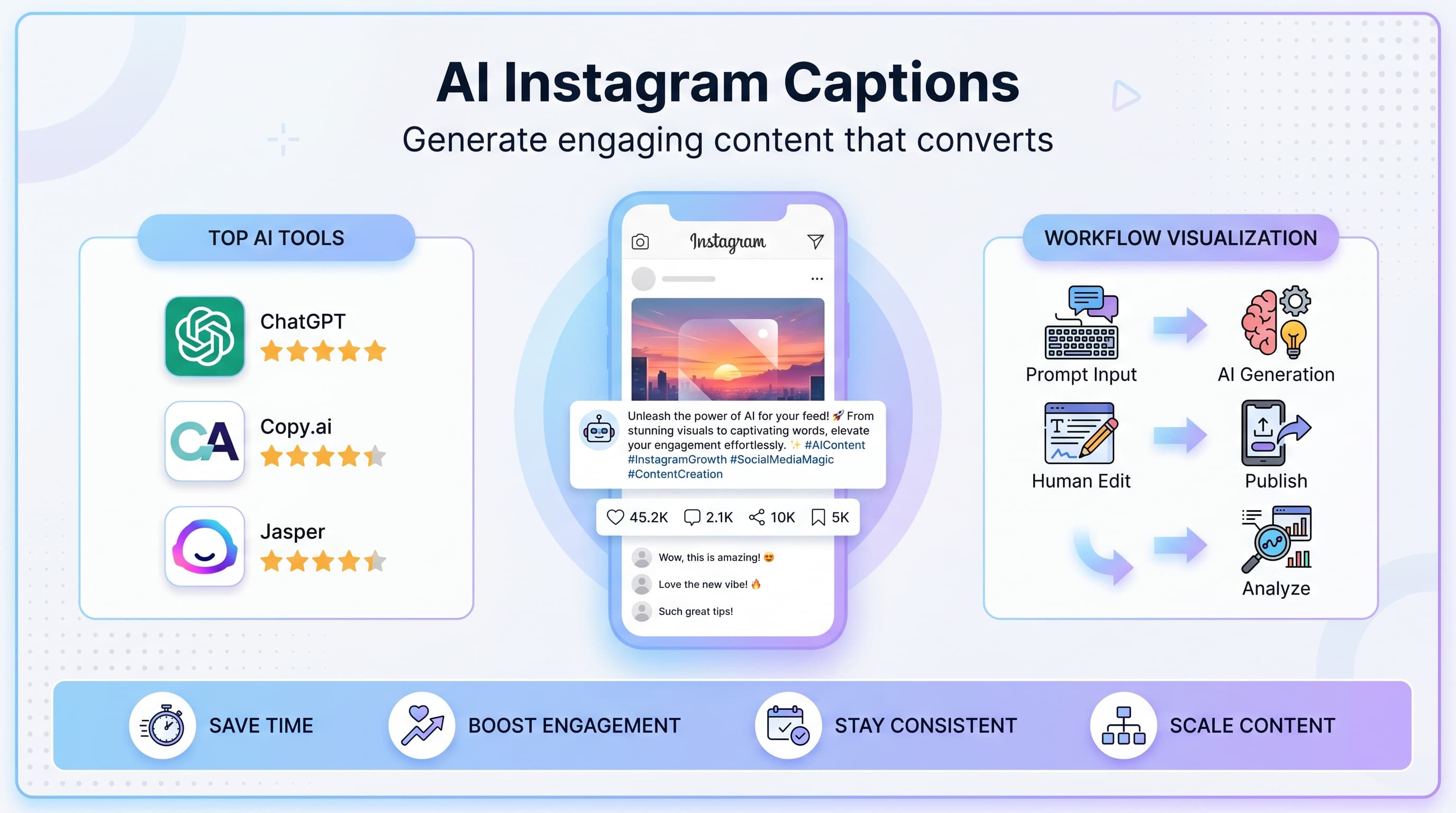
| Tool | Best For | Price | Key Feature |
|---|---|---|---|
| ChatGPT | Custom prompts | $20/mo | Conversational interface |
| Copy.ai | Marketing copy | $49/mo | Industry templates |
| Jasper | Brand consistency | $59/mo | Brand voice training |
| Later | Social scheduling | $25/mo | Built-in scheduler |
| Hootsuite | Team collaboration | $99/mo | Multi-platform management |
1. ChatGPT for custom captions
ChatGPT excels at understanding context and generating personalized captions. The key is crafting detailed prompts that specify your brand voice, target audience, and post objective.
Example prompt: 'Write an Instagram caption for a fitness brand targeting busy professionals. The post shows a 15-minute morning workout. Use an encouraging tone, include a question to drive comments, and add relevant hashtags. Keep it under 150 words.'
ChatGPT will generate multiple variations, each tailored to your specific requirements. The conversational interface lets you refine and iterate quickly.
2. Copy.ai for marketing-focused content
Copy.ai specializes in marketing copy with pre-built templates for different industries and post types. Their Instagram caption tool includes options for product launches, behind-the-scenes content, and user-generated content campaigns.
The platform's strength lies in its marketing intelligence. It understands sales funnels, customer psychology, and conversion-focused language.
Copy.ai works best for brands with clear commercial objectives. If you're selling products or services through Instagram, their templates incorporate proven sales techniques naturally.
3. Jasper for brand consistency
Jasper's brand voice feature sets it apart. Upload examples of your best content, and Jasper learns your specific style, vocabulary, and messaging approach.
This training creates remarkably consistent output. Whether you're generating one caption or a month's worth of content, everything sounds authentically you.
Jasper also integrates with content calendars and social media schedulers, streamlining your entire content creation process.
Step-by-step caption generation process
Creating great AI captions isn't just about picking a tool and hitting generate. The best results come from a systematic approach that combines AI efficiency with human creativity.
Step 1: Define your caption objectives
Before generating any text, clarify what you want this caption to achieve. Are you building brand awareness, driving website traffic, encouraging user-generated content, or promoting a specific product?
Your objective determines everything else: tone, length, call-to-action, and hashtag strategy. AI works best when it understands your specific goal.
- Brand awareness: Focus on storytelling and personality
- Traffic generation: Include clear calls-to-action and value propositions
- Community building: Ask questions and encourage interaction
- Sales: Highlight benefits and create urgency
Step 2: Gather context and inspiration
Feed your AI tool relevant context about your post. Describe the image or video, mention current trends in your industry, and reference any ongoing campaigns or themes.
The more context you provide, the more relevant and engaging your captions become. Generic inputs produce generic outputs.
Example context: 'The image shows our new sustainable packaging in a kitchen setting. We're launching an eco-friendly product line next month. Our audience cares about environmental impact and premium quality.'
Step 3: Craft detailed prompts
Your prompt is the blueprint for your caption. Include specific instructions about tone, length, structure, and key messages. The more detailed your prompt, the better your results.
Effective prompt structure:
- Context: What's in the post and why it matters
- Audience: Who you're talking to and what they care about
- Tone: Casual, professional, humorous, inspirational, etc.
- Structure: Hook, body, call-to-action format preferences
- Constraints: Character limits, hashtag requirements, brand guidelines
Step 4: Generate multiple variations
Never settle for the first caption AI generates. Create 3-5 different versions with varying approaches: different hooks, tones, or structures.
This variety gives you options to match your mood, current brand campaigns, or audience preferences. Sometimes a casual, conversational caption works better than a polished marketing message.
Save the variations you don't use. They often work perfectly for future posts or can inspire new content ideas.
Step 5: Edit and personalize
AI gets you 80% of the way there. The final 20% is your human touch: adding personal anecdotes, adjusting the voice, or incorporating timely references.
Look for opportunities to make the caption more specific to your brand or current events. Generic phrases like 'reaching new heights' or 'game-changer' should be replaced with concrete, unique language.
Read the caption aloud. Does it sound like something you'd actually say? If not, adjust the language until it feels authentic.
Step 6: Optimize for engagement
Before publishing, review your caption for engagement opportunities. Add questions to encourage comments, include clear calls-to-action for the behavior you want, and ensure your hashtags reach the right audience.
Test different posting times and track which caption styles perform best with your audience. This data improves your future AI prompts.
Consider adding a 'comment prompt' at the end: 'What's your favorite sustainable swap?' generates more discussion than 'Let us know what you think!'
Prompt templates that actually work
Great AI captions start with great prompts. These tested templates produce consistently engaging results across different industries and post types.
Product showcase template
Prompt: 'Create an Instagram caption for [product name] targeting [specific audience]. The image shows [describe visual elements]. Highlight [2-3 key benefits] using a [tone] voice. Include a question about [relevant topic] to encourage comments. End with a clear call-to-action to [desired action]. Use [X] relevant hashtags. Keep under [character limit].'
Example: 'Create an Instagram caption for our noise-canceling headphones targeting remote workers. The image shows someone working peacefully in a busy coffee shop. Highlight superior sound quality and all-day comfort using a professional but friendly voice. Include a question about their biggest work-from-anywhere challenges. End with a clear call-to-action to check out our website. Use 10 relevant hashtags. Keep under 200 characters.'
Behind-the-scenes template
Prompt: 'Write a behind-the-scenes Instagram caption showing [process/activity]. Adopt a [casual/authentic/excited] tone that makes followers feel like insiders. Share [specific insight/challenge/win] from this experience. Ask followers about [related experience they might have]. Include [X] industry-relevant hashtags.'
Example output: 'Coffee at 5 AM, design sketches everywhere, and about 47 'that's not quite right' moments later... our new logo is finally here! The hardest part wasn't the creative process—it was agreeing on the perfect shade of blue. (Spoiler: we changed it three times.) What's the longest you've ever spent perfecting one small detail?'
Educational content template
Prompt: 'Create an educational Instagram caption about [topic] for [target audience]. Break down [concept] into 3-5 simple points using bullet points or numbers. Use a helpful, expert tone without being condescending. Include a practical tip they can implement immediately. Ask what other [related topics] they want to learn about.'
This template works particularly well for coaches, consultants, and service-based businesses. It positions you as an expert while providing genuine value to your audience.
User-generated content template
Prompt: 'Write a caption featuring user-generated content from [customer name/type]. Express genuine appreciation for [specific aspect of their post/experience]. Highlight how they're using [product/service] in their unique way. Encourage other customers to share similar content using [branded hashtag]. Keep the tone grateful and community-focused.'
UGC captions should always feel celebratory rather than promotional. Focus on the customer's success or creativity rather than your product features.
Trending topic template
Prompt: 'Connect [current trend/holiday/event] to our [industry/product] in a clever, non-forced way. Use a [playful/witty/observational] tone that shows we're aware of what's happening without trying too hard. Include our unique perspective on [trending topic]. Ask followers for their hot takes or experiences related to [trend].'
The key to trending topic posts is authenticity. If the connection feels forced, skip it. Your audience will appreciate genuine relevance over forced topicality.
Advanced AI caption strategies
Once you've mastered basic AI caption generation, these advanced techniques will set your content apart from the competition.
1. Audience segmentation prompts
Create different caption variations for different audience segments. Your existing customers need different messaging than potential customers discovering your brand for the first time.
New audience prompt: 'Write an Instagram caption introducing our brand to someone who's never heard of us. Focus on our core mission and what makes us different. Use welcoming, accessible language that doesn't assume prior knowledge.'
Existing customer prompt: 'Create a caption for loyal customers who already love our brand. Reference inside jokes, acknowledge their loyalty, and give them exclusive or early access information. Use the tone of talking to friends.'
2. Emotional arc development
Great captions take readers on an emotional journey. Structure your prompts to create specific emotional progressions: curiosity to satisfaction, frustration to relief, or confusion to clarity.
Example prompt: 'Start with a relatable frustration our audience experiences. Build tension by describing the problem in detail. Then reveal our solution as the turning point. End with the positive outcome and invite them to experience it themselves.'
This approach works especially well for problem-solving products or transformational services. The emotional arc keeps readers engaged through the entire caption.
3. Conversation threading
Create caption series that build on each other over time. Reference previous posts, continue storylines, or develop themes across multiple posts.
Series prompt: 'This is post 3 in our 'sustainable living' series. Reference insights from posts 1 and 2 briefly, then introduce today's topic: [specific focus]. Connect this topic to the overarching theme and tease what's coming in post 4.'
Threading keeps your audience engaged with your account long-term and encourages them to check your profile for previous or upcoming posts.
4. Platform-specific optimization
Instagram captions work differently than other social platforms. Optimize your AI prompts for Instagram's unique features: the 'more' button, hashtag culture, and visual-first audience.
Instagram-optimized prompt: 'Write a caption with a strong hook in the first line that shows in the feed preview. Include line breaks for readability. Add strategic hashtags that balance reach and relevance. Consider how this caption works with Instagram Stories and Reels cross-promotion.'
5. Performance-based iteration
Use your best-performing captions as training data for future AI generations. Analyze what worked and incorporate those elements into new prompts.
Data-driven prompt: 'Our highest-engaging captions include [specific elements from your top posts]. Create a new caption that incorporates these successful elements while staying fresh and relevant to [current topic/product].'
This approach continuously improves your caption quality based on real performance data rather than guesswork.
Common AI caption mistakes to avoid
Even with powerful AI tools, certain mistakes can make your captions feel robotic, generic, or off-brand. Avoiding these pitfalls ensures your AI-generated content maintains authenticity and effectiveness.
1. Generic inspirational language
AI often defaults to vague, motivational language that sounds like every other brand: 'Chase your dreams,' 'Believe in yourself,' or 'The sky's the limit.'
Instead: Use specific, actionable language tied to your industry. Replace 'Follow your passion' with 'Start that side project you've been sketching in margins for months.'
Fix in prompts: Add 'avoid generic motivational phrases' and 'use specific, concrete language' to your prompt instructions.
2. Overly promotional tone
AI can sound like a used car salesman if you're not careful: 'Amazing product! Incredible results! Limited time offer!' This aggressive approach turns off modern Instagram audiences.
Instead: Focus on value, stories, and genuine benefits. Let the product speak for itself through customer experiences and authentic use cases.
Fix in prompts: Specify 'conversational, helpful tone' and 'focus on customer benefits rather than product features.'
3. Ignoring your brand voice
AI without proper training produces generic content that could belong to any brand. Your unique voice gets lost in algorithmic optimization.
Instead: Feed AI examples of your best content regularly. Include voice and tone guidelines in every prompt.
Fix in prompts: Always include 'Write in [brand name]'s voice, which is [describe your brand personality]' in your instructions.
4. Keyword stuffing hashtags
AI sometimes generates hashtag lists that read like SEO spam: #best #amazing #incredible #perfect #musthave. This approach hurts reach and looks unprofessional.
Instead: Use a mix of broad, niche, and branded hashtags. Research what your audience actually searches for.
Fix in prompts: Request 'relevant hashtags that our target audience actually uses' rather than just 'popular hashtags.'
5. Forgetting the human element
The biggest mistake is treating AI as a complete replacement for human creativity and intuition. AI doesn't understand context, emotions, or cultural nuances like humans do.
Instead: Use AI as a starting point, then add personal touches, current references, and authentic personality.
Fix in prompts: Always plan to edit and personalize AI output. Build editing time into your content creation process.
Measuring AI caption success
Creating great AI captions is only half the battle. Measuring their performance helps you refine your approach and improve results over time.
Key metrics to track
Focus on metrics that align with your caption objectives rather than vanity metrics that look impressive but don't drive business results.
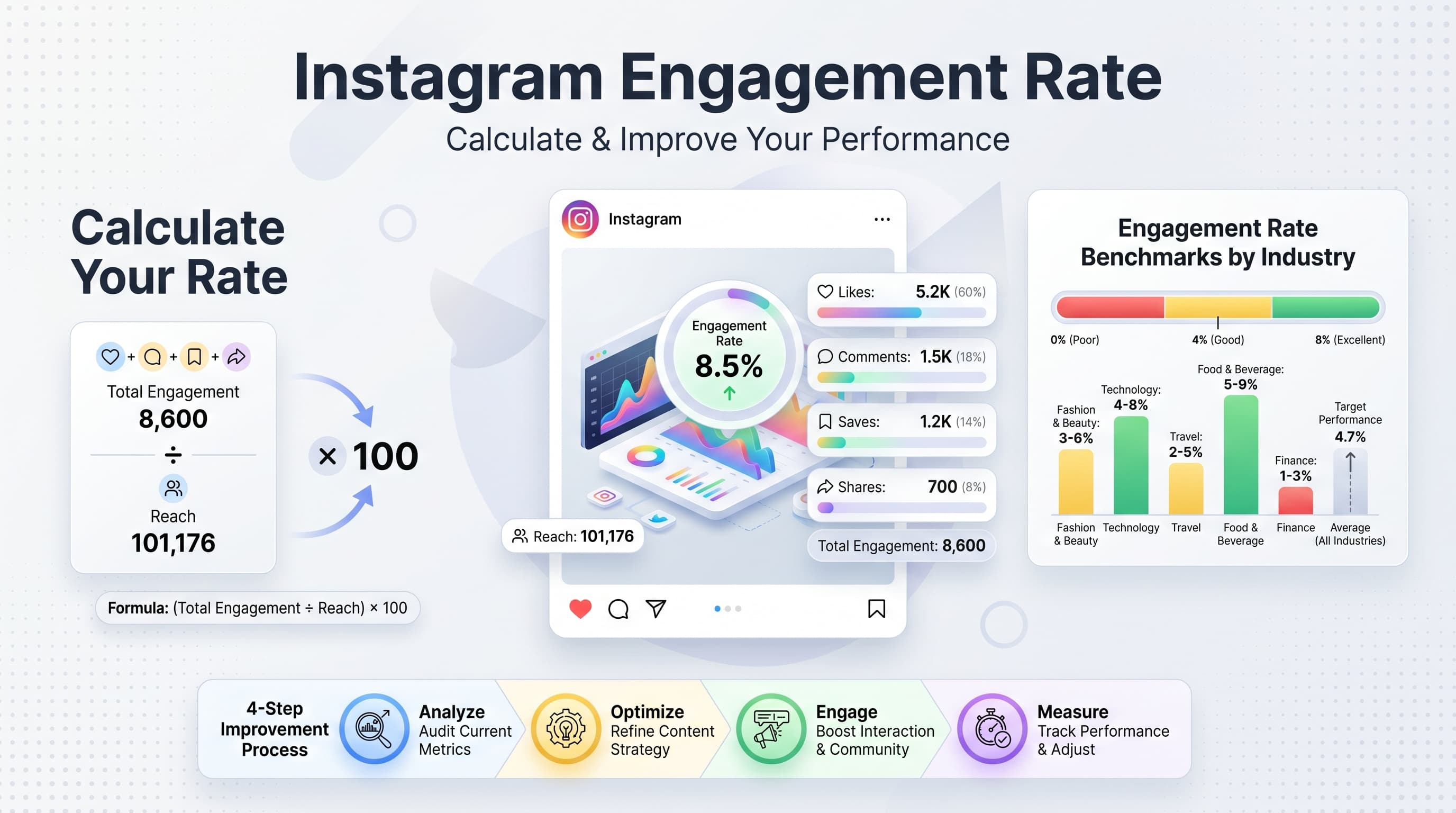
- Engagement rate: Comments, likes, and shares relative to follower count
- Comment quality: Meaningful responses vs. emoji-only reactions
- Click-through rate: Traffic driven to your website or landing pages
- Hashtag performance: Reach and impressions from specific hashtags
- Save rate: How often people bookmark your content for later
- Profile visits: New followers driven by specific posts
A/B testing AI captions
Test different AI-generated approaches systematically. Create multiple caption versions for similar content and track which styles resonate most with your audience.
Testing variables: Caption length (short vs. long), tone (casual vs. professional), structure (story vs. list), and call-to-action placement (beginning vs. end).
Run tests for at least two weeks to account for posting time variations and audience behavior patterns. Instagram's algorithm needs time to fully distribute your content.
Improving based on data
Use performance insights to refine your AI prompts. If questions consistently drive more comments, incorporate more questions. If shorter captions perform better, adjust your character limits.
Monthly review process: Analyze your top 10 performing captions for common elements. Update your prompt templates to include successful patterns. Eliminate or modify approaches that consistently underperform.
Document what works in a 'brand voice guide' that you can reference in future AI prompts. This creates consistency while allowing for creative variation.
AI caption workflow integration
The most successful brands integrate AI caption generation into comprehensive social media workflows. This systematic approach ensures consistent quality and saves significant time.
1. Content planning integration
Plan your AI caption generation around your content calendar. Batch similar types of posts together to maintain consistent prompting approaches and voice.
Weekly workflow: Mondays for educational content prompts, Wednesdays for product showcases, Fridays for behind-the-scenes content. This consistency improves AI output quality.
Create template prompts for each content type and customize them for specific posts. This speeds up generation while maintaining quality standards.
2. Team collaboration systems
If multiple people create captions for your brand, establish clear AI usage guidelines. Document your prompt templates, brand voice requirements, and editing standards.
Approval workflow: AI generation → human editing → brand review → final approval. Each step has specific quality checkpoints and responsibilities.
Share successful prompts and caption examples across your team. This collective knowledge improves everyone's AI caption quality.
3. Scheduling tool integration
Many social media scheduling platforms now include AI caption features. These integrations streamline your workflow by combining generation, editing, and scheduling in one place.
Look for tools that let you save custom prompts, maintain brand voice consistency, and track performance metrics alongside your AI-generated content.
Schedulala integration tip: Use AI to generate multiple caption options, then schedule the best version for optimal posting times based on your audience data.
Future of AI Instagram captions
AI caption technology continues evolving rapidly. Understanding upcoming trends helps you stay ahead of the curve and maintain competitive advantages.
Personalization at scale
Future AI tools will generate different caption variations for different audience segments automatically. Imagine AI that creates one version for new followers and another for loyal customers, all from a single prompt.
This level of personalization will dramatically improve engagement rates by speaking directly to where each audience member sits in your customer journey.
Real-time trend integration
Advanced AI systems will monitor trending topics, viral content patterns, and cultural moments in real-time, automatically suggesting timely caption angles for your content.
This capability will help brands stay culturally relevant without constantly monitoring social media trends manually.
Visual content analysis
AI will analyze your images and videos to generate more contextually relevant captions. Instead of describing your visual content to the AI, it will see and understand it directly.
This advancement will create stronger connections between visual content and caption messaging, improving overall post cohesion.
Try Schedulala for free
Schedule posts to Bluesky, Twitter, and 8 other platforms from one dashboard.
Get started for free→