Social Media Scheduling Best Practices for 2026: The Complete Guide
Master social media scheduling best practices with our 2026 guide. Learn optimal posting times, batch creation, and strategies that actually drive engagement.

Quick answer
Follow scheduling best practices by batching content creation, posting at peak times, maintaining a consistent cadence, and leaving room for real-time posts.
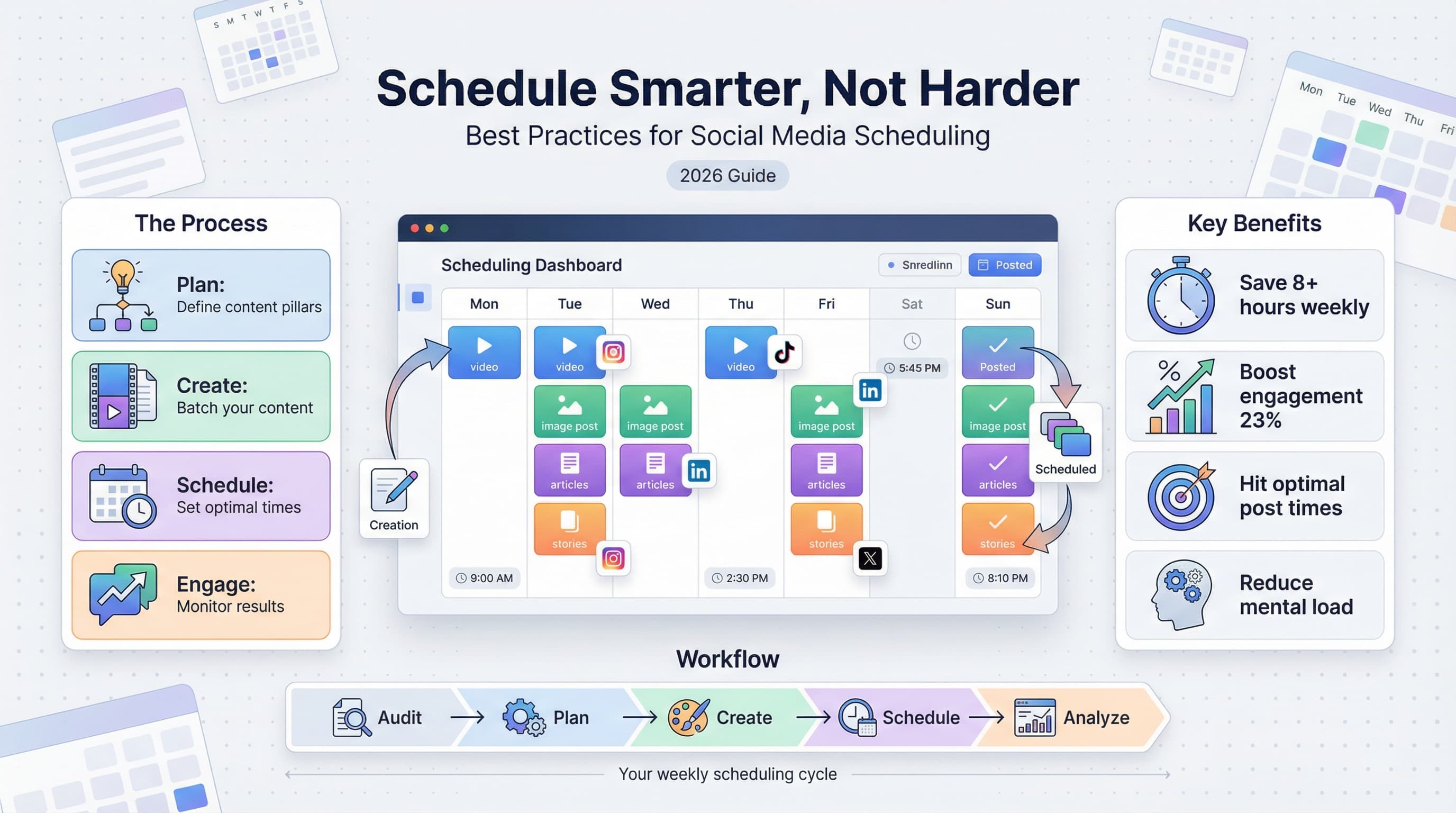
- •Batch-create content weekly to maintain consistency without daily pressure
- •Use platform-specific optimal posting times based on your audience analytics
- •Schedule 80% of content in advance and leave 20% for real-time engagement
- •Schedulala supports scheduling across 12 platforms for $9/month with unlimited posts
You've got 47 browser tabs open, three half-written captions in your notes app, and that nagging feeling you forgot to post something yesterday. Sound familiar?
Most social media managers spend between 6 and 10 hours per week just on posting. Not strategy. Not engagement. Just the act of publishing content across platforms.
What if you could reclaim most of that time while actually improving your results?
That's what smart scheduling does. Not just automating for automation's sake, but building a system that works harder than you do. This guide breaks down exactly how to do it in 2026, with tactics that work across every major platform.
Try Schedulala for free
Schedule posts to Bluesky, Twitter, and 8 other platforms from one dashboard.
Get started for free→Why scheduling matters more than ever in 2026
The social media game has changed. Five years ago, you could wing it. Post when you remembered, hop on trends when you noticed them, and still see decent results. That approach doesn't cut it anymore.
Algorithms now favor consistency above almost everything else. Instagram's internal documents (leaked in late 2024) confirmed what many suspected: accounts that post on predictable schedules receive up to 23% more reach than those posting sporadically. TikTok's recommendation system works similarly, prioritizing creators who show up regularly.
The consistency equation
Here's what the data shows. Accounts posting 5 times per week see 2.3x more follower growth than those posting twice weekly. But here's the catch: that only holds true when those posts go out at optimal times. Random scheduling kills your momentum even if you hit the quantity targets.
This creates an impossible situation for anyone managing social manually. You'd need to be available at 7am, 12pm, 6pm, and sometimes 9pm, every single day, across multiple time zones if you have a global audience. Nobody can sustain that without burning out or letting quality slip.
The mental load problem
Beyond the time commitment, there's the mental overhead. When you're constantly thinking "did I post today?" or "what should I share tomorrow?", you're draining cognitive resources that could go toward actual creative work. Scheduling eliminates that background anxiety.
I've talked to social media managers who describe the shift to proper scheduling as "getting their brain back." They stop context-switching between creation and distribution, which lets them go deeper on both.
Building your scheduling foundation
Before diving into tactics, you need the right infrastructure. Think of this like setting up a kitchen before cooking: you can technically make dinner without organizing your ingredients and tools first, but it's going to be chaotic and the results will suffer.
Step 1: Audit your current posting patterns
Pull your analytics from the past 90 days. You're looking for patterns in what's working and what's not. Specifically, examine which posts got the most engagement, what times those posts went live, which days of the week performed best, and what content formats drove the most saves and shares.
Most people skip this step and jump straight to generic "best times to post" advice. That's a mistake. Your audience is unique. A B2B software company has a completely different engagement pattern than a lifestyle brand targeting college students. Generic advice gets generic results.
What to look for in your audit
Create a simple spreadsheet with your top 20 performing posts from the past quarter. For each one, note the day it was posted, the exact time, the content format (carousel, video, static image, text), the topic or theme, and any external factors (was it tied to a trending topic, did someone influential share it).
Patterns will emerge. Maybe your audience loves Tuesday morning posts but ignores Friday content. Maybe carousels outperform single images by 3x. This data becomes the foundation for your scheduling strategy.
Step 2: Define your content pillars
Random posting is the enemy of growth. You need content pillars, which are three to five core themes that all your content falls under. These pillars make scheduling easier because you're not starting from zero every time you need to create something.
For a fitness brand, pillars might be workout tutorials, nutrition tips, client transformations, and behind-the-scenes content. For a SaaS company, they might be product updates, industry insights, customer stories, and educational content. Whatever your pillars are, write them down and commit to them.
Step 3: Create your content calendar template
A content calendar isn't just a schedule. It's a strategic document that shows what you're posting, when, where, and why. The "why" part is what most people forget. Every post should have a purpose tied to a broader goal.
Your calendar should include the date and time, platform, content pillar, post format, caption (or at least the hook), relevant hashtags, any links or CTAs, and the goal (awareness, engagement, conversion, etc.). Having all this information in one place transforms scheduling from a chore into a strategic exercise.
| Calendar Element | Why It Matters | Common Mistake |
|---|---|---|
| Date/Time | Ensures optimal posting windows | Using generic 'best times' instead of your data |
| Platform | Different platforms need different approaches | Copy-pasting the same content everywhere |
| Content Pillar | Maintains thematic balance | Posting whatever feels right that day |
| Post Goal | Ties content to business objectives | Creating content without purpose |
| Caption/Hook | Allows for review and improvement | Writing captions last minute |
Optimal posting times by platform in 2026
Here's where things get specific. I'm going to share general guidelines based on aggregate data from millions of posts, but remember: your own analytics should always take priority over generic advice.
Instagram's algorithm heavily rewards posts that get immediate engagement. This means posting when your specific followers are most active is non-negotiable. Generally, weekday mornings between 7am and 9am perform well as people check their phones during commutes or morning routines. The lunch window from 11am to 1pm catches people on breaks. Evening posts between 7pm and 9pm work because people are winding down and scrolling.
Reels have different optimal times than feed posts. Reels perform better in the evening hours when users have more time to watch video content. Static posts and carousels do better during quick-scroll moments like commute times.
Sunday evening has emerged as a sleeper hit for many accounts in 2026. Competition is lower because fewer brands post on weekends, but engagement is high as people prepare for the week ahead.
TikTok
TikTok's For You Page algorithm is more forgiving of posting times than Instagram, but timing still matters for initial velocity. The best windows are typically 7am to 9am, 12pm to 3pm, and 7pm to 11pm. TikTok users skew younger and stay up later, so evening and nighttime posts can perform exceptionally well.
One TikTok-specific tactic: post right before trending audio or challenges peak. The platform's trend cycles move fast, usually lasting only 3 to 5 days from emergence to saturation. Scheduling tools that let you react quickly while still batching your work give you an edge here.
LinkedIn is all about the work week. Tuesday through Thursday consistently outperforms Monday and Friday. The sweet spots are early morning (7am to 8am) when professionals check updates before starting work, and midday (12pm to 1pm) during lunch breaks.
Avoid posting after 5pm on weekdays or anytime on weekends. LinkedIn users have a clear mental separation between work and personal time, and they're not scrolling the platform during off hours. Your brilliant post at 8pm on Saturday will get buried by Monday morning content.
For LinkedIn scheduling, consistency trumps frequency. Three posts per week at optimal times will outperform daily posts at random times.
X (Twitter)
X moves fast. The half-life of a tweet is roughly 18 minutes, which means timing matters more here than almost anywhere else. Best times cluster around 8am to 10am and 6pm to 9pm on weekdays. Weekends see lower overall activity but less competition.
Because content disappears quickly, X is the one platform where posting frequency should be higher. Three to five posts per day is reasonable for brands, compared to one to two on Instagram. Scheduling makes this sustainable without consuming your entire day.
The batch creation method that actually works
Batch content creation is the secret weapon of every efficient social media manager. Instead of creating one post at a time, you dedicate focused blocks to producing multiple pieces of content at once.
The math is simple. Context switching costs you about 23 minutes every time you shift between tasks (according to research from the University of California). If you're creating, editing, writing captions, and scheduling as separate sessions throughout the week, you're losing hours to mental ramp-up time.
The weekly batch schedule
Here's a framework that works for most teams and solo creators:
Monday: Planning and ideation
Spend 60 to 90 minutes reviewing your content calendar, identifying gaps, and brainstorming ideas for the coming week. Pull from your content pillars, check trending topics, and note any upcoming events or launches that need coverage.
By the end of this session, you should have a clear list of exactly what content you need to create. Titles, hooks, and rough concepts for each piece. No actual creation yet, just planning.
Tuesday: Visual creation
This is your production day. Create all the visual assets you need for the week in one focused session. If you're making Reels, shoot all of them back to back. Carousels? Design them all at once. Static graphics? Batch those too.
Batching visuals is particularly effective because you stay in the same creative headspace and can reuse setups, templates, and assets across multiple pieces. What might take 30 minutes per post individually can often be done in 10 to 15 minutes per post when batched.
Wednesday: Writing and captions
Now write all your captions in one session. Open your content calendar, look at each visual you created, and write the accompanying copy. Having the visuals done first makes this easier because you know exactly what story each image or video tells.
Write more than you need. For each post, draft two or three caption variations. You can test different hooks, different lengths, different CTAs. This gives you options and backup content if something doesn't feel right later.
Thursday: Scheduling and quality check
Load everything into your scheduling tool. As you schedule each post, do a final quality check. Does the visual look right on the platform preview? Is the caption free of typos? Are the hashtags relevant? Is the posting time optimal?
This is also when you schedule for the following week's beginning. Having Monday's content scheduled before the weekend means you're never starting the week scrambling.
Friday: Engagement and analysis
Friday is for community management and review. Respond to comments from the week, engage with your audience, and analyze what performed well. These insights feed into next Monday's planning session.
Many people skip this step, but it's where the compound growth happens. The data you gather Friday makes next week's content better, which improves results, which gives you better data, and the cycle continues.
Platform-specific scheduling strategies
Scheduling isn't one-size-fits-all. Each platform has quirks that affect how you should approach automated posting. Understanding these nuances separates effective schedulers from those who just blast content everywhere.
Instagram scheduling nuances
Instagram's algorithm gives a slight boost to content posted natively versus through third-party apps. This gap has narrowed significantly since 2024, but it still exists. The workaround? Use scheduling tools for feed posts and carousels, but consider posting Stories manually since they're more ephemeral and spontaneous anyway.
For Reels, schedule them to post as Reels specifically, not as regular video posts. The format distinction matters for how the algorithm distributes the content. Also, add captions to your Reels before scheduling since most users watch without sound.
Hashtag placement affects performance more than many realize. Posts with hashtags in the caption (not comments) see slightly higher reach in 2026. Schedule your hashtags as part of the caption, but place them after a line break for visual cleanliness.
TikTok scheduling considerations
TikTok's native scheduling tool has improved dramatically, but third-party tools still offer advantages for teams managing multiple accounts. The key with TikTok is understanding that trending sounds and effects can't always be added via scheduling tools. If your content relies on a specific trending audio, you might need to post manually.
Descriptions on TikTok should be scheduled with relevant keywords since the platform uses them for search discovery. Include 3 to 5 relevant hashtags, but don't stuff. TikTok's hashtag culture is different from Instagram, and over-tagging looks spammy.
LinkedIn scheduling tactics
LinkedIn rewards native content heavily. Links in posts get suppressed compared to text-only or image posts. The workaround: schedule your post without a link, then add the link as the first comment immediately after posting. Most scheduling tools support comment scheduling for exactly this reason.
Document posts (PDF carousels) perform exceptionally well on LinkedIn but require specific upload handling. Make sure your scheduling tool supports document posts rather than just images.
Personal profiles generally outperform company pages on LinkedIn. If you're managing both, schedule more content to personal profiles and use company pages for official announcements and evergreen brand content.
Cross-platform scheduling mistakes to avoid
The biggest mistake is posting identical content everywhere simultaneously. Each platform has different aspect ratios, character limits, hashtag cultures, and audience expectations. A LinkedIn post copied directly to TikTok looks out of place and performs poorly.
| Platform | Optimal Aspect Ratio | Caption Length | Hashtag Count |
|---|---|---|---|
| Instagram Feed | 4:5 or 1:1 | 125-150 characters (before truncation) | 5-10 relevant |
| Instagram Reels | 9:16 | Short hooks, under 100 characters | 3-5 specific |
| TikTok | 9:16 | Brief, keyword-rich | 3-5 trending |
| 1.91:1 or 1:1 | Up to 3,000 characters optimal | 3-5 professional | |
| X (Twitter) | 16:9 or 1:1 | Under 280 characters | 1-2 maximum |
When scheduling to multiple platforms, create platform-specific variations of each piece of content. Same core message, different execution. Your scheduling tool should let you customize each platform's version individually.
Advanced scheduling techniques for 2026
Once you've mastered the basics, these advanced tactics can take your scheduling game further.
Content series and recurring posts
Create weekly content series that your audience can anticipate. "Monday Motivation," "Tech Tip Tuesday," or "Friday Wins" create expectations and habitual engagement. Schedule these series in advance for the entire month or quarter.
Recurring evergreen content also benefits from scheduling. Customer testimonials, FAQ answers, and educational fundamentals can be recycled every few months. Build a library of these posts and schedule them to fill gaps in your calendar automatically.
Event-based scheduling
Build your calendar around known events: industry conferences, product launches, holidays, awareness days. Schedule content for these dates months in advance, then fill in the gaps with regular content.
Create event "packages" with before, during, and after content. For a product launch, you might schedule teaser posts the week before, announcement posts on launch day, feature highlights the week after, and testimonials the following week. Plan and schedule the entire sequence at once.
A/B testing through scheduling
Use scheduling to run informal A/B tests. Post similar content with different hooks, different visuals, or different posting times on alternating days. Track which variations perform better and apply those insights to future content.
This doesn't require fancy testing tools. Simply schedule variation A on Tuesday and variation B on Thursday, then compare results. Over time, you'll build a clear picture of what resonates with your audience.
Algorithmic gap filling
Algorithms favor accounts that post consistently but not predictably. If you always post at exactly 9am, the algorithm might start to "expect" that and reduce the urgency of distribution. Mix in some variation by scheduling posts a few minutes off your usual time.
Similarly, don't let your scheduling create long gaps. If your scheduled content ends on Thursday and you don't have anything for Friday through Sunday, your Monday post will underperform because the algorithm has "forgotten" about you. Maintain momentum even if weekend posts are lighter.
Common scheduling mistakes and how to avoid them
Even experienced social media managers fall into these traps. Here's what to watch out for.
Mistake 1: Set it and forget it
Scheduling doesn't mean you can ignore your accounts. You still need to engage with comments, respond to DMs, and stay aware of what's happening in your community. Scheduled content provides the backbone, but real-time engagement provides the soul.
Block 15 to 30 minutes daily for engagement, even when your content is fully scheduled. This is when you build relationships, answer questions, and turn followers into fans.
Mistake 2: Ignoring real-time events
Nothing looks worse than a cheerful scheduled post going live during a crisis or tragedy. Build a system for quickly pausing scheduled content when something major happens. Most scheduling tools have a "pause all" function for exactly this reason.
Beyond crisis management, you should also be ready to add real-time content alongside scheduled posts. If something relevant trends in your industry, create and post about it immediately, even if it disrupts your schedule. Relevance sometimes trumps planning.
Mistake 3: Scheduling low-quality content just to fill slots
An empty slot in your calendar is not an emergency. Posting mediocre content to maintain a schedule damages your brand more than occasional gaps. If you don't have something valuable to say, don't say anything.
Quality always beats quantity. A schedule of 15 great posts per month will outperform 30 mediocre ones. Use scheduling to ensure your best content goes out at optimal times, not to artificially inflate your posting volume.
Mistake 4: Not reviewing scheduled content
Content you wrote two weeks ago might not make sense today. Review your scheduled queue at least weekly. Is that joke still funny? Is that statistic still accurate? Is that product feature still live?
Scheduled content can become stale or outdated. Build in a review checkpoint before each post goes live, especially for time-sensitive content or anything referencing current events.
Mistake 5: Robotic uniformity
Scheduled content that's obviously automated feels impersonal. Vary your tone, mix up your posting patterns slightly, and include content that feels spontaneous even if it's pre-planned.
Add "planned spontaneity" to your schedule. Posts that feel casual, behind-the-scenes moments, quick thoughts, or reactions to common experiences. These human touches prevent your feed from feeling like it's run by a bot.
Tools and workflows that make scheduling sustainable
The right tools transform scheduling from a burden into a competitive advantage. Here's how to build a workflow that scales.
Essential scheduling tool features
Not all scheduling tools are created equal. Look for these features when choosing your platform:
- Multi-platform support with platform-specific customization
- Visual calendar view to see your entire schedule at a glance
- Bulk upload capabilities for batch creation workflows
- Draft functionality for content that's not ready yet
- Queue recycling for evergreen content
- Team collaboration features if you're not working solo
- Analytics integration to track what's working
- Mobile access for on-the-go adjustments
Schedulala offers all of these features with an interface designed for speed. The visual calendar makes it easy to spot gaps, and bulk upload handles even large content batches efficiently.
Building your content creation to scheduling pipeline
The smoothest workflows connect content creation directly to scheduling without manual file management nightmares. Here's a system that works:
First, use a centralized asset library. All images, videos, and templates live in one place (Google Drive, Dropbox, or your scheduling tool's built-in library). Nothing gets lost, and you can easily find past assets for repurposing.
Second, create content in batches with clear naming conventions. "2026-01-15_instagram_reel_product-demo.mp4" tells you exactly what the file is for, even weeks later. When you sit down to schedule, you're not guessing which file goes where.
Third, write captions in a separate document first, then copy into your scheduling tool. This lets you review all captions together for tone consistency and makes editing easier than jumping between individual posts.
Fourth, schedule in designated sessions rather than whenever you have a spare moment. Batched scheduling is faster and less prone to errors than scattered scheduling throughout the week.
Measuring scheduling success
How do you know if your scheduling strategy is working? Track these metrics:
Time efficiency metrics
Track how many hours you spend on social media weekly, broken down by creation, scheduling, and engagement. Your goal is to reduce scheduling and administrative time while maintaining or increasing engagement time.
Also measure your content output. Are you posting more consistently since implementing scheduling? Count posts per week and note any gaps or missed days.
Engagement metrics by posting time
Compare engagement rates across different posting times. If you've been testing optimal times, you should see patterns emerging. Double down on times that work and phase out those that don't.
Look at engagement velocity too, not just total engagement. How quickly do likes and comments come in after posting? Fast initial engagement signals you're hitting the right time for your audience.
Consistency impact metrics
Track follower growth rate before and after implementing consistent scheduling. For most accounts, consistency produces measurable growth improvements within 60 to 90 days.
Watch reach trends over time. Consistent posting should produce steadily increasing reach as algorithms learn to favor your account.
| Metric | What to Track | Target Improvement |
|---|---|---|
| Time Spent Scheduling | Hours per week on posting tasks | 50% reduction within 30 days |
| Posting Consistency | Posts per week, missed days | Zero gaps, target frequency hit |
| Engagement Rate | Likes + comments / followers | 10-20% improvement |
| Reach Growth | Monthly average reach | Steady month-over-month increase |
| Follower Growth Rate | New followers per week | Consistent positive trajectory |
Your action plan for better scheduling
Theory is useless without action. Here's exactly what to do this week to transform your scheduling:
Day 1: Audit and analyze
Pull your analytics from the past 90 days. Identify your top 20 performing posts and note when they were published. Look for patterns in days and times that consistently perform well.
Day 2: Define pillars and calendar
Write down your 3 to 5 content pillars. Create a basic content calendar template with days assigned to specific pillar themes. This becomes your scheduling blueprint.
Day 3: Set up your tool
If you don't have a scheduling tool, sign up for one. If you do, optimize your setup. Create content buckets, set up posting time presets for your optimal windows, and organize your asset library.
Day 4: Batch create one week
Create all visual content for next week in one session. Don't stop to post or schedule. Just create. Store everything in your asset library with clear naming conventions.
Day 5: Write captions and schedule
Write captions for all the content you created yesterday. Load everything into your scheduling tool and set it to post at your identified optimal times.
Day 6 and 7: Monitor and adjust
Watch your scheduled posts go live. Engage with early comments. Note any issues with timing, visuals, or captions that need adjustment for future batches.
Repeat this cycle weekly, and within a month, you'll have a sustainable system that practically runs itself.
Final thoughts on scheduling success
Social media scheduling isn't about removing the human element from your content. It's about removing the friction that keeps you from being consistently human. When you're not scrambling to post something, anything, just to stay visible, you can focus on creating content that actually matters.
The best social media managers I know aren't working 12-hour days. They've built systems that let them do better work in less time. Scheduling is the foundation of those systems.
Start small. Schedule a week's worth of content and see how it feels. Then extend to two weeks. Then a month. The confidence that comes from knowing your content is handled frees up mental space for the creative and strategic work that actually moves the needle.
Try Schedulala for free
Schedule posts to Bluesky, Twitter, and 8 other platforms from one dashboard.
Get started for free→