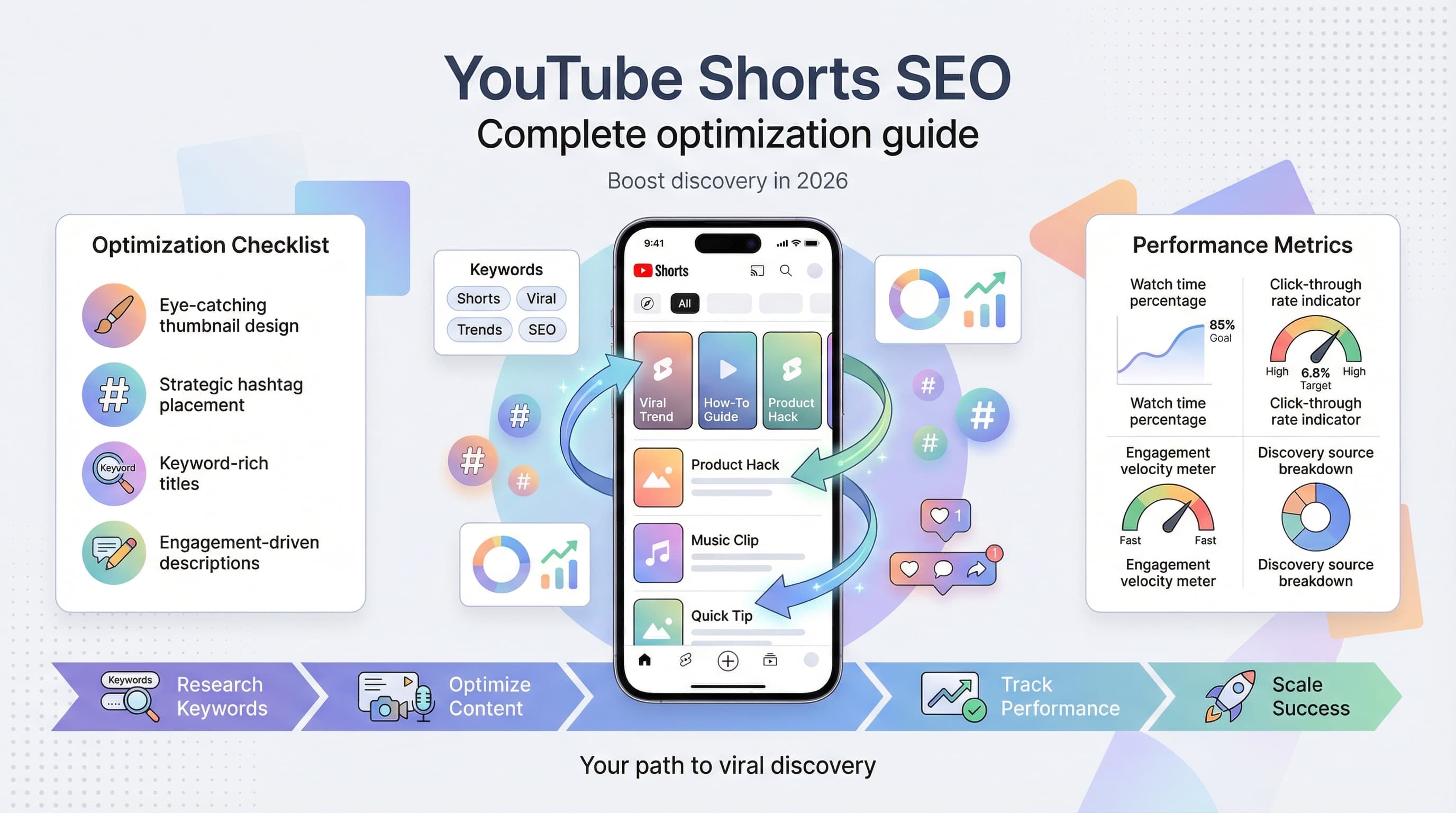
YouTube Shorts Hashtags: The Complete Best Practices Guide for 2026
Master YouTube Shorts hashtags with this complete guide. Learn which tags drive views, how many to use, and mistakes killing your reach.

Quick answer
Use 3-5 relevant hashtags on YouTube Shorts including #Shorts plus niche-specific tags to boost discoverability in search and the Shorts feed.
- •#Shorts is no longer required but still helps with categorization
- •Use 3-5 targeted hashtags rather than stuffing 15+ irrelevant ones
- •Place hashtags in the title or description for search indexing
- •Research hashtags using YouTube search autocomplete and competitor analysis
Your YouTube Short got 47 views. The one you posted yesterday? 52. Meanwhile, some creator in your niche just hit 2 million views on what looks like the exact same content. See our YouTube scheduling guide.
The difference often comes down to hashtags. Not just any hashtags, but the right combination used the right way. See our youtube shorts ideas 100 guide.
I've spent months analyzing thousands of Shorts across dozens of niches, tracking which hashtag strategies actually move the needle versus which ones are just noise. What I found surprised me, and it'll probably surprise you too. See our how to repurpose content guide.
Try Schedulala for free
Schedule posts to Bluesky, Twitter, and 8 other platforms from one dashboard.
Get started for free→See It in Action
This is what scheduling YouTube Shorts looks like in Schedulala
How YouTube Shorts hashtags actually work
Before we get into strategy, let's clear up some confusion about what hashtags do on Shorts versus regular YouTube videos. Learn more about bluesky content ideas 50.
On traditional YouTube videos, hashtags appear above your title as clickable links. When someone clicks one, they see a feed of videos using that hashtag. Simple enough. See our best time to post on youtube guide.
Shorts work differently. Hashtags serve two primary functions: they help YouTube's algorithm categorize your content, and they create discoverable pathways when viewers tap them. But here's what most creators miss: the algorithm weighs hashtags as just one of many signals. Your hashtags won't save bad content, but the wrong ones can definitely tank good content. See our youtube character counter guide.
The algorithm's hashtag hierarchy
YouTube processes your hashtags in a specific order of importance. The first three hashtags carry the most weight because those are the ones that appear publicly above your title. Anything beyond the third gets indexed but remains hidden from viewers.
This means your first hashtag should be your most important categorization signal. If you're posting a cooking Short, #cooking or #recipe should come before #viral or #trending. The algorithm uses that first tag as a strong signal about where to initially test your content.
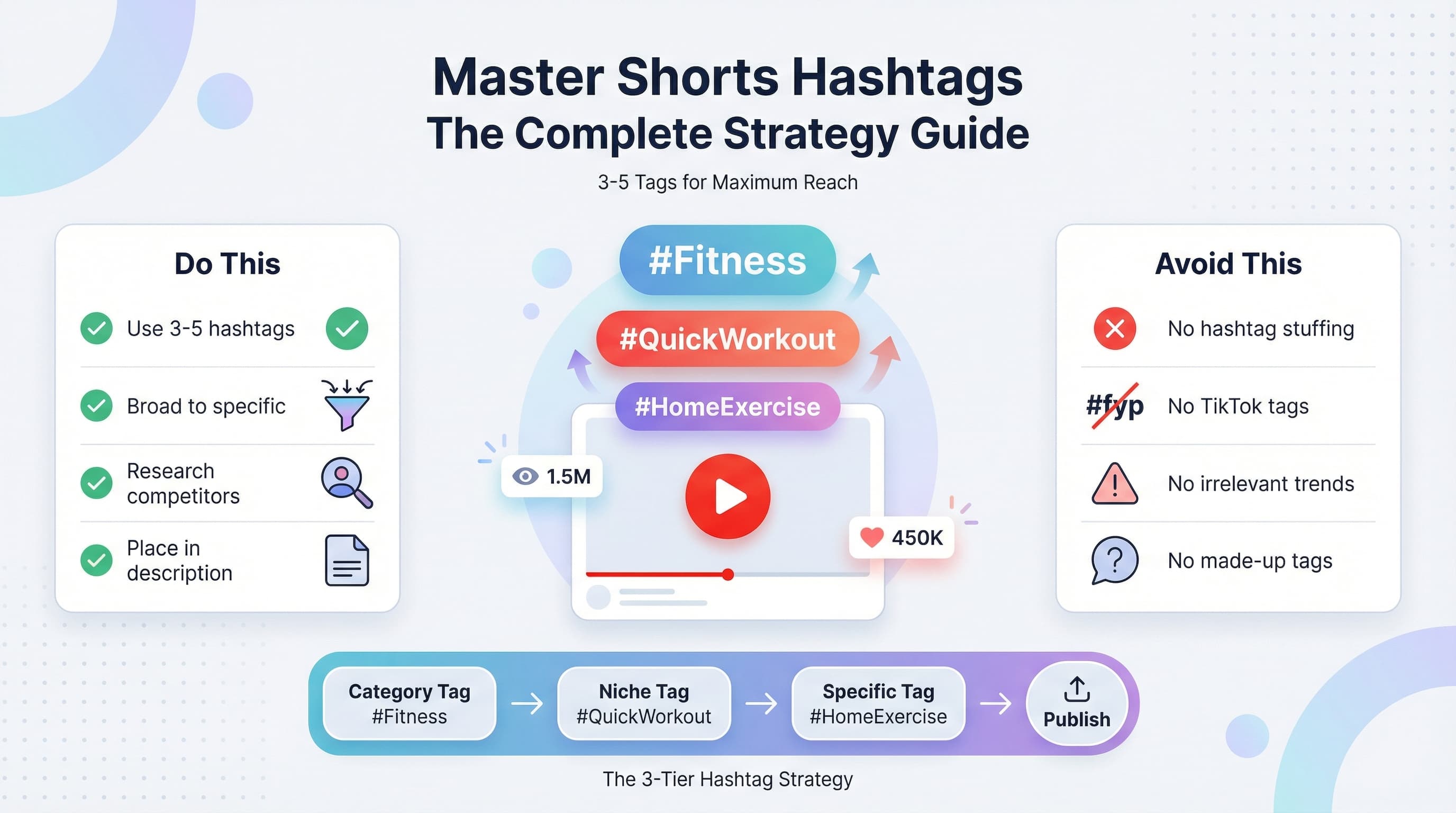
Your second and third hashtags should narrow the focus. Think of it like a funnel: broad category first, then niche, then specific topic. A cooking Short might use #cooking, #quickrecipes, #5minutemeals in that order.
How many hashtags should you use on YouTube Shorts?
This is the question I get asked most, and the answer has changed over the past year.
YouTube officially allows up to 60 hashtags per video. Using all 60 would be insane. The platform has confirmed that using more than 15 hashtags can actually trigger their spam filters, which tanks your reach instead of helping it.
But the real question isn't about maximum limits. It's about optimization.
The data on hashtag quantity
After analyzing high-performing Shorts across entertainment, education, fitness, and lifestyle niches, a pattern emerged. The sweet spot sits between 3 and 5 hashtags for most content types.
Shorts using exactly 3 hashtags showed the most consistent performance. They weren't always the top performers, but they rarely bombed. The three-hashtag approach gives YouTube clear categorization signals without muddying the waters.
Shorts using 4 to 5 hashtags performed slightly better on average, but with higher variance. When they hit, they hit bigger. When they missed, they missed harder. This suggests that adding those extra 1 to 2 hashtags introduces more variables the algorithm has to process.
Anything above 8 hashtags showed diminishing returns. And past 12, performance actually declined on average. The algorithm seems to interpret hashtag stuffing as a low-quality signal.
| Hashtag Count | Average Performance | Consistency | Recommendation |
|---|---|---|---|
| 1-2 | Below average | High variance | Too few signals |
| 3 | Good | Very consistent | Safe baseline |
| 4-5 | Best average | Moderate variance | Optimal range |
| 6-8 | Slightly below optimal | Moderate variance | Acceptable |
| 9-15 | Declining | High variance | Avoid |
| 15+ | Poor | Triggers spam filters | Never |
Choosing the right YouTube Shorts hashtags
Now for the part that actually matters: picking hashtags that work. Not hashtags that look good or feel right, but ones that measurably improve your reach.
The three-tier hashtag strategy
Every effective hashtag strategy uses a mix of broad, niche, and specific tags. Here's how to think about each tier.
Tier 1 (Broad): These are category-level hashtags with massive search volume. Think #fitness, #comedy, #cooking, #gaming. They face intense competition, but they signal to YouTube exactly what content bucket you belong in. Use one broad hashtag per Short.
Tier 2 (Niche): These narrow your content within the broad category. Instead of #fitness, you might use #homeworkouts or #strengthtraining. These hashtags have meaningful search volume but less competition than tier 1. Use one to two niche hashtags per Short.
Tier 3 (Specific): These are highly targeted tags for your exact content type. #30secondabworkout or #dumbbellshoulderpress are examples. Lower search volume, but the people searching for them are exactly who you want to reach. Use one to two specific hashtags per Short.
The magic happens when all three tiers work together. Your broad hashtag gets you into the right content pool. Your niche hashtags help YouTube understand which subset of that pool is most relevant. Your specific hashtags connect you with viewers actively searching for exactly what you made.
How to research hashtag performance
You can't just guess at which hashtags work. Here's a research process that takes about 15 minutes but saves you weeks of wasted reach.
Step one: Find 10 Shorts in your niche that performed well in the past 30 days. Look for creators at similar audience sizes to you, not the mega-accounts. Their hashtag strategies won't translate to smaller channels.
Step two: Document every hashtag they used. Create a spreadsheet if you're serious about this. Note which hashtags appear repeatedly across multiple successful Shorts.
Step three: Test the popular hashtags on YouTube search. Type each one into the search bar and see what comes up. You want hashtags where the results match your content type. If you're making fitness Shorts and a hashtag shows mostly memes, skip it.
Step four: Check hashtag pages directly. Tap any hashtag in the Shorts feed to see all videos using it. Look at posting frequency and average performance. A hashtag with new content every few minutes is competitive but active. One with content from weeks ago is dead.
Best hashtags for YouTube Shorts by niche
Rather than giving you a generic list of "top hashtags" that'll be outdated by next month, I want to show you how to think about hashtag selection for specific content categories. These examples are current as of early 2026, but the principles apply regardless of when you're reading this.
Entertainment and comedy
The entertainment space is brutally competitive on Shorts. Everyone's fighting for the same eyeballs, and generic hashtags like #funny get lost in the noise.
What works: #comedy paired with format-specific tags like #skit, #impression, or #storytime. The third hashtag should describe your specific angle: #darkhumor, #relatable, #workhumor, etc.
What doesn't work: #viral, #trending, #fyp, or #foryou. These hashtags are either ignored by YouTube's algorithm entirely or so competitive they provide zero signal value. TikTok habits die hard, but #fyp does nothing on YouTube.
Example combination: #comedy #skitcomedy #officehumor
Fitness and health
Fitness content performs well on Shorts because the format matches how people want to consume workout tips. Quick, visual, actionable.
What works: #fitness or #workout as your broad tag, then equipment or style-specific tags like #dumbbells, #bodyweight, #yoga, or #hiit. Finish with the specific body part or goal: #absworkout, #glutegains, #shoulderday.
What doesn't work: Overly long hashtags that describe your whole video. #30SecondFullBodyNoEquipmentHomeWorkoutForBeginners isn't a hashtag strategy, it's a desperate prayer.
Example combination: #fitness #homeworkout #quickabs
Food and cooking
Recipe Shorts have exploded in popularity, which means you need smart hashtag choices to stand out.
What works: #cooking or #recipe as your foundation, cuisine type or meal category second (#italianfood, #breakfast, #dessert), and specific dish third (#pastacarbonara, #pancakerecipe, #chocolatecake).
What doesn't work: #food alone is too broad and too competitive. Also avoid trendy food hashtags that don't match your content. Don't tag #healthyfood on a triple bacon cheeseburger video.
Example combination: #cooking #quickdinners #chickenstirfry
Gaming
Gaming hashtags need to be game-specific to work. The gaming community searches for content about particular titles, not gaming in general.
What works: #gaming as your broad tag (if you want it), game-specific hashtag second (#fortnite, #minecraft, #valorant, #eldenring), and content type third (#gaming tips, #gameplay, #gamingclips, #epicmoments).
What doesn't work: Using only #gaming without specifying the game. Also, hashtags for games you're not actually playing. The algorithm will notice when your content doesn't match your tags.
Example combination: #valorant #valorantclips #radiantranked
Education and tutorials
Educational Shorts have lower competition than entertainment but require precise hashtag targeting to reach learners.
What works: Subject-area hashtag first (#science, #history, #math, #language), topic-specific second (#physics, #worldwar2, #algebra, #spanish), and learning format third (#explained, #tutorial, #learnon youtube, #quicklesson).
What doesn't work: Hashtags that make your content sound boring. #EducationalContent reads like a textbook. #MindBlowingFacts reads like engagement bait but at least it's interesting.
Example combination: #science #spacefacts #astronomy
Where to place hashtags on YouTube Shorts
Placement matters more than most creators realize. You have two options for hashtag placement, and each has pros and cons.
Option 1: In the title/description field
The most common approach is adding hashtags at the end of your Short's description. When you do this, YouTube automatically pulls the first three hashtags and displays them above your title as clickable links.
Pros: Clean appearance, hashtags are clearly visible and tappable, standard practice that viewers expect.
Cons: Uses character space in your description, limits how much actual description you can write.
Best for: Most creators in most situations. This is the default recommendation.
Option 2: In a comment
Some creators put their hashtags in the first comment instead of the description. This keeps the description clean and focused on the content pitch.
Pros: More room for description text, cleaner visual appearance.
Cons: YouTube may not index comment hashtags as strongly as description hashtags. Limited testing suggests this reduces discoverability, though YouTube hasn't confirmed this officially.
Best for: Creators who prioritize aesthetics over optimization, or those with very long descriptions.
One formatting note: don't put hashtags in the middle of your description. It looks messy and breaks up your content pitch. Always add them at the end, separated from your main text by a line break if possible.
Common hashtag mistakes killing your Shorts reach
I've reviewed thousands of underperforming Shorts, and the same hashtag mistakes show up again and again. Here's what to avoid.
Mistake 1: Using TikTok hashtags on YouTube
#fyp, #foryou, #foryoupage, and #xyzbca mean nothing on YouTube. These TikTok-specific hashtags don't help YouTube categorize your content because they're not part of YouTube's taxonomy. Worse, they signal to the algorithm that you might be cross-posting without optimizing for the platform.
The fix: Research hashtags specifically for YouTube. What works on TikTok rarely translates directly.
Mistake 2: Hashtag stuffing
Adding 15, 20, or 30 hashtags in hopes that something sticks actually hurts your performance. YouTube interprets hashtag stuffing as a spam signal. The algorithm can't figure out what your content is actually about when you're tagging everything.
The fix: Stick to 3 to 5 focused hashtags that accurately describe your content.
Mistake 3: Irrelevant trending hashtags
Jumping on trending hashtags that don't match your content is tempting. A trending topic gets searched more, so theoretically more people see your Short, right? Wrong. When viewers click a hashtag expecting one thing and get something completely different, they bounce immediately. High bounce rates tell YouTube your content doesn't satisfy search intent, which tanks your reach.
The fix: Only use trending hashtags when your content genuinely relates to the trend.
Mistake 4: Inconsistent hashtag strategy
Changing your hashtags completely for every video makes it harder for YouTube to understand your channel. If you post fitness content but use completely different hashtags each time, the algorithm struggles to build a profile of your typical viewer. This slows down how quickly YouTube learns to recommend your content.
The fix: Develop a core set of 5 to 10 hashtags that apply to most of your content. Use 2 to 3 from this core set on every Short, then add 1 to 2 video-specific hashtags.
Mistake 5: Ignoring capitalization
Hashtags aren't case-sensitive for search purposes (#Fitness and #fitness are identical to YouTube), but capitalization affects readability. #quickhomeworkoutforbeginners is harder to read than #QuickHomeWorkoutForBeginners. Viewers are less likely to tap hashtags they can't easily read.
The fix: Use camel case (capitalizing each word) for multi-word hashtags. It doesn't affect indexing but improves click-through rates.
Mistake 6: Creating fake or overly specific hashtags
Making up hashtags like #JohnDoeGaming or #MyAmazingRecipes does nothing for discoverability. Nobody is searching for your made-up tags. The only person using them is you, which means they provide zero discovery value.
The fix: Only use hashtags that other people actually search for. If you want to brand your content, do it through your channel name and video titles, not hashtags.
Advanced hashtag strategies for YouTube Shorts
Once you've mastered the basics, these advanced techniques can squeeze extra performance from your hashtag strategy.
Seasonal and event-based hashtags
Certain hashtags see massive search spikes during specific times of year. #Halloween, #Christmas, #NewYearsResolutions, #SuperBowl, and similar event tags can dramatically increase reach when timed correctly.
The key is planning content around these events in advance. Create holiday-themed Shorts 2 to 3 weeks before the event, use the appropriate hashtags, and let the algorithm pick them up as search interest builds.
Don't force it though. A cooking channel can naturally use #ThanksgivingRecipes. A gaming channel probably can't use #Thanksgiving authentically unless they're doing something creative.
Series hashtags for content grouping
If you create content series (like "Kitchen Hacks Part 1, 2, 3..."), consider creating a semi-unique hashtag for that series. Something like #QuickKitchenHacks that you use consistently.
This won't help with discovery initially, but as your series grows and viewers recognize it, they'll start searching for that hashtag specifically. It becomes a content navigation tool for your existing audience.
The series hashtag should always be your third or fourth hashtag, never your first or second. Discovery hashtags still need priority.
Testing hashtag combinations systematically
Most creators guess at hashtags and never actually test whether their choices work. Here's a simple testing framework.
Create 10 Shorts with similar content quality and post them with identical hashtag combinations. Track their average performance. Then create another 10 Shorts with a different hashtag combination. Compare the averages.
You need a sample size of at least 10 to account for normal variance. One viral Short with certain hashtags doesn't prove those hashtags work. Ten consistently performing Shorts does.
Change only one variable at a time. If you're testing whether #homeworkouts outperforms #athomeworkouts, keep everything else identical. Otherwise you won't know what caused the difference.
Hashtags versus other Shorts optimization factors
Let's be honest about something: hashtags matter, but they're not the most important factor in Shorts performance. Not even close.
Here's a rough breakdown of what actually drives Shorts views, based on patterns across successful creators:
| Factor | Impact Level | Why It Matters |
|---|---|---|
| Hook (first 1-2 seconds) | Critical | Determines if viewers keep watching |
| Content quality/entertainment value | Critical | Drives watch time and engagement |
| Posting consistency | High | Algorithm favors reliable creators |
| Trending audio/topics | High | Riding trends multiplies reach |
| Thumbnail (for browse/search) | Medium-High | Affects click-through from non-feed surfaces |
| Title/description | Medium | Helps categorization and search |
| Hashtags | Medium | Improves categorization and discovery |
| Posting time | Low-Medium | Some impact but overrated |
Hashtags sit solidly in the "medium" impact category. They won't make or break your Shorts, but optimizing them is low-hanging fruit that takes minimal effort. A 10% improvement from better hashtags is still a 10% improvement.
Don't obsess over hashtags while ignoring your hook. A perfect hashtag strategy with a boring first second will still fail. A mediocre hashtag strategy with a killer hook will still succeed.
Your YouTube Shorts hashtag checklist
Before you hit publish on your next Short, run through this quick checklist:
Pre-publish hashtag checklist
- Are you using 3 to 5 hashtags (not more)?
- Is your first hashtag a broad category tag?
- Do your hashtags accurately describe your content?
- Have you avoided TikTok-specific tags like #fyp?
- Are multi-word hashtags capitalized for readability?
- Are your hashtags placed at the end of the description?
- Have you researched whether these hashtags show relevant content when searched?
- Are you including at least one hashtag from your consistent core set?
- Is there a video-specific hashtag for this particular content?
- Have you avoided making up fake hashtags nobody will search?
Run through this list for your next 20 Shorts until it becomes automatic. After that, you'll naturally think through these points without needing the checklist.
Putting it all together
Hashtags on YouTube Shorts aren't complicated once you understand the logic. Use 3 to 5 hashtags. Structure them from broad to specific. Research what works in your niche. Avoid common mistakes. Track your results.
That's genuinely all there is to it. The creators who overthink hashtags usually underperform because they're spending mental energy on medium-impact optimizations instead of making better content.
The creators who ignore hashtags entirely also underperform because they're leaving easy discoverability gains on the table.
The sweet spot is treating hashtags like any other optimization: important enough to do well, not important enough to obsess over.
Your hashtag strategy should take about 30 seconds per video once you have your core tags established. If it's taking longer than that, you're overcomplicating it.
Now go apply this to your next Short. Then your next 10. Then your next 50. The data you collect from consistent posting will teach you more about hashtags than any guide ever could, including this one.
Try Schedulala for free
Schedule posts to Bluesky, Twitter, and 8 other platforms from one dashboard.
Get started for free→
![YouTube Shorts Script Templates [Free Download] - 15 Proven Templates That Drive Views](/_next/image?url=%2Fblog%2Fyoutube-shorts-script-templates%2Fheader.jpeg&w=3840&q=75&dpl=dpl_6RiKV7dz1EjMEbYgqheh1pc2YPwv)