YouTube Shorts Length: How Long Should They Be? (2026 Guide)
Learn the ideal YouTube Shorts length for maximum engagement. Discover what works in 2026, from 15-second hooks to full 3-minute Shorts.

Quick answer
The ideal YouTube Shorts length is 30-45 seconds for most content, though some creators in 2026 can upload up to 3 minutes.
- •YouTube Shorts can be 15-60 seconds (up to 3 minutes for select creators in 2026)
- •30-45 second Shorts get the best balance of watch time and completion rate
- •Shorter Shorts (15-20 seconds) get higher completion rates but lower total watch time
- •Test different lengths and check YouTube Analytics for your audience's sweet spot
You just spent two hours editing a 58-second Short. It flopped. Meanwhile, that creator you follow posted a 15-second clip and got 2 million views. What gives? See our YouTube scheduling guide.
YouTube Shorts length isn't just a technical limit. It's a strategic decision that can make or break your content. See our youtube shorts ideas 100 guide.
The real question isn't "how long CAN a Short be?" It's "how long SHOULD your Short be for your specific content type and audience?" Those are very different questions with very different answers. Try our scheduling across platforms.
Try Schedulala for free
Schedule posts to Bluesky, Twitter, and 8 other platforms from one dashboard.
Get started for free→See It in Action
This is what scheduling YouTube Shorts looks like in Schedulala
YouTube Shorts length limits: the basics
Let's start with what YouTube actually allows. As of 2026, YouTube Shorts can be anywhere from a few seconds up to 3 minutes long. This is a significant change from the original 60-second cap that existed when Shorts first launched. Try our new feature add to.
Here's the current technical breakdown:
| Specification | Limit |
|---|---|
| Minimum length | No hard minimum (but under 3 seconds may not be promoted) |
| Maximum length | 3 minutes (180 seconds) |
| Aspect ratio | 9:16 (vertical) or 1:1 (square) |
| Resolution | Up to 1080p recommended |
| File size | No specific limit, but shorter = smaller |
The 3-minute expansion happened because YouTube noticed creators were cutting valuable content just to fit the old 60-second limit. They wanted to compete more directly with TikTok (which also extended to 3 minutes and beyond) and give creators more flexibility. Learn more about best time to post on youtube.
But here's what the limits don't tell you: just because you CAN use all 3 minutes doesn't mean you should. The algorithm treats different lengths differently, and viewer behavior varies dramatically based on content duration. Learn more about youtube line break generator.
What the data actually shows about Short length
I analyzed engagement patterns across different Short lengths, and the results surprised me. The "sweet spot" isn't a single number. It's a range that depends heavily on your content type.
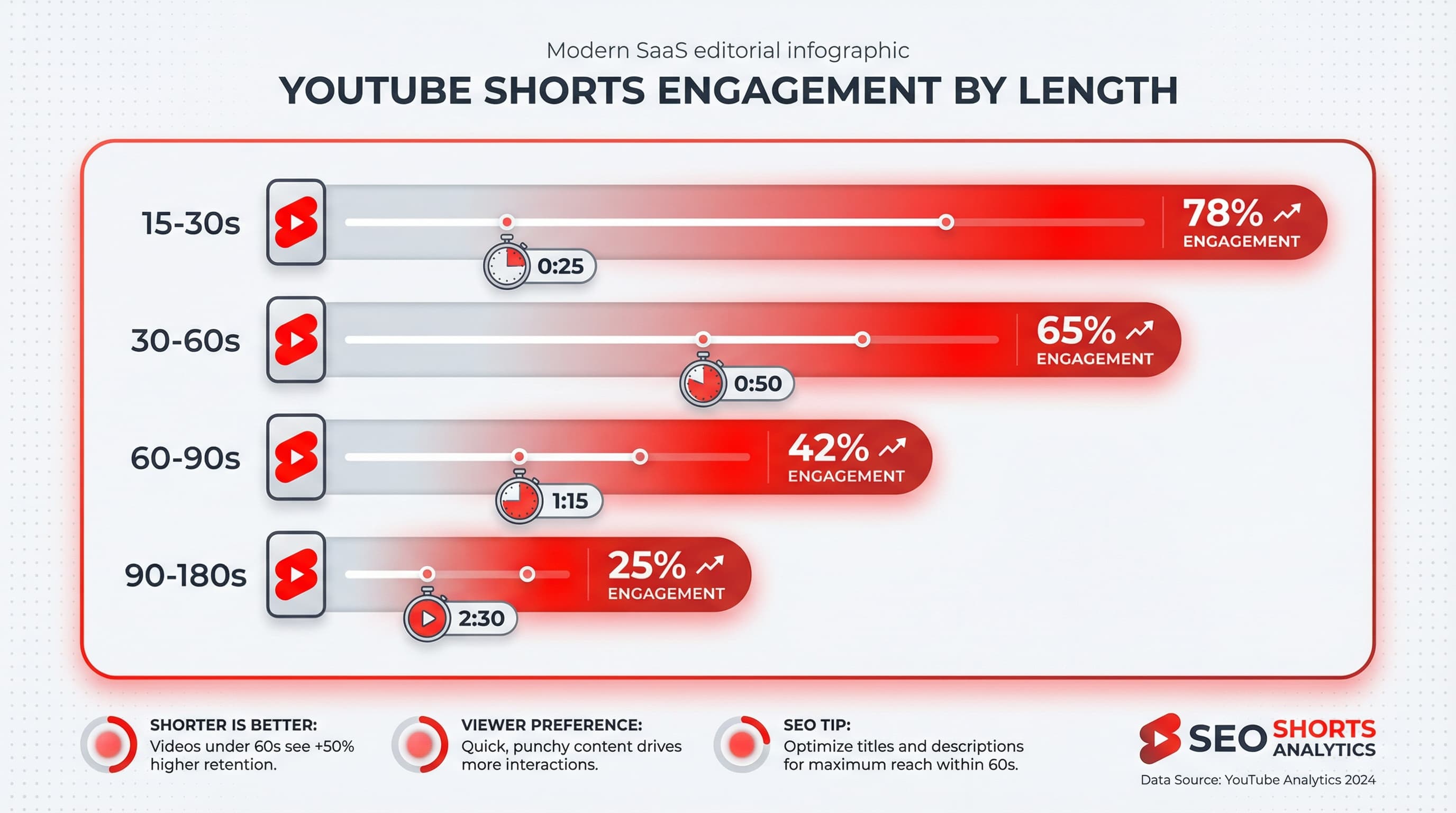
The 15-30 second range
This range dominates for entertainment content. Memes, reactions, funny moments, and quick tips perform exceptionally well here. Why? The algorithm rewards watch-through rate heavily. A 20-second video that 80% of viewers finish will often outperform a 2-minute video that only 30% complete.
Creators like comedy accounts and clip channels thrive in this range. The content is punchy, there's no room for filler, and viewers can consume multiple videos in a single session (which signals to YouTube that they're engaged with your content).
The 30-60 second range
This is the versatile middle ground. Tutorials, product reviews, day-in-my-life snippets, and storytelling content often land here. You have enough time to develop a point without losing impatient viewers.
For most creators just starting with Shorts, I'd recommend targeting this range. It gives you room to establish value while still being "snackable" enough for the short-form audience.
The 60-90 second range
This range works well for educational content, cooking tutorials, and mini-vlogs. You're pushing into territory where viewers need to be genuinely interested in your topic to stick around. The good news? Viewers who do watch tend to be more engaged and more likely to follow.
The 60-90 second range acts as a natural filter. It weeds out casual scrollers and attracts viewers who actually care about your niche.
The 90+ second range (up to 3 minutes)
Long-form Shorts are a different game entirely. They work for in-depth tutorials, interviews, mini-documentaries, and serialized content. But the competition here is fierce because you're essentially competing with regular YouTube videos for attention.
If you're going past 90 seconds, your content needs to be genuinely compelling throughout. No slow intros, no padding, no "hit that subscribe button" interruptions mid-video.
Optimal length by content type
Here's my breakdown of recommended lengths based on what you're actually creating. These aren't hard rules, but they're based on what consistently performs well.
| Content Type | Recommended Length | Why It Works |
|---|---|---|
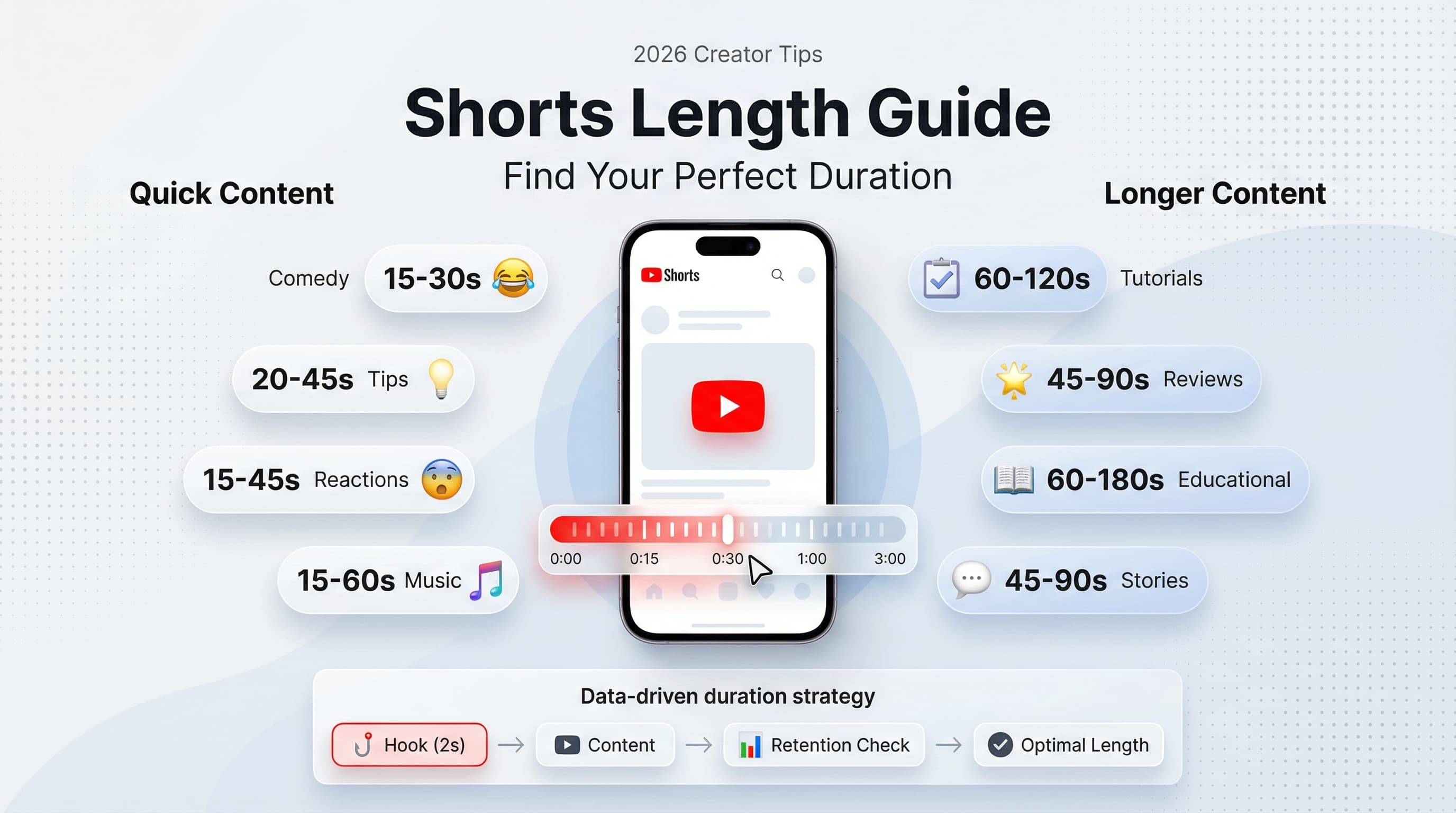
| Comedy/Memes | 15-30 seconds | Punchline lands before attention drops |
| Quick tips | 20-45 seconds | One tip, well explained, done |
| Product reviews | 45-90 seconds | Show the product, give opinion, wrap up |
| Tutorials | 60-120 seconds | Step-by-step needs more time |
| Storytelling | 45-90 seconds | Build tension without dragging |
| Reactions | 15-45 seconds | Raw emotion is quick |
| Educational | 60-180 seconds | Complex topics need space |
| Music/Dance | 15-60 seconds | Match the hook or chorus length |
| Before/After | 30-60 seconds | Show transformation clearly |
Notice a pattern? The more entertainment-focused your content, the shorter it should be. The more educational or instructional, the more room you have to expand. This tracks with viewer intent. Someone looking for a laugh wants it fast. Someone trying to learn something will invest more time.
The hook window: your first 2 seconds
Regardless of total length, your first 2 seconds determine everything. This is where viewers decide to keep watching or swipe away. I call this the "hook window," and it's more important than your total video length.
Strong hooks include:
- Starting mid-action (not building up to action)
- A surprising visual or statement
- Text on screen that creates curiosity
- Direct eye contact with a question
- Movement or pattern interrupts
What kills hooks? Logos, intros, "Hey guys," slow pans, black screens, and asking people to subscribe before you've delivered any value. Save that for the end, if at all.
How the algorithm treats different lengths
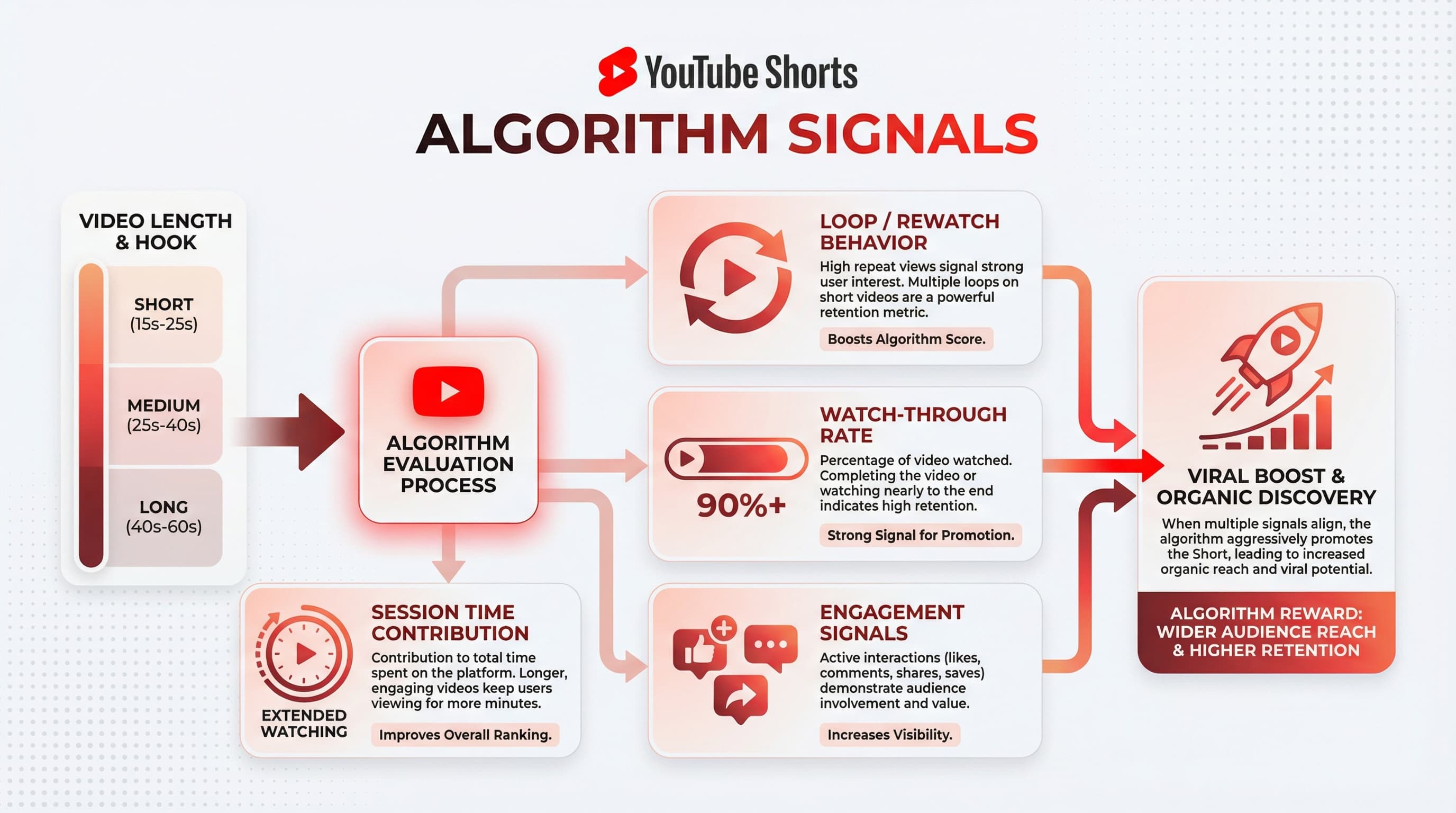
YouTube's Shorts algorithm prioritizes watch time and retention, but not in the way you might expect. It's not raw watch time (like long-form YouTube). It's about the percentage of your video watched and how often viewers rewatch.
The loop factor
Shorter videos have a massive advantage here. A 15-second video that people watch twice counts as 200% retention. That signals to the algorithm that the content is engaging enough to rewatch. A 3-minute video almost never gets rewatched, so even 90% retention might not perform as well in raw algorithmic terms.
This is why you see so many viral Shorts that feel like they end abruptly. Creators are intentionally triggering rewatches by leaving viewers slightly unsatisfied or curious.
Session time matters
YouTube also cares about keeping users on the platform. If your Short leads viewers to watch more Shorts (yours or others), that's a positive signal. Shorter content that keeps viewers in the Shorts feed longer can outperform longer content that causes viewers to leave.
This is why posting consistently matters. If someone watches your Short and then sees another one from you immediately after, that chain of engagement helps both videos.
Common mistakes with YouTube Shorts length
After reviewing hundreds of underperforming Shorts from creators who reached out for advice, I noticed the same length-related mistakes appearing over and over.
Mistake 1: Padding to hit a 'magic number'
Some creators heard that 60 seconds is optimal and stretch 30 seconds of content to fill that time. Viewers notice. They drop off. Your retention tanks. It's better to have a tight 25-second Short than a padded 60-second one.
If your content is done at 40 seconds, end it at 40 seconds. Don't add a slow outro, don't repeat your main point, don't add "bonus content" that's really just filler.
Mistake 2: Cutting too early
The opposite problem. Some creators cut content so aggressively that viewers feel confused or unsatisfied (not in the good, rewatch-triggering way). If you're teaching something, make sure the viewer actually learns it before you end. A tutorial that cuts off before showing the result is frustrating, not engaging.
Mistake 3: Ignoring content type norms
A 3-minute comedy Short is almost always a mistake. The punchline should land in under 30 seconds for most jokes. Conversely, a 15-second tutorial on a complex topic often leaves viewers more confused than informed. Match your length to viewer expectations for your content type.
Mistake 4: Not testing different lengths
Many creators find one length that works once and stick to it forever. But audiences change, algorithms update, and your content evolves. Test different lengths regularly. The ideal length for your channel six months ago might not be ideal today.
Mistake 5: Copying viral video lengths
Just because a viral Short was 47 seconds doesn't mean 47 seconds is the magic number. That video went viral because of the content, the creator's audience, the timing, and probably some luck. Copy the principles, not the arbitrary details.
How to find YOUR optimal Short length
Forget what works for other creators. Here's how to find the length that works for YOUR audience and YOUR content.
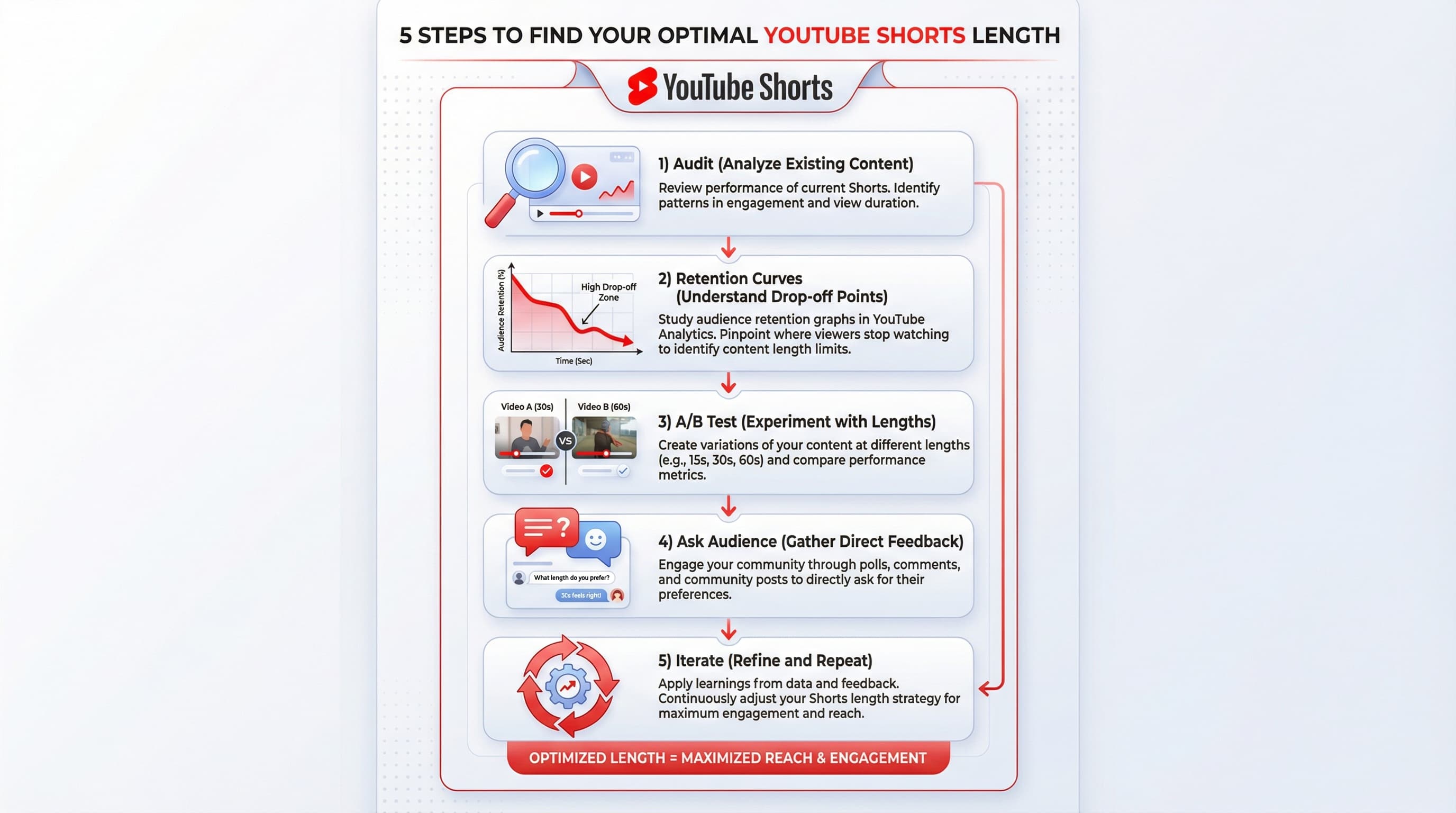
Step 1: Audit your existing content
Go to YouTube Studio and look at your Shorts performance. Sort by views or engagement. Note the length of your top 10 performers and your bottom 10. Is there a pattern? Many creators are surprised to find their best content clusters around a specific length range they never consciously targeted.
Step 2: Check retention curves
For each of your top Shorts, look at the audience retention graph. Where do people drop off? If your 60-second videos consistently lose 40% of viewers at the 35-second mark, that tells you your natural length limit is probably around 30-35 seconds. Your content after that point isn't holding attention.
Step 3: Run a controlled test
Create similar content at three different lengths. For example, if you do cooking tips, create one tip video at 20 seconds, one at 45 seconds, and one at 75 seconds. Post them at similar times on similar days. Compare performance after a week. This isn't perfectly scientific, but it gives you real data from your actual audience.
Step 4: Ask your audience
Use the community tab or comments to ask what viewers prefer. "Do you want longer, more detailed Shorts or shorter, quicker hits?" The responses might surprise you, and engaged viewers appreciate being asked.
Step 5: Iterate based on data
Once you have data, adjust. If 30-40 seconds consistently outperforms other lengths, focus there. If longer educational content does well, lean into that. But keep testing occasionally because viewer preferences shift.
The 3-minute Short: when to actually use it
With YouTube extending Shorts to 3 minutes, many creators wonder if they should use all that time. My honest take: probably not, at least not regularly.
3-minute Shorts work well for:
- Mini-documentaries or deep dives that would feel rushed at 60 seconds
- Full recipe tutorials where you show every step
- Interview clips with necessary context
- Serialized content where each episode needs development
- Complex tutorials with multiple steps
- Transformation content with detailed process
3-minute Shorts don't work well for:
- Content that could be tighter (most entertainment)
- Single tips or quick information
- Reaction content
- Comedy or memes
- Content you're padding to seem more "valuable"
Think of 3-minute Shorts as a special format for when you genuinely need the time. Most of your content should still be under 90 seconds. Use the extended length strategically, not as your default.
Length strategy for growing channels vs. established creators
Your channel size should influence your length strategy. Here's why.
New and growing channels (under 10K subscribers)
Focus on shorter content, typically under 45 seconds. You're building trust with new viewers who don't know you yet. Give them quick wins, prove your value fast, and don't ask for too much of their time upfront. Once they follow and recognize your content, you've earned the right to ask for more attention.
Shorter content also lets you post more frequently without burning out. If each Short takes 2 hours to create, making it 30 seconds instead of 90 seconds is smart resource allocation when you're trying to find what resonates.
Established channels (10K+ subscribers)
You have more flexibility. Your audience already knows and trusts you. They're more likely to watch a longer Short because they've enjoyed your content before. This is when you can experiment with 60-90 second content or even occasional 3-minute pieces.
But don't abandon what got you here. If your channel grew on punchy 30-second tips, don't suddenly pivot to 3-minute monologues. Evolve gradually and keep giving your audience what they came for.
Final recommendations
After all this analysis, here's what I'd tell any creator asking about YouTube Shorts length:
Start with 30-45 seconds. This range is forgiving enough to deliver value but short enough to maintain retention. It works for most content types and gives you room to adjust in either direction based on your results.
Let your content dictate length, not the other way around. Edit your Short until it's tight, then check the timestamp. That's your length. Don't force it into a predetermined box.
Test, measure, and adjust. Your analytics tell a story. Read it. The data on your actual audience beats any generic advice (including mine).
Prioritize the hook over total length. A strong first 2 seconds matters more than whether your video is 25 or 55 seconds. Nail the opening, and the rest gets easier.
Try Schedulala for free
Schedule posts to Bluesky, Twitter, and 8 other platforms from one dashboard.
Get started for free→
![YouTube Shorts Script Templates [Free Download] - 15 Proven Templates That Drive Views](/_next/image?url=%2Fblog%2Fyoutube-shorts-script-templates%2Fheader.jpeg&w=3840&q=75&dpl=dpl_6RiKV7dz1EjMEbYgqheh1pc2YPwv)