Best Social Media Scheduler for Small Business: 12 Tools to Save Time & Boost Growth
Find the perfect social media scheduler for small business. Compare top tools that save time, reduce costs, and grow your audience automatically.

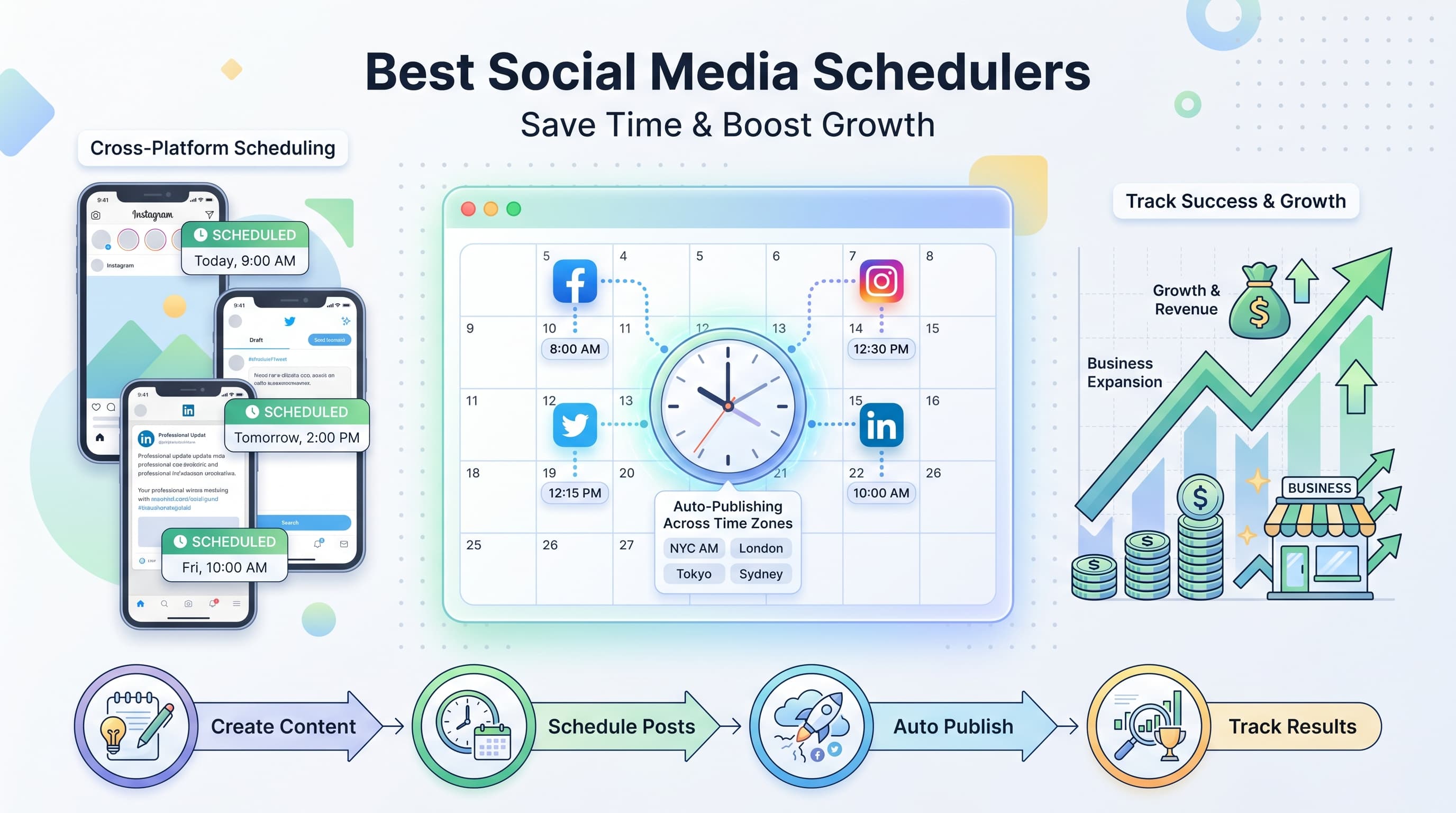
You're juggling a million things as a small business owner. The last thing you need is spending three hours every day crafting social media posts. Try our Instagram scheduling.
See It in Action
This is what scheduling an Instagram post looks like in Schedulala
Here's the reality: 73% of small businesses waste 6+ hours weekly on manual social media posting. That's time you could spend serving customers, developing products, or actually running your business. Learn more about cross-platform analytics track 9.
The solution? A solid social media scheduler designed specifically for small business needs. Not the enterprise-level monsters that cost $500/month, but practical tools that actually understand your budget and workflow constraints. Try our ai social media post.
Try Schedulala for free
Schedule posts to Bluesky, Twitter, and 8 other platforms from one dashboard.
Get started for free→What makes a social media scheduler perfect for small business
Before diving into the tools, let's get clear on what small businesses actually need. You're not Facebook with unlimited budgets and dedicated social media teams. Try our social media scheduling tools.
- Affordable pricing that won't break your monthly budget
- Simple interface you can master in 30 minutes, not 30 days
- Multi-platform support because your audience is everywhere
- Basic analytics to prove ROI without overwhelming data
- Team collaboration for when you hire your first marketing assistant
- Mobile apps because you're always on the go
Most scheduling tools are built for agencies or large corporations. The ones below understand that small businesses need maximum impact with minimal complexity. Learn more about best time to post on instagram.
Top 12 social media schedulers for small business
1. Schedulala
Starting at $9/month | All major platforms | Unlimited posts. Try our instagram engagement calculator.
Schedulala wins for small businesses because it removes every unnecessary complication. The interface feels like using a simple email composer, not learning rocket science. You can schedule a week's worth of content in under 20 minutes.
The standout feature is the AI content suggestions that actually understand small business pain points. Instead of generic corporate speak, it helps you write posts that sound like they came from a real human running a real business.
Best for: Solo entrepreneurs and teams up to 5 people who want powerful features without the learning curve. The analytics focus on metrics that matter to small businesses: engagement rates, best posting times, and follower growth patterns.
2. Buffer
Starting at $6/month | Instagram, Twitter, Facebook, LinkedIn | 10 scheduled posts
Buffer pioneered simple social media scheduling, and they still excel at it. The free plan gives you 3 social accounts and basic scheduling, perfect for testing the waters. The interface is clean and intuitive.
Where Buffer shines is reliability. Posts go out exactly when scheduled, every time. Their analytics are straightforward without overwhelming you with vanity metrics you don't need.
The downside? Limited posts per month on cheaper plans, and some newer platforms like TikTok require higher-tier subscriptions. But for Facebook, Instagram, and LinkedIn consistency, Buffer remains solid.
Best for: Small businesses just starting with social media scheduling who want a proven, reliable tool without bells and whistles.
3. Hootsuite
Starting at $49/month | All major platforms | Unlimited posts
Hootsuite is the Swiss Army knife of social media tools. It can do everything: scheduling, monitoring, analytics, team management, and social listening. For some small businesses, this comprehensive approach is exactly what they need.
The dashboard lets you manage multiple social accounts from one screen. You can respond to comments, track mentions, and schedule content without jumping between platforms. The team collaboration features are robust.
However, this power comes with complexity. New users often feel overwhelmed by the interface. The pricing has also crept up significantly, making it less attractive for budget-conscious small businesses.
Best for: Established small businesses with multiple team members who need comprehensive social media management beyond just scheduling.
4. Later
Starting at $18/month | Instagram, Pinterest, Twitter, Facebook | Visual content focus
Later built their reputation on Instagram scheduling, and it shows. The visual content calendar makes it easy to see how your Instagram feed will look before posts go live. You can drag and drop to rearrange posts for better visual flow.
The media library automatically saves your uploaded content, making it easy to repurpose images across different posts. The free plan includes 1 social set and 30 posts per month, perfect for testing their approach.
Later also includes basic link-in-bio functionality and user-generated content tools. The analytics focus on visual performance metrics, showing which image styles and colors get the best engagement.
Best for: Small businesses with strong visual brands, especially retail, food, travel, or lifestyle companies where Instagram and Pinterest drive sales.
5. Sprout Social
Starting at $249/month | All platforms | Enterprise features
Sprout Social delivers enterprise-level features with a cleaner interface than most competitors. The unified inbox combines messages from all platforms, making customer service management seamless.
Their analytics are comprehensive without being overwhelming. You get detailed reports on engagement, optimal posting times, and audience demographics. The content calendar shows team member assignments clearly.
The price point puts Sprout Social beyond most small business budgets, but for businesses ready to scale or those in service industries where social customer service is critical, the investment can pay off.
Best for: Small businesses transitioning to medium-sized companies who need professional-grade social media management and can justify the higher cost.
6. CoSchedule
Starting at $29/month | Content marketing focus | Calendar integration
CoSchedule approaches social media as part of your broader content marketing strategy. The calendar view shows blog posts, email campaigns, and social media posts together, helping you coordinate your entire marketing effort.
The tool excels at content repurposing. Write a blog post, and CoSchedule helps you create multiple social media posts promoting it across different platforms with platform-specific messaging.
Team features include task assignments, approval workflows, and project management capabilities. This makes CoSchedule valuable for small businesses with multiple content creators or those working with freelancers.
Best for: Content-focused small businesses like agencies, consultants, or SaaS companies where blog posts, social media, and email marketing work together.
7. SocialBee
Starting at $24/month | Content categorization | Recycling features
SocialBee's unique approach involves organizing content into categories like 'promotional,' 'educational,' or 'entertaining,' then automatically mixing these categories in your posting schedule. This ensures variety without manual planning.
The content recycling feature automatically reposts your best-performing content at optimal intervals. This is perfect for small businesses with limited content creation time who need to maximize what they produce.
SocialBee also includes basic social media growth tools like follower targeting and hashtag suggestions. The RSS feed integration automatically creates posts from your blog content.
Best for: Small businesses with limited content creation capacity who want to maximize their existing content through strategic recycling and categorization.
8. MeetEdgar
Starting at $29/month | Automatic recycling | Library-based system
MeetEdgar pioneered the content library approach where you create categories of content that automatically cycle through your posting schedule. Instead of scheduling individual posts, you fill content buckets that Edgar draws from.
This system works brilliantly for businesses with evergreen content. Tips, quotes, behind-the-scenes content, and product highlights can be recycled intelligently without feeling repetitive.
The platform includes basic analytics and supports major social networks. The learning curve is minimal once you understand the library concept, making it accessible for non-technical users.
Best for: Service-based businesses like coaches, consultants, or fitness trainers who create evergreen content that remains valuable over time.
9. Sendible
Starting at $29/month | White-label options | Client management
Sendible targets small agencies and consultants managing multiple client accounts. The white-label options let you brand the platform as your own, perfect for offering social media management as a service.
Client management features include separate dashboards, custom reporting, and approval workflows. You can give clients limited access to review and approve content without exposing your entire operation.
The content suggestion feature pulls ideas from RSS feeds and trending topics. Built-in image editing tools mean you don't need separate design software for basic graphics.
Best for: Small marketing agencies, freelance social media managers, or consultants who manage social media for multiple clients.
10. Agorapulse
Starting at $79/month | Social listening | Community management
Agorapulse combines scheduling with robust community management features. The unified inbox shows comments, messages, and mentions from all platforms, making it easy to stay on top of customer interactions.
Social listening tools help you monitor brand mentions and industry keywords. This competitive intelligence can inform your content strategy and help you join relevant conversations.
The analytics go deep into audience demographics and competitor analysis. Team collaboration features include internal notes, task assignments, and approval workflows.
Best for: Small businesses in competitive industries who need to monitor brand mentions and engage actively with their community beyond basic posting.
11. Crowdfire
Starting at $9.99/month | Content curation | Growth features
Crowdfire combines scheduling with content discovery and basic growth tools. The platform suggests relevant articles and images based on your industry and audience interests.
Growth features include follower analytics, hashtag recommendations, and competitor tracking. You can see who unfollowed you and identify inactive accounts to clean up your following list.
The content curation saves significant time for businesses struggling with content ideas. RSS integration automatically suggests articles from your favorite sources for social sharing.
Best for: Small businesses new to social media who need help with both content creation and audience growth strategies.
12. Zoho Social
Starting at $10/month | Zoho ecosystem | CRM integration
Zoho Social integrates seamlessly with the broader Zoho business suite, including CRM, email marketing, and analytics tools. If you already use Zoho products, this integration is powerful.
The platform includes standard scheduling features plus social listening and custom report building. Team collaboration tools allow multiple users with different permission levels.
Lead tracking connects social media interactions to your sales pipeline, showing how social media contributes to actual revenue. This ROI tracking is valuable for B2B small businesses.
Best for: Small businesses already using Zoho CRM or other Zoho products who want integrated social media management within their existing workflow.
Feature comparison: What matters most for small business
Not all features are created equal when you're running a small business. Here's what actually matters versus what sounds impressive in marketing copy.
| Tool | Price/Month | Platforms | Team Users | Best Feature |
|---|---|---|---|---|
| Schedulala | $9 | All major | 5 | AI content help |
| Buffer | $6 | 4 main | 1 | Reliable posting |
| Hootsuite | $49 | All | 1 | All-in-one |
| Later | $18 | 4 visual | 1 | Visual planning |
| Sprout Social | $249 | All | 1 | Enterprise features |
| CoSchedule | $29 | All | Unlimited | Content marketing |
| SocialBee | $24 | All | 1 | Content recycling |
| MeetEdgar | $29 | All | 1 | Auto recycling |
| Sendible | $29 | All | 1 | Client management |
| Agorapulse | $79 | All | 2 | Community mgmt |
| Crowdfire | $10 | All | 1 | Content discovery |
| Zoho Social | $10 | All | 1 | CRM integration |
Essential features every small business needs
Vendors love to overwhelm you with feature lists, but small businesses need to focus on capabilities that directly impact their bottom line.
Multi-platform posting
Your customers aren't all on the same platform. A 40-year-old contractor might check Facebook while a 25-year-old designer lives on Instagram and TikTok. Cross-platform posting ensures you reach everyone without quadrupling your workload.
Look for tools that adapt content for each platform automatically. The same message needs different formatting for LinkedIn's professional audience versus Twitter's casual conversation style.
Content calendar visualization
Seeing your content schedule visually prevents embarrassing mistakes like posting three promotional messages in a row or going silent for a week during a busy period.
The best calendars let you drag and drop to rearrange posts and show content variety at a glance. Color coding helps distinguish between promotional, educational, and entertaining content.
Basic analytics that matter
Vanity metrics like total followers matter less than engagement rates and website traffic from social media. Focus on tools that track post performance and identify your best posting times.
Small businesses need analytics that answer practical questions: Which posts drive website visits? When is your audience most active? What content types get shared most often?
Team collaboration
Even solo entrepreneurs eventually need help. Whether it's a part-time assistant, a freelance graphic designer, or a family member helping out, team features become essential as you grow.
Look for approval workflows, comment assignments, and role-based permissions. You want to delegate without losing control over your brand voice.
Features you probably don't need (yet)
Marketing tools love to sell you on features that sound impressive but add complexity without value for most small businesses.
Advanced social listening
Monitoring every mention of your brand across the internet sounds important, but most small businesses get better results from responding to direct messages and comments consistently.
Save advanced social listening for when you have dedicated time to act on the insights. Basic mention tracking is usually sufficient.
Influencer management
Built-in influencer outreach tools target enterprise needs. Small businesses often succeed better with direct, personal outreach to local micro-influencers or industry peers.
Custom reporting dashboards
Unless you're reporting to investors or board members regularly, standard analytics reports provide enough insight to improve your strategy.
Spending hours customizing reports usually means less time creating content that actually drives business results.
How to choose the right tool for your business
The perfect social media scheduler depends on your specific situation, not just the feature checklist. Here's how to evaluate your actual needs.
Start with your current pain points
Are you spending too much time manually posting? Choose a basic scheduler like Buffer or Schedulala. Struggling with content ideas? Consider tools with content suggestion features like Crowdfire or SocialBee.
If team coordination is your biggest challenge, prioritize collaboration features over advanced analytics. If you're losing track of customer messages, focus on unified inbox capabilities.
Consider your growth trajectory
Solo entrepreneurs might start with simple tools but should consider upgrade paths. A tool that works for one person might break down when you hire your first employee.
Growing businesses benefit from platforms that scale pricing gradually rather than forcing expensive plan jumps.
Test the mobile experience
Small business owners live on mobile devices. The tool you choose needs a mobile app that actually works, not just a responsive website.
Test critical functions like scheduling posts, responding to comments, and checking basic analytics from your phone. If the mobile experience is clunky, find a different tool.
Calculate the real cost
Beyond monthly subscription fees, consider setup time, learning curve, and ongoing maintenance. A $10/month tool that takes 20 hours to master costs more than a $30/month tool you can use effectively in 2 hours.
Factor in any additional costs for extra users, premium analytics, or add-on features you might need later.
Implementation tips for maximum ROI
Having the right tool is only half the battle. These strategies help small businesses get maximum value from their social media scheduler.
Batch content creation
Set aside 2-3 hours weekly to create all your social content at once. This focused time produces better results than scattered 10-minute sessions throughout the week.
Prepare content templates for different post types: product announcements, behind-the-scenes content, customer spotlights, and educational tips. Templates maintain consistency while speeding up creation.
Focus on 2-3 platforms maximum
Spreading yourself across every social platform dilutes your impact. Choose platforms where your customers actually spend time and do them well.
Most small businesses succeed with Facebook for local community building, Instagram for visual storytelling, and LinkedIn for B2B networking. Add other platforms only after mastering these basics.
Automate posting, not engagement
Schedule your content, but respond to comments and messages personally and promptly. Automated responses to customer questions feel impersonal and damage relationships.
Set phone notifications for mentions and comments so you can respond quickly even when busy with other business tasks.
Track metrics that matter
Engagement rates matter more than total followers for small businesses. A smaller, engaged audience that visits your website and makes purchases beats thousands of passive followers.
Track website traffic from social media using Google Analytics UTM codes. This connects social media activity to actual business results.
Common mistakes small businesses make
Learning from others' mistakes saves time and money. These are the most frequent errors small businesses make when implementing social media scheduling.
Over-automating everything
Social media is called 'social' for a reason. Businesses that automate every interaction lose the personal connection that gives small businesses an advantage over larger competitors.
Schedule content posts but handle customer service, questions, and conversations manually. Your personality and responsiveness differentiate you from corporate competitors.
Ignoring platform differences
Posting identical content across all platforms wastes each platform's unique strengths. LinkedIn audiences want professional insights while Instagram followers prefer behind-the-scenes visuals.
Adapt your core message for each platform's culture and format requirements. The same promotion can become a professional case study for LinkedIn and a fun behind-the-scenes story for Instagram.
Focusing on vanity metrics
Follower counts and likes feel good but don't pay the bills. Small businesses need to focus on metrics that correlate with business growth: website visits, email signups, and sales inquiries.
A post that generates 50 likes but no website visits is less valuable than a post with 10 likes that brings 5 qualified leads to your business.
Inconsistent posting
Social media algorithms favor consistent activity. Posting 10 times one week and then disappearing for two weeks hurts your reach more than posting 3 times weekly consistently.
Use your scheduler to maintain regular posting even during busy periods. Consistency builds audience expectations and improves platform algorithm performance.
Try Schedulala for free
Schedule posts to Bluesky, Twitter, and 8 other platforms from one dashboard.
Get started for free→Budget considerations and ROI calculation
Social media scheduling tools need to pay for themselves through time savings or increased revenue. Here's how to evaluate the financial impact.
Time savings calculation
Manual posting typically takes 30-45 minutes daily when done properly. This includes creating content, posting to multiple platforms, and basic engagement monitoring.
A good scheduler reduces this to 10-15 minutes daily, saving 20-30 minutes per day or 2.5-3.5 hours weekly. At a $50/hour value rate for your time, this saves $125-175 weekly.
Even expensive tools at $100/month pay for themselves if they save 2+ hours weekly of your time.
Revenue impact tracking
Track social media leads using UTM codes and dedicated landing pages. If consistent social posting generates even one additional customer monthly, most scheduling tools pay for themselves.
Small improvements in posting consistency and timing can increase social media traffic by 25-40%. For businesses already getting customers through social media, this multiplier effect justifies significant tool investments.
Hidden costs to consider
Factor in setup time, learning curve, and any required integrations. Some tools require additional subscriptions for image libraries or analytics platforms.
Team training time becomes significant if multiple people need to learn the system. Simple tools with shorter learning curves often provide better total ROI.
Platform-specific considerations
Each social media platform has unique requirements that affect your scheduler choice. Understanding these differences helps you pick the right tool.
Instagram scheduling complexities
Instagram limits third-party posting capabilities, requiring mobile notifications for many schedulers. Tools like Later and Schedulala offer true auto-posting through Instagram's business API.
Stories scheduling requires specific features not available in all tools. If Instagram Stories are important for your business, prioritize schedulers with robust Stories support.
LinkedIn B2B considerations
LinkedIn's professional audience responds better to educational content and industry insights. Tools with content suggestion features help maintain the appropriate tone.
LinkedIn posting times differ significantly from consumer platforms. B2B audiences are often active during business hours and Tuesday-Thursday, requiring flexible scheduling options.
TikTok and newer platforms
Newer platforms often have limited third-party integration. TikTok scheduling is still evolving, with many tools offering partial functionality or requiring manual posting.
Consider whether cutting-edge platform support is essential for your business or if focusing on established platforms provides better ROI.
Integration with other business tools
Social media doesn't exist in isolation. The best schedulers integrate with other tools you already use to run your business.
CRM integration
Connecting social media to your customer relationship management system helps track which social interactions lead to sales. This data proves social media ROI and guides strategy decisions.
Tools like Zoho Social excel at CRM integration, while others require third-party connectors like Zapier to bridge the gap.
Email marketing connections
Social media posts can drive email signups, while email content can be repurposed for social media. Look for schedulers that integrate with your email marketing platform.
Cross-channel content planning ensures consistent messaging across all marketing touchpoints.
Analytics and reporting
Social media data should feed into your overall marketing analytics. Google Analytics integration helps track social media's contribution to website goals.
Custom UTM codes and conversion tracking connect social activity to revenue, enabling data-driven optimization.
Getting started: Your first 30 days
A structured approach to implementing your chosen social media scheduler ensures maximum value from day one.
Week 1: Setup and basic content
Connect your social accounts and explore the interface without pressure. Create your first week's content manually to understand the workflow.
Focus on basic functionality: scheduling posts, adjusting times, and viewing the content calendar. Don't overwhelm yourself with advanced features yet.
Week 2: Establish posting rhythm
Develop a consistent posting schedule based on your audience insights and capacity. Most small businesses succeed with 3-5 posts weekly per platform.
Experiment with posting times and track basic engagement metrics to identify patterns.
Week 3: Content variety and engagement
Diversify content types: promotional posts, behind-the-scenes content, customer spotlights, and educational tips. Aim for 80% value-added content and 20% promotional.
Start actively monitoring and responding to comments and messages. Engagement builds community and improves algorithm performance.
Week 4: Analysis and optimization
Review your first month's performance data. Identify top-performing content types, optimal posting times, and engagement patterns.
Adjust your strategy based on data, not assumptions. What works for other businesses might not work for your specific audience.
Try Schedulala for free
Schedule posts to Bluesky, Twitter, and 8 other platforms from one dashboard.
Get started for free→Final recommendations
After reviewing dozens of tools and working with hundreds of small businesses, clear patterns emerge in what actually works.
For most small businesses: Start with Schedulala or Buffer. Both offer excellent value, simple interfaces, and room to grow. Schedulala wins if you want AI assistance and unlimited posting. Buffer wins if you prefer proven simplicity and don't mind post limits.
For visual brands: Later provides the best Instagram planning experience. Retail, food, and lifestyle businesses benefit from the visual content calendar and feed preview features.
For growing agencies: Sendible or CoSchedule offer the client management and collaboration features you'll need as you scale.
For established businesses: Sprout Social or Agorapulse provide enterprise features when budget allows. The investment pays off through improved efficiency and deeper insights.
The best tool is the one you'll actually use consistently. Simple, reliable scheduling beats complex features you never touch. Start with basic functionality and upgrade only when you've mastered the fundamentals.
Social media success comes from consistent, valuable content and genuine engagement with your audience. The right scheduler simply makes this sustainable for busy small business owners.