Hashtag Research Template: A Free Spreadsheet to Find Hashtags That Actually Grow Your Account
Download a free hashtag research template to track reach, find winning tags, and stop guessing which hashtags grow your account.

You've got 47 browser tabs open, a notes app full of half-remembered hashtags, and still no real idea whether #smallbusiness is pulling its weight or just cluttering your caption. Sound familiar? Most people never actually track hashtag performance. They copy what a competitor used last week, guess at what sounds relevant, and move on to the next post. That's exactly why reach plateaus. Try our Instagram scheduling.
See It in Action
This is what scheduling an Instagram post looks like in Schedulala
A hashtag research template fixes that. It's not a $200 tool or a mysterious algorithm hack. It's a simple spreadsheet that turns hashtag selection into a repeatable process backed by real numbers: post volume, average engagement, and results over time. Below is a full breakdown of what belongs in your template, how to build one in under 30 minutes, and a ready-to-copy structure you can set up today. Our content calendar can help.
This guide is for solo creators tired of guessing, small teams juggling multiple client accounts, and social managers who need a system that doesn't fall apart the moment someone new joins the team. If you're posting across Instagram, TikTok, LinkedIn, Pinterest, or any combination of the 12 major platforms, the same core template works for all of them with small tweaks. Learn more about how to repurpose content.
Try Schedulala for free
Schedule posts to Bluesky, Twitter, and 8 other platforms from one dashboard.
Get started for free→Why most hashtag strategies fail without a template
Here's the problem with the way most people do hashtag research: it's reactive. You post, you check how it did a day later, you shrug, and you repeat the same five hashtags next time because they're easy to remember. There's no comparison, no record of what worked, and no way to tell if a tag drove actual reach or just happened to coincide with a good post. Try our social media bio templates.
A template changes that by forcing three things you'd otherwise skip: categorization (grouping tags by size and intent), measurement (tracking what each tag actually returned), and rotation (avoiding the shadowban risk that comes from spamming the exact same hashtag set on every single post). See our best time to post on instagram guide.
Think of it like SEO keyword research, because that's basically what it is. You wouldn't target only one keyword for your entire website. You'd build a mix of high-volume, medium-volume, and niche long-tail terms. Hashtags work the same way, and a spreadsheet is the only tool that lets you see the mix at a glance. See our instagram engagement calculator guide.
What your hashtag research template actually needs
1. Hashtag column
This sounds obvious, but write the hashtag exactly as you'll use it, including capitalization patterns like #SmallBizSaturday if that's how you plan to post it. Consistency matters when you're scanning rows later.
2. Post volume (size tier)
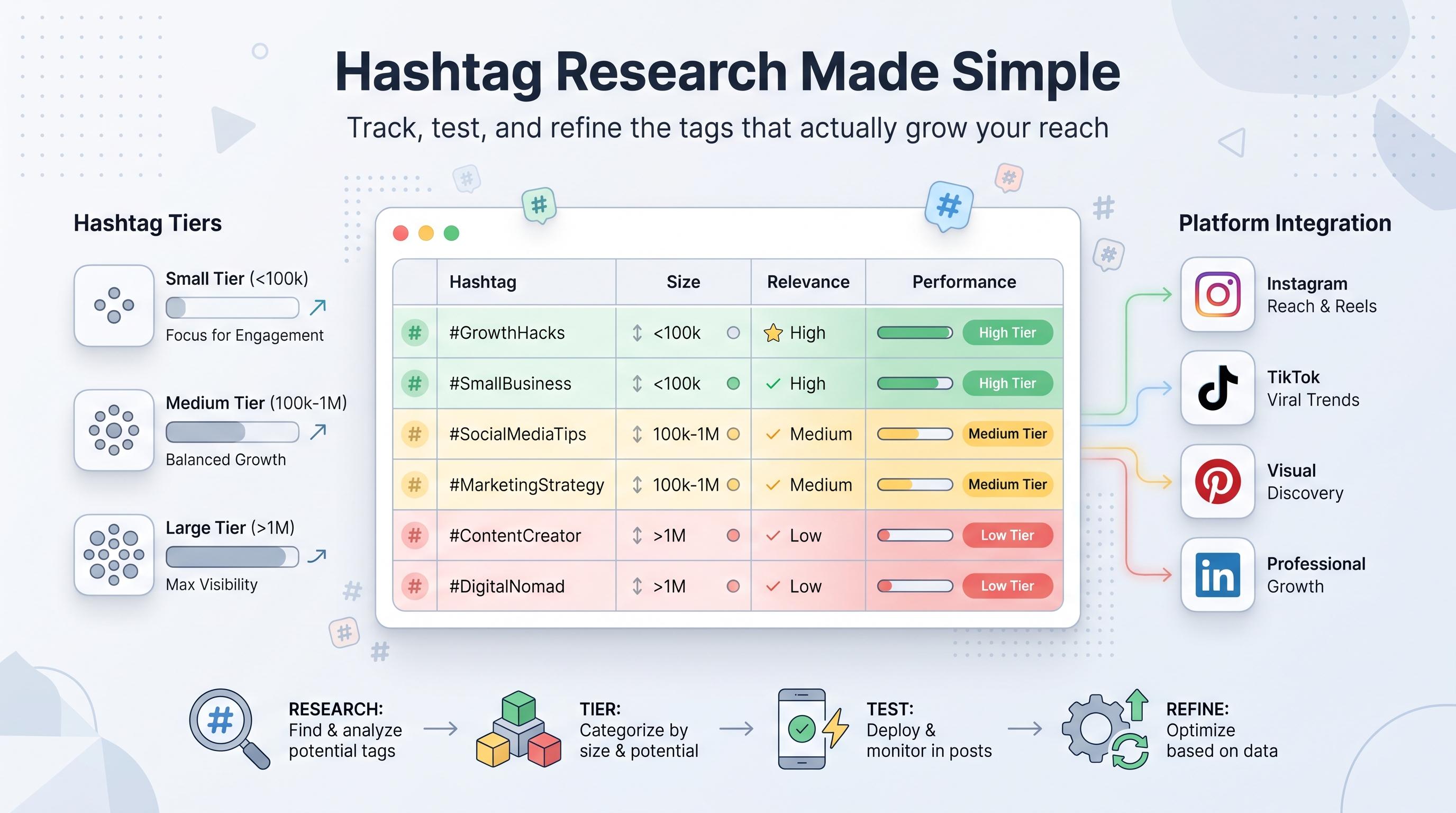
Record the total number of posts using that tag, then tag it as large (1M+), medium (100K to 1M), or small (under 100K). Large tags get you lost in a flood of content. Small tags have less competition but also less reach. The goal is a mix, not an all-large or all-small list.
3. Relevance score
A quick 1 to 5 rating of how directly the tag relates to your content. A fitness coach using #motivation (huge, vague) scores lower on relevance than #strengthcoachingtips (smaller, specific). Relevance keeps you from chasing volume for its own sake.
4. Competitor usage
Note which accounts similar to yours are using this tag and how their posts with it tend to perform. This isn't about copying; it's about validating that a tag has proven traction in your niche before you bother testing it yourself.
5. Your own performance data
This is the column everyone skips and the one that actually matters most. Every time you use a tag, log the post's reach, engagement rate, or follower growth within 48 hours. Over a month, patterns show up that you'd never spot from memory alone.
6. Platform tag
If you're running the same product or brand across Instagram, TikTok, and Pinterest, hashtags don't transfer cleanly between them. A column marking which platform each tag belongs to keeps your spreadsheet from turning into a mess of cross-platform noise.
7. Last used date
Rotating hashtags is good practice on most platforms, and some creators believe reusing the exact same block repeatedly can suppress reach over time. A last-used date column makes rotation automatic instead of something you have to remember.
Building your template step by step
1. Set up your tabs
Create three tabs: a Master List (every hashtag you've ever researched), Active Sets (the specific combinations you're currently rotating through for each content type), and a Performance Log (raw data from each post you track). Keeping these separate stops the spreadsheet from becoming unreadable after month two.
2. Build your master list first
Start with 40 to 60 hashtags relevant to your niche. Pull from competitor posts, platform search suggestions, and tags your audience already uses in their own captions and comments. Don't filter for quality yet, just get volume into the sheet.
3. Tier every hashtag by size
Search each one on the platform and record the post count. This step is tedious but it's the one that actually makes the template useful. Budget an hour for your first pass of 50 tags, and plan to refresh this data every three to six months since hashtag volume shifts over time.
4. Create active sets by content pillar
If you post about three different topics (say, recipes, behind-the-scenes, and product launches), build a separate active set for each. Each set should include a mix: two or three large tags, four or five medium tags, and two or three small, highly specific tags.
5. Log performance after every post
This is non-negotiable if you want the template to actually improve your results instead of just sitting there looking organized. Set a recurring reminder, even a dumb phone alarm, to go back 48 hours after posting and fill in reach and engagement numbers.
6. Review and prune monthly
Once a month, sort your Performance Log by engagement rate. Flag your top 10 performing tags and your bottom 10. Swap underperformers out of your active sets and test new candidates from your master list in their place. This is where the compounding value shows up: three months in, your active sets are made entirely of proven winners instead of guesses.
How hashtag strategy differs by platform
Not every platform treats hashtags the same way, and a template that doesn't account for that will give you misleading data. Here's a quick breakdown of what to adjust depending on where you're posting.
| Platform | Typical hashtag count | What matters most |
|---|---|---|
| 3 to 8 focused tags | Relevance over volume; large tags get buried fast | |
| TikTok | 3 to 5 tags | Trend relevance; small niche tags paired with one trending tag |
| 2 to 5 tags | Treated more like search keywords than social tags | |
| 3 to 5 tags | Industry-specific tags perform better than broad ones | |
| Twitter/X | 1 to 2 tags | Too many tags reads as spam and hurts reach |
| Threads | Minimal use | Hashtags carry little weight currently; focus on text |
If you manage accounts on several of these at once, your master list tab should include a platform filter so you're not accidentally dragging a Pinterest-style tag set onto a LinkedIn post. This is a common mistake for teams managing a brand's presence across all 12 major platforms (Instagram, TikTok, Twitter/X, LinkedIn, YouTube, Facebook, Threads, Bluesky, Pinterest, Telegram, Mastodon, and Google Business Profile) without separating strategy by channel.
Common hashtag research mistakes to avoid
- Using the same 10 hashtags on every post. Rotation matters both for reach and for avoiding accounts looking automated or spammy.
- Chasing only huge, high-volume tags. #love or #instagood have hundreds of millions of posts, which means your content disappears within seconds of posting.
- Ignoring your own data in favor of "best hashtags" blog posts. A generic list written for a general audience will never outperform tags validated against your specific audience.
- Never pruning the list. A template with 200 untested hashtags and no performance data isn't a strategy, it's clutter.
- Mixing platforms in one tag set. A hashtag that performs on Instagram rarely transfers meaning or reach to LinkedIn or Pinterest.
- Skipping relevance for the sake of trends. A trending tag that has nothing to do with your content will tank engagement rate even if it boosts initial reach.
Turning the template into a repeatable workflow
A spreadsheet only works if it fits into how you actually post. If filling it out feels like a second job, you'll abandon it within two weeks. The fix is building hashtag selection into whatever tool you already use to plan and schedule content, so pulling up your active set takes seconds, not a separate research session every time.
This is where a scheduling tool like Schedulala earns its keep. Instead of hashtag research living in one spreadsheet and your posting calendar living somewhere else entirely, you can draft posts, drop in your tested hashtag set from the active sets tab, and schedule across all 12 supported platforms from one place. Every plan includes unlimited scheduled posts, so there's no reason to ration how often you test new hashtag combinations.
If you're managing multiple brands or client accounts, the account structure matters here too. Schedulala counts social accounts as a flat number you can spend however you want, whether that's ten Instagram accounts for ten different clients or a spread across several platforms for one brand. There's no sub-limit per platform and no bundling into rigid "channel sets," which matters a lot once you're running separate hashtag strategies for separate accounts.
Quick-start checklist
- Create three tabs: Master List, Active Sets, Performance Log.
- Add 40 to 60 hashtags to your Master List with size tier, relevance score, and platform columns.
- Build 3 to 5 Active Sets grouped by content pillar, mixing large, medium, and small tags.
- Log reach and engagement 48 hours after every post that uses a tracked set.
- Review the Performance Log monthly and swap out your lowest performers.
- Refresh size tier data every 3 to 6 months as hashtag volumes shift.
Try Schedulala for free
Schedule posts to Bluesky, Twitter, and 8 other platforms from one dashboard.
Get started for free→