Pinterest Boards Organization Strategy: How to Structure Your Boards for Growth in 2026
A practical Pinterest boards strategy for organizing content, boosting SEO, and growing your reach in 2026.

Most Pinterest accounts I look at have the same problem: a graveyard of boards. Some were made in 2019 and never touched again. Others have three pins and a name like 'Stuff I Like.' None of it is doing anything for reach, and the account owner has no idea why their pins stopped showing up in search. Our Pinterest scheduling can help.
Pinterest is a visual search engine first and a social network second. That means how you organize your boards actually affects whether Pinterest's algorithm understands what you do and shows your pins to the right people. A messy board structure isn't just an aesthetic problem. It's a discoverability problem. Learn more about scheduling across platforms.
This guide walks through a board organization strategy you can actually implement this week: auditing what you have, building a structure that supports search and browsing, naming and describing boards so Pinterest's algorithm can categorize them correctly, and keeping the whole thing consistent without it becoming a second job. Our bluesky content ideas 50 can help.
Why board organization actually matters
Pinterest treats boards as topic signals. When you save a pin to a board named 'easy weeknight dinners,' Pinterest reads that context and uses it to decide what searches your pin should show up in. When you save it to a board named 'yum' or 'favorites,' Pinterest has almost nothing to work with. Same pin, wildly different distribution. Try our pinterest content strategy what.
There's also a user experience angle that's easy to forget. People land on your profile from a single pin. If your boards are clearly labeled and logically grouped, they'll click into two or three more. If your profile looks like a junk drawer, they bounce. A clean board structure keeps people on your profile longer, and Pinterest rewards profiles that keep users engaged. Try our best time to post on pinterest.
I've seen accounts double their monthly viewers within 60 days just by reorganizing existing boards, without publishing a single new pin. That's the leverage here: this is one of the few Pinterest tactics that pays off immediately and doesn't require more content. Try our pinterest line break generator.
Try Schedulala for free
Schedule posts to Bluesky, Twitter, and 8 other platforms from one dashboard.
Get started for free→Step 1: Audit your existing boards before you touch anything
1. Pull a full list of every board on your profile
Open your profile in a desktop browser (it's easier to scan than mobile) and list every board, including secret ones. Note the pin count and the last time it was updated. You're looking for patterns: dead boards, duplicate topics, and boards with vague names.
2. Flag boards for one of four actions
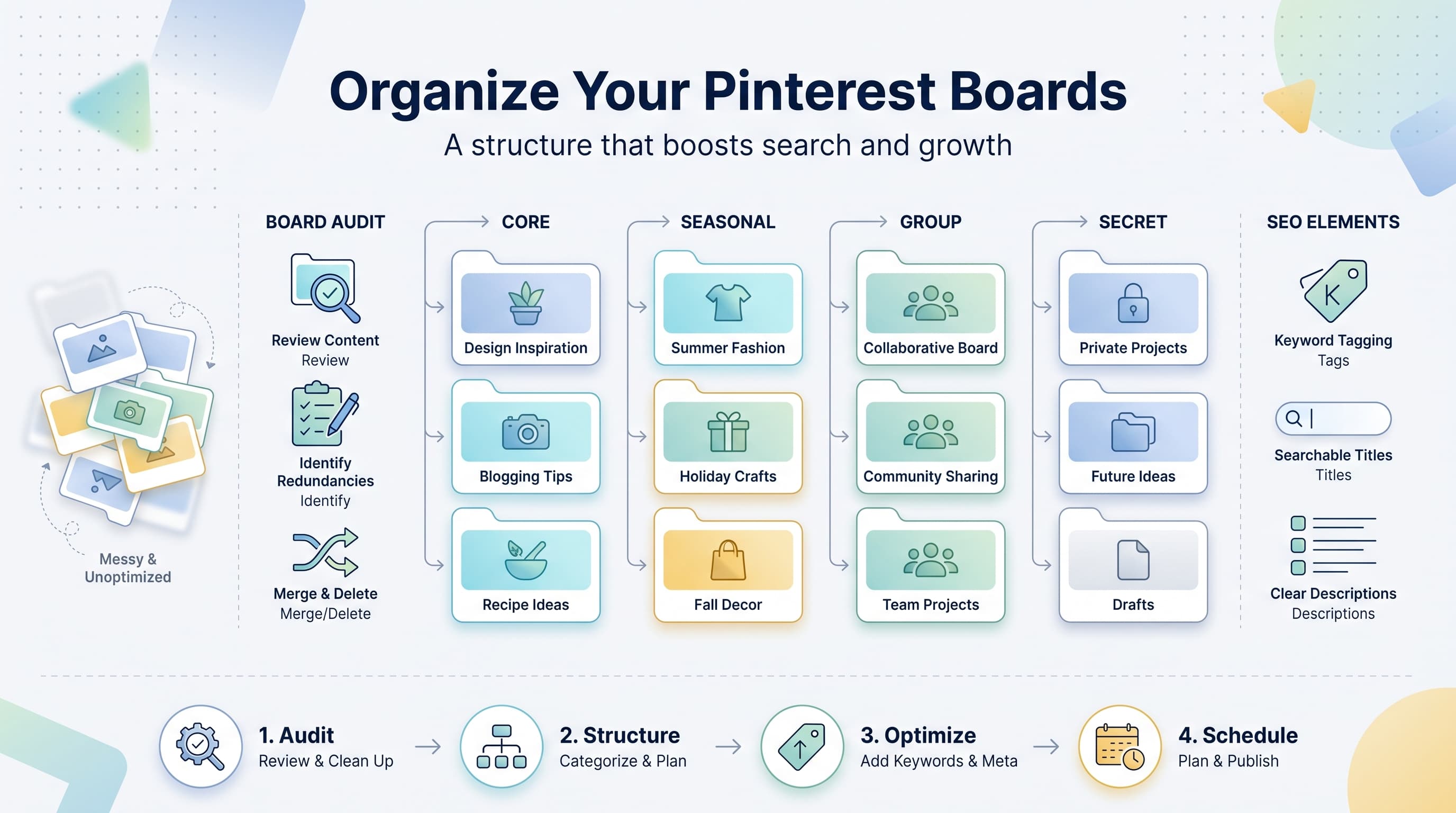
Keep, rename, merge, or delete. Boards with fewer than 10 pins and no clear topic almost always get merged into a bigger, better-named board. Boards that overlap heavily with another board (two boards about the same recipe niche, for example) should be combined into one strong board rather than split thin across two weak ones.
3. Check which boards are actually driving traffic
In Pinterest Analytics, look at impressions and outbound clicks by board. You'll usually find that 20% of your boards are doing 80% of the work. Those top boards should get priority: better cover images, tighter descriptions, and first pick of new pins. The underperformers either need a rebuild or a quiet burial.
Step 2: Build a board structure with three layers
The accounts that grow steadily on Pinterest almost always use some version of a three-layer board structure: core boards, seasonal boards, and group boards. Trying to run a profile with only one of these types is where most people get stuck.
Core boards: your bread and butter
These are the 8 to 15 boards that map directly to your main content categories. If you're a food blogger, this is 'slow cooker dinners,' 'sheet pan meals,' '30 minute lunches,' and similar. These boards should always be public, should get new pins first, and should have the strongest keyword-rich names and descriptions. This is where your best cover images live too.
Seasonal boards: short bursts of relevance
'Christmas cookie recipes' or 'back to school lunch ideas' are seasonal boards. They spike hard for six to ten weeks a year and go quiet the rest of the time. Keep them, but don't feel obligated to pin to them year-round. Pinterest's own search data shows people start searching holiday content 60 to 90 days ahead of the actual holiday, so plan seasonal board activity around that window, not the holiday date itself.
Group boards: borrowed reach, use sparingly
Group boards used to be a growth hack. In 2026 they're much less effective because Pinterest's algorithm weights individual pinner signals more heavily than board membership. Keep one or two high-quality group boards if they're active and relevant, but don't build a strategy around joining 40 of them. That was a 2018 tactic, not a current one.
| Board type | How many to have | Update frequency | Best for |
|---|---|---|---|
| Core boards | 8-15 | Weekly, ongoing | Main topic categories and search visibility |
| Seasonal boards | 4-8 | Bursts, 6-10 weeks/year | Holiday and seasonal search traffic |
| Group boards | 1-3 | As pins are relevant | Occasional extra reach, not primary strategy |
| Secret boards | Unlimited | Never (planning only) | Idea collection and content planning, not distribution |
Step 3: Name and describe every board like it's a search page
Every board name is a keyword opportunity. 'DIY' tells Pinterest nothing. 'DIY home organization ideas' tells Pinterest exactly what searches to associate with that board and everything pinned to it. Front-load the most searched term and keep the name under 20 characters where you can, since long names get cut off in the mobile UI.
The board description matters more than most people realize. Write two to three sentences that naturally include the terms your audience actually searches. Skip keyword stuffing (Pinterest's algorithm has gotten better at penalizing that) and instead write it the way you'd explain the board to a real person, while making sure the obvious terms show up once.
For example, instead of 'organization tips ideas home organizing tips organize,' write: 'Simple home organization ideas for small spaces, closets, and kitchens. Practical storage solutions that don't require a full renovation.' That reads naturally and still hits 'home organization,' 'small spaces,' 'closets,' and 'storage solutions.'
Step 4: Organize pins within each board using sections
A board with 400 pins in random order is hard to browse and harder to maintain. Pinterest's board sections feature (that folder-like grouping inside a board) solves this, and it's underused. If your 'healthy dinners' board has grown large, break it into sections like 'chicken,' 'vegetarian,' 'under 30 minutes,' and 'meal prep.' It makes the board easier for visitors to scan and gives you another layer of topical clarity for the algorithm.
Pin order also matters more than people assume. Pinterest still gives some weight to newer pins at the top of a board, but the pins that get repositioned or re-saved recently also get a small freshness signal. Periodically moving a few of your best older pins back toward the top (by unpinning and re-pinning, or using the 'move pin' feature) keeps a board from going stale in the algorithm's eyes.
Cover images deserve five minutes of your time per board. A board with a custom, on-brand cover image communicates professionalism and gets more profile clicks than one showing whatever pin happened to be added last. Keep cover image style consistent across boards (same font, same color treatment) so your profile reads as a cohesive brand rather than a scrapbook.
See It in Action
This is what scheduling a Pinterest post looks like in Schedulala
Step 5: Keep boards active without pinning manually every day
The hardest part of board strategy isn't the setup, it's the maintenance. Pinterest still rewards accounts that pin consistently, but 'consistently' doesn't mean hourly. Most creators do better pinning 3 to 5 fresh pins a day spread across their core boards than dumping 20 pins into one board and going silent for a week.
This is where scheduling tools earn their keep. Batching a week or two of pins at once, then spreading them across boards on a set cadence, keeps every board active without you logging in daily. With Schedulala, you can queue pins to specific boards ahead of time and set the posting cadence per board, so your seasonal board picks up steam in October without you manually remembering to switch focus from your evergreen boards.
Schedulala covers Pinterest alongside 11 other platforms (Instagram, TikTok, Twitter/X, LinkedIn, YouTube, Facebook, Threads, Bluesky, Telegram, Mastodon, and Google Business Profile), and every plan includes unlimited scheduled posts, so you're not rationing how many pins you can queue in a month. Accounts on any plan work as a flat count you can spend however you want. If you manage six Pinterest boards' worth of accounts and a few Instagram profiles, that's just part of your total account allowance, no separate 'Pinterest add-on' required.
Common board organization mistakes to avoid
- Vague board names. 'Favorites,' 'Inspo,' and 'Random' give Pinterest nothing to work with. Every board name should describe a specific, searchable topic.
- Too many boards spread too thin. A profile with 60 boards and 12 pins each performs worse than one with 15 boards and 100+ pins each. Concentration beats sprawl.
- Ignoring board descriptions entirely. An empty description field is a missed SEO opportunity on every single board.
- Ghost boards. Boards you haven't touched in over a year signal inactivity. Either revive them with a plan or set them to secret.
- Copy-pasting descriptions across boards. Pinterest can tell, and it dilutes the specific keyword signal each board should send.
- Ignoring board order on your profile. Pinterest lets you drag boards to reorder them on your profile. Put your strongest, most active core boards first.
A simple monthly checklist
Board strategy isn't a one-time project. It needs a light monthly touch to stay useful. Here's the minimum version worth doing:
- Check Pinterest Analytics for board-level impressions and clicks
- Rename or rewrite descriptions for any board that's underperforming its topic potential
- Add or update sections in any board over 150 pins
- Refresh cover images on your top 5 core boards if they look dated
- Set upcoming seasonal boards to active 60-90 days before the relevant holiday
- Schedule the coming month's pins across core boards in one batch session
The takeaway
Board organization is one of the highest-leverage things you can do on Pinterest because it's largely a one-time fix that keeps paying off. Get your core, seasonal, and group boards structured correctly, name and describe them like search pages instead of scrapbook labels, and use sections to keep large boards browsable. Then schedule consistently instead of pinning in unpredictable bursts.
Try Schedulala for free
Schedule posts to Bluesky, Twitter, and 8 other platforms from one dashboard.
Get started for free→