How to Repurpose TikToks to YouTube Shorts: The Complete Guide
Learn how to repurpose TikTok content to YouTube Shorts effectively. Step-by-step process, tools, and strategies to maximize your short-form video reach.

Quick answer
Repurpose TikTok videos to YouTube Shorts by downloading without the watermark, adjusting captions, and re-uploading in vertical format.
- •Remove the TikTok watermark before uploading to YouTube to avoid algorithmic penalties
- •Tools like SnapTik and SaveTT download TikTok videos without watermarks
- •Adjust captions and hashtags for YouTube's search-based discovery versus TikTok's feed
- •Schedule repurposed Shorts across YouTube, TikTok, and Instagram with Schedulala for $9/month
You spent three hours creating that TikTok. It performed well, got decent engagement, maybe even went semi-viral. Now it's sitting there, slowly dying in the algorithm while you stress about creating fresh content for YouTube Shorts. Our TikTok scheduling can help.
Here's the thing: that TikTok doesn't need to stay on TikTok. Our scheduling across platforms can help.
Repurposing your TikTok content for YouTube Shorts isn't just smart, it's basically required if you want to build a sustainable content strategy without burning out. The same 60-second video can reach entirely different audiences on each platform, and YouTube Shorts has over 2 billion logged-in monthly users waiting to discover your content. Our how to repurpose content can help.
But there's a catch. You can't just download your TikTok and upload it directly to YouTube. The TikTok watermark, different audience expectations, and platform-specific optimization all matter. Do it wrong, and you'll tank your reach on both platforms. See our batch content creation guide.
This guide walks you through everything: removing watermarks the right way, adapting your content for YouTube's algorithm, avoiding common mistakes, and building a workflow that actually scales. Try our best time to post on tiktok.
Try Schedulala for free
Schedule posts to Bluesky, Twitter, and 8 other platforms from one dashboard.
Get started for free→See It in Action
This is what scheduling YouTube Shorts looks like in Schedulala
Why repurposing TikToks to YouTube Shorts makes sense
Before we get into the how, let's talk about why this strategy works so well. Understanding the reasoning helps you make better decisions throughout the process. Learn more about tiktok engagement calculator.
You reach different audiences
TikTok and YouTube have significant user overlap, but they're not identical. TikTok skews younger (60% of users are Gen Z), while YouTube Shorts attracts a broader age range. Your content might resonate with people on YouTube who never would have seen it on TikTok.
I've seen creators get 50,000 views on a TikTok, repurpose it to Shorts, and get 200,000 views on YouTube. Different algorithm, different moment, different audience. Same content investment.
YouTube Shorts drives long-form subscriptions
Here's something TikTok can't do as effectively: YouTube Shorts feeds directly into your long-form channel. Viewers who discover you through Shorts often subscribe and start watching your regular videos. That's a pipeline TikTok simply doesn't offer.
If you're building a YouTube presence alongside TikTok, repurposing creates a funnel that benefits your entire content ecosystem.
You maximize your content ROI
Creating quality short-form video takes time. Scripting, filming, editing, adding captions, finding the right music. When you repurpose effectively, you're not doubling your workload, you're doubling your reach with maybe 15-20 minutes of additional effort.
Smart creators don't work twice as hard. They make their content work twice as hard for them.
The watermark problem (and how to solve it)
Let's address the elephant in the room: the TikTok watermark. YouTube has stated they deprioritize videos with watermarks from other platforms. Instagram Reels does the same thing. These platforms want original content, not obviously recycled posts.
Uploading a TikTok with the watermark visible is basically telling YouTube's algorithm "hey, treat this as second-class content." Your reach will suffer.
Option 1: Save before posting
The cleanest solution is saving your video before you ever upload it to TikTok. After you finish editing in TikTok's editor, tap the download button before hitting post. You'll get a clean version without any watermark.
The downside? You need to remember to do this every single time. If you forgot to save a video that performed well, you'll need another approach.
Option 2: Use a watermark remover
Several tools can remove TikTok watermarks from already-posted videos. SnapTik, SaveTT, and SSSTikTok are popular free options. You paste your TikTok URL, and they generate a clean download.
These work well, but quality can vary. Some tools compress your video more than others. Test a few and stick with whichever produces the clearest output.
Option 3: Edit from your original files
If you have the original footage on your phone or computer, you can re-edit for YouTube Shorts without dealing with watermarks at all. This takes more time but gives you the highest quality result and lets you make platform-specific tweaks.
Option 4: Crop out the watermark
If the watermark sits in an area with non-essential content, you can sometimes crop it out. This works best when your main subject is centered and there's dead space around the edges. Most editing apps let you adjust crop and zoom.
Be careful with this approach. Over-cropping can cut off important visuals or make your video feel claustrophobic. It's a backup option, not a primary strategy.
Step-by-step process to repurpose TikToks to YouTube Shorts
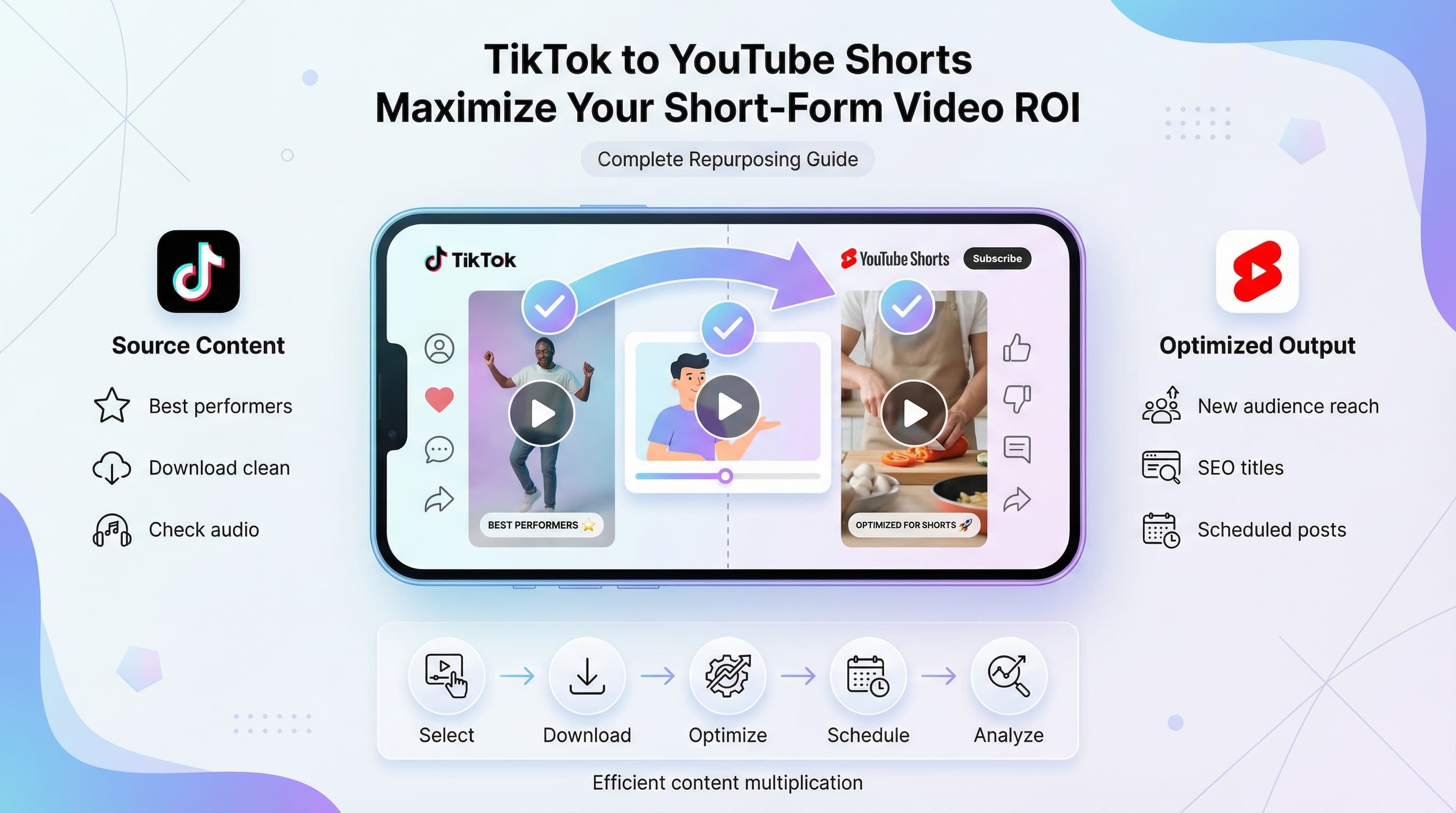
Now let's get practical. Here's the exact workflow I recommend for repurposing your TikTok content to YouTube Shorts efficiently.
Step 1: Identify your best performers
Don't repurpose everything. Start with TikToks that already proved they resonate with audiences. Look for videos with above-average view counts, strong completion rates, and good engagement (likes, comments, shares relative to views).
A video that flopped on TikTok might still work on YouTube since the audiences differ, but starting with proven content gives you better odds.
Check your TikTok analytics weekly and flag videos that hit certain thresholds. Maybe anything over 10,000 views gets added to your "repurpose" list. Find the threshold that works for your account size.
Step 2: Download or recreate without watermarks
Using one of the methods above, get a clean version of your video. If you're downloading from TikTok, check the quality. If it looks compressed or blurry, consider re-editing from your original files instead.
YouTube Shorts supports up to 4K resolution. If your original footage is higher quality than what TikTok exported, use the original.
Step 3: Adjust the caption and text overlays
TikTok-style captions work on YouTube Shorts, but you might want to tweak them. YouTube's audience skews slightly older and may prefer cleaner text treatments. Also, if your TikTok captions reference TikTok specifically ("POV: you see this on your FYP"), edit those out.
Check that all text is readable and doesn't get cut off by YouTube's interface elements. The title and description overlay at the bottom, so keep that area clear of important text.
Step 4: Replace TikTok sounds with YouTube-safe audio
This is where many creators mess up. TikTok has licensing agreements for its sound library that don't extend to YouTube. That trending audio you used? It might trigger a copyright claim on YouTube, demonetizing your Short or getting it taken down.
Your options: use royalty-free music, use sounds from YouTube's audio library, or use original audio (your voice, sounds you recorded). If the original TikTok sound was critical to the joke or message, you might need to find an equivalent on YouTube or rethink whether this video works for repurposing.
Step 5: Optimize your title and description
YouTube Shorts titles matter more than TikTok captions for discoverability. Include relevant keywords naturally. If your TikTok was about a kitchen organization hack, your YouTube Short title might be "Kitchen organization hack that actually works" rather than just "Why didn't I think of this sooner?!"
Keep titles under 40 characters so they don't get cut off. Add relevant hashtags (including #Shorts) and a brief description with keywords.
Step 6: Choose an engaging thumbnail
YouTube now lets you select custom thumbnails for Shorts. Pick a frame that shows the most interesting or intriguing moment. Faces with expressions perform well. Avoid blurry frames or ones that don't represent what the video is about.
You can also upload a custom thumbnail image, though this requires more effort. For most repurposed content, selecting the best frame is sufficient.
Step 7: Schedule or publish
Timing matters less for Shorts than long-form YouTube videos, but it's not irrelevant. Posting when your audience is active gives you a small initial boost. Check your YouTube analytics to see when your subscribers are online.
If you're repurposing multiple TikToks, spread them out. Don't dump ten Shorts in one day. One or two per day maintains consistent presence without overwhelming your subscribers' feeds.
Platform differences you need to know
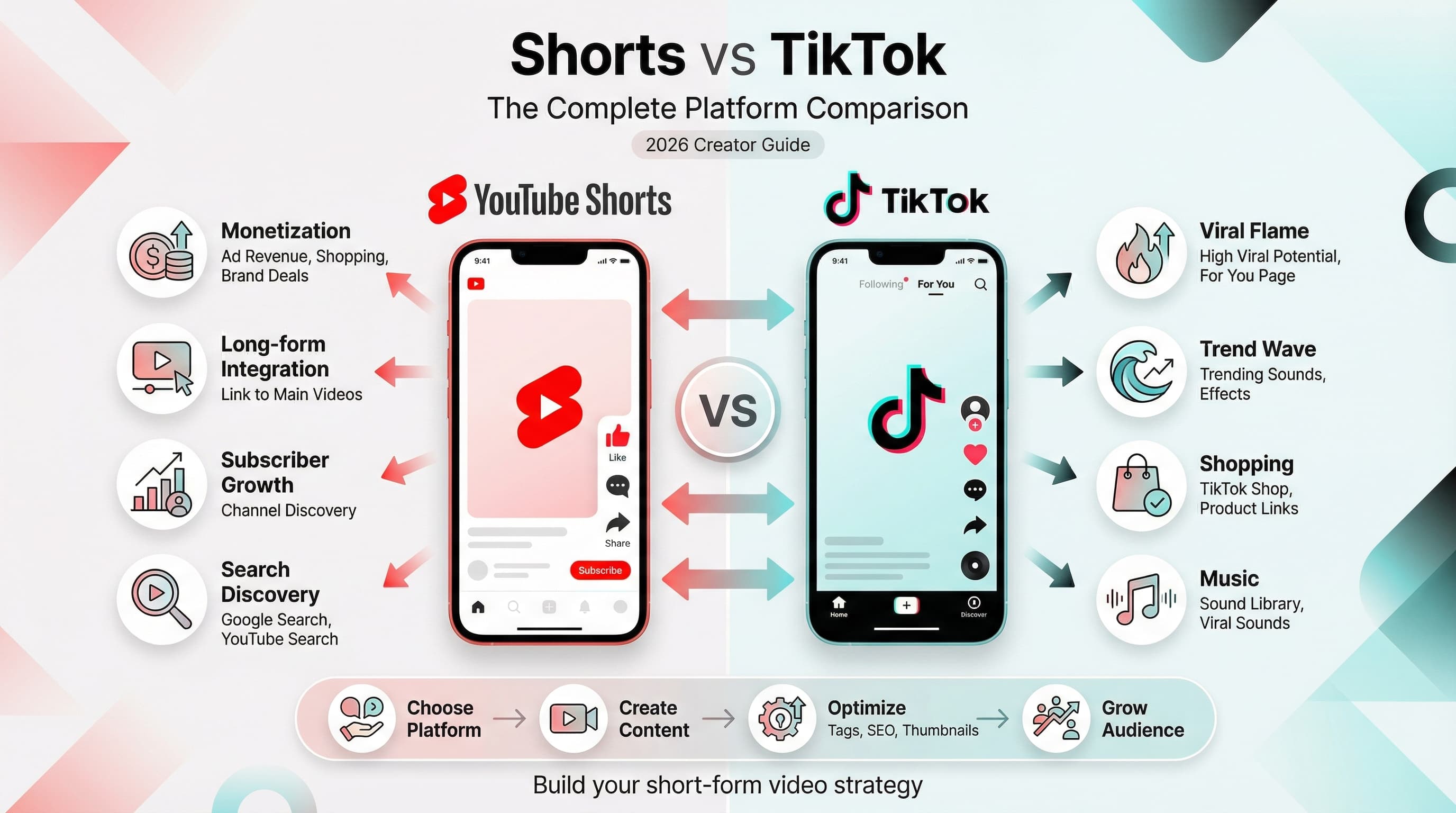
TikTok and YouTube Shorts look similar, but they operate differently. Understanding these differences helps you adapt your content for better performance.
| Factor | TikTok | YouTube Shorts |
|---|---|---|
| Max length | 10 minutes (but under 3 mins works best) | 60 seconds max (3 min for some accounts) |
| Aspect ratio | 9:16 vertical | 9:16 vertical |
| Algorithm priority | Watch time, replays, shares | Watch time, engagement, CTR |
| Discovery | FYP-driven, hashtags less important | Shorts shelf, search, suggested |
| Audience age | 60% Gen Z | Broader range, more millennials |
| Audio | Trending sounds critical | Original audio often performs better |
| Monetization | Creator Fund, gifts, brand deals | Revenue sharing (from ads) |
| Connection to longer content | Limited | Drives long-form subscriptions |
Content that translates well
Educational content, tutorials, behind-the-scenes clips, and informative content tend to perform well on both platforms. YouTube's audience often seeks value and information, so TikToks that teach something usually repurpose successfully.
Content that might need adjustment
Heavily trend-dependent TikToks (specific dances, sounds, or memes) may feel dated or confusing on YouTube if the trend hasn't crossed over. Content that relies on TikTok-specific inside jokes or references might miss the mark.
Consider whether your YouTube audience will understand the context. If a TikTok requires knowledge of a specific trend to make sense, it might not translate well.
Pacing and editing style
TikTok rewards extremely fast pacing. Cuts every 1-2 seconds, rapid-fire information, chaotic energy. YouTube Shorts viewers tolerate slightly slower pacing. You don't need to re-edit everything, but if a TikTok felt too frenetic, you might let some shots breathe a bit longer.
That said, the first 2-3 seconds still need to hook viewers immediately on both platforms. Don't slow down your intros.
Common mistakes when repurposing (and how to avoid them)
I've watched hundreds of creators attempt TikTok-to-YouTube repurposing. Here are the mistakes that tank performance most often.
Mistake 1: Leaving the TikTok watermark visible
We covered this, but it bears repeating. The watermark signals "recycled content" to YouTube's algorithm. Even if your video is excellent, you're starting with a handicap.
Fix: Always remove watermarks using the methods described earlier. Make it a non-negotiable part of your workflow.
Mistake 2: Using copyrighted audio
That viral TikTok sound that's everywhere? YouTube might flag it instantly. Copyright claims can demonetize your Short, restrict its reach, or result in strikes against your channel.
Fix: Replace TikTok sounds with YouTube-safe alternatives. Use YouTube's audio library or royalty-free music services. Original audio (your voice, sounds you recorded) is always safe.
Mistake 3: Repurposing too quickly after posting
If someone sees your TikTok and then immediately sees the same thing on YouTube Shorts, it feels redundant. Worse, if both platforms show similar content simultaneously, you're competing with yourself.
Fix: Wait 3-7 days before repurposing. Let the TikTok run its course, then post to YouTube. This maximizes fresh exposure on each platform.
Mistake 4: Identical captions and descriptions
TikTok captions are often short, emoji-heavy, and conversational. YouTube descriptions can be longer and should include keywords for search discoverability. Using identical text misses optimization opportunities.
Fix: Write platform-specific titles and descriptions. Keep TikTok's casual vibe for TikTok, use more descriptive and searchable language for YouTube.
Mistake 5: Ignoring YouTube's interface
YouTube Shorts displays the title and creator info at the bottom of the screen. If your TikTok had text or important visuals in that zone, they'll get covered.
Fix: Preview how your video looks in the YouTube Shorts player. Reposition any text that gets obscured. Keep the bottom 15% of the frame clear of essential content.
Mistake 6: Repurposing everything without strategy
Just because you can repurpose a TikTok doesn't mean you should. Low-quality content, failed experiments, or highly niche TikToks might dilute your YouTube presence.
Fix: Be selective. Repurpose your best content, not your entire catalog. Quality over quantity builds a stronger YouTube channel.
Building a sustainable repurposing workflow
Repurposing one or two videos is easy. Maintaining it as an ongoing strategy requires a system. Here's how to build one that doesn't eat all your time.
Batch your repurposing work
Instead of repurposing each TikTok individually as it performs, set aside dedicated time (weekly or bi-weekly) to repurpose in batches. Review your TikTok analytics, identify top performers, download them, adjust audio and captions, and schedule them all at once.
This batching approach is significantly more efficient than context-switching between creation and repurposing daily.
Create a repurposing checklist
Standardize your process so you don't forget steps. Your checklist might include:
- Download video without watermark
- Check audio for copyright issues
- Replace audio if needed
- Adjust text overlays for YouTube interface
- Write YouTube-optimized title (under 40 chars)
- Write description with keywords and hashtags
- Select thumbnail frame
- Schedule for optimal posting time
Use scheduling tools
Manual posting every day isn't sustainable. Use a scheduling tool to queue your repurposed Shorts in advance. You can prep a week's worth of content in one session, then let the tool handle distribution.
This also helps maintain consistent posting frequency, which signals to YouTube's algorithm that your channel is active.
Track what works
Not all TikToks will perform equally well on YouTube. Pay attention to patterns. Does educational content outperform entertainment on your channel? Do certain topics resonate more on YouTube than TikTok?
Keep simple notes: TikTok views vs YouTube Shorts views for the same content. Over time, you'll learn which content types are worth repurposing and which aren't.
Advanced repurposing strategies
Once you've mastered basic repurposing, these advanced tactics can boost your results further.
Create YouTube-first versions
Instead of just adapting TikToks, create slightly different versions optimized for YouTube. Same core content, but with YouTube-safe audio, YouTube-specific hooks ("you won't believe what happens"), and keywords in text overlays.
This extra effort yields better performance than straight ports. Think of it as localization, adapting your content for a different audience culture.
Link Shorts to long-form content
If you have relevant long-form YouTube videos, mention them in your Shorts descriptions. "Want the full tutorial? Check out my complete guide on my channel." This drives viewers deeper into your content ecosystem.
You can also create Shorts that tease or excerpt your long-form videos specifically as trailers to drive views.
Test different hooks
The hook that worked on TikTok might not be optimal for YouTube. Try creating alternate versions with different opening lines or visuals. A/B test them over time to learn what YouTube's audience responds to.
This is extra work, but if you have a video you're confident in, testing multiple hooks can significantly boost performance.
Repurpose to Instagram Reels too
While we're focused on YouTube Shorts here, the same content can also go to Instagram Reels. Once you've done the work to remove watermarks and optimize audio, posting to a third platform is minimal additional effort.
Same warnings apply: Instagram also deprioritizes visible watermarks, so use clean versions.
Create compilation Shorts
Take multiple short TikTok clips on a related theme and combine them into a longer YouTube Short. "5 kitchen hacks in 60 seconds" using clips from five different TikToks. This creates fresh content from existing material.
Compilations work especially well for educational or tips-based content where multiple quick points add up to substantial value.
Tools that make repurposing easier
The right tools streamline your workflow significantly. Here's what I recommend for different parts of the process.
For removing watermarks
- SnapTik: free web tool, paste URL and download clean video
- SaveTT: similar functionality, good quality output
- CapCut: if you edit here originally, export before adding to TikTok
For audio replacement
- YouTube Audio Library: free music and sound effects for YouTube
- Epidemic Sound: subscription service with huge library (many creators use this)
- Artlist: another solid subscription option for royalty-free music
For editing and adjustments
- CapCut: free, powerful, works on mobile and desktop
- InShot: quick mobile edits, good for minor adjustments
- Premiere Pro / Final Cut: overkill for most repurposing, but if you're already using them
For scheduling and distribution
- Schedulala: schedule Shorts alongside your other social content
- YouTube Studio: native scheduling built into the platform
- Later or Buffer: multi-platform scheduling options
Measuring success: what metrics matter
How do you know if your repurposing strategy is working? Focus on these metrics.
Views relative to effort
The whole point of repurposing is efficiency. Track total views across both platforms versus the time invested. If you spent an extra 15 minutes repurposing and got 20,000 additional views on YouTube, that's excellent ROI.
Cross-platform conversion
Are YouTube Shorts viewers subscribing to your channel? Are they watching your long-form content? Check YouTube Studio to see how Shorts contribute to overall channel growth.
Watch time and retention
YouTube values watch time heavily. If your repurposed Shorts have low retention (people swipe away quickly), they won't get recommended as often. Compare retention rates between your native YouTube content and repurposed TikToks.
Revenue (if monetized)
YouTube Shorts revenue sharing means you can earn money from repurposed content. Track which repurposed videos generate the most revenue and prioritize similar content.
Don't expect every repurposed video to outperform its TikTok version. Some will do better, some worse, some about the same. The strategy works when your aggregate results justify the time investment.
Quick action plan to start today
Ready to start repurposing? Here's a simple action plan to implement this week.
- Review your TikTok analytics and identify your top 5 performing videos from the past month
- Download clean versions of those videos (without watermarks)
- Check each video for copyrighted audio and replace if necessary
- Write YouTube-optimized titles and descriptions for each
- Schedule them to post over the next two weeks (one every 2-3 days)
- Track performance and note which content types translate best
That's it. Start with five videos, learn from the results, then expand your repurposing efforts based on what works.
Try Schedulala for free
Schedule posts to Bluesky, Twitter, and 8 other platforms from one dashboard.
Get started for free→