Social Media Audit Checklist [Free Template]: The Complete Guide to Auditing Your Accounts
Use this social media audit checklist to review profiles, content, and performance before your next planning cycle.

Open your Instagram bio right now. Is the link still working? Does your profile photo match what's on LinkedIn? When's the last time you checked whether your Pinterest account even has a password anyone remembers? Learn more about Instagram scheduling.
See It in Action
This is what scheduling an Instagram post looks like in Schedulala
Most brands post constantly but never step back to check if any of it still makes sense. Bios go stale. Links break. Someone changes jobs and still has admin access to the Facebook page. Engagement quietly drops for three months and nobody notices because everyone's too busy scheduling the next post to look at the last one. See our cross-platform analytics track 11 guide.
A social media audit fixes that. It's a structured review of every account, every piece of content performance, and every process behind your social presence. Done right, it takes a weekend. Done regularly (we recommend quarterly), it saves you from the slow bleed of wasted ad spend, dead links, and a brand voice that's drifted into five different directions across five platforms. Learn more about social media bio templates.
This guide gives you the full checklist: what to check, in what order, with specific things to look for in each category. Copy it into a spreadsheet, work through it section by section, and you'll walk away with a clear picture of what's working, what's broken, and what to fix first. See our content calendar guide.
Try Schedulala for free
Schedule posts to Bluesky, Twitter, and 8 other platforms from one dashboard.
Get started for free→What a social media audit actually covers
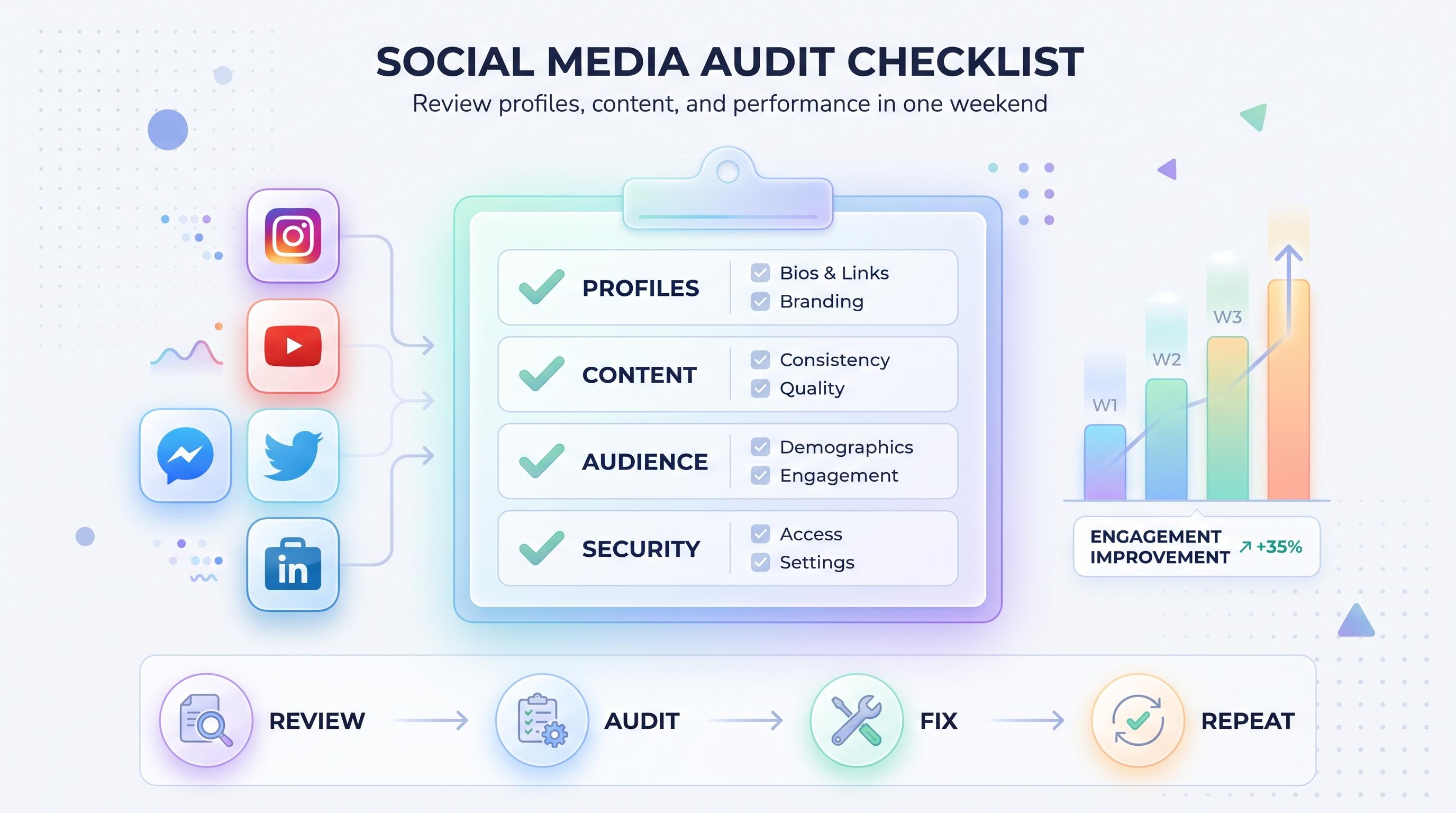
A social media audit is not the same thing as checking your analytics dashboard once a month. It's a deliberate, documented review across four areas: your profiles (are they accurate and consistent), your content (what's performing and what's dead weight), your audience (who's actually following you and does it match who you're trying to reach), and your processes (who has access, how often you post, and whether your workflow is actually efficient). See our best time to post on instagram guide.
Agencies typically audit client accounts every 90 days. Solo creators and small teams can get away with every six months, but if you're running paid social or managing more than three platforms, quarterly is the right cadence. Anything longer than that and you risk making decisions based on data that's no longer true. See our instagram engagement calculator guide.
Here's who should be running this checklist: anyone managing social for a brand with more than one person touching the accounts, anyone whose follower growth has stalled, anyone about to pitch a new social strategy to leadership, and honestly, anyone who inherited accounts from a previous employee and has no idea what's actually set up back there.
The complete social media audit checklist
Work through these eight categories in order. Each one builds on the last, so skipping ahead usually means you miss context you needed later.
1. Profile and bio audit
Start with the basics on every single account: Instagram, TikTok, Twitter/X, LinkedIn, YouTube, Facebook, Threads, Bluesky, Pinterest, Telegram, Mastodon, and Google Business Profile if you're on them. For each one, check:
- Profile photo and cover/banner image are current and sized correctly for that platform
- Bio text is accurate (no outdated taglines, old job titles, or mentions of discontinued products)
- Link in bio works and goes to the correct destination, not a dead landing page from 2023
- Username/handle is consistent across platforms where possible
- Business category and contact info (especially on Facebook and Google Business Profile) is correct
- Pinned posts or featured content still reflect what you want people to see first
This is the single fastest category to fix and the most commonly ignored. We've seen brands running ad campaigns pointing to a bio link that hadn't worked in four months.
2. Content performance audit
Pull your last 90 days of posts per platform and sort by engagement rate, not raw likes. Raw numbers lie when your follower count has shifted. Look for:
- Top 10 performing posts by engagement rate, and what they have in common (format, topic, posting time)
- Bottom 10 performing posts, and whether there's a pattern worth cutting from your calendar
- Content format breakdown: are reels/shorts outperforming static images? Is carousel content pulling more saves?
- Click-through rate on any posts with links, and whether that's trending up or down
- Hashtag or keyword usage and whether it's actually bringing in reach or just habit
If you're using Schedulala, your scheduled post history and basic performance data live in one place across all 12 platforms, which makes this step a lot faster than pulling exports from five separate native dashboards.
3. Audience audit
Follower count means nothing without context. Check:
- Follower growth rate over the last quarter, and whether any spikes correlate with a specific campaign or just a bot wave
- Audience demographics (age, location, gender where available) against your actual target customer
- Follow-to-engagement ratio: a huge following with low interaction usually means purchased or inactive followers
- Which platform is actually driving traffic or conversions versus which one just feels active because of volume
This is where a lot of teams get an uncomfortable wake-up call. We've seen accounts with 40,000 followers on one platform generating fewer link clicks than a 3,000-follower account on another, simply because the audience match was better on the smaller platform.
4. Visual brand consistency
Scroll each grid or feed and ask: does this look like it belongs to the same brand? Check color palette consistency, font usage in graphics, logo placement, filter/editing style, and whether your most recent 12 posts tell a coherent visual story or look like five different people posted them (because, often, they did).
If you manage multiple brands or clients, this step is also where you catch cross-posting mistakes, like a client's content accidentally going out under the wrong account.
5. Posting cadence and timing
Document your actual posting frequency per platform over the last 90 days (not your intended frequency, your actual one). Compare it against what the data says is your best-performing times. Most brands discover a gap here: they planned to post daily on LinkedIn and actually posted eight times in three months, or they're posting at 9pm when their audience data clearly shows an 11am peak.
6. Competitor benchmarking
Pick 3-5 direct competitors and run a lighter version of this same checklist on their public accounts: posting frequency, content formats they're leaning into, follower growth trend if visible, and anything they're doing that's clearly outperforming your own content. This isn't about copying them, it's about knowing where the bar actually sits in your industry.
7. Security and access audit
This is the category everyone skips and the one that causes the most damage when ignored. Check:
- Who has admin, editor, or owner access on each account, and whether every person listed still works with you
- Two-factor authentication is enabled everywhere it's available
- Passwords aren't shared via Slack messages from two years ago
- Connected third-party apps (old scheduling tools, analytics plugins, contest apps) that you no longer use and should disconnect
- Recovery email and phone number on file are ones you actually control
A surprising number of audits turn up a former employee who still has owner-level access to the company Instagram. Fix this one immediately, don't wait for the full audit report.
8. Workflow and tool audit
Last category: how are you actually getting content published? Document your current scheduling tool, who approves content before it goes live, how long content takes from idea to publish, and whether your current setup covers every platform you're active on or forces someone to manually post to the gaps.
How to run the audit in a weekend
1. Set up your tracking sheet first
Before you touch a single platform, build a spreadsheet with a tab per platform and columns for each checklist category above. This sounds tedious but it's the difference between an audit that produces decisions and one that produces a pile of screenshots nobody acts on.
2. Audit profiles across all platforms in one sitting
Knock out the profile and bio checks for every platform back to back. It's fast, it's mechanical, and doing it in one block keeps you consistent about what 'good' looks like across accounts.
3. Pull performance data platform by platform
This is the slowest part. Export or screenshot your last 90 days of post data per platform, and if you're using a tool that centralizes this across accounts, use it here. Schedulala pulls post history and engagement into a single view, which saves a meaningful amount of time compared to logging into native apps one at a time.
4. Run the security check with a second person
Access audits are easy to rush through alone and miss something. Have a second team member confirm the admin list for at least your two or three highest-risk accounts.
5. Summarize into three lists
End the audit with three short lists: fix immediately (broken links, security access), fix this month (bio updates, cadence changes), and consider for next quarter's strategy (content format shifts, platform additions or removals). This turns raw audit data into an actual action plan instead of a report that gets filed away.
Audit frequency by team type
| Team type | Recommended audit frequency | Primary focus |
|---|---|---|
| Solo creator | Every 6 months | Content performance, profile consistency |
| Small business (1-2 people on social) | Every 3-4 months | Access security, cadence, bio accuracy |
| In-house team (3+ people) | Quarterly | Workflow, approval process, access audit |
| Agency managing multiple clients | Quarterly per client | Full checklist, competitor benchmarking |
Common mistakes teams make during a social media audit
- Only auditing the platforms that feel important and skipping the ones that feel neglected, which is usually exactly where the problems are hiding
- Measuring success by follower count instead of engagement rate or conversion data
- Doing the audit once and never repeating it, which means every audit after the first one starts from scratch instead of tracking a trend
- Skipping the access and security review because it feels like IT's job, not marketing's
- Auditing content without checking the workflow behind it, so the same mistakes (missed posting windows, inconsistent branding) get fixed temporarily and then drift back within a month
- Treating the audit as a report to file away instead of a prioritized action list with owners and deadlines attached
Tools that make the audit faster
You can run this entire checklist with a spreadsheet and manual logins, but it's going to eat your whole weekend. The audit goes faster when your content history, scheduling, and basic performance data already live in one place instead of twelve separate native apps.
Schedulala covers all 12 major platforms (Instagram, TikTok, Twitter/X, LinkedIn, YouTube, Facebook, Threads, Bluesky, Pinterest, Telegram, Mastodon, and Google Business Profile) from one dashboard, with unlimited scheduled posts on every plan, including the entry-level Personal plan. That matters during an audit because you're not hunting through separate publishing tools to figure out what actually went out and when.
Plans run Personal at $29/month for 10 social accounts, Team at $49/month for 25 accounts, and Agency at $99/month for 100 accounts, with annual billing giving you two months free on any tier. The account count is flat and spendable however you want: 10 accounts can be 10 Instagram profiles, one account on each of 10 different platforms, or any mix in between. There's no per-seat charge and no per-channel markup buried in the fine print, which is worth knowing before your next audit uncovers a tool that's quietly charging you more than you thought for less flexibility than you need.
If you're doing the access and security portion of the audit, a centralized tool also makes it easier to see exactly who has access to what, instead of chasing down admin lists across a dozen separate platform settings pages one at a time.
Try Schedulala for free
Schedule posts to Bluesky, Twitter, and 8 other platforms from one dashboard.
Get started for free→What to do with your audit results
An audit that doesn't change anything is just a chore. Once you've worked through the checklist, assign an owner and a deadline to every item on your 'fix immediately' and 'fix this month' lists. Security fixes should happen within 48 hours, not at the end of the quarter. Bio and profile updates can usually happen the same week.
For the strategic items (content format shifts, platform additions, cadence changes) build them into your next planning cycle rather than trying to overhaul everything at once. Pick two or three changes to test over the following 30 days, measure the impact, and bring those results into your next audit. That's how the checklist turns into an actual cycle of improvement instead of a one-time cleanup.
Set a calendar reminder right now for your next audit date. Seriously, do it before you close this tab. The accounts that drift the furthest off track are always the ones where someone meant to check in 'at some point' and never put a date on the calendar.
Try Schedulala for free
Schedule posts to Bluesky, Twitter, and 8 other platforms from one dashboard.
Get started for free→