Social Media Workflow: Agency Best Practices for Scaling Client Accounts Without Losing Your Mind
Build a social media workflow agency teams can actually scale. Approval chains, calendars, reporting, and tools that keep clients happy.

Every agency hits the same wall around client number eight or nine: the system that worked fine for three accounts starts falling apart. Approvals get lost in Slack threads. Someone posts the wrong client's content to the wrong account. A client asks for last month's numbers and it takes two days to pull them together. Try our social media automation.
This isn't a staffing problem. It's a workflow problem. Most agencies build their process reactively, bolting on a new spreadsheet or a new approval step every time something breaks. By the time you're managing 15+ client accounts, you're running on duct tape and good intentions. Try our scheduling across platforms.
This guide walks through what an actual, repeatable social media workflow looks like for agencies, from onboarding a new client to reporting on results, plus the specific mistakes that tend to blow up agency operations at scale. See our ai social media post guide.
Try Schedulala for free
Schedule posts to Bluesky, Twitter, and 8 other platforms from one dashboard.
Get started for free→Why most agency workflows break around 10 clients
When you're managing one or two clients, almost any system works. You remember who needs what, when it's due, and what the brand voice sounds like. That memory-based approach stops scaling the moment you add a third account manager or a fifth client. See our best time to post on instagram guide.
There are three specific failure points we see over and over:. Try our best time to post on tiktok.
- No single source of truth. Content lives in Google Docs, approvals happen in email, and the actual posting calendar is in someone's head. When that person goes on vacation, the whole thing stalls.
- Approval bottlenecks. One client contact has to sign off on everything, including minor caption tweaks, which turns a 10-minute task into a three-day wait.
- Reporting built from scratch every time. If your team spends a full day each month manually pulling screenshots and building slide decks, you're losing billable hours you'll never get back.
Fixing these three things alone usually buys back 15-20% of your team's time. That's not a small number when you're billing hourly or trying to improve margins on retainer clients.
The core components of an agency social media workflow
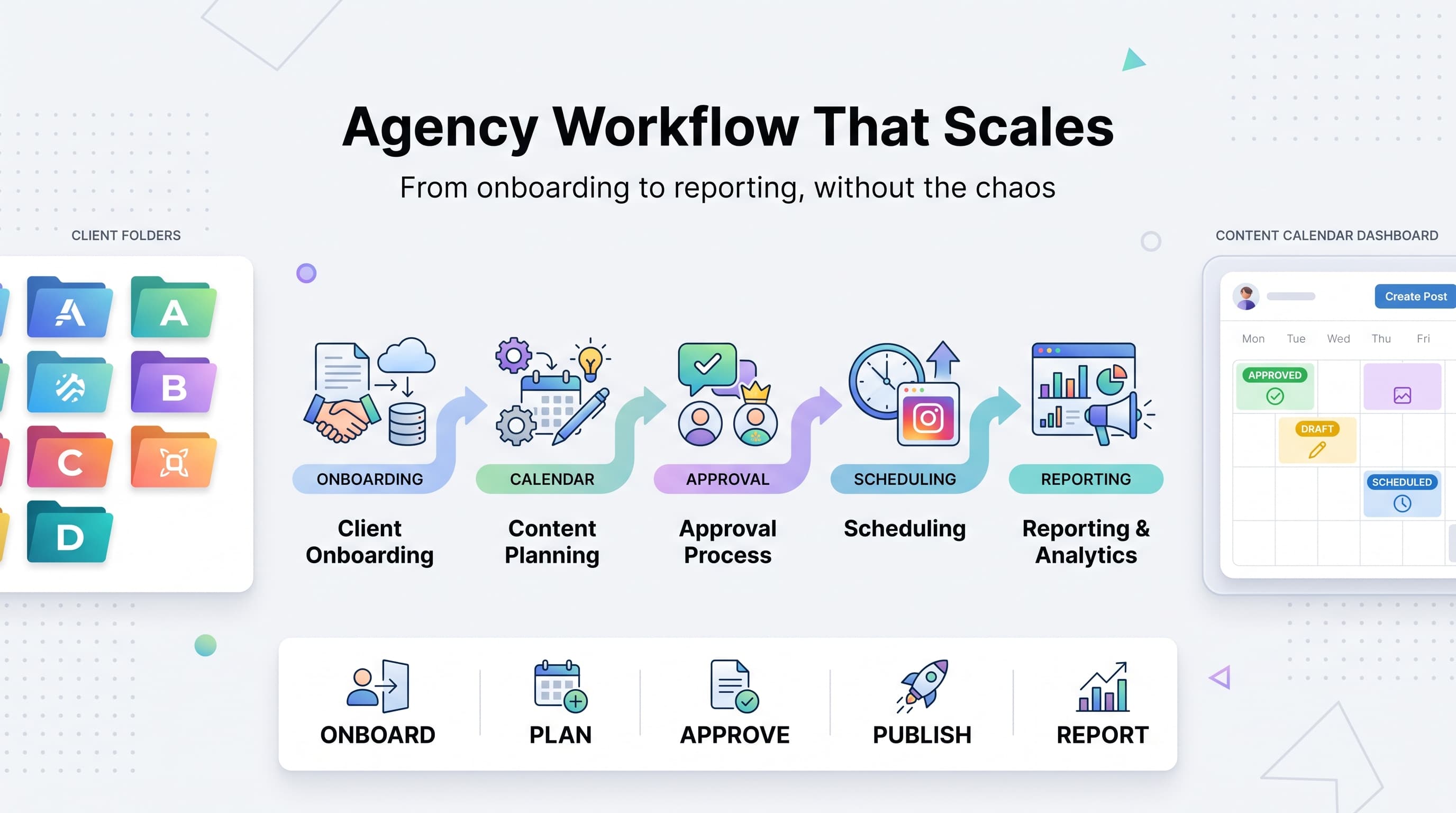
A workflow that actually holds up under load has five parts. Skip any one of them and you'll feel it eventually, usually during a busy launch week when there's no margin for error.
1. Client onboarding and brand documentation
Before a single post gets scheduled, you need a brand brief that answers the questions your content team will ask repeatedly: What's the tone of voice? Which hashtags are banned? Who are the three competitors they're obsessed with? What's off-limits content-wise (politics, pricing, certain product lines)?
Build a standard onboarding template once and reuse it for every new client. We've seen agencies cut onboarding time from two weeks to three days just by having a consistent intake form instead of a fresh kickoff call every time.
2. Content planning and calendars
This is where most agencies either win or lose the month. A shared content calendar (not a personal one) should show every client, every platform, and every scheduled post status at a glance: draft, in review, approved, scheduled, published.
The calendar needs to be visible to account managers, content creators, and clients at the same time. If your calendar lives in one tool and your scheduling lives in another, you're creating a sync problem that compounds with every new client you add.
3. A defined approval chain
Not every piece of content needs the same level of scrutiny. A routine Instagram caption and a crisis-response post should not go through the same approval path. Set up tiers:
- Tier 1 (low-risk, routine posts): internal review only, no client sign-off required
- Tier 2 (standard content): one round of client approval with a clear deadline
- Tier 3 (sensitive or paid content): full client sign-off plus legal/compliance if applicable
Agree on this tiering with the client during onboarding, in writing. It saves you from the "everything needs my approval" client who otherwise turns your whole calendar into a bottleneck.
4. Scheduling and publishing
This is the step where tooling matters most. Manually publishing to each client's accounts, one platform at a time, is where mistakes happen: wrong account, wrong caption, wrong time zone. A centralized scheduling tool with client-level account grouping removes most of that risk.
This is also the point where most agencies get burned by pricing structures that don't fit how they actually work. More on that below.
5. Reporting and client communication
Reporting shouldn't be a scramble at the end of the month. Set a standing reporting cadence (weekly snapshot, monthly deep dive) and build a template once that pulls consistent metrics for every client: reach, engagement rate, follower growth, top-performing posts, and whatever KPI ties back to that specific client's goals.
Clients don't need every metric. They need the three or four that map to what they actually care about, usually leads, sales, or brand awareness depending on the account.
Step-by-step: building the workflow from scratch
If you're starting from zero, or rebuilding after your current system fell apart, here's the order of operations that actually works.
1. Audit what's actually happening today
Before changing anything, map your current process for one client, start to finish. Where does content get created? Where does it get approved? Who schedules it? Where do results get reported? You'll usually find two or three steps that exist only because "that's how we've always done it," not because they're necessary.
2. Standardize the client intake process
Build one onboarding form or document that covers brand voice, approval contacts, platform access, posting cadence, and any legal or compliance flags. Use it for every single client, no exceptions, even the ones you've worked with for years.
3. Centralize content planning
Move content planning into one shared system where every client's calendar is visible side by side. Separate client-facing views from internal ones if needed, but keep the underlying data in one place.
4. Set approval SLAs
Agree with every client on a turnaround time for approvals (48 hours is a reasonable default) and build that into your contract or statement of work. If a client misses the window, your content goes out as submitted or gets pushed to the next slot. This single rule eliminates most of the "waiting on the client" delays agencies complain about.
5. Pick one scheduling tool for all clients
Using different scheduling tools for different clients (because that's what they were already using) creates chaos for your team. Standardize on one platform that can handle multiple clients and multiple accounts per client without forcing you into awkward workarounds.
This is where Schedulala's account structure actually fits agency work well: accounts are a flat count you can split across clients however you want. On the Agency plan ($99/month, 100 social accounts), that might mean 10 accounts each for 10 clients, or a lopsided split where your biggest retainer gets 30 accounts and five smaller clients share the rest. There's no per-platform sub-limit forcing you to buy a bigger plan just because one client wants Pinterest and Threads in addition to Instagram and LinkedIn.
6. Build a reporting template once
Create one master reporting template with client-specific sections, not a new deck from scratch every month. Automate the data pull where you can. Reserve human time for the analysis and recommendations section, which is the part clients actually pay attention to.
Choosing tools that match how agencies actually bill and scale
A lot of scheduling tools were built for individual brands managing their own accounts, not agencies juggling dozens of clients across every platform imaginable. That mismatch shows up in a few specific ways:
- Per-seat pricing that punishes you for adding team members or client-side reviewers
- Bundled profile sets that force you to buy a whole new bundle when one client adds a single new platform
- Post caps on lower tiers that make busy launch months expensive or impossible
- No clean way to separate client accounts, so your team risks posting to the wrong client entirely
When you're evaluating tools for agency use, ask three questions: Can I group accounts by client? Are posts unlimited regardless of plan tier? And does adding a new platform for an existing client cost me more, or does it just use account capacity I already have?
Schedulala covers 12 platforms (Instagram, TikTok, Twitter/X, LinkedIn, YouTube, Facebook, Threads, Bluesky, Pinterest, Telegram, Mastodon, and Google Business Profile) with unlimited scheduled posts on every plan, including the entry-level Personal tier. There's no per-seat fee and no per-channel fee, which matters a lot once your team grows past two or three people touching the same client accounts.
| Plan | Price | Social accounts | Best for |
|---|---|---|---|
| Personal | $29/month | 10 accounts | Solo freelancer managing a couple of small clients |
| Team | $49/month | 25 accounts | Small agency with a handful of active retainers |
| Agency | $99/month | 100 accounts | Growing agency managing many clients across platforms |
Annual billing gets you two months free on any plan (Personal at $290/year, Team at $490/year, Agency at $990/year), which is worth doing once you know your account count is stable.
Try Schedulala for free
Schedule posts to Bluesky, Twitter, and 8 other platforms from one dashboard.
Get started for free→Common workflow mistakes that cost agencies real money
We've worked with and talked to a lot of agencies about where their process actually breaks. These are the mistakes that show up again and again, regardless of agency size.
Treating every client's approval process the same
Some clients want to see every single post before it goes out. Others are happy to review a monthly batch and let you run day-to-day posting. Forcing both types of clients through identical approval steps either annoys the hands-off client with unnecessary emails, or terrifies the hands-on client by moving too fast. Tier your approval process by client, not by habit.
Letting content creation and scheduling live in separate systems
If your writers draft in Google Docs, your designers work in Canva, and your scheduler lives in a third tool with no connection between them, someone eventually schedules the wrong version of a caption. Build a workflow where approved content moves directly into the scheduling queue without a manual copy-paste step.
Not having a backup for who's logged into what
When one account manager owns all the platform logins for a client and goes on leave, you've got a real problem. Centralize account access through your scheduling platform so anyone on the team with the right permissions can step in without chasing down passwords.
Reporting on vanity metrics instead of client goals
Follower count growth looks nice in a slide deck, but if the client's actual goal is driving leads through Instagram DMs, that's the number they're watching. Build reporting templates around each client's specific KPI, not a generic metrics dump.
Underpricing retainers because the workflow is inefficient
If your team spends six hours a week on manual tasks that a cleaner workflow could cut to two, you're effectively giving away four hours of billable time on every retainer. Fixing your workflow isn't just about reducing stress, it directly protects your margins.
A realistic weekly rhythm for agency teams
Beyond the process itself, it helps to have an actual weekly rhythm that your team follows without reinventing the schedule every Monday morning.
- Monday: Review the upcoming week's content for every client, flag anything missing approval, chase down outstanding client sign-offs
- Tuesday-Wednesday: Content creation and internal review for the following week's posts, plus any reactive or trending content for the current week
- Thursday: Client approvals finalized, content moves into the scheduling queue, team leads do a final spot-check on brand voice and platform-specific formatting
- Friday: Weekly performance snapshot sent to clients who want weekly check-ins, next week's calendar gets a final look
- Monthly (last week): Full reporting cycle, retainer renewal conversations, and a quick retro on what worked or didn't that month
This rhythm isn't magic. It's just consistent enough that your team stops making decisions from scratch every week, which is where a lot of wasted time and dropped balls come from in the first place.
When to bring in automation vs. keep a human in the loop
Agencies sometimes over-correct on efficiency and automate steps that actually need a human eye. A good rule: automate the repetitive, low-risk parts (scheduling, basic reporting data pulls, reminder notifications) and keep a human firmly in the loop for anything client-facing or judgment-based (final approval, crisis response, tone checks on sensitive topics).
The goal isn't to remove people from the workflow. It's to free up their time so they're spending it on strategy and client relationships instead of copy-pasting captions into five different platform dashboards.
Putting it all together
A social media workflow that scales isn't about adding more tools or more steps. It's usually about removing the ones that don't add value and standardizing the ones that do: one onboarding process, one shared calendar, tiered approvals, one scheduling tool, and one reporting template per client reused every month.
If you're currently juggling client accounts across three or four different scheduling tools because that's what each client happened to already use, it's worth the short-term pain of consolidating onto one platform. The account-count flexibility you get in return (splitting capacity however you want across clients and platforms, with no per-seat fees) tends to pay for itself within the first month or two just from the time your team gets back.
Try Schedulala for free
Schedule posts to Bluesky, Twitter, and 8 other platforms from one dashboard.
Get started for free→