TikTok LIVE: How to Go Live & Grow Your Audience in 2026
Complete TikTok live guide: requirements, setup, engagement tips, and growth strategies. Start streaming and build your audience with our step-by-step tutorial.

You've spent months creating TikTok videos, building your following, and watching other creators explode through live streaming. Now you're ready to jump on TikTok LIVE yourself. Our TikTok scheduling can help.
See It in Action
This is what scheduling a TikTok post looks like in Schedulala
Going live on TikTok can 10x your engagement overnight and turn casual followers into die-hard fans. But most creators mess it up by diving in without a strategy, talking to empty rooms, or failing to understand what makes TikTok LIVE different from every other platform. Our how to repurpose content can help.
Try Schedulala for free
Schedule posts to Bluesky, Twitter, and 8 other platforms from one dashboard.
Get started for free→TikTok LIVE requirements and eligibility
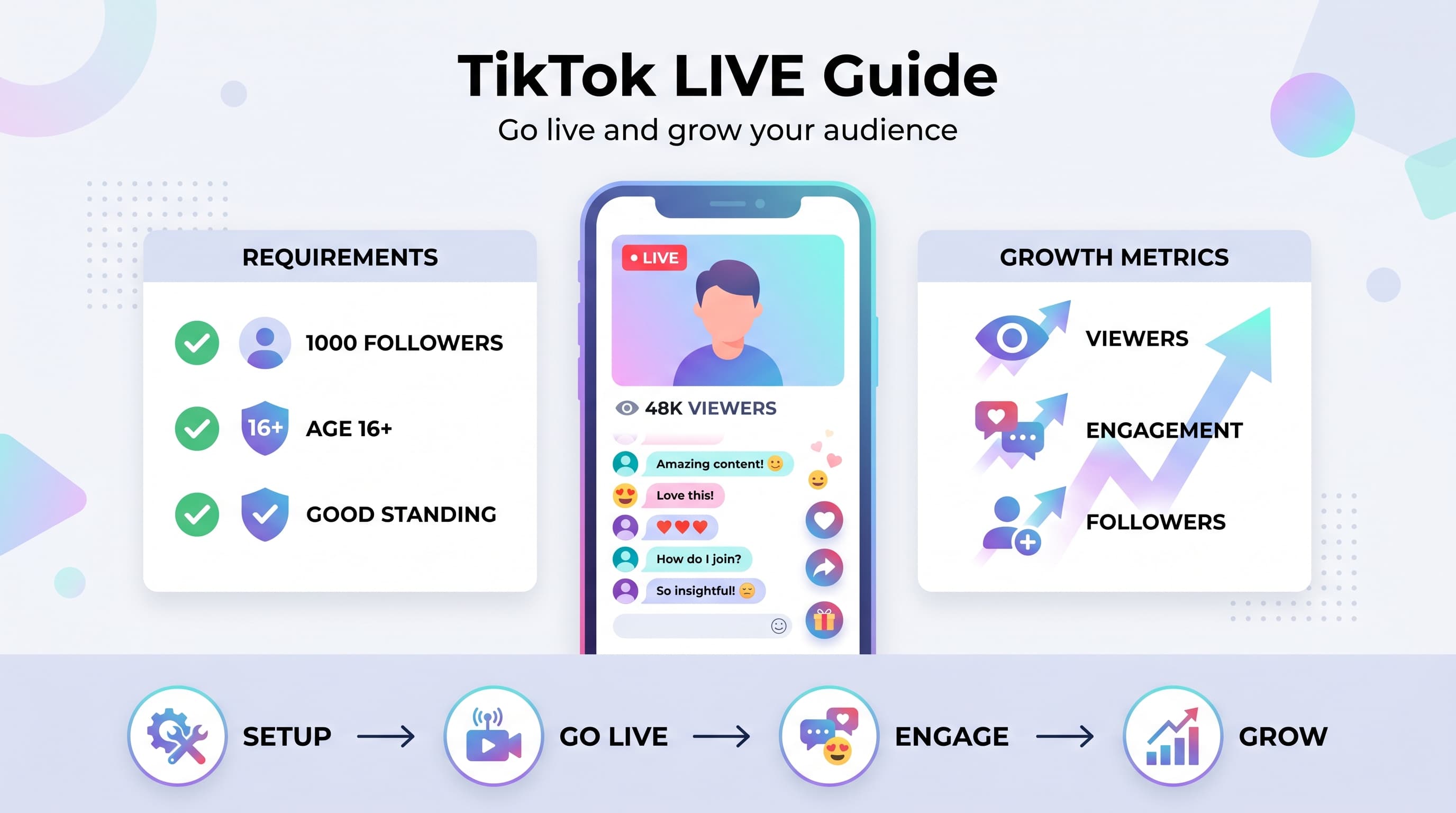
Before you can start streaming, you need to meet TikTok's basic requirements. The rules are straightforward, but they trip up new creators who assume they can go live immediately after creating an account. Learn more about scheduling across platforms.
1. Age requirement
You must be at least 16 years old to access TikTok LIVE. This is non-negotiable and verified through your account information. If you're between 16-18, some features like receiving gifts will be limited. Our chatgpt for social media can help.
TikTok verifies age through various signals, so using a fake birthdate won't work long-term and could get your account suspended. Try our best time to post on tiktok.
2. Follower threshold
You need at least 1,000 followers to unlock the LIVE feature. This threshold exists to prevent spam and ensure creators have some audience foundation before streaming. Try our tiktok engagement calculator.
The follower count is checked in real-time, so if you drop below 1,000, you'll lose access to LIVE until you rebuild your following. Focus on consistent content creation to reach this milestone organically.
3. Account standing
Your account must be in good standing with no recent community guideline violations. This includes strikes for inappropriate content, copyright violations, or spam behavior.
Even minor violations can temporarily block LIVE access. If you've had recent strikes, wait for them to expire before attempting to go live.
How to start your first TikTok LIVE stream
Once you meet the requirements, starting your first live stream is straightforward. The key is understanding the interface and preparing your setup before you hit that LIVE button.
1. Access the LIVE feature
Open TikTok and tap the plus (+) button at the bottom center of your screen. You'll see the standard recording interface with different options at the bottom.
Swipe right past 'Camera' and '60s' until you see LIVE. If you don't see this option, double-check that you meet all the eligibility requirements we covered above.
2. Set up your stream details
Before going live, you'll need to add a title for your stream. This is crucial because it appears in your followers' feeds and helps attract viewers. Make it specific and engaging.
Good titles: 'Teaching basic guitar chords', 'Q&A about college applications', 'Cooking authentic tacos'. Bad titles: 'Just chilling', 'Bored lol', 'Live stream'.
You can also choose whether to allow comments and adjust other privacy settings before starting.
3. Prepare your environment
Lighting matters more than your camera quality. Position yourself facing a window or invest in a simple ring light. Avoid backlighting that makes you appear as a silhouette.
Check your internet connection before starting. A unstable connection will frustrate viewers and hurt your stream's discoverability. Use WiFi when possible, and test your connection speed.
Clean up your background and remove distractions. Your viewers should focus on you and your content, not wondering what that pile of laundry is behind you.
4. Go live
Hit the Go LIVE button and you're streaming. The first few seconds are critical because TikTok uses initial engagement to determine whether to show your stream to more people.
Start talking immediately, even if no one is watching yet. Introduce yourself, explain what you'll be doing, and ask viewers to say hello in the comments. Energy and enthusiasm are contagious.
Essential features and controls during LIVE
Understanding TikTok's live streaming interface helps you engage better with your audience and manage your stream professionally. Let's break down each feature and how to use it effectively.
Comments and interaction
Comments appear in real-time on the right side of your screen. Read them out loud and respond directly to viewers by name. This personal connection keeps people watching and encourages others to comment.
You can pin important comments that relate to your content topic. This helps new viewers understand what you're discussing without explanation.
For inappropriate comments, tap and hold to report or delete them. You can also block users during the stream if needed.
Gifts and monetization
Viewers can send virtual gifts that convert to real money through TikTok's Creator Fund. Common gifts include roses, thumbs up, and more expensive options like lions or rockets.
Thank gift senders by name and show genuine appreciation. This encourages more gifts and creates a positive atmosphere that attracts additional viewers.
Don't beg for gifts, but you can mention them naturally: 'Thanks for the rose, Sarah! That helps support the stream.'
Camera and effects
You can flip between front and back cameras during your stream by tapping the flip icon. Use this to show your environment, demonstrate activities, or switch perspectives.
Filters and effects are available during LIVE, but use them sparingly. They can be fun for special moments but often distract from your content and message.
The beauty filter is subtle and can improve your appearance in poor lighting, but avoid heavy filters that make you look unnatural.
Sharing and inviting
Use the share button to invite specific friends to your stream. This is powerful for building initial momentum when you're starting out.
You can also go live with another user by sending or accepting collaboration requests. This feature helps cross-pollinate audiences between creators.
Content ideas that work on TikTok LIVE
Success on TikTok LIVE requires different content than regular videos. Live viewers want interaction, education, or entertainment they can't get from pre-recorded content. Here are proven formats that consistently attract and retain audiences.
Teaching and tutorials
Step-by-step tutorials perform exceptionally well because viewers can ask questions in real-time. Popular topics include makeup techniques, cooking recipes, art lessons, music instruction, and language learning.
Break complex topics into digestible chunks and repeat key points for new viewers joining throughout the stream. Always explain what you're doing and why.
Prepare your materials beforehand but stay flexible enough to adjust based on audience questions and interest levels.
Q&A and advice sessions
Question and answer streams build strong connections with your audience. Choose topics where you have genuine expertise: career advice, relationship guidance, fitness tips, or hobby knowledge.
Announce Q&A topics in advance through regular posts to give followers time to prepare questions. Start with a few prepared questions in case comments are slow initially.
Address viewers by name and give thoughtful, detailed answers rather than quick responses. This demonstrates value and keeps people engaged longer.
Behind-the-scenes content
Show your creative process, workspace setup, or daily routine. People love seeing how their favorite creators actually work and live.
This works particularly well for artists, musicians, business owners, and content creators. Document your process while explaining decisions and challenges you face.
Be authentic about struggles and failures, not just successes. Vulnerability creates deeper connections with your audience.
Interactive games and challenges
Viewer participation keeps engagement high and encourages people to invite friends. Try trivia questions, would-you-rather games, storytelling prompts, or creative challenges.
Create simple games where viewers can influence your actions through comments: choosing what to draw, deciding story directions, or voting on decisions.
Acknowledge participants by reading their usernames and celebrating creative responses. This gamification keeps energy high throughout your stream.
Growing your LIVE audience and engagement
Building a consistent live audience requires strategy beyond just showing up and streaming. You need to understand TikTok's algorithm, optimize your timing, and create compelling reasons for people to watch you over thousands of other live creators.
Optimal streaming schedule
Consistency beats perfection when building a live audience. Pick 2-3 specific days and times each week and stick to them religiously. Your audience needs to know when to find you.
Peak hours vary by audience demographics, but generally 7-9 PM in your time zone works well for most niches. Test different times and track your average viewer count to find your sweet spot.
Announce your schedule in your bio and remind followers through regular posts. Treat your live streams like a TV show that airs at specific times.
Pre-stream promotion
Post teasers 2-3 hours before going live. Share what you'll be covering, any special guests, or exclusive content viewers can expect. Use Stories and regular posts to build anticipation.
Create countdown posts that give followers time to clear their schedules. Visual countdown graphics perform better than text-only announcements.
Tag relevant hashtags in your promotion posts to attract new viewers who might be interested in your live content topics.
Engagement tactics during streams
Address new viewers immediately when they join. Say something like 'Welcome Sarah! We're just talking about...' This personal acknowledgment makes people feel seen and more likely to stay.
Ask specific questions that require more than yes/no answers. Instead of 'How's everyone doing?', try 'What's the most interesting thing that happened to you this week?'
Create recurring segments that regular viewers anticipate: 'Question of the day', 'Viewer spotlight', or 'Challenge corner'. Familiarity builds community.
Use strategic pauses after asking questions to give people time to type responses. Don't feel pressure to fill every moment with talking.
Building community beyond LIVE
Reference your live streams in regular content. Create follow-up videos addressing questions from previous streams or expanding on topics you discussed.
Highlight loyal live viewers in your regular posts occasionally. This recognition encourages continued participation and shows new followers the value of joining your live streams.
Consider creating a Discord server or group chat for your most engaged live viewers. This deepens community connections beyond TikTok's platform.
Try Schedulala for free
Schedule posts to Bluesky, Twitter, and 8 other platforms from one dashboard.
Get started for free→Common TikTok LIVE mistakes to avoid
Most creators sabotage their live streaming success through preventable mistakes. Learning what doesn't work saves you months of frustration and helps you build your audience faster.
Technical and setup errors
Poor audio quality kills streams faster than bad video. Viewers will tolerate mediocre visuals but won't stay for audio they can't understand. Test your microphone and find a quiet space.
Inconsistent internet connection frustrates both you and your viewers. Your stream buffers, cuts out, and eventually people leave. Always test your connection speed before going live.
Bad lighting makes you look unprofessional and hard to see. Avoid streaming with light sources behind you or in completely dark rooms. Natural window light or a simple ring light fixes most problems.
Content and engagement mistakes
Talking to empty chat for too long discourages new viewers from engaging. If no one is commenting, ask specific questions, share interesting stories, or switch topics to spark conversation.
Ignoring comments makes viewers feel invisible and less likely to participate. Read every comment you can and respond personally, even with quick acknowledgments.
Going live without a plan leads to awkward silences and boring content. Always have 3-4 topics prepared and smooth transitions between them.
Ending streams abruptly wastes the relationships you've built during the session. Always give a 2-3 minute warning before ending and tell people when you'll be back.
Audience development errors
Streaming at random times prevents audience building because people never know when to find you. Consistency is more important than frequency.
Focusing only on follower count instead of engagement quality limits your growth potential. 50 engaged viewers is better than 200 passive ones.
Not promoting your streams means relying entirely on TikTok's algorithm to find you viewers. Always announce when you're going live through other posts.
Monetizing your TikTok LIVE streams
TikTok LIVE offers multiple monetization opportunities beyond just virtual gifts. Understanding all your options helps you build sustainable income from your live streaming efforts.
Virtual gifts and diamonds
Virtual gifts are TikTok's primary monetization method for live streams. Viewers purchase coins with real money and send gifts that you can convert to cash through the Creator Fund.
Thank every gift sender personally and show genuine appreciation. This encourages more gifts and creates a positive atmosphere that attracts additional viewers.
Don't focus entirely on gifts or beg for them constantly. Provide value first, and gifts will come naturally from viewers who appreciate your content.
Payment thresholds and conversion rates vary by region, so check TikTok's current policies for your location to understand earning potential.
Product and service promotion
Live streams build trust faster than regular videos, making them perfect for promoting your products or services. The real-time interaction allows viewers to ask questions and see authentic reactions.
Demonstrate products naturally within your content rather than making your streams feel like commercials. Show how you use products in real situations.
Offer exclusive discounts to live viewers to create urgency and reward engagement. This also gives people reasons to join your future streams.
Building email lists and external platforms
Use live streams to drive traffic to owned platforms like email lists, websites, or other social media accounts. Mention exclusive content or resources available elsewhere.
Cross-promote your other platforms naturally during streams. If someone asks a detailed question, offer to send them more information through your newsletter or website.
Create lead magnets specifically for live viewers: exclusive guides, templates, or resources that capture contact information for future marketing.
Advanced TikTok LIVE strategies
Once you've mastered the basics, these advanced strategies help you stand out from other live creators and build a genuinely engaged community around your content.
Collaborative live streams
Partner with other creators in your niche for joint live streams. This exposes you to their audience and creates more dynamic content through conversation and collaboration.
Plan collaboration topics that showcase both creators' expertise. Avoid just 'hanging out' - give viewers specific value they can't get from solo streams.
Cross-promote beforehand on both accounts to maximize turnout. Collaboration streams often perform better than solo content because of the combined promotional power.
Series and recurring formats
Create ongoing series that give viewers reasons to return. Examples: 'Monday Motivation', 'Tutorial Tuesdays', or 'Weekend Workshops' with consistent themes and formats.
Build anticipation between episodes by ending with cliffhangers or previewing next week's content. This borrowed from traditional TV keeps audiences coming back.
Reference previous streams to reward loyal viewers and help newcomers understand your community's inside jokes and ongoing conversations.
Community-driven content
Let your audience choose topics through polls in your regular posts or Stories. This ensures you're creating content people actually want to see.
Feature viewer submissions during streams: their questions, artwork, stories, or challenges. This participation makes people feel invested in your content.
Create viewer challenges that extend beyond your live stream. Ask people to try something and report back in your next stream or through comments.
Measuring and improving your LIVE performance
Successful live streaming requires constant optimization based on data and audience feedback. Track the right metrics and adjust your approach to steadily grow your audience and engagement.
| Metric | What It Means | How to Improve |
|---|---|---|
| Average Viewers | Concurrent audience size | Better promotion, consistent schedule |
| Watch Time | How long people stay | More engaging content, interaction |
| Comments per Minute | Engagement level | Ask questions, respond to all comments |
| Gift Revenue | Monetization success | Provide value, thank supporters |
| Follower Growth | Stream's impact on overall growth | Cross-promote streams in regular content |
Post-stream analysis
Review your streams objectively by watching recordings when available. Note energy drops, engagement peaks, and moments when viewers left or joined.
Ask your audience directly what they enjoyed most and what they'd like to see changed. Regular viewers often provide the most valuable feedback.
Track patterns over time rather than judging single streams. Look for trends in your most successful content types, timing, and engagement strategies.
Continuous improvement tactics
Test one change at a time so you can identify what actually improves your results. Try new topics, streaming times, or engagement techniques individually.
Study successful creators in your niche without copying them directly. Understand why their approaches work and adapt principles to your unique style.
Document what works in a simple spreadsheet or notes app. Track your best topics, most engaging questions, and successful promotional strategies for future reference.
Your TikTok LIVE action plan
Success with TikTok LIVE comes from consistent execution of proven strategies. Here's your step-by-step roadmap to launch and grow your live streaming presence.
Week 1: Foundation setup
Verify your eligibility and ensure you meet all requirements. If you need more followers, focus entirely on reaching 1,000 through regular content creation.
Plan your first 5 stream topics based on your expertise and audience interests. Having topics prepared reduces anxiety and ensures smooth delivery.
Test your technical setup: lighting, audio, internet connection, and streaming interface. Practice going live privately or with close friends first.
Week 2-4: Consistent execution
Stream 2-3 times per week at consistent times. Quality and consistency matter more than frequency in the beginning.
Promote every stream through regular posts and Stories. Build anticipation and give followers time to plan attending.
Engage authentically with every viewer who comments. Read names out loud and respond personally to build community.
Month 2+: Optimization and growth
Analyze your performance data and identify your most successful content types and streaming times. Double down on what works.
Experiment with advanced strategies: collaborations, series content, and community-driven topics. Take calculated risks to stand out.
Scale your promotional efforts across other platforms and consider email marketing to your most engaged live viewers.
Try Schedulala for free
Schedule posts to Bluesky, Twitter, and 8 other platforms from one dashboard.
Get started for free→