Hootsuite Free vs Paid: What Do You Get in 2026? Complete Breakdown
Compare Hootsuite free vs paid plans. See exactly what features you get, pricing breakdown, and which plan is worth it for your business needs.

Quick answer
Hootsuite eliminated its free plan in 2023; its cheapest plan is Professional at $99/month for 1 user and 10 social accounts.
- •Hootsuite Professional: $99/month for 1 user, 10 accounts, unlimited posts
- •Hootsuite Team: $249/month for 3 users; Enterprise: custom pricing
- •All paid plans include analytics, scheduling, and content curation
- •Schedulala Personal is $9/month for $one account on each of {PLATFORM_COUNT} platforms with unlimited posts
Hootsuite's free plan promises social media management without the price tag. But when you dig into the details, the limitations stack up fast. Our LinkedIn scheduling can help.
See It in Action
This is what scheduling a LinkedIn post looks like in Schedulala
The paid plans start at $99 per month, which makes you wonder: what exactly are you paying for? Learn more about social media scheduling tools.
Let's break down exactly what you get with each tier and whether upgrading is worth your money. Our content calendar can help.
Try Schedulala for free
Schedule posts to Bluesky, Twitter, and 8 other platforms from one dashboard.
Get started for free→Hootsuite Free Plan: What You Actually Get
The Good
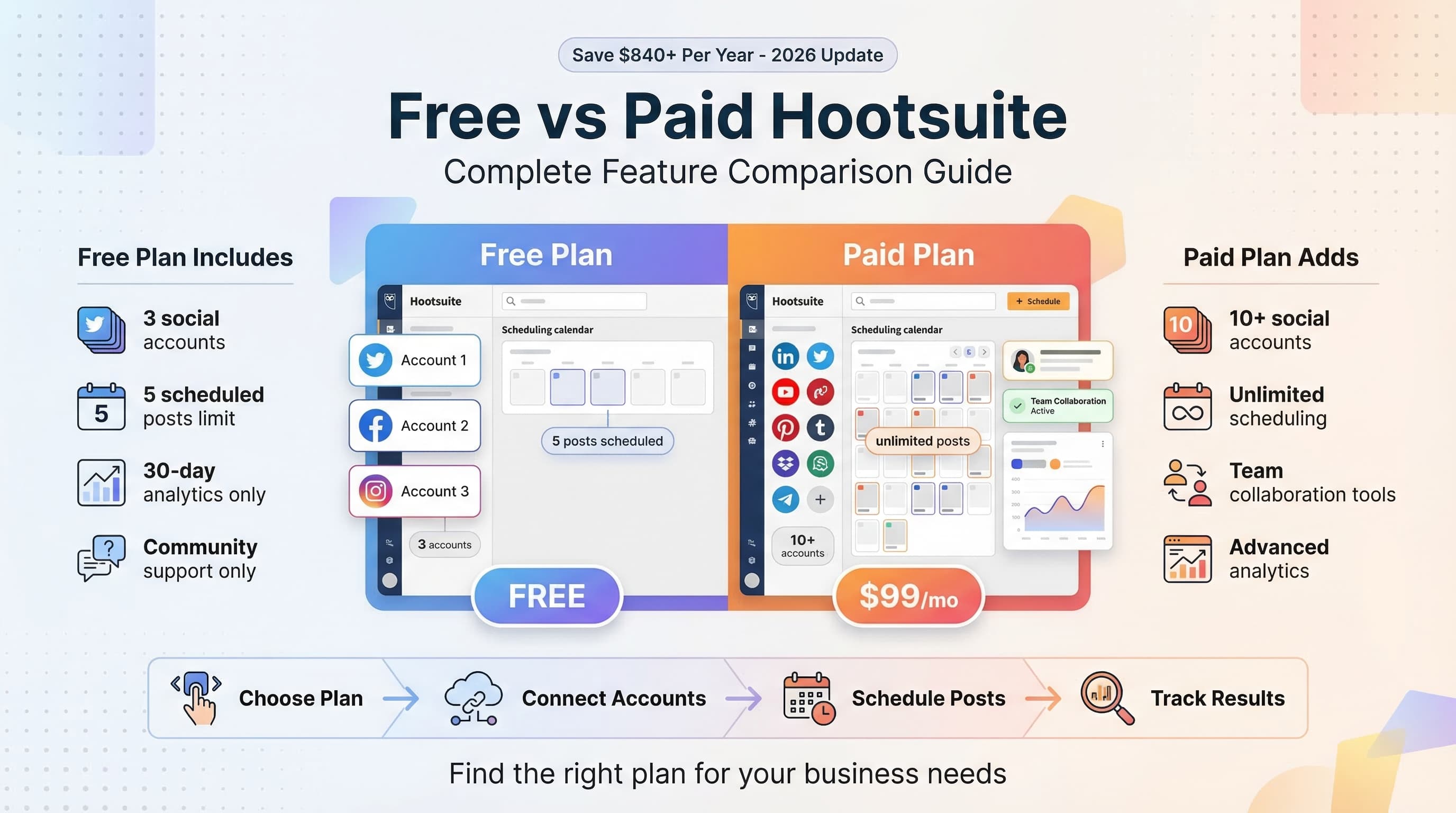
Hootsuite's free plan covers the basics. You can connect up to 3 social media accounts, schedule up to 5 posts in advance, and access their mobile app. Learn more about scheduling across platforms.
The bulk scheduler lets you upload a CSV file to schedule multiple posts at once, which is genuinely useful for content batching. You also get access to their content library with stock photos and videos. Our best time to post on linkedin can help.
Basic analytics show you post performance, reach, and engagement metrics for the past 30 days. It's not comprehensive, but it covers the fundamentals. Our linkedin line break generator can help.
The Limitations Hit Hard
Only 5 scheduled posts means you're constantly hitting the limit if you post daily across multiple platforms. The 3-account restriction means you can't even cover the main platforms most businesses need.
No team collaboration features. No approval workflows. No advanced analytics beyond 30 days. The content calendar only shows your scheduled posts, not a comprehensive view of your content strategy.
Customer support is limited to community forums and help articles. When you run into issues, you're on your own.
Hootsuite Paid Plans Breakdown
Professional Plan - $99/month
The Professional plan bumps you up to 10 social media accounts and unlimited post scheduling. You get access to the Hootsuite Inbox for managing messages and comments in one place.
Analytics expand to 12 months of historical data with more detailed metrics. You can create custom reports and track hashtag performance. The content calendar becomes more robust with drag-and-drop scheduling.
Team features include basic user permissions and content approval workflows. You can add team members and assign roles, though collaboration tools are still limited compared to enterprise solutions.
Team Plan - $249/month
The Team plan supports up to 20 social accounts and 3 team members. Advanced analytics include competitor benchmarking and social ROI tracking.
You get priority customer support and access to Hootsuite Academy training resources. The approval workflow becomes more sophisticated with multi-level approvals and content review processes.
Advanced scheduling features include optimal posting time recommendations and automated posting based on audience activity patterns.
Enterprise Plan - Custom Pricing
Enterprise plans start around $739 per month and scale up based on your needs. You get unlimited social accounts, unlimited team members, and dedicated account management.
Advanced security features include SSO, two-factor authentication, and compliance reporting. Custom integrations and API access let you connect Hootsuite to your existing business tools.
White-label reporting and advanced analytics dashboards provide detailed insights for stakeholder presentations and strategic planning.
Feature Comparison: Free vs Paid
| Feature | Free | Professional ($99) | Team ($249) |
|---|---|---|---|
| Social Accounts | 3 | 10 | 20 |
| Scheduled Posts | 5 | Unlimited | Unlimited |
| Team Members | 1 | 1 | 3 |
| Analytics History | 30 days | 12 months | 24 months |
| Custom Reports | No | Yes | Advanced |
| Approval Workflow | No | Basic | Advanced |
| Priority Support | No | No | Yes |
| Hootsuite Inbox | No | Yes | Yes |
| Bulk Scheduling | CSV only | CSV + Advanced | All Methods |
| Content Library | Limited | Full Access | Full + Custom |
Pricing Reality: Is Hootsuite Worth It?
The Professional Plan Problem
At $99 per month, Hootsuite Professional is expensive for what you get. Many competitors offer similar features for $30-50 per month. The jump from free to $99 is steep, especially for small businesses.
You're paying for brand recognition and enterprise-grade infrastructure, but most small to medium businesses don't need that level of complexity. The interface is cluttered, and basic tasks require multiple clicks.
The analytics, while comprehensive, are often overwhelming for users who just want to track basic performance metrics. The learning curve is significant, and onboarding takes weeks rather than days.
When Hootsuite Makes Sense
Large enterprises with complex approval workflows and compliance requirements benefit from Hootsuite's robust feature set. If you're managing 50+ social accounts across multiple brands, the platform's organizational tools become valuable.
Agencies managing multiple client accounts appreciate the white-label reporting and client management features. The ability to separate client data and provide branded reports justifies the higher cost.
Organizations already using Salesforce or other enterprise tools benefit from Hootsuite's extensive integration ecosystem. The platform connects with over 250 third-party applications.
Team Plan: $249/month ÷ 20 accounts = $12.45 per account
The more accounts you manage, the better the value proposition becomes.
User Experience: Free vs Paid
Interface and Usability
The free plan gives you access to the full Hootsuite interface, which can be overwhelming for new users. The dashboard displays multiple streams, analytics widgets, and navigation options that make it feel cluttered.
Paid plans don't improve the user experience significantly. You get more features, but the interface remains complex. Simple tasks like scheduling a post require navigating through multiple screens and options.
The mobile app experience is better than the desktop version, with a cleaner interface and faster performance. However, advanced features are limited on mobile, forcing you back to the desktop for comprehensive management.
Performance and Reliability
Free users experience slower loading times and occasional service interruptions during peak hours. Posts sometimes fail to publish without clear error messages, requiring manual intervention.
Paid users get priority server access and better reliability, but issues still occur. The platform's complexity means more potential failure points, especially when managing multiple integrations and automated workflows.
Customer support response times vary significantly. Free users rely on community forums, while paid users can access email support. Enterprise customers get phone support and dedicated account managers.
Analytics and Reporting Differences
Free Plan Analytics Limitations
Free users get basic post-level analytics for the past 30 days. You can see likes, shares, comments, and reach for individual posts, but there's no aggregated data or trend analysis.
No competitor analysis, audience insights, or optimal posting time recommendations. The data export options are limited, making it difficult to create comprehensive reports for stakeholders.
Social listening and mention tracking aren't available, so you can't monitor brand conversations or track hashtag performance beyond your own posts.
Paid Plan Analytics Power
Professional and Team plans offer detailed analytics with 12-24 months of historical data. You can track follower growth, engagement rates, and content performance across all connected accounts.
Custom reporting lets you create branded reports for clients or executives. Automated report scheduling means stakeholders receive regular updates without manual intervention.
Advanced metrics include click-through rates, conversion tracking (with proper setup), and ROI calculations. Competitor benchmarking shows how your performance stacks against industry standards.
Analytics Reality Check
While paid plans offer comprehensive analytics, the data often lacks actionable insights. Reports are data-heavy but light on recommendations for improvement.
Setting up proper tracking requires technical knowledge and significant time investment. Many users find themselves overwhelmed by data without clear guidance on what actions to take.
The analytics dashboard loads slowly when displaying large date ranges or multiple accounts, making real-time monitoring frustrating.
Team Collaboration: Free vs Paid
Free Plan Solo Experience
The free plan is designed for individual users. There are no collaboration features, approval workflows, or team management tools. Everything you create and schedule is immediately published or queued.
This works for solopreneurs and personal brands but becomes problematic when multiple people need access to social media accounts. You'd have to share login credentials, which creates security and accountability issues.
Paid Plan Team Features
Professional plans add basic user permissions and content approval workflows. You can assign team members different roles (admin, editor, viewer) and require approval before posts go live.
The Team plan expands to 3 users and adds advanced approval workflows with multi-level reviews. Content creators can submit posts for review, managers can approve or reject with comments, and administrators maintain oversight of the entire process.
Team analytics show individual contributor performance and workflow efficiency metrics. You can track how long approvals take and identify bottlenecks in your content creation process.
Team Feature Limitations
Even paid plans have collaboration limitations. The approval process is linear, meaning content can't move through complex review workflows with multiple stakeholders.
Team communication happens outside the platform since there's no built-in messaging or commenting system. This creates disconnection between content planning and execution.
User management is basic compared to dedicated project management tools. You can't create custom roles or permissions beyond the preset options.
Integration and Third-Party Apps
Free Plan Integration Limits
Free users can connect basic social media accounts (Facebook, Twitter, Instagram, LinkedIn) but can't access premium integrations with tools like Canva Pro, Google Analytics, or CRM systems.
The Hootsuite App Directory offers limited functionality for free users. Many integrations require paid plans or separate subscriptions to third-party services.
Paid Plan Integration Benefits
Professional and Team plans unlock access to the full App Directory with over 250 integrations. You can connect design tools, analytics platforms, customer service software, and e-commerce systems.
Popular integrations include Canva for design, Google My Business for location-based posting, and Mailchimp for email marketing coordination. These connections streamline workflows and reduce manual data entry.
Custom integrations through API access are available on higher-tier plans, allowing technical teams to build specialized connections with proprietary business systems.
Customer Support Comparison
Free Plan Support
Free users rely on community forums, help articles, and video tutorials. While the knowledge base is comprehensive, finding specific answers to technical issues can be time-consuming.
Response times in community forums vary widely. Popular questions get quick answers from other users, but complex technical issues may go unresolved for days.
No direct contact with Hootsuite support staff means troubleshooting platform bugs or account issues becomes a DIY experience.
Paid Plan Support Tiers
Professional plan users can submit support tickets via email with typical response times of 24-48 hours. Support quality varies depending on the complexity of your issue and the agent you reach.
Team plan subscribers get priority email support with faster response times and access to phone support during business hours. The support team can screen-share and provide hands-on troubleshooting.
Enterprise customers receive dedicated account managers and priority phone support with guaranteed response times. Custom onboarding and training sessions help teams maximize platform usage.
Who Should Choose Which Plan?
Stick with Free If...
You're a personal brand, blogger, or small business owner managing 2-3 social media accounts with minimal posting frequency. The 5-post limit works if you post 2-3 times per week across platforms.
You don't need team collaboration, advanced analytics, or customer support. You're comfortable figuring things out on your own and don't mind the limitations.
Budget is a primary concern, and you're willing to work within constraints to avoid monthly software costs.
Upgrade to Professional If...
You manage 5-10 social media accounts and need unlimited post scheduling. Your content strategy requires more than 5 posts scheduled in advance.
Basic team features and approval workflows add value to your content creation process. You need analytics beyond 30 days for performance tracking and reporting.
However, consider alternatives like Schedulala at $29/month for similar features at a much lower cost.
Choose Team Plan If...
You manage 15+ social accounts with a team of 2-3 content creators. Advanced approval workflows and team analytics justify the $249/month cost.
Priority customer support is essential for your business operations. You need comprehensive reporting for client management or executive presentations.
Go Enterprise If...
You're managing 50+ social accounts across multiple brands or locations. Compliance, security, and white-label reporting are business requirements.
Integration with enterprise systems (Salesforce, Adobe Creative Cloud, custom CRMs) provides significant operational value. Dedicated support and account management justify the premium cost.
Better Alternatives to Consider
Why We Built Schedulala
Hootsuite's pricing gap between free and $99/month left small businesses without good options. Schedulala offers professional features at $29/month with unlimited posting, team collaboration, and comprehensive analytics.
Our interface prioritizes simplicity without sacrificing functionality. Scheduling posts takes seconds, not minutes. Analytics focus on actionable insights rather than overwhelming data dumps.
Better customer support means real humans respond to your questions within hours, not days. We're building for growing businesses, not just enterprise clients.
Final Verdict: Free vs Paid Hootsuite
The free plan covers basic needs but you'll hit limitations quickly if your social media strategy grows. The Professional plan at $99/month provides solid features but costs 3x more than comparable alternatives.
For most businesses, the sweet spot is finding a tool that bridges the gap between free limitations and enterprise pricing. Schedulala was built specifically for that market, offering professional features at small business prices.
If you're committed to Hootsuite, start with the free plan and upgrade only when limitations become deal-breakers. But explore alternatives before committing to their expensive paid plans.
Try Schedulala for free
Schedule posts to Bluesky, Twitter, and 8 other platforms from one dashboard.
Get started for free→