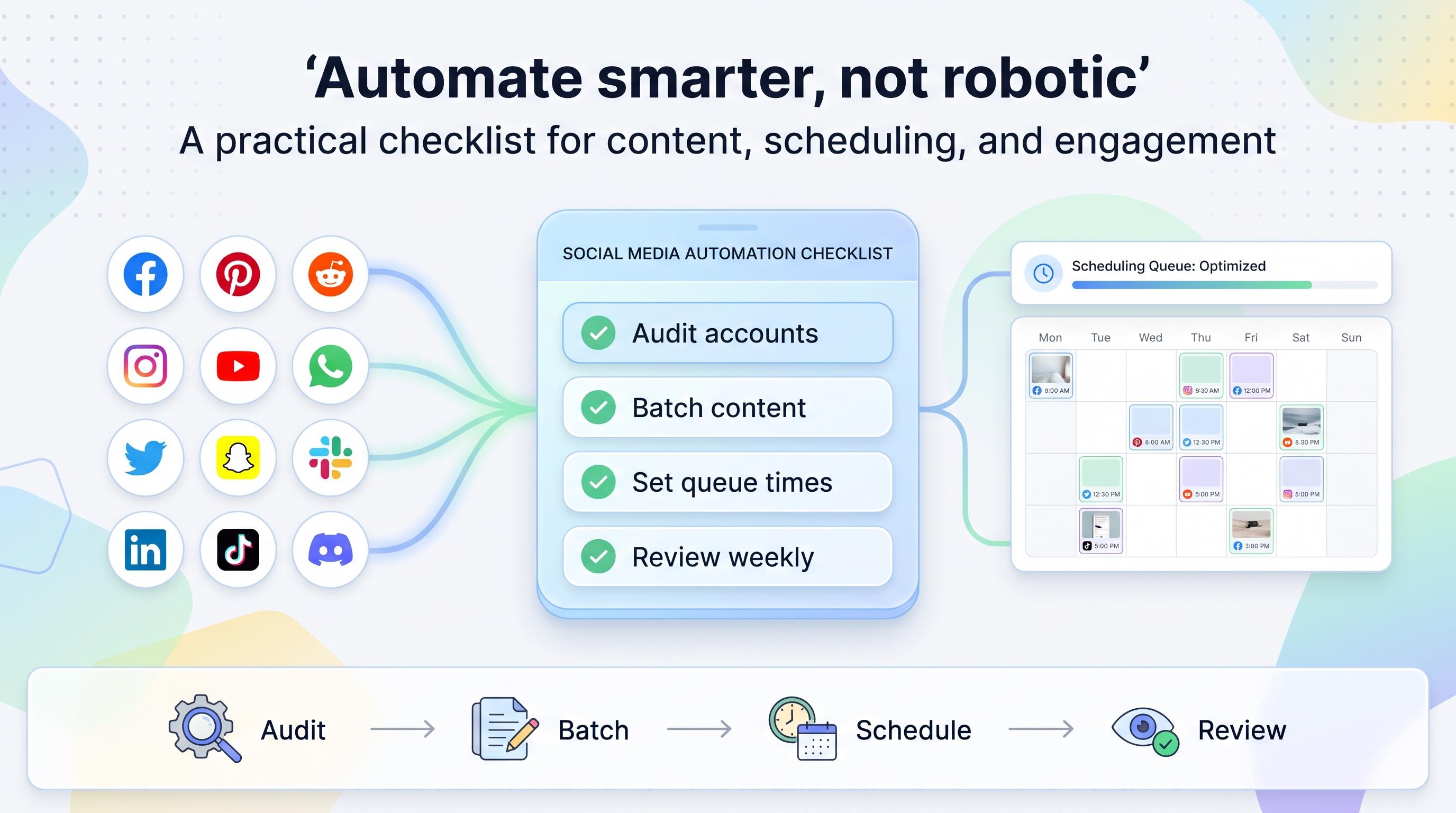
The Social Media Automation Checklist Every Team Needs Before Hitting Schedule
A practical social media automation checklist covering content, scheduling, and engagement so nothing falls through the cracks in 2026.

Here's the thing about social media automation: most people set it up once, feel smart for a week, then quietly go back to posting manually because something broke. A caption went out with the wrong hashtag. A post landed at 3am for no reason. Nobody replied to a comment for four days. See our Instagram scheduling guide.
See It in Action
This is what scheduling an Instagram post looks like in Schedulala
Automation isn't the problem. A missing checklist is. If you treat automation like a system instead of a one-time setup, it saves hours every week without turning your brand into a robot nobody wants to talk to. This checklist is built for marketers, solo founders, and agency teams who want their scheduling tool to actually do the job instead of creating new fires. Try our free social media tools.
Who this checklist is for
This guide works whether you're running one brand account or managing a dozen clients. If you post on more than two platforms, batch content in advance, or have ever forgotten to publish something because you were relying on memory, this is for you. Try our content calendar.
We're going to walk through every stage: auditing what you currently do, setting up the actual automation, deciding what should never be automated, and reviewing performance so the system improves instead of calcifying into bad habits. Try our social media automation.
Try Schedulala for free
Schedule posts to Bluesky, Twitter, and 8 other platforms from one dashboard.
Get started for free→What social media automation actually means
Automation gets a bad reputation because people assume it means a robot talking to your audience. It doesn't. Good social media automation handles the repetitive, time-sensitive parts of the job, scheduling, cross-posting, reminders, and basic reporting, while a human still writes the captions, approves the content, and replies to comments. Learn more about best time to post on instagram.
Think of it as a conveyor belt, not a replacement worker. You still load the belt and inspect what comes off the other end. The goal is removing the manual clicking, copy-pasting, and remembering, not removing judgment. Our instagram engagement calculator can help.
1. Define what you're actually automating
Before you touch a tool, write down the three to five tasks eating your time. Common answers: posting the same content to five platforms, remembering optimal posting times, pulling weekly performance numbers, and formatting content per platform (aspect ratios, character limits, hashtags).
If you can't name the specific task, you'll end up automating the wrong thing, like auto-replying to DMs when the real time sink is reformatting the same video for TikTok, Instagram Reels, and YouTube Shorts.
Phase 1: The pre-automation audit
2. Inventory every active account
List every social account your brand runs, including the ones nobody checks anymore. Agencies especially tend to have forgotten Pinterest boards or dormant LinkedIn pages still technically live. If you're not posting there intentionally, decide whether to revive it or shut it down before building automation around it.
3. Document your posting cadence per platform
Instagram three times a week, LinkedIn twice, Threads daily, whatever it is, write it down. This becomes the backbone of your scheduling calendar. Teams that skip this step end up posting erratically because nobody agreed on frequency in the first place.
4. Audit who has access to what
Before connecting accounts to an automation tool, confirm who the admins are and revoke access for former employees or freelancers. This is also a good moment to check two-factor authentication on every account, since a scheduling tool with full publishing access is a juicy target for hackers if your login hygiene is sloppy.
Phase 2: Content and batching checklist
5. Build a content calendar template
A spreadsheet or Kanban board with columns for platform, copy, asset, publish date, and status (draft, approved, scheduled, published) keeps everyone out of each other's way. This is the single document that feeds your scheduling tool, so it needs to be the source of truth, not one of five competing versions in someone's inbox.
6. Batch content creation in weekly or monthly sprints
Writing one caption at a time, every day, is how burnout happens. Set aside a half day weekly (or a full day monthly) to write and design a batch of posts. Automation tools are only as good as what you feed them, so this is where the real time savings come from, not the scheduling button itself.
7. Create platform-specific formatting rules
A caption that works on LinkedIn (longer, professional tone) usually flops on Threads (shorter, conversational). Write a quick style guide per platform: character count target, hashtag count, tone, and whether links go in the caption or the first comment. This prevents the lazy habit of pasting identical text everywhere, which readers notice immediately.
8. Set an approval workflow
If more than one person touches content, decide who approves before it goes into the scheduling queue. This matters more for agencies managing client accounts, where an unapproved post going live can mean an awkward client call the next morning.
Phase 3: Scheduling tool setup checklist
9. Choose a tool that matches your account count, not your current team size
This is where people get burned. Some tools sell you "bundles" of profiles per platform, which gets expensive fast if you manage multiple accounts on the same platform (say, five Instagram accounts for five clients). Schedulala counts social accounts as a flat number usable in any combination, so 10 accounts on the Personal plan can be 10 Instagram profiles, one account on 10 different platforms, or any mix you need. No per-platform sub-limits to work around.
10. Connect accounts and verify permissions
After connecting each account, post a test draft to confirm the tool has publishing access, not just read access. Some platform API changes quietly downgrade permissions, and you won't notice until a scheduled post silently fails.
11. Set your queue times based on actual audience data, not guesses
Every platform has an analytics tab showing when your specific audience is active. Use that instead of generic "best time to post" advice you find online, because your audience in Lagos, London, or Los Angeles behaves differently than the average.
12. Build evergreen and recurring content into the queue
Unlimited scheduled posts means there's no reason to ration your queue. Load it with a mix of fresh campaign content and evergreen posts (testimonials, FAQs, older top-performing content) that can recycle every few months without feeling repetitive to new followers.
| Setup item | Why it matters | Frequency to recheck |
|---|---|---|
| Account permissions | Prevents silent publish failures | Monthly |
| Queue posting times | Keeps content in front of active followers | Quarterly |
| Approval workflow | Stops unapproved content going live | Ongoing |
| Evergreen content stock | Fills gaps without manual scrambling | Monthly |
Phase 4: What you should never automate
This is the part most checklists skip, and it's the reason automation gets a bad name. Automate the wrong things and your brand looks cold, slow to respond, or outright tone-deaf during a crisis.
13. Comment replies and DMs
Canned auto-replies are fine for an away message, but real engagement (answering a customer question, thanking someone for sharing, handling a complaint) needs a human. Set a daily window, even just 20 minutes, where someone actually reads and responds to comments across every connected account.
14. Reactive or trending content
If a trend, meme, or news event is relevant to your brand, don't schedule a reaction three days out. By then it's stale. Keep a slot open in your weekly calendar for reactive posts that go out same-day.
15. Crisis communication
If something goes wrong (a product recall, an outage, bad press), pause your automated queue immediately. Nothing looks worse than a scheduled "excited to announce..." post going live in the middle of a brand crisis. Build a habit of checking the queue before any major announcement or known risk period.
Phase 5: Review and reporting checklist
16. Pull weekly performance snapshots
Don't wait for monthly reports to notice a post format is underperforming. A five-minute weekly check (top post, worst post, any failed publishes) catches problems before they compound into a month of wasted content.
17. Audit your queue monthly
Scroll through what's scheduled for the next 30 days. Check for outdated offers, broken links, or content that references a date that's already passed. Automation makes it easy to "set and forget," which also means it's easy to forget something embarrassing is still queued.
18. Compare platforms against each other quarterly
If Threads is driving real engagement but Pinterest hasn't moved in three months, that's a signal to shift effort, not just keep posting out of habit. Automation should free up time to make these strategic calls, not replace them.
Common mistakes teams make with automation
- Scheduling identical captions across every platform instead of adapting tone and format.
- Letting the queue run for months without checking for outdated or broken content.
- Automating replies to comments and DMs, which reads as impersonal and often annoys customers more than silence.
- Choosing a tool based on headline price without checking how it counts accounts, since bundled profile sets can get expensive fast once you manage multiple accounts on the same platform.
- Treating analytics as an afterthought instead of a weekly habit that informs the next batch of content.
A simple weekly rhythm that keeps this sustainable
Most of this checklist sounds like a lot until you turn it into a rhythm. Here's what it looks like in practice for a lean team: Monday morning, review last week's top and bottom performing posts. Tuesday, batch-write and design the week's content. Wednesday, load it into the queue and route for approval. Thursday, double-check the next 30 days of scheduled posts for anything stale. Friday, spend 20 minutes replying to comments across every account that the week's automation didn't touch.
Where Schedulala fits into this checklist
Schedulala covers all 12 major platforms, including Instagram, TikTok, Twitter/X, LinkedIn, YouTube, Facebook, Threads, Bluesky, Pinterest, Telegram, Mastodon, and Google Business Profile, from one queue. Every plan, including the entry-level Personal plan at $29/month for 10 social accounts, includes unlimited scheduled posts, so you're never rationing how much content you load into the system.
Team runs $49/month for 25 accounts and Agency runs $99/month for 100 accounts, all with the same flat account count usable in any combination of platforms, no per-platform sub-limits or bundled profile sets to navigate. Annual billing gets you two months free on any plan. There's a 7-day free trial to test the checklist above against your own accounts before committing, though a card is required to start it.
Try Schedulala for free
Schedule posts to Bluesky, Twitter, and 8 other platforms from one dashboard.
Get started for free→