Social Media Content Buckets: The Template That Ends Content Block (With Examples and Posting Ratios)
A practical social media content buckets template with categories, posting ratios, and a weekly calendar you can copy today.

You sit down to plan next week's posts and your brain goes blank. Not because you lack ideas exactly, but because you have too many floating around with no system to catch them. That's what content buckets fix. Our Instagram scheduling can help.
See It in Action
This is what scheduling an Instagram post looks like in Schedulala
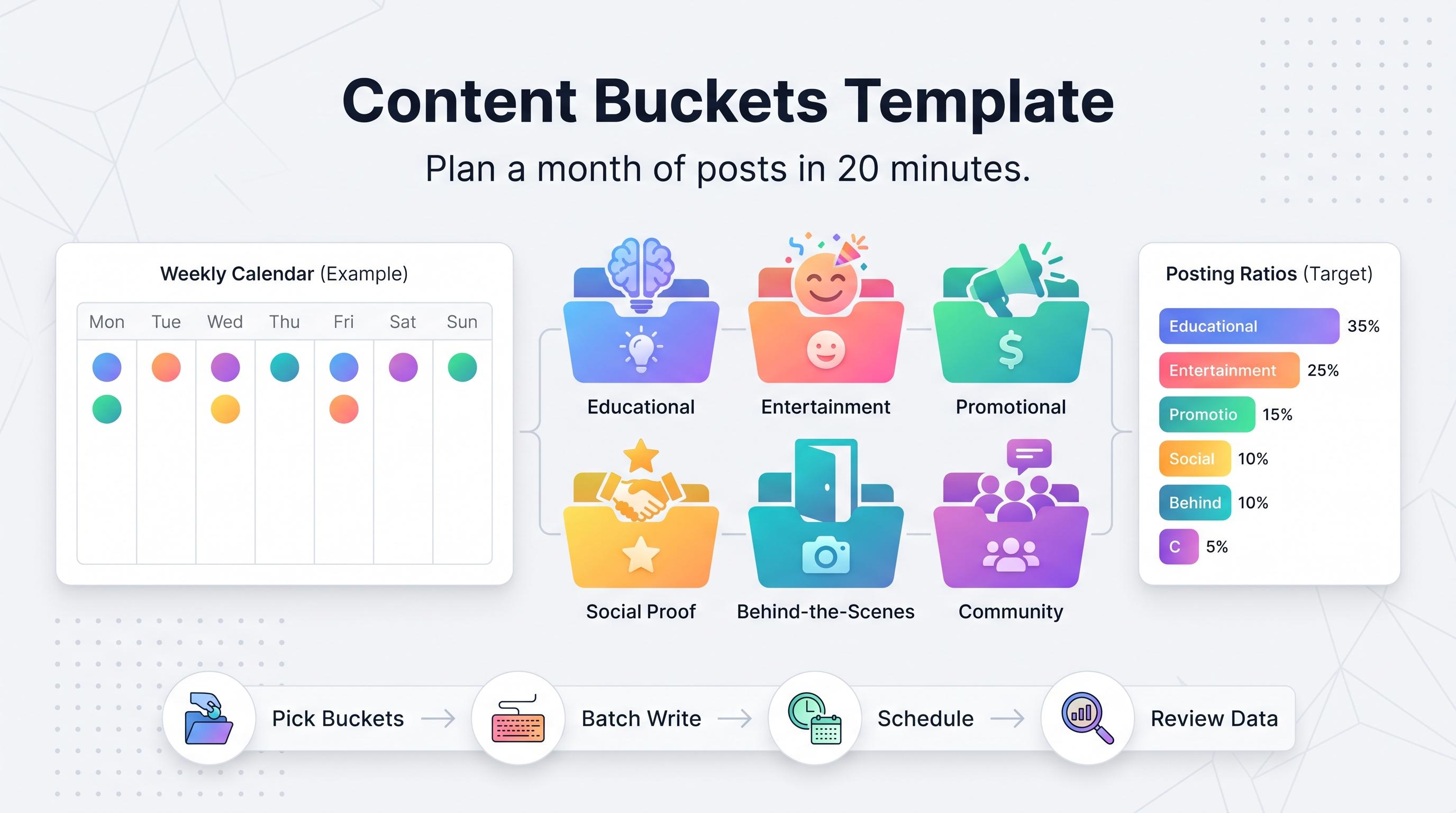
A content bucket system takes the random scramble of "what do I post today" and turns it into a repeatable structure. You pick 5 to 8 categories, assign a rough posting ratio to each, and suddenly a month of content plans itself in about 20 minutes instead of three hours of staring at a blinking cursor. Learn more about content calendar.
What content buckets actually are
A content bucket is a category of content that serves one specific job for your audience or your business. Think of it like a grocery list organized by aisle instead of one giant scrawled list. Instead of "post something," you know it's a "behind-the-scenes day" or an "educational day," and the topic falls out naturally from there. Our scheduling across platforms can help.
Buckets matter for two reasons. First, variety keeps your feed from feeling like a sales pitch on repeat, which is the fastest way to tank engagement and get muted. Second, buckets remove decision fatigue. Marketers who batch-plan content by category report spending far less time per post because they're not reinventing the format every single day, just filling in the specifics. Learn more about bluesky content ideas 50.
This guide gives you a ready-to-use template with eight proven buckets, a posting ratio that works for most small businesses and creators, and a step-by-step process to build your own version if the defaults don't fit your niche. Learn more about best time to post on instagram.
Try Schedulala for free
Schedule posts to Bluesky, Twitter, and 8 other platforms from one dashboard.
Get started for free→The content bucket template (8 categories you can use today)
Not every brand needs all eight. Most people do fine with five or six. But having the full list gives you options to swap in and out depending on the season, the platform, or what's actually performing. Our instagram engagement calculator can help.
1. Educational / how-to
Teach your audience something they can use in under two minutes. A checklist, a quick tutorial, a "here's how to do X" carousel. This bucket builds trust because you're giving value before asking for anything. It also tends to be your most saveable and shareable content type, which helps distribution on platforms like Instagram and Pinterest.
2. Entertainment / relatable
Memes, trending audio, "POV" formats, or a funny observation about your industry. This is the bucket most people skip because it feels unserious, but it's often the highest-reach content you'll post. Relatable content gets shared in DMs and comments, which is exactly the kind of engagement signal the algorithms reward.
3. Promotional
Your product, your service, a sale, a new feature launch. This bucket is necessary, it's your business after all, but it should be the smallest slice of your calendar. Overloading on promotional posts is the number one reason follower growth stalls.
4. Social proof / testimonials
Customer reviews, case studies, before-and-afters, screenshots of DMs saying nice things. This bucket does the selling for you without feeling like an ad, because it's someone else's voice vouching for the result.
5. Behind the scenes
Show the process, the team, the mess, the packing of orders, the Monday morning chaos. People follow accounts, not logos. This bucket humanizes the brand and tends to perform well on Stories, Threads, and TikTok where lower production value actually reads as more authentic.
6. Community / user-generated content
Repost a customer photo, answer a follower question publicly, run a poll, feature a fan comment. This bucket costs you almost no creative effort and makes your audience feel seen, which is a cheap way to build loyalty.
7. Industry news / trends
Your take on a trend, a new tool, or a headline relevant to your niche. This bucket positions you as someone who's paying attention, and it's an easy way to piggyback on a conversation that's already getting attention instead of starting from zero reach.
8. Personal / brand story
Why you started the business, a lesson you learned, a failure you're open about. This is the bucket that turns casual followers into people who root for you. Used sparingly, it's one of the most effective trust-builders available.
How many buckets do you need, and what ratio should you use
There's no single right number, but five to eight buckets is the sweet spot. Fewer than that and your feed starts to feel repetitive. More than eight and you'll spend more time managing the system than making content, which defeats the point.
Ratio matters more than bucket count. Here's a starting split that works well for a typical seven-post week on most platforms. Adjust based on what's actually driving results once you've got a month of data to look at.
| Bucket | Weekly share | Posts per week (of 7) |
|---|---|---|
| Educational / how-to | 30% | 2 |
| Entertainment / relatable | 20% | 1-2 |
| Behind the scenes | 15% | 1 |
| Social proof | 15% | 1 |
| Promotional | 10% | 0-1 |
| Community / UGC | 5% | 0-1 |
| Industry news or personal story | 5% | 0-1 |
That ratio puts promotional content at roughly 1 in 10 posts. That might feel low if you're used to posting a product shot every other day, but the data on this is consistent: accounts that post mostly value-first content see better follower retention than accounts that lean heavily promotional, even when both are posting the same frequency.
How to build your own bucket system in five steps
1. List what your audience actually asks you
Go through your DMs, comments, and customer emails from the last month. The questions people repeatedly ask you are your educational bucket, basically handed to you for free. If five people asked how your product compares to a competitor, that's a post.
2. Pick 5-8 buckets that match your business, not someone else's
A solo consultant and a 20-person e-commerce brand shouldn't use the same bucket list. The consultant leans harder into personal story and educational content. The e-commerce brand leans harder into social proof and UGC because they have a steady stream of customer photos to pull from.
3. Assign a rough ratio, then test it for a month
Use the 30/20/15/15/10/5/5 split above as a starting point. After four weeks, look at saves, shares, and comments by bucket, not just likes. The bucket that gets saved and shared the most is probably your highest-value category, even if it doesn't have the highest like count.
4. Build a simple content bank per bucket
Keep a running note (a spreadsheet works fine) with 10-15 topic ideas sitting in each bucket at all times. When you sit down to plan, you're pulling from a stocked shelf instead of starting from a blank page. This is the single biggest time-saver in the whole system.
5. Map buckets to a weekly calendar and schedule in batches
Assign each day of the week a default bucket (Monday is educational, Wednesday is behind-the-scenes, Friday is entertainment, for example). Then batch-write a week or two of posts in one sitting and load them into a scheduler so you're not making daily posting decisions at all.
A sample week built from the template
Here's what a real week looks like once the buckets are assigned to days. This is a general small-business example, swap specifics for your niche.
- Monday: Educational, a quick tip or how-to carousel
- Tuesday: Behind the scenes, a Stories sequence of the morning process
- Wednesday: Social proof, a customer screenshot or review repost
- Thursday: Entertainment, a trending audio or relatable meme format
- Friday: Promotional, a product feature or limited offer
- Saturday: Community, repost a fan photo or answer a common question
- Sunday: Off, or a low-effort personal/brand story post
Notice promotional only shows up once. That's intentional. The other six days are doing the work of keeping people interested enough that when Friday's promotional post shows up, it doesn't feel like an interruption.
Common mistakes people make with content buckets
- Making every bucket about the product. If your "educational" posts are secretly just product demos, you don't have variety, you have one bucket wearing different hats.
- Rigid assignment with zero flexibility. If Tuesday is always "behind-the-scenes" but a trending sound drops that fits perfectly, post the trend. The calendar is a guide, not a contract.
- Never reviewing performance by bucket. Buckets without data are just a nicer-looking guess. Check saves and shares by category monthly and cut what's underperforming.
- Too many buckets, not enough content in the bank. Eight categories with two backup ideas each will run dry in two weeks. Fewer buckets with a deep idea bank beats more buckets with shallow ones.
- Copying a template without adjusting for your platform mix. A ratio built for Instagram will not work unchanged on LinkedIn or Pinterest. Adjust per platform.
Scheduling your buckets without losing the plan
The bucket system only works if you can actually see it laid out across the month, not just as a list in a notebook you forget to check. This is where a scheduling tool earns its keep. You batch-write a month of posts sorted by bucket, then drop them onto a calendar so each day's category is visible at a glance.
Schedulala supports 12 platforms (Instagram, TikTok, Twitter/X, LinkedIn, YouTube, Facebook, Threads, Bluesky, Pinterest, Telegram, Mastodon, and Google Business Profile) from a single calendar, with unlimited scheduled posts on every plan including the entry tier. That matters for a bucket system specifically, because you're not capped on how many educational, promotional, or UGC posts you can queue up in a given month.
Plans run $29/month for Personal with 10 social accounts, $49/month for Team with 25 accounts, and $99/month for Agency with 100 accounts, with annual billing giving you two months free on any tier. Those accounts are a flat count you can spend however you want, 10 Instagram accounts, one account on each of 10 different platforms, or any mix in between. There's a 7-day free trial to test the bucket calendar workflow before committing, though a card is required to start it.
Try Schedulala for free
Schedule posts to Bluesky, Twitter, and 8 other platforms from one dashboard.
Get started for free→Keep it simple and let the data adjust it
The content bucket template above isn't sacred. It's a starting point that saves you from the blank-page problem on day one. The real win comes a month in, when you check which bucket actually drove saves, shares, and messages, and lean into it.
Try Schedulala for free
Schedule posts to Bluesky, Twitter, and 8 other platforms from one dashboard.
Get started for free→